How to Master Community Engagement on Social Media?
Explore effective ways to boost community engagement on social media. Learn how to connect, inspire, and mobilize your audience.


You're posting consistently, but engagement stays flat. Your follower count grows, yet conversations never really take off. Sound familiar?
Most brands don't have a creativity problem. They have plenty of good ideas, but fail to analyze them in practice. They publish and forget, instead of optimizing their content calendar to maximize engagement and community building.
Time to change that. In this guide, I break down the community engagement strategies that work based on industry benchmarks and examples of brands that are nailing it.
Key takeaways
-
What does community engagement on social media represent?
Community engagement represents the depth and quality of interaction between your brand and its audience, reflecting real relationships rather than surface-level metrics. -
Why is community engagement an indicator of social media success? Community engagement is a strong indicator of social media success because genuine interactions signal content relevance, build trust, and drive long-term business impact.
-
How to build a community-first content strategy? Building a community-first content strategy means creating content designed to spark conversation, reflect audience realities, and prioritize interaction over visibility alone.
-
What are the most effective tactics for creating an engaged community on social media? The most effective tactics for creating an engaged community include producing shareable value-driven content, using polls and questions strategically, and hosting interactive live sessions.
-
Key metrics to effectively track community engagement on social media: To effectively track community engagement, focus on engagement rate, comments, saves, shares, sentiment, and share of voice to understand both interaction levels and audience perception.
What does community engagement on social media represent?
Community engagement on social media goes deeper than vanity metrics such as follower count and reach. It's a measure of how actively your audience engages with your brand: comments, content they share with their networks, and how often they come back.
Social media engagement is an important step towards building trust with your audience. When someone takes the time to respond to your post, tag a friend, or share their own experience in your comments section, you've successfully stopped the scroll and gotten people to react. Well done!
When I managed online community engagement for brands, I tracked a range of touchpoints and social media metrics: reactions, comments, shares, saves, direct messages, mentions, and user-generated content. I saw all these interactions (and improving them) as the foundation of a real relationship with the audience.
Why is community engagement an indicator of social media success?
Community engagement is one of the most honest signals you have. Algorithms can inflate reach, paid ads can get you impressions, and follower counts can be gamed. But genuine interaction from people is much harder to fake.
When your community engages consistently, your content is hitting the mark. You're speaking to the right people, in the right way, about things that matter.
Understanding how to calculate engagement rate and tracking it over time gives you a far clearer picture of content performance than surface-level metrics alone ever could.
There's also a compounding effect: high engagement signals to algorithms that your content is worth distributing, which results in more reach and potential followers and, yes, even more engagement.
Beyond the algorithmic advantages, social media and community engagement are directly tied to business outcomes. Engaged communities are more likely to trust your brand, advocate for it, and eventually convert.
So when you're building a social media strategy, treat community engagement as a core indicator that helps you grow meaningfully.
How to build a community-first content strategy?
Most social media content is built to be seen. A community-first content strategy is designed to be engaged with.
The difference shows up in how you think about every piece of content before you publish it. Instead of asking "will this perform well?", you start asking "will this make someone want to say something?"
That shift in mindset is what separates brands that accumulate followers from brands that build genuine communities. Let me shoow you next how to put that into practice.
Create content that sparks conversation, not just consumption
When you're thinking about how to create content for social media with community at the center, a few principles tend to hold up across platforms and industries.
First, content that tries to appeal to everyone typically goes unnoticed. So, give people something specific to react to:
- Create content that takes a clear point of view. You can even be mildly controversial (within brand guidelines).
- Ask questions that don't have obvious answers.
- Share an opinion and invite pushback.
- Post something that makes your audience feel seen in a specific, non-generic way.
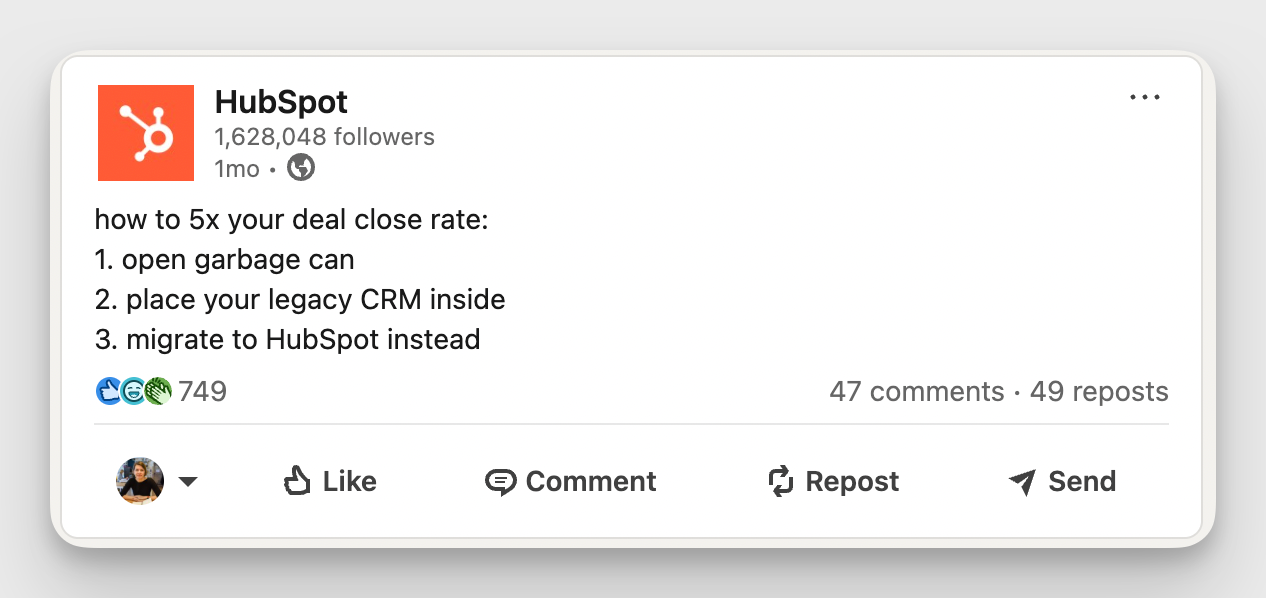
Here’s an example of HubSpot being slightly controversial on LinkedIn by implying that their CRM competitors are no good, but doing so in an amusing way that gets people to react.
Second, show you’re paying attention and make your audience the protagonist through:
- User-generated content
- Community spotlights
- Content that directly references your followers' experiences
People engage more readily when they feel like participants rather than spectators.
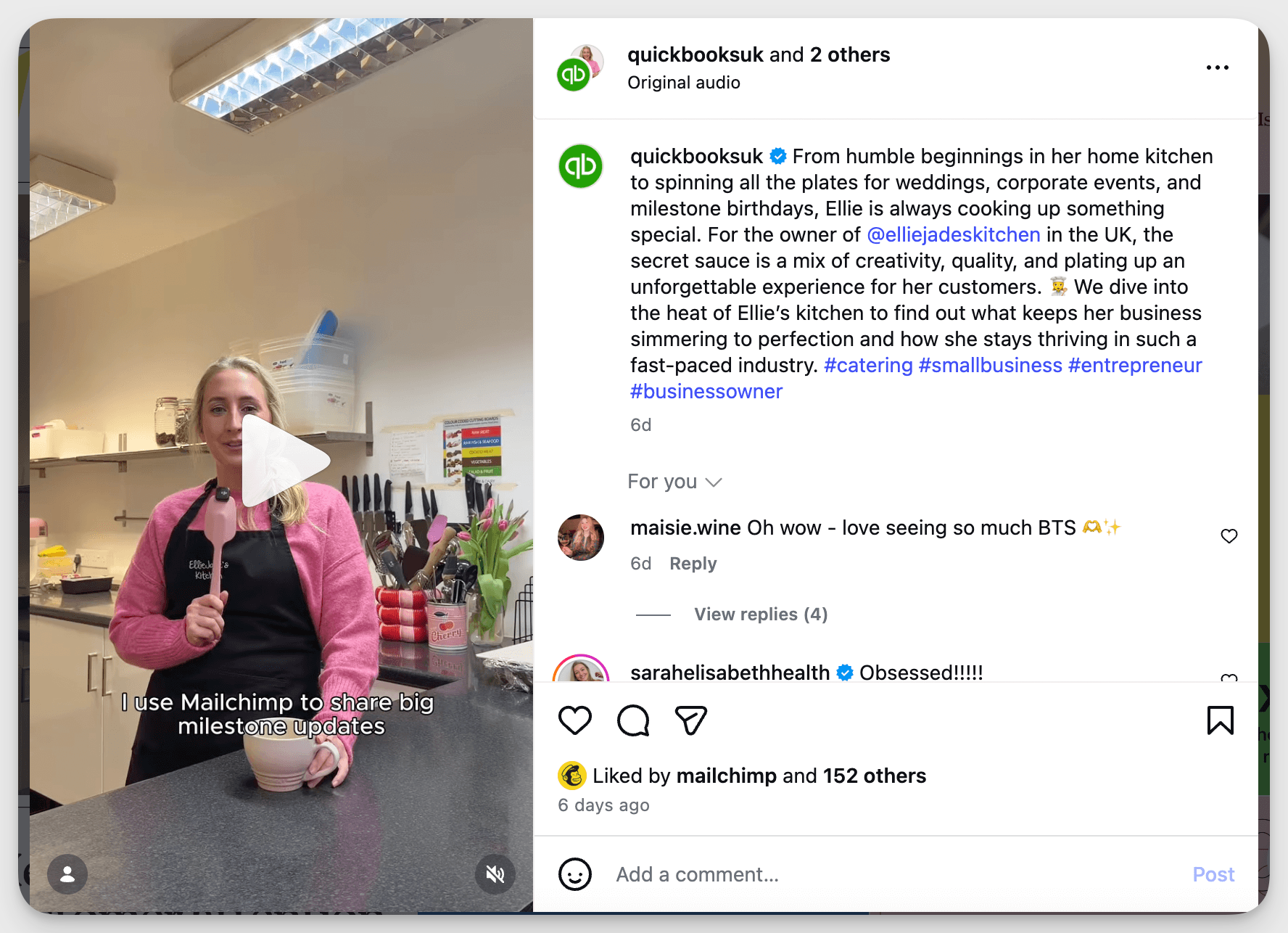
Here’s a great example from Mailchimp: a candid video featuring a small entrepreneur who struggles with everyday challenges, seamlessly promoting the platform.
Third, think about your content pillars for social media as conversation starters, not broadcasting categories. Each pillar should represent a topic your community genuinely cares about, not just topics your brand wants to talk about. When those two things overlap, that's where the real engagement happens.
And finally, consistency matters more than virality. A community is built post by post, interaction by interaction. Showing up regularly with content that's relevant and human is more effective for long-term social media and community engagement than chasing occasional spikes.
Leverage the content formats that drive the highest engagement by platform
Even the most compelling content idea can underperform if it's delivered in the wrong format.
Each platform has its own engagement logic, and understanding which formats your audience responds to most is one of the more straightforward community engagement tactics for social media.
Here's what Socialinsider data tells us, broken down by platform.
Carousels on Instagram
If you're serious about Instagram engagement, carousels deserve a central place in your content mix.
According to Socialinsider's Instagram benchmarks report, carousels consistently generate the highest engagement rate among all Instagram post formats, outperforming both Reels and single images across several years.
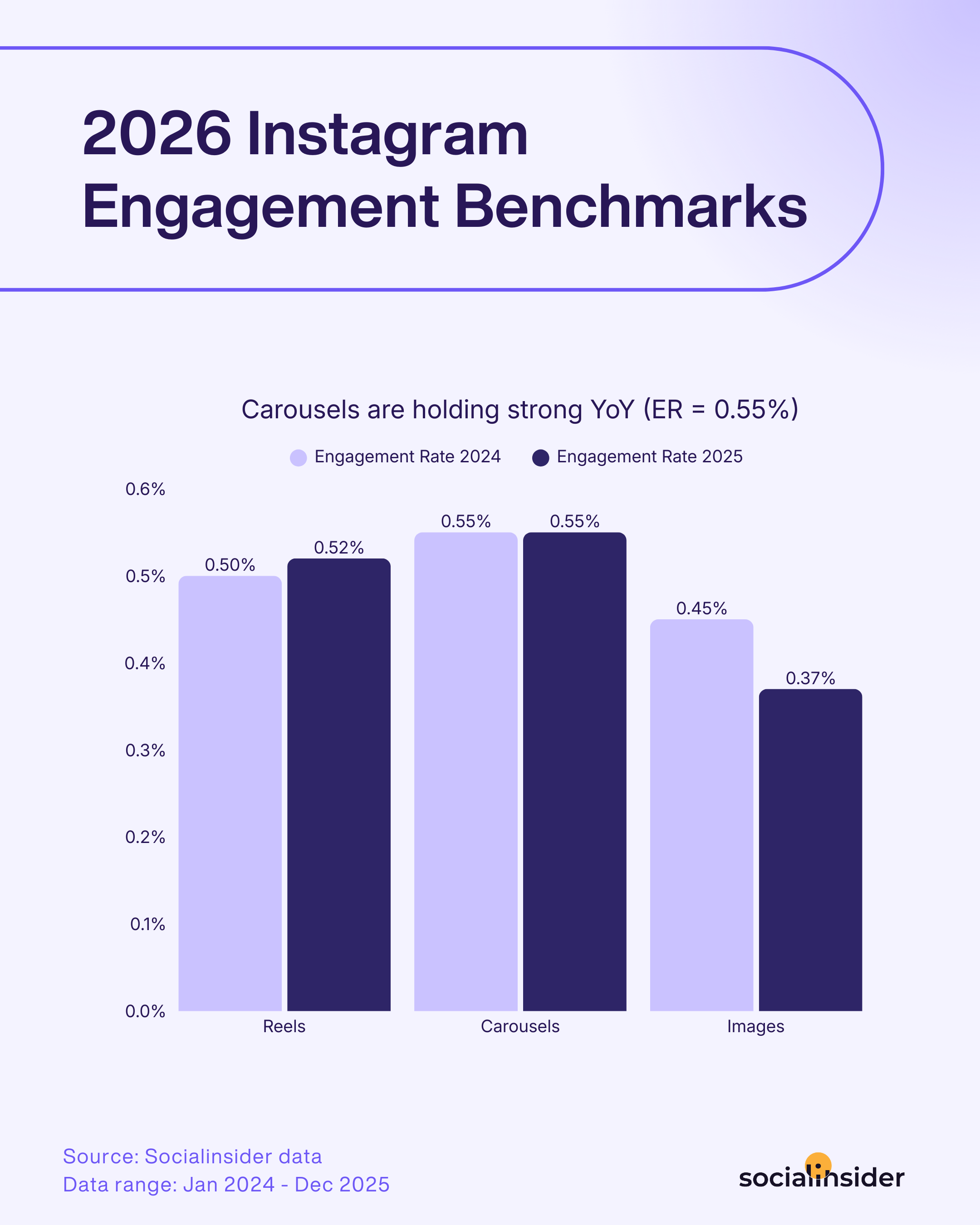
Carousels work so well for community engagement on social media because they create natural opportunities for storytelling, education, and step-by-step content that keeps people coming back.
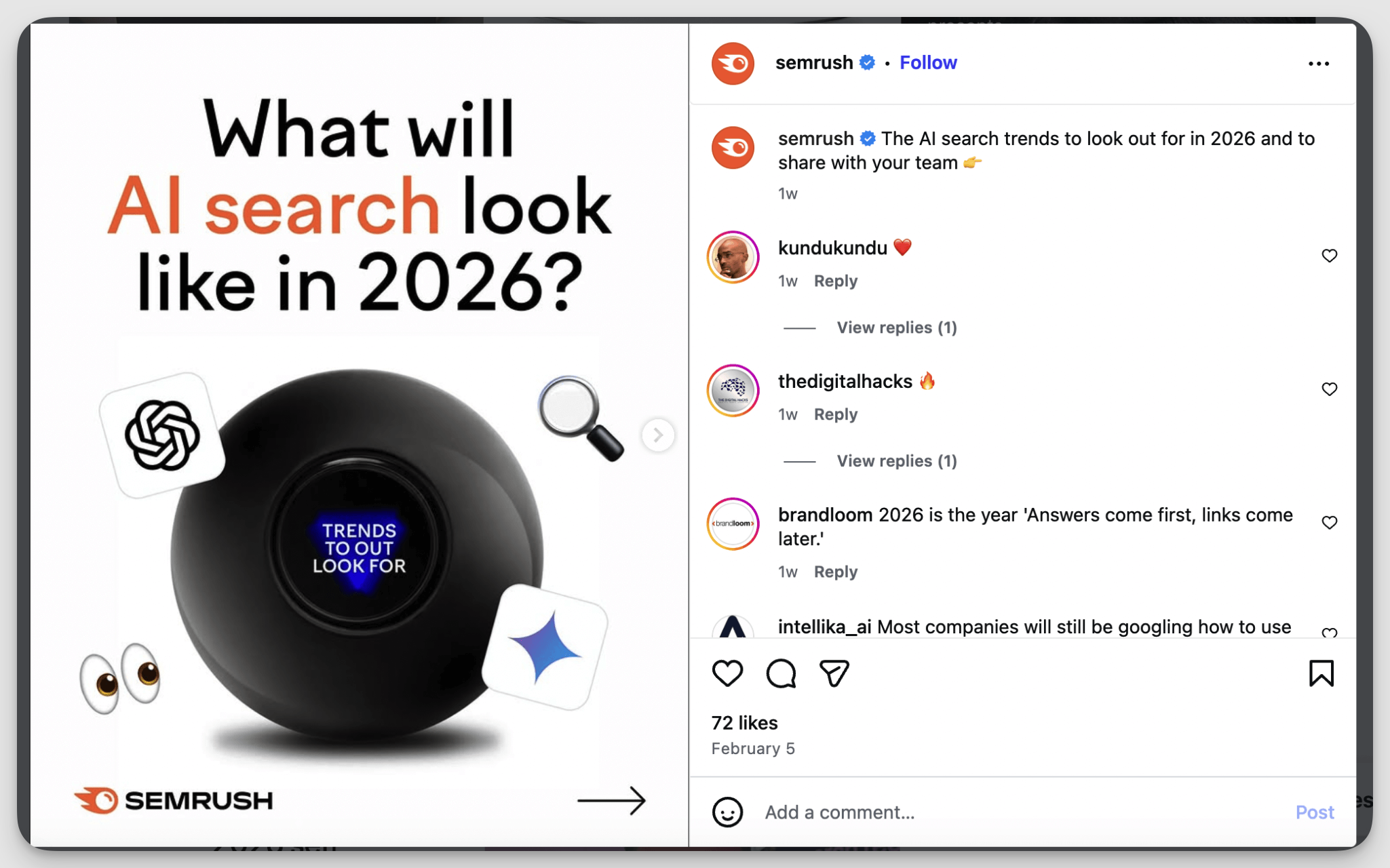
Use the first slide as a strong, curiosity-driven hook — a bold statement, an unexpected stat, or a question — like in the Semrush example below. This structure keeps swipe-through rates high and gives your audience a reason to share.
Albums on Facebook
Facebook often gets overlooked in community engagement strategies, but for brands that have cultivated an active audience there, the format choices you make still matter quite a bit.
According to Socialinsider's Facebook engagement benchmarks study, albums generate the highest engagement rate on the platform.
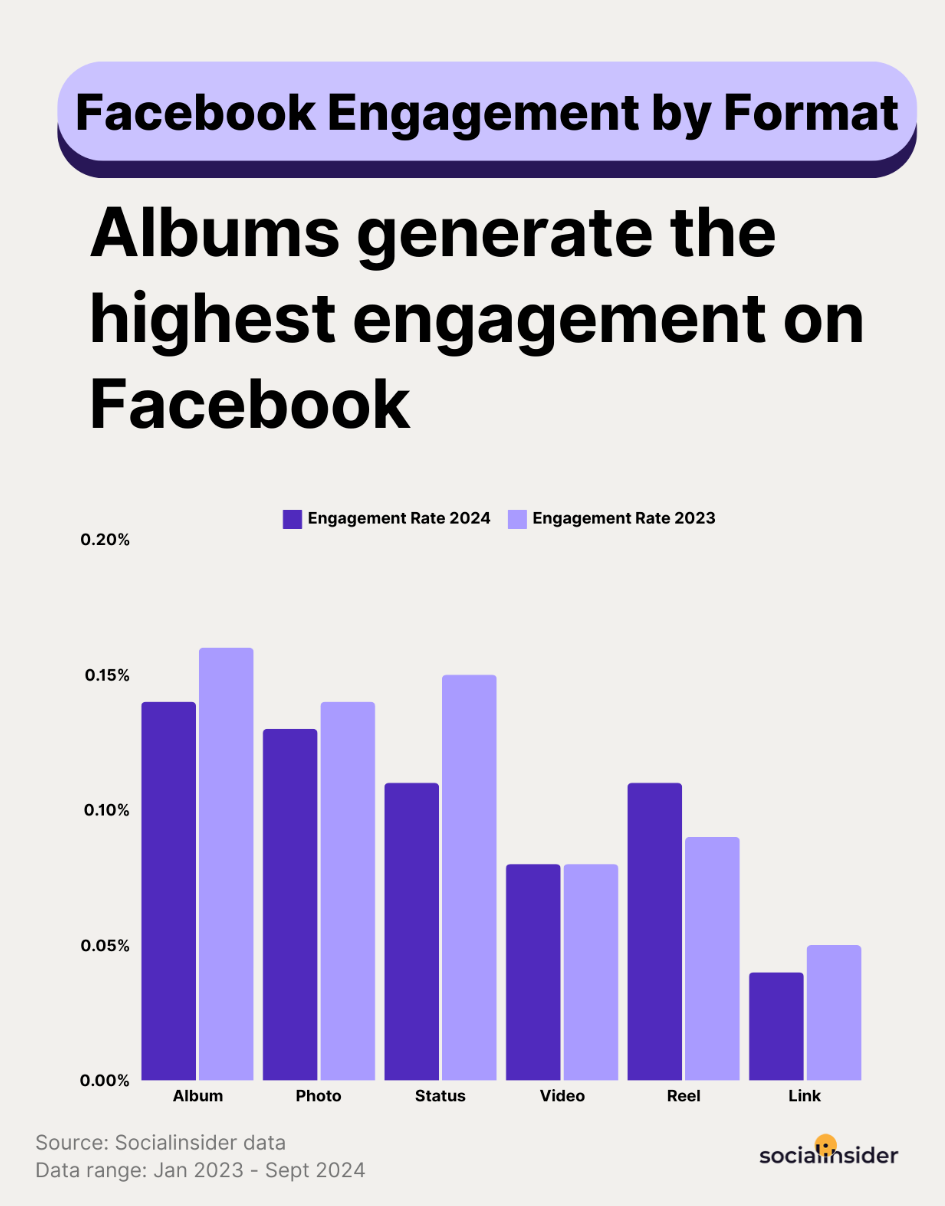
The data shows albums pulling ahead of photos, status updates, videos, Reels, and link posts. If you've been relying on single photos or videos on Facebook, this is a good moment to reconsider.
Just like carousels do well organically on Instagram, multi-image albums give your audience more to interact with and a richer browsing experience that tends to hold attention longer than a single asset.
Albums work particularly well for event recaps, product collections, behind-the-scenes series, and community spotlights. They give you room to tell a fuller story, which is exactly the kind of content that increases engagement on Facebook and keeps your audience coming back.
Multi-images and native documents on LinkedIn
LinkedIn’s engagement logic is quite different from Instagram or Facebook. The audience there is primed for professional value: they want to learn something, take something away, or share something that makes them look informed.
According to Socialinsider's 2025 LinkedIn engagement report, multi-image posts lead the platform with an engagement rate of around 6.6%, followed closely by native documents at 6.1%.
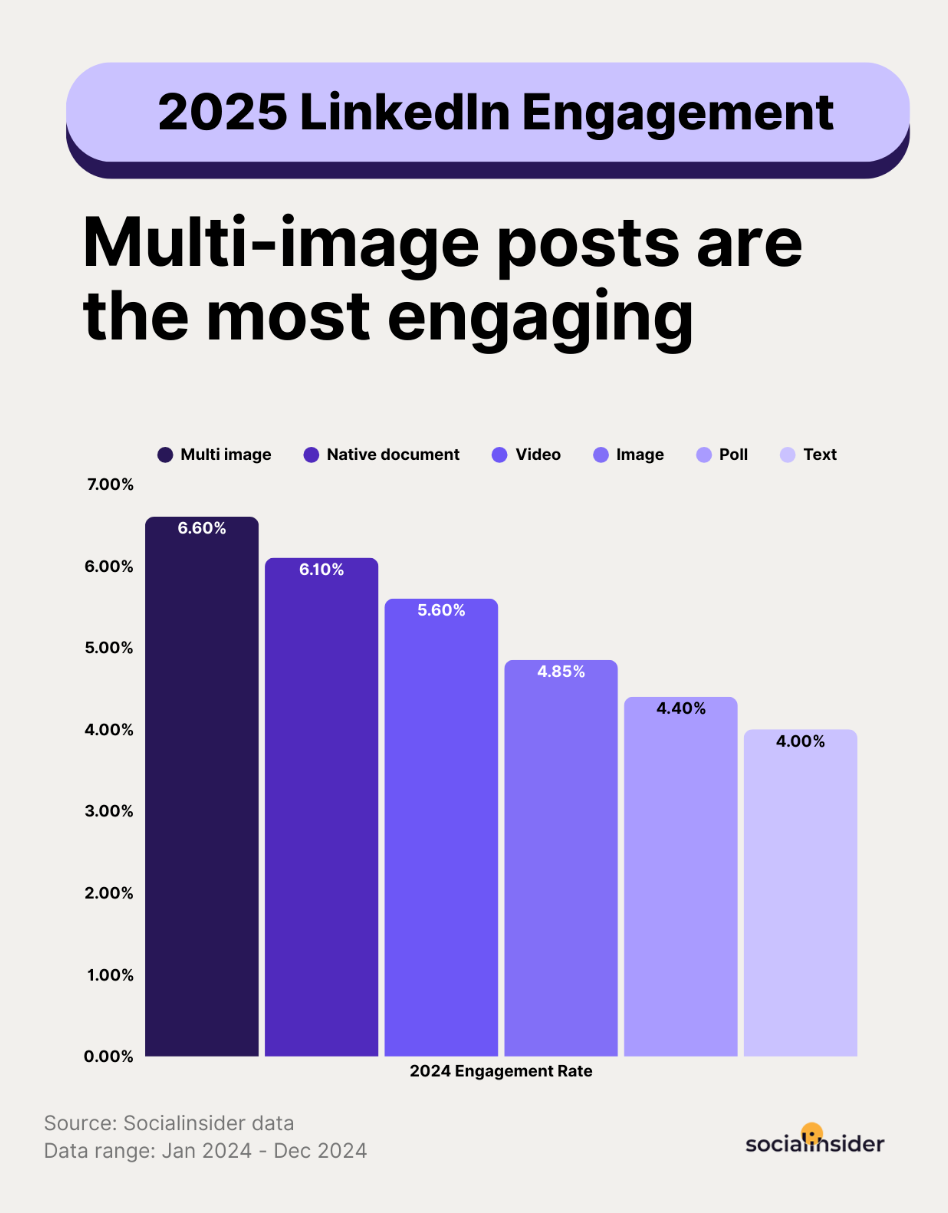
That gap between multi-image posts and native documents and everything else (videos, single images, polls, plain text) suggests that LinkedIn's audience responds most to formats that deliver structured, swipeable value.
Native documents (often called "LinkedIn carousels") are particularly effective because they mimic the feel of a presentation or guide, which aligns with how professionals consume content. They also keep users on LinkedIn rather than clicking away, which the algorithm tends to reward.
If you want to track how your LinkedIn engagement rate compares to these benchmarks, measuring by format — not just overall — gives you a much more honest read on what's working.
Identify your community's content preferences through analytics and double down on it
Knowing which formats generally perform well across platforms is useful, but what matters most is knowing what content works for your community specifically. Let me whow you how to do that.
When you look at your content performance data, you get a direct signal from your audience about what they care about, respond to, and scroll past. The brands that get community engagement right listen to those signals rather than publishing on instinct alone.
This is where a social media analytics tool like Socialinsider makes a difference. You can see your entire content picture in one place, organized by content pillar, format, channel, and engagement rate.
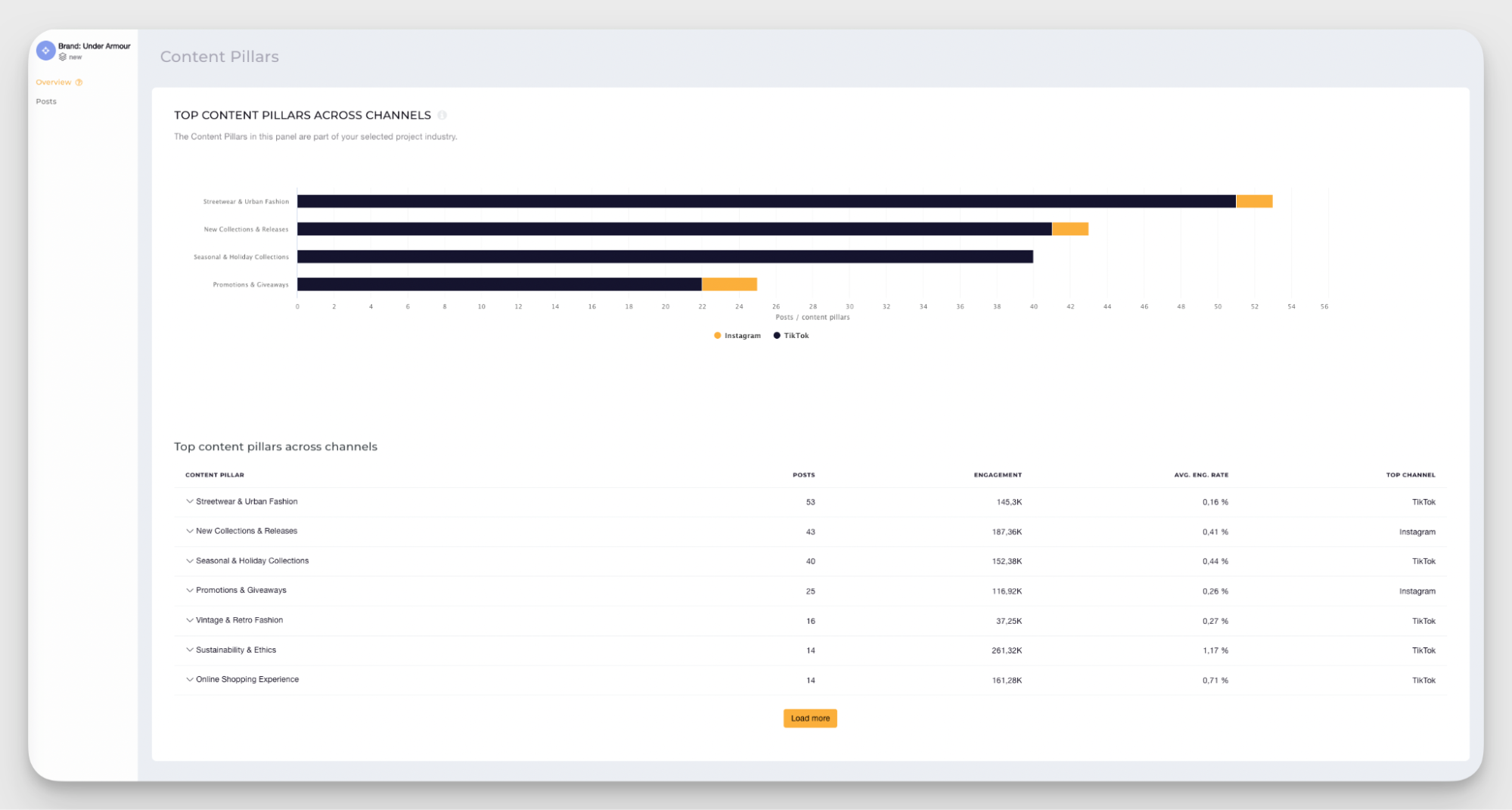
As you can see in the example above, Under Armour's top content pillars across channels are clearly mapped out, from Streetwear & Urban Fashion, which drives the highest volume of posts, to Sustainability & Ethics, which shows a notably strong average engagement rate despite a lower post count.
That kind of visibility is hard to build manually, and it changes how you make decisions. If Sustainability & Ethics content is achieving the highest engagement rate, that's a clear signal to create more of it, not less, just because it's posted less frequently.
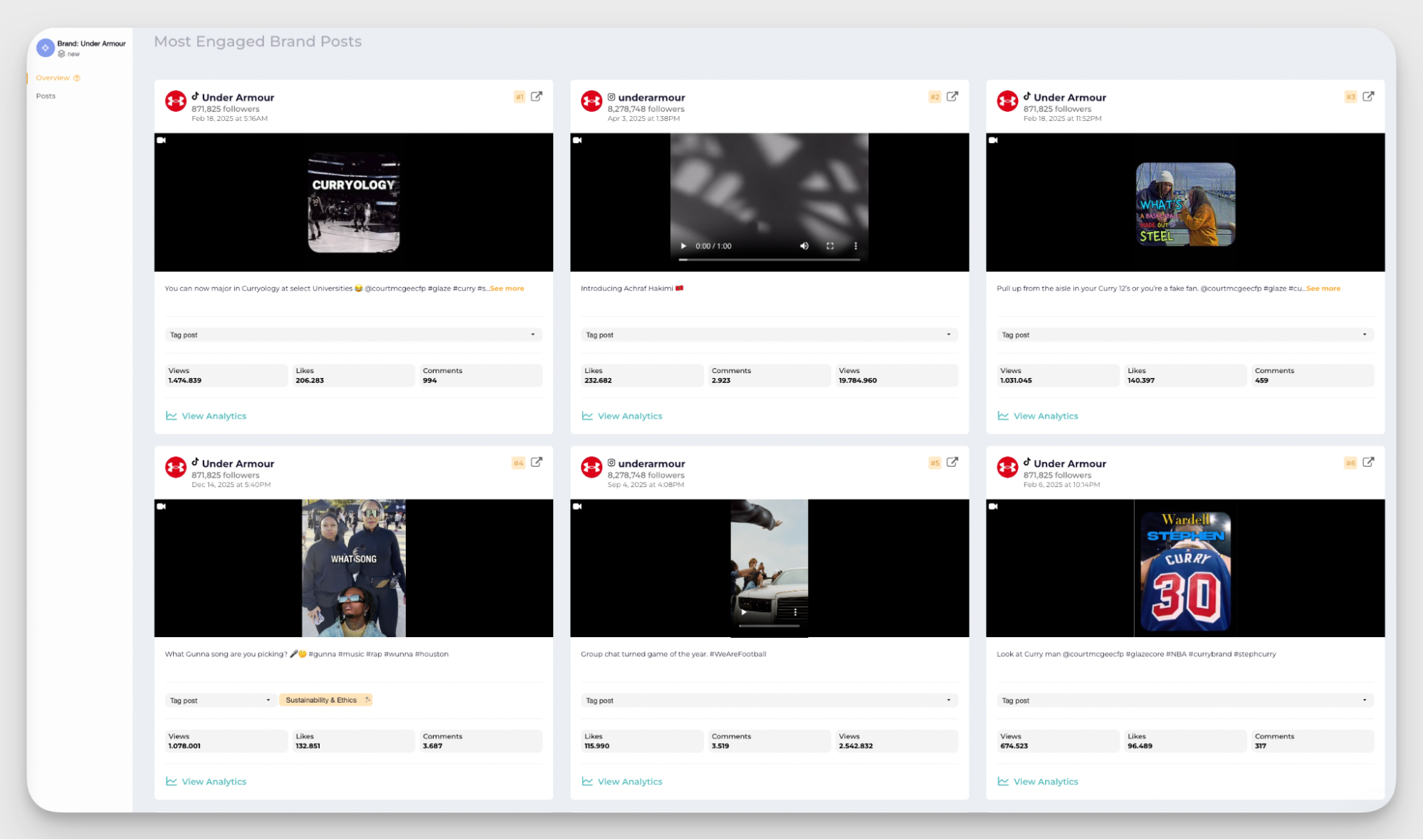
The Most Engaged Brand Posts view takes the analysis one step further. As you can see in this Socialinsider panel for Under Armour, the posts pulling the highest interaction — views, likes, and comments well into the hundreds of thousands — are almost entirely video-led content tied to athlete stories, product launches, and culturally relevant moments.
The data shows you the pattern behind what works so that you can repeat it intentionally.
Look for your "content underdogs": content pillars or formats that don't get posted often but consistently punch above their weight in engagement. These are often the most underused opportunities in your strategy.
What are the most effective tactics for creating an engaged community on social media?
Building an engaged community doesn't happen by accident. It's the result of deliberate choices about what you publish, how you show up, and how consistently you make your audience feel like the interaction is worth their time.
The social media best practices I put below show up repeatedly in the strategies of brands with genuinely active, responsive communities. Trust me.
Create shareable, save-worthy content
For community engagement through social media, saves and shares matter more than likes. When someone saves your post, they're telling you it had real value. When they share it, they're putting their credibility behind it and introducing you to new potential community members.
So what makes content save-worthy or shareable? A few things tend to work across industries and platforms:
- Content that teaches something specific and actionable gets saved: a framework, a process, a shortcut.
- Content that articulates something people already feel but haven't found the words for gets shared.
- Content that challenges a widely held assumption tends to be both saved and shared.
Here’s my recommendation - ask yourself: "Would I save this? Would I send this to a colleague?" If the honest answer is no, it's worth reconsidering whether it's doing the job you need it to do.
A few practical approaches worth building into your social media content calendar:
- Checklists and frameworks your audience can refer back to
- "Hot take" or opinion content that names something others are thinking but not saying
- Data-led posts that give people a stat or finding worth referencing
- Behind-the-scenes content that makes people feel like insiders
- Roundups or comparisons that save your audience research time
Ask questions and use polls strategically
If you're looking for one of the most direct community engagement tactics for social media, I’d say polls and questions are hard to beat. They lower the barrier to participation (responding to a poll takes a single tap), and they signal to your audience’s opinion matters to you.
But there's a difference between polls that work and polls that fall flat. Generic questions get ignored because they don't connect to anything your audience cares about professionally or personally. The polls that drive real engagement are the ones that reflect your community's specific reality back at them.
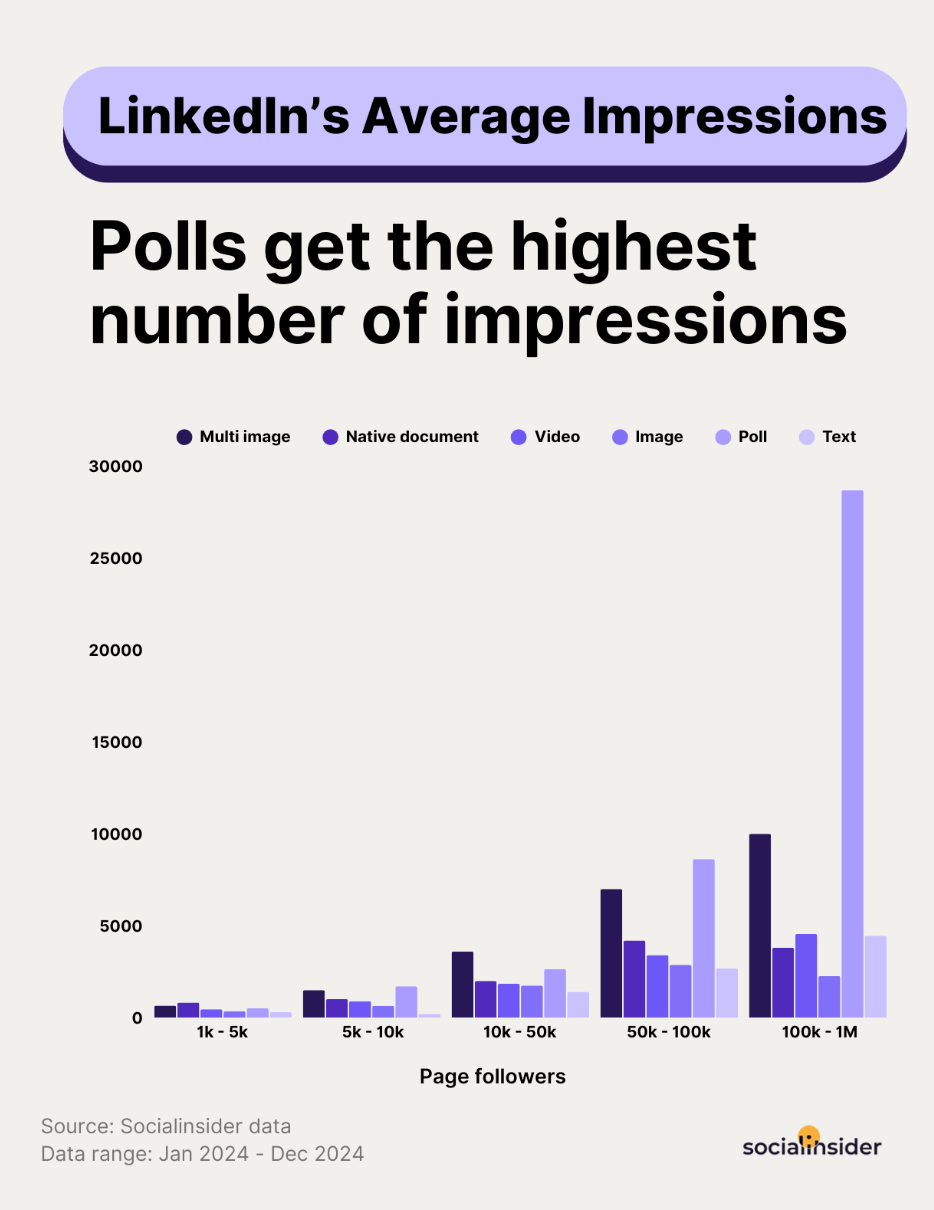
This is also worth considering from a reach perspective. On LinkedIn in particular, Socialinsider data shows that polls generate the highest average impressions across all post formats, especially for pages with larger followings.
For example, at Socialinsider, we use polls strategically to engage practitioners and ask about the operational realities of their day-to-day. Questions like "What’s your biggest concern when using AI for social media analytics?" or "What kind of content would you love to see more of here on LinkedIn?" land differently from generic prompts because our audience immediately recognizes their own situation in the question.
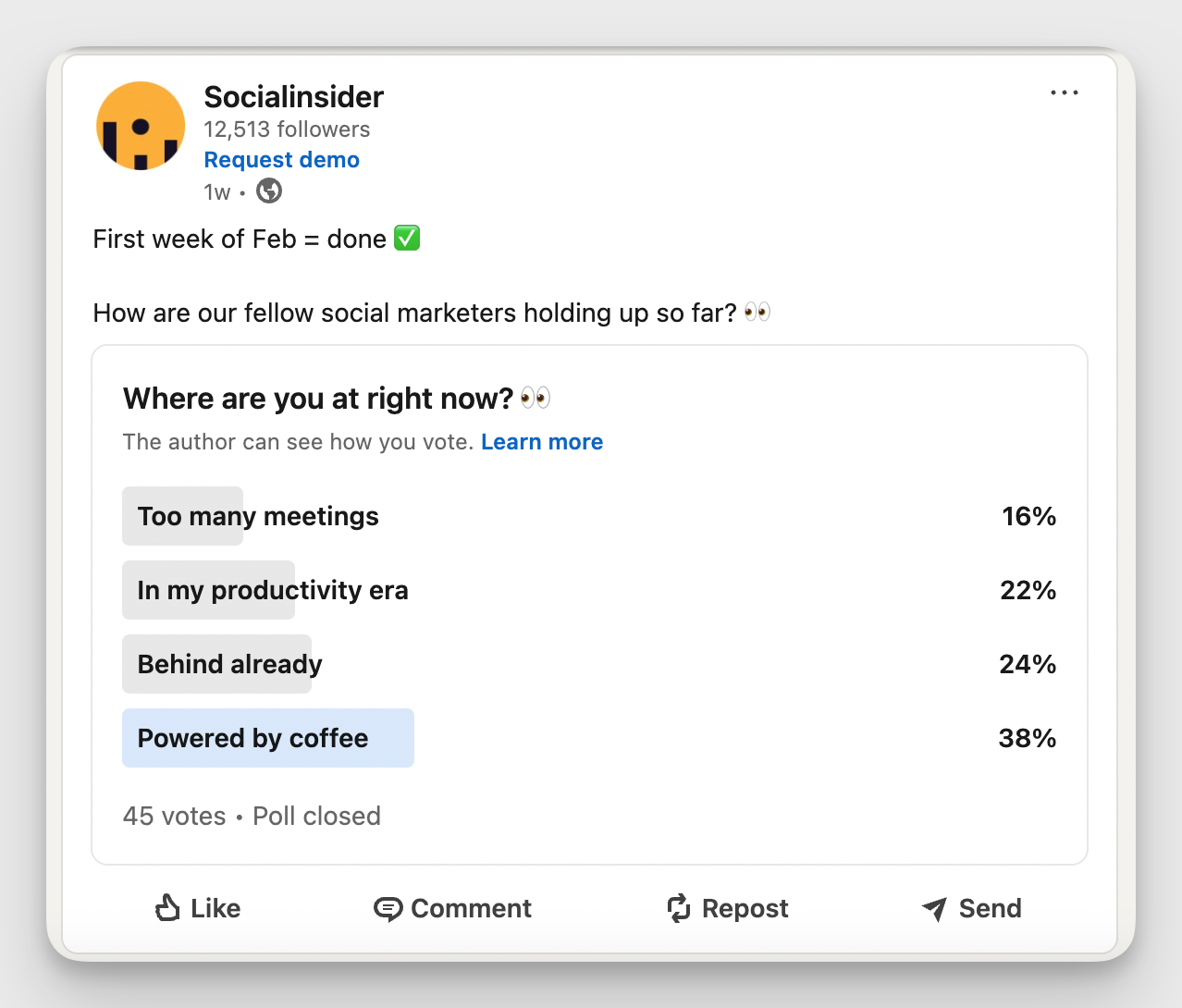
When someone sees a poll question that directly maps to a challenge they're dealing with, they feel seen. And that feeling is exactly what turns passive followers into active community members.
Practical tips:
- Ask questions that are specific to your audience's professional or personal reality
- Use polls to validate content ideas before investing in creating them
- Follow up on poll results publicly — share what your audience said and what it means
- Repurpose poll data into standalone content (reports, carousels, social posts)
- Combine a poll with a follow-up question in the comments to extend the conversation
Host live sessions and AMAs
For community engagement on social media, live sessions and Ask Me Anything formats generate genuine participation rather than passive watching.
The brands that do this well show up with a specific reason for their audience to be there: a question that will be answered, a problem that will be solved, a conversation that's worth the time.
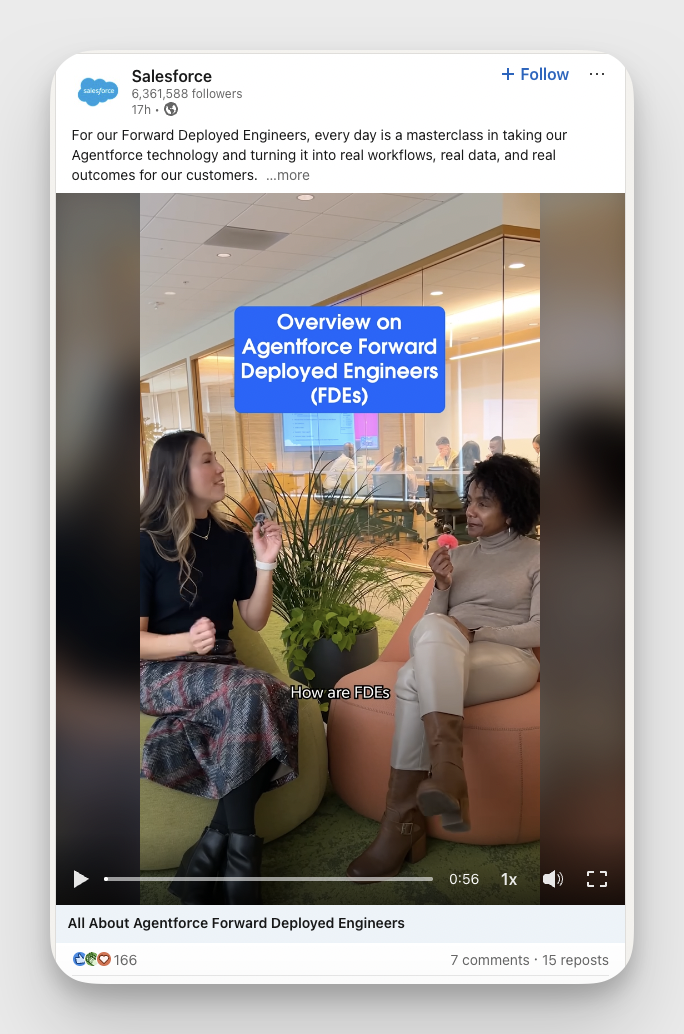
Personally, I think Salesforce is a strong example of how to make live and AMA formats work consistently for community building. What makes it effective isn't the production value but the format itself: practitioners talking directly to practitioners about issues that matter to their audience.
Practical tips:
- Establish a regular cadence for live sessions so your audience knows when to expect them
- Center each session around a specific, timely topic rather than keeping it open-ended
- Actively engage with comments and questions in real time
- Take note of comments as they reflect audience problems and questions and use them to inform future content
- Repurpose live recordings into clips, carousels, or summary posts to extend the life of the content
Key metrics to effectively track community engagement on social media
Knowing your community is engaged is one thing. Understanding how they're engaged, what drives that engagement, and how to optimize for more engagement is another.
Here are the social media metrics I paying close attention to when I want to build and sustain an active community.
Engagement rate
Engagement rate is the foundational metric for any community engagement strategy. It tells you how much of your audience is actively responding to your content.
And because it's a rate rather than a raw number, it gives you a fair way to track engagement trends across posts, time periods, and even competitors.
There are a few ways to calculate engagement rate, and each tells you something slightly different.
- Engagement rate by followers reflects how well you're activating your existing community.
- Engagement rate by views tells you how compelling your content is to the people who actually saw it.
A single high-performing post looks good, but it’s just a point in time. A consistent upward or downward trend in engagement rate indicates whether your community strategy is working.
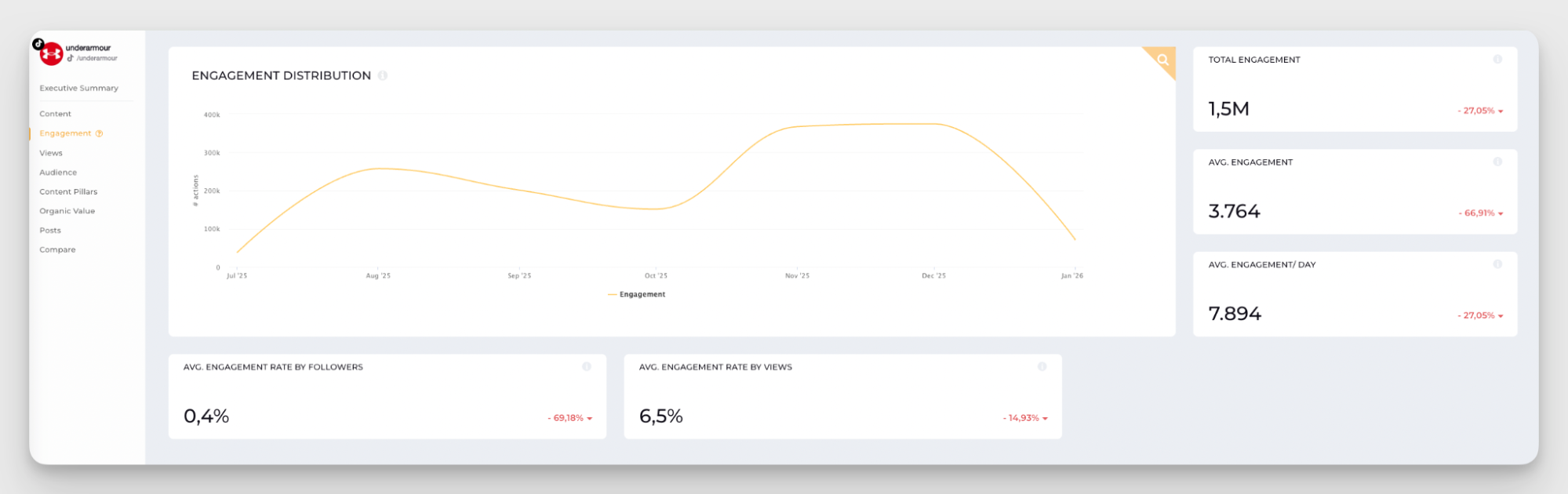
As you can see in this Socialinsider TikTok engagement dashboard for Under Armour, the distribution curve over six months shows clear peaks and lows. That kind of trend view immediately raises useful strategic questions: What changed in the content mix during the high-engagement months? Was it a specific campaign, a content format shift, or an increase in posting frequency?
A healthy average engagement per post tells you your content quality is solid. A strong average engagement per day tells you your publishing rhythm is working. When both trend in the right direction together, you're building something real.
Comments, saves, and shares
Engagement rate gives you the macro view. Comments, saves, and shares give you specific signals about why your audience is engaging and what value your content delivers.
Each metric carries a distinct meaning:
- Comments indicate that your content prompted a reaction strong enough to make someone stop and say something.
- Shares indicate that your audience found the content valuable or relatable enough to put their own name behind it.
- Saves indicate that your content had standalone utility.
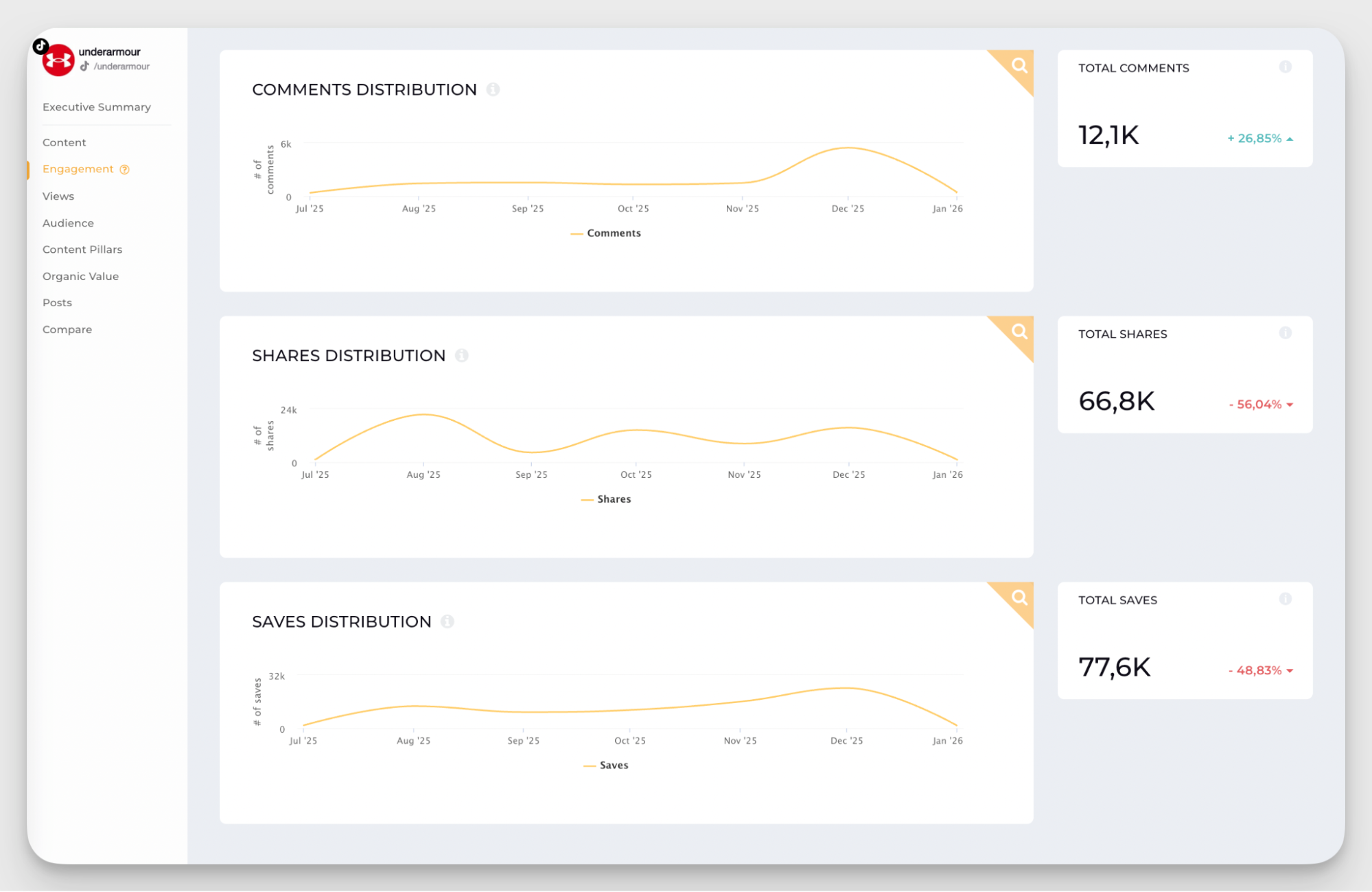
Continuing with my brand example, as shown in the Socialinsider dashboard above, the distributions of comments, shares, and saves for UnderArmour are tracked independently over the same time period. Looking at the curves together reveals an interesting pattern: comments climbed steadily through November and into December, while shares peaked earlier in the period and then leveled off, and saves grew gradually before pulling back sharply in January. Each of those movements tells a different part of the story.
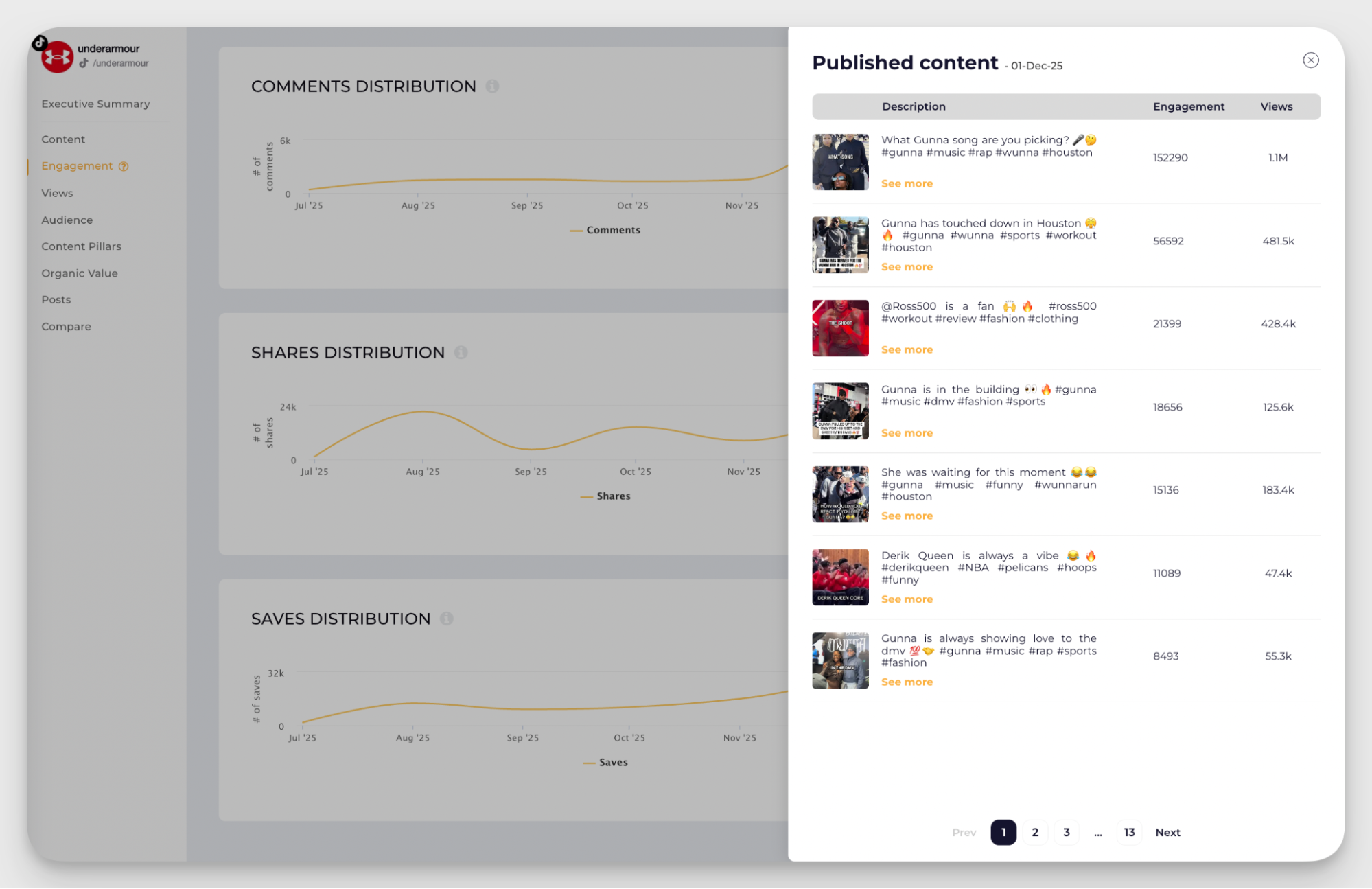
Clicking into a specific peak takes you directly to the content that drove it. For example, the post asking "What Gunna song are you picking?" generated over 150,000 engagements and more than a million views, pulling well ahead of every other post in that window. That single data point shows that culturally relevant, community-participation content drove an outsized response in comments for Under Armour.
This kind of insight is easy to miss if you're only looking at aggregated engagement totals. When you can connect a spike in comments directly to a specific post and understand why it resonated, you can start making informed decisions about how to increase community engagement on social media.
Sentiment
Social media sentiment tells you how your audience feels about what you're putting out.
A post can generate hundreds of comments and still harm your community if those comments are negative, frustrated, or dismissive. Conversely, a post with modest engagement numbers but overwhelmingly positive sentiment can build the kind of trust and goodwill that compounds over time.
Monitoring sentiment as part of your social media analysis means going beyond the numbers and paying attention to the emotional tenor of what your community is saying.
To interact with your community effectively, sentiment data also guides your responses. A comment section trending negative on a particular topic is an early warning signal. A wave of positive sentiment around a specific type of content, on the other hand, is a green light to create more of it.
Share of voice
Share of voice measures how much of the total conversation in your category or industry centers on your brand, relative to your competitors.
For social media for community engagement, the share of voice is useful because it contextualizes your engagement numbers. A brand with strong engagement metrics but a shrinking share of voice is losing ground. On the other hand, a brand with a growing share of voice typically sees its community expand.
A useful way to approach share of voice measurement is to define a clear competitive analytics set and regularly monitor how your brand's mentions, hashtag usage, and content reach compare to that set.
Final thoughts
Building genuine community engagement on social media takes more than showing up regularly. It takes knowing what's working and why.
The strategies in this guide all point in the same direction: your audience is already telling you what they want through their behavior.
The brands that grow sustainably are the ones that listen to that data and act on it. Start with a top social media analytics tool like Socialinsider, and the rest will follow.
Sabina Varga
Content marketing expert with 15 years of experience in digital marketing. I dream of beach life but love the city as a multitasking mom juggling playgrounds, books, brunches, and travels.

Analyze your competitors in seconds
Track & analyze your competitors and get top social media metrics and more!
You might also like



Improve your social media strategy with Socialinsider!
Use in-depth data to measure your social accounts’ performance, analyze competitors, and gain insights to improve your strategy.