How to Create a Social Media Plan Step-by-Step
This social media plan guide covers the five building blocks, leadership-ready templates, and the planning mistakes that erode team credibility.

A social media plan is your most reliable tactical document that translates a social media marketing strategy into action.
And, despite a common misconception, it’s not just a posting plan. A solid social media plan covers a lot of ground: from content planning to ownership and approval flows.
In this article, I’ll share my tried and tested guide on creating a social media plan that is actionable, comfortable to use on an everyday basis, and convincing for leadership.
Key takeaways
- A social media plan is built on five core blocks: workflow, posting cadence, ownership, reporting rhythm, and tools, each of which needs to be defined before the plan can function as a reliable operational document.
- Building a social media plan that holds up with leadership means translating strategy into a content matrix tied to business goals, setting a cadence the team can sustain, building a scalable approval workflow, assigning clear ownership across every stage, and establishing a review cadence with role-appropriate reporting.
- Among the social media planning mistakes that erode leadership trust are missing reporting cycles, setting a posting cadence the team can't sustain, and sharing performance numbers without competitive context.
What is a social media plan (and how is it different from a strategy)?
A social media plan is a detailed tactical breakdown of how your brand will be presented on social media. A social media plan usually includes the publishing schedule, copy, assets, reporting cycles, and tools you use for achieving your business goals.
What differs it from a social media strategy then?
A social media management plan is a part of a social media strategy:
- Social media strategy gives you direction. It’s the overall framework you’re operating in that dictates what you want to say, who your target audience is, and why you’re using a specific toolset (tone of voice, messages, pillars).
- A social media plan is operational. It’s the way you translate strategy into tactics: what exactly do you post, when, how often, on which channels, and with what tools. A social media plan keeps you on track and translates strategic ideas into concrete posts going live when you need them to.
A social media posting plan can technically exist without a social media strategy, but it won’t be nearly as effective. Tactics without a strategy to back them up rarely lead to controlled results.
What are the building blocks of a social media plan?
When you have your social media content strategy — meaning, you are set on your core messages, target audiences, content pillars, and channels — you need to lay it out in action steps.
Social media work is a cycle of plan -> create -> analyze -> adapt. So whenever I am working on a high-level social media plan, I want it to cover the whole social media process through these five main blocks:
- Workflow. How is the content planned? How often? Who’s creating it? How? All those questions form your whole operational layer, so your social media plan has to include this to be applicable and useful.
- Cadence. Unlike some less marketing-savvy people may believe, one viral hit doesn’t secure a win for your brand. Consistency, on the other hand, does. So setting a desirable and feasible posting cadence in a strategic social media plan is a must.
- Ownership. My personal pet peeve is when you have multiple cooks in the kitchen and no content ready in time. Set specific roles across your team so everyone knows who’s responsible for delivering copy, scheduling posts, or reporting to the higher-ups.
- Reporting rhythm. Establish in advance how often you plan to report. This helps you stay consistent and read the numbers correctly: comparing two-week growth numbers against one-week numbers distorts the picture for both you and your executives.
- Tools. Bringing a tool on board means additional budget and time to restructure your workflows. Social media automation tools may seem like overkill at the very beginning, but I recommend planning for at least an analytics and scheduling tool in advance.
That said, I never treat a social media plan as a thing set in stone forever. These blocks can move, change, and evolve as you go.
But when you need a social media plan presentation for executives, this setup gives them the most comprehensive idea of what you plan to do and how many resources it would require.
How to build a social media plan you can defend to leadership?
Now, speaking of executives — how do you build a plan for social media that is cohesive and convincing for your higher-ups, but also helpful for your team?
Let’s go over how to flesh out each of the five blocks above and create a social media action plan.
Translate your strategy into a working plan
Step one is remapping your content pillars, goals, and strategic messages into tangible form.
An expert content pillar looks different depending on your industry. You and your leadership need to know what an expert content pillar (and any other pillar) will look like for your brand.
Start by creating a content mix: concrete posts you'd actually publish on social media to support each content pillar.
I like to build a content matrix to do that. Use a spreadsheet: list all the content pillars in the left column and the features or messages you’d like to highlight in the top row. Now, fill in each cell with ideas at the intersection of features and content pillars.
For example, for a B2B project management tool, it could look something like this:
Remember, though: for executives, what you post matters, but why you post it matters more.
Before you schedule anything from the matrix, label each row with the goal it serves. This will help you tie your posts to an objective and show your higher-ups how each post feeds into a specific outcome:
- Customer proof helps shorten your sales cycle by building trust online and prepping leads for a rep call.
- Industry expertise exists to build authority, so when a prospect finally does talk to sales, they're not starting from zero.
- Team & culture supports hiring and retention, not engagement rate.
This gives you a content roadmap to follow, and your leadership — clarity on what to expect from each post.
Set a cadence you can actually resource
The rule is: only plan for the cadence you can provide consistently.
A social media marketing plan rarely falls apart because you lack ideas. A classic catch is planning an ambitious amount of content, sticking to it for two weeks, and then skipping formats that take longer to produce because of the resource crunch.
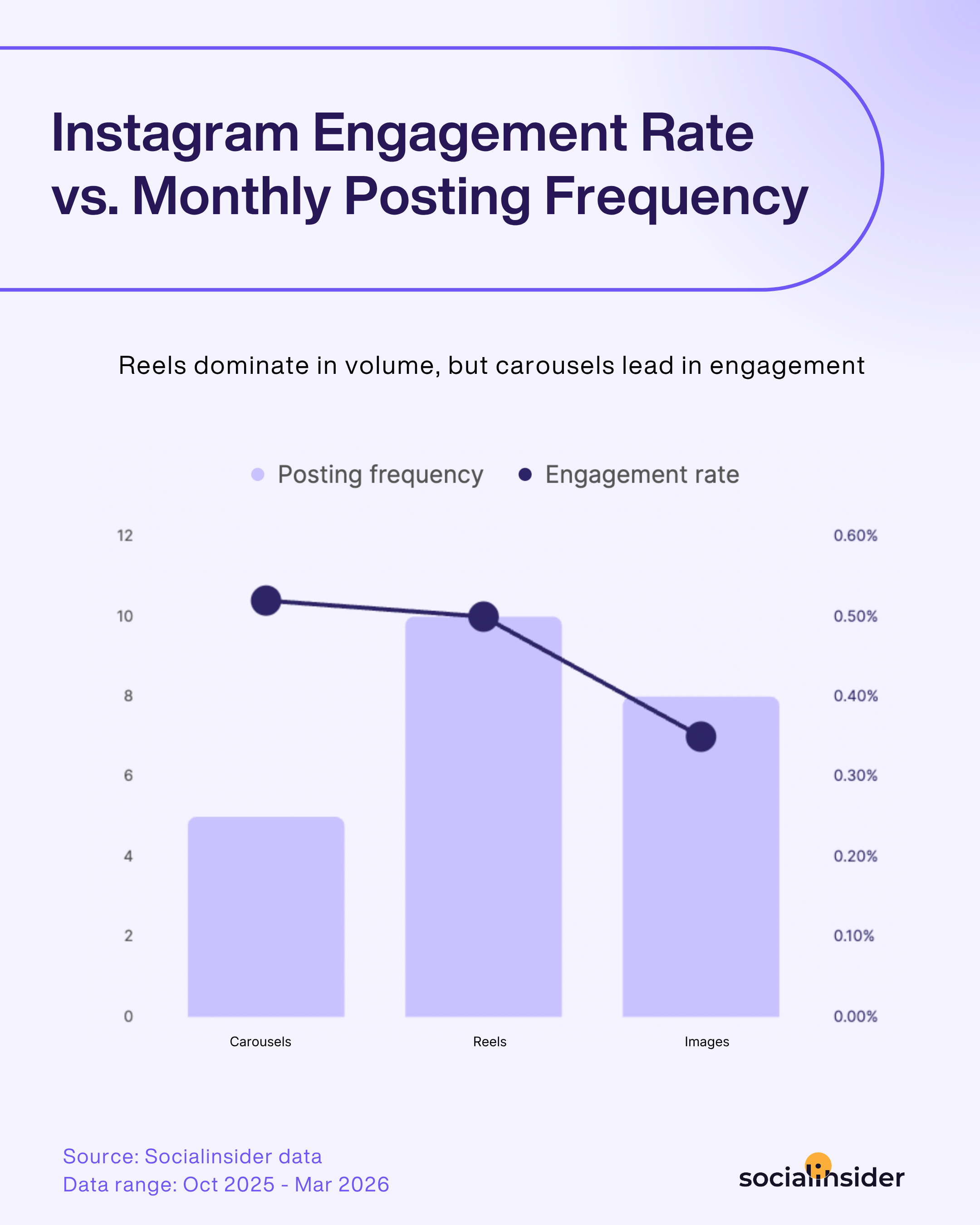
The idea of posting less can be a hard sell for leadership. But posting more doesn’t define how effective social media marketing is. High engagement, on the other hand, is a much more convincing factor. And what gets posted more is not always what brings more engagement.
Socialinsider's 2026 social media posting frequency study shows that on Instagram, Reels are published about twice as often as carousels. However, carousels yield more overall engagement.
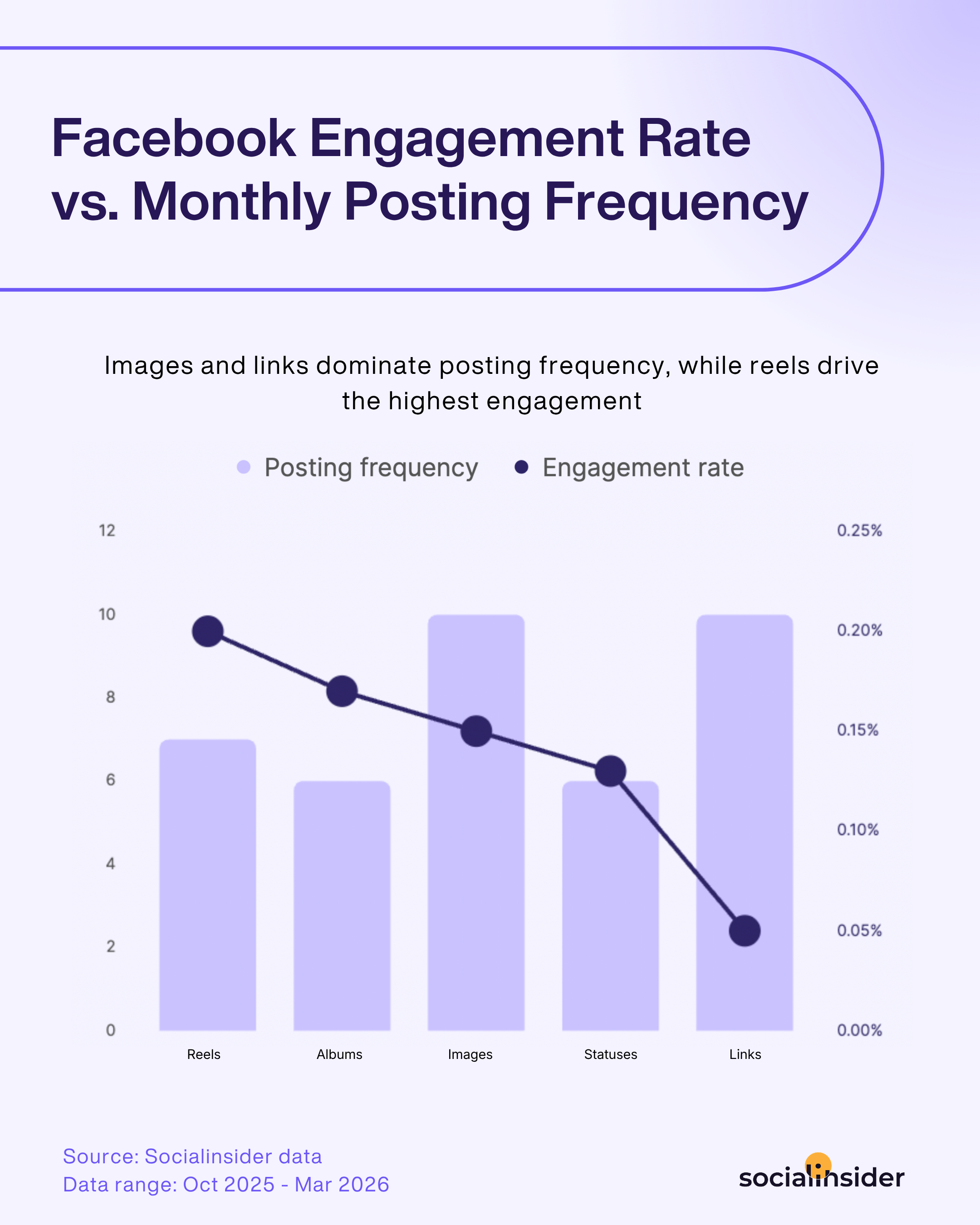
The same goes for Facebook: everyone doubles down on images and links, when Reels and albums often drive the strongest engagement. (Links, by the way, generate little to no engagement, so you can bring that up next time your higher-ups ask for a link in every post.)
But the widest gap between expectations and reality is LinkedIn. Brands are posting images the most, while native documents, sitting at a modest twice a month, are responsible for almost 40% higher engagement.
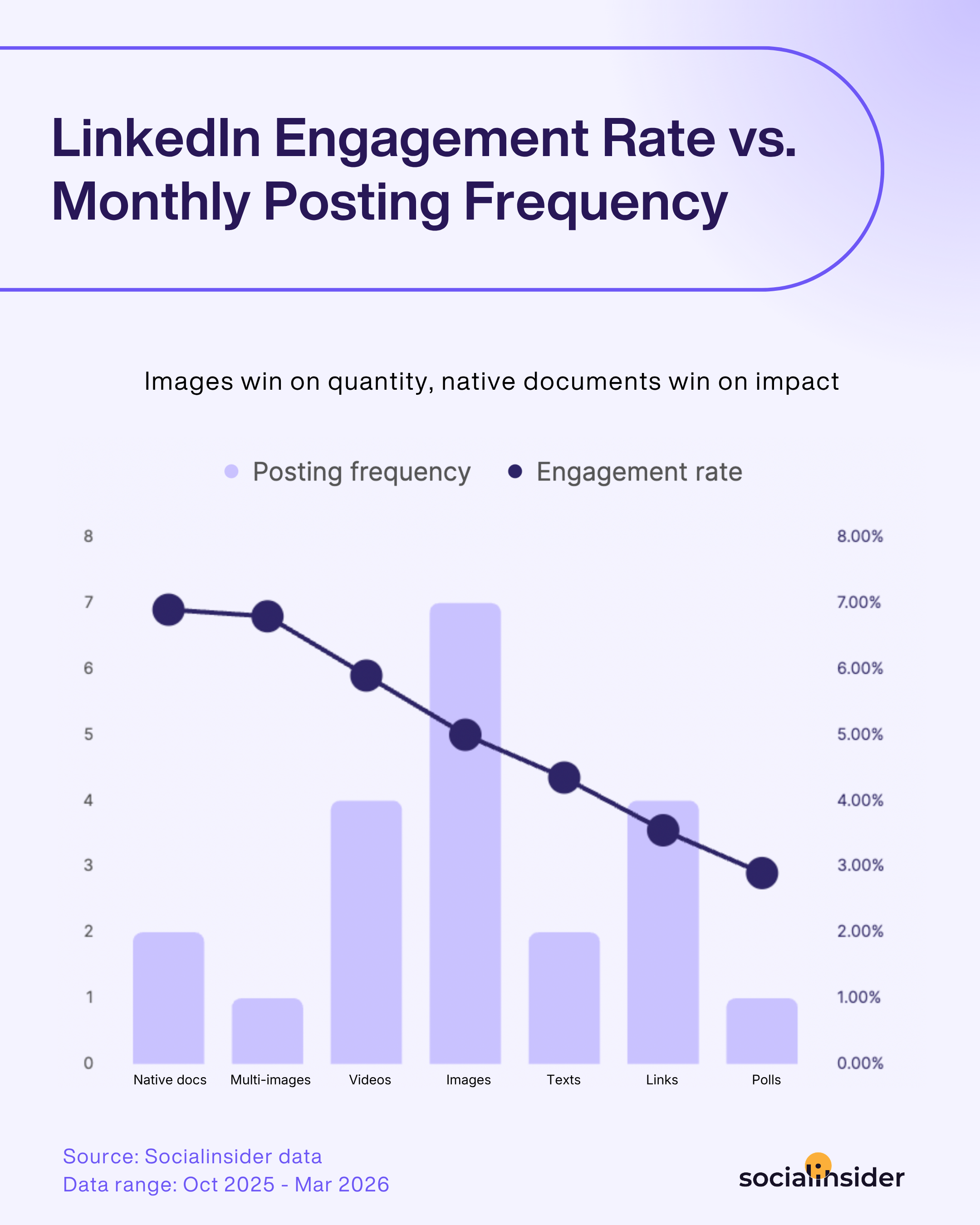
Long story short, if your team can do one well-made carousel, one reel, and one document per week, that’s a stronger plan engagement-wise than seven quick single image posts.
Build an approval workflow that scales past one person
Social media moves fast, and by that I mean “I don’t have five days for a TikTok approval”-fast.
A lot of brands on social media that executives often look up to become viral because they jump on trends and newsbeats immediately. That requires butter-smooth approval workflows to get a post out the same day.
The bigger the team, the more friction the approval process might cause. The brand spawns sub-brands, one market becomes three, the agency comes on board, legal just wants a quick look, and suddenly, there are six people between your new Instagram Reel and the feed.
So when you think of how to plan social media content, approvals are part of the equation. Base your process on answering these questions:
- How will you send content for approval? Decide whether stakeholders will review posts one by one or in batches. Will copy and creative be reviewed together, or does the visual need approval before the copy?
- Who needs to sign off, and in which order? List the approval layers and people responsible for each. That includes the social media lead, brand or communications team, client, legal team, or another stakeholder.
- Who has final publishing authority? Approval gets messy when everyone can comment, but nobody makes the final call. Assign the final owner who can say, “This is ready to go.”
- Where will approvals happen? Pick one source of truth channel. That might be email, a Google Sheet with statuses, a task tracker, or a dedicated social media management tool with approvals built in.
- What are your crisis escalation paths? Document what happens when something goes wrong. Who needs to be informed? Who can pause scheduled posts, publish a response, or escalate the issue to legal or leadership?
Now, take all of these answers, and think about where you can cut corners without hurting the outcome.
Trend-driven content needs a faster route than campaign content. Not every post needs every pair of eyes, so define which content requires additional checks. A detailed brand kit defines how you use fonts, logos, and brand colors, so you can skip brand checks and give an agency a little more guardrails to begin with.
Structure ownership across in-house, agency, or hybrid models
Everybody’s business is nobody’s business. Establishing ownership over concrete parts of the workflow is essential to ensure the said workflow delivers.
Make sure to assign:
- Who plans content? Runs the content calendar, defines channels, and creates briefs for visual assets.
- Who creates content? That includes copy, static assets, videos, GIFs, and whatever else is planned.
- Who approves content? The whole chain of command that has to green-light a piece before it goes live.
- Who distributes the content? Gather the final posts from assets, schedule them to go live across all platforms, monitors that they indeed went live on time.
- Who manages comments and DMs? We don’t post and ghost — someone has to take over the comment section with vetted answers.
- Who runs analytics and reports? Data collection, gathering a social media report, making sure the report makes it to the higher-ups in time, drawing conclusions that feed the future content planning and creation.
Mind that defining ownership doesn’t equal listing a job description. It’s assigning a field of responsibility to a team or a person.
When you have an in-house social media team, all of those fields of responsibility will probably lie within it.
But if you have a hybrid model, where part of the work is delegated to the agency, it’s especially important to divide the ownership in advance. Besides defining the workflow, it will also define the resources you need to allocate.
For example, the agency can plan and create social media content, but then someone on your side has to approve, schedule, and analyze it. Agencies can take over the whole cycle (planning, creation, distribution, and reporting), but then you still have to appoint someone to approve the content.
Establish who owns what in your social media plan, so it acts as the single source of truth for the whole team.
Build a review cadence that keeps leadership aligned
Decide on the content of each social media report and the reporting cycles that suit both your team and the leadership.
I personally like to track social media data:
- Weekly for the operational team. 7 days is enough time for most platforms to process all the numbers, and it gives the hands-on team a good understanding of what’s working in the moment.
- Monthly for the higher-ups. Leadership is usually more concerned with trends than everyday operational numbers. A month is a good window to give an overview of what has been done and how it influenced the brand’s performance.
- Quarterly for everyone. Quarterly reports align the whole team and give a better understanding of whether the current strategy is working towards the goals or if it needs adjustments. It’s also when most of my clients revisit goals in general to see if we need to focus on something else.
Best practice for social media reporting is to differentiate the metrics you use for each. For operational reports, you can focus more on day-to-day engagement metrics that help your tactical group evaluate if the content landed well or poorly.
For monthly and quarterly reports, stick to high-level numbers that show trends and outcomes. You can also add competitor benchmarks to these reports to put the performance metrics in context.
Social media analytics tools like Socialinsider can help you a lot in automating your report cycles. Socialinsider’s autoreporting allows you to schedule your reports and email them to all your stakeholders weekly, monthly, or quarterly.

Social media plan template
A social media plan is the operational document you'll use practically every day.
It doesn't need to list goals or highlight KPIs — that's what your strategy is for. It should translate the strategy into action: what to post, who approves it, and who owns each part.
Here's the social media plan template I use when working with clients. It covers the operational essentials: a content calendar with approval statuses and ownership built in, plus a content matrix to keep the plan stocked with ideas.

Planning mistakes that cost teams credibility with leadership
Credibility with executives can go a long way, from earning you more creative freedom to cutting corners on approvals. Trust in your social media marketing plan and your team is a valuable resource.
However, some common mistakes can damage that trust and cause leadership to rely on your numbers and judgement less.
Missing reporting cycles
Leadership builds their work on information that comes in a timely and predictable manner. A missed report leaves higher-ups hanging: they might not be able to move on with their decisions or simply lack information for an upcoming executive sync.
Plus, it looks worse if you were initially the one to set up the reporting cycle, and then failed to deliver on it.
Usually, this is a capacity problem more than a discipline one. Gathering data across channels, formatting it, and writing it up takes up a lot of time.
Socialinsider's autoreporting removes that risk:
- You don’t need to gather report data every time from scratch. Socialinsider collects social media data across all channels in a consistent format, so you can always compare your numbers in the same dimension.
- You don’t have to send reports out manually. No mailing lists and calendar reminders needed. Socialinsider will make sure the report lands in your stakeholders’ inboxes every reporting cycle.
You set it up once and stay on track with reporting pretty much forever.
Letting cadence collapse under real capacity
A social media editorial plan with daily posts looks great in a slide deck.
But it looks a lot worse when you’re three months in, and either your quality or your cadence is slipping, or your team is completely burned out. For leadership, that doesn’t immediately scream “understaffed,” but rather “overpromising.”
The solution is to plan initially with a cadence that sounds realistic to your team and fits your niche. Socialinsider helps you find your best bet with competitors’ intelligence:
- Competitors’ benchmarking shows you how often your main competitors post. Use this number as your target range and adjust to your capacity. Keep an eye on the engagement, too — if a brand posts 80 posts per month, but has less engagement than the one posting 40 posts, I’d focus on the latter.
- Content analysis shows best-performing content pillars and formats, sorted by engagement. This helps you narrow down your content mix to focus on the most impactful content pieces topic- and format-wise.
Reporting numbers with no context
Your executives are not social media professionals. They don’t have an objective idea of whether the number of followers or monthly views you get is good.
And technically, you can assure them that any result is a good result. But it can also work the other way: they might see the truly fine result as underwhelming, because they’re comparing you to a brand way outside your league.
As a result, the stakeholders can’t fully rely on your performance data because they can’t fully comprehend it.
Competitive insights give them the context and put all of you on the same page. Socialinsider helps you gather both detailed competitor data for everyday use and high-level summaries to give your stakeholders a grasp of where you stand in the market.

You can compare brands cross-platform or dive in channel-by-channel. Socialinsdier covers a lot of ground: from basic brand metrics like follower growth, average engagement, and reach to more custom ones, like content pillars sorted by engagement and Earned Media Value showing how much the current organic result costs in ad money.
Final thoughts
Creating a social media marketing plan goes beyond planning posts and choosing distribution channels. It’s a tactical reflection of your social media strategy and a continuation of your brand strategy.
Social media analytics helps you create a social media plan that is feasible, reliable, and sits well with the executives. Try Socialinsider for 14 days for free to back up your tactics with real data.
FAQs on social media plan
What’s the difference between a content calendar and social media plan?
A content calendar (also sometimes called an editorial plan for social media) is a list of planned posts with dates, channels, and posting time. It’s the schedule you follow to ensure that you maintain posting cadence.
A social media plan is a bigger tactical document that includes a content calendar alongside things like approval workflows, ownership over different parts of the social media process, and a content matrix. The plan defines which posts go into the calendar, and the cadence you'll stick to, while the calendar is the execution layer.
How often should a social media plan be updated?
A social media plan is usually owned by the social media lead. They have to review the plan monthly against the reporting data, update it quarterly to reflect what's working, and revisit it fully once a year alongside new company goals.
However, if the analytics show mid-cycle that the plan no longer supports the current goals, don’t hesitate to revamp it ad hoc.

Kseniia Volodina
With a background in journalism, Kseniia Volodina writes about social media analytics, audience research, and competitive data for teams that want strategy, not guesswork.

Know what your competitors do — before your manager asks
Get instant social benchmarks & reports without manual work.


