How to Run a Twitter Audit That Actually Holds Up in a Report
Twitter audit guide: check profile, followers, and content performance, then turn results into a report that justifies your X strategy.


X's native analytics now sit behind a Premium paywall, which means most teams doing a Twitter account audit are already locked out of their own data before they start. Run a proper audit anyway, and you get something a lot more useful than a compliance checkbox: proof of whether the channel still earns its spot in your mix.
I still get asked, semi-regularly, whether X (I'll say Twitter too, since that's what most of us still call it out loud) is worth the effort. And while it's not the platform it was five years ago, it's still the place where news breaks first, and if your brand touches media, finance, tech, or anything remotely newsworthy, a presence there still matters.
Whether your presence is working is a different question, and a Twitter audit is how you answer it.
So, not to drag this for too long, in this guide I'm going to show you how to run a Twitter audit that gives you something to actually act on, not just a screenshot of your follower count. Let's dive in!
Key takeaways
- X restricted native analytics access to Premium and Premium+ subscribers, pushing most social teams toward third-party twitter audit tools like Socialinsider to access basic performance data.
- A Twitter audit checks profile setup, goal-level metrics (engagement rate, impressions, follower growth), content and format performance, posting frequency and timing, follower authenticity, and competitive benchmarking, in that order, using a twitter audit tool such as Socialinsider.
- Socialinsider tracks twitter follower growth, engagement rate by followers and impressions, replies, reposts, views, posting frequency, and content pillar performance with historical data, and supports side-by-side competitive benchmarking against any public X account.
What is a Twitter audit?
A Twitter audit is a structured review of how your X account is actually performing, versus how you assume it's performing. It covers your profile setup, your twitter followers (real ones, not just the count), your content's engagement, your posting frequency, and how you stack up against competitors on the same platform.
Done properly, it's less "let's tidy up the bio" and more "here's whether this channel is pulling its weight." That's the version worth your time.
What might differ now for running Twitter/X audits?
Two things changed the way this audit gets done.
First, X's own analytics dashboard moved behind Premium. If your team isn't paying for a Premium or Premium+ subscription, you don't get native performance data at all. That alone pushes most social teams toward a third-party Twitter audit tool just to see basic numbers again.
Second, the platform's relevance has narrowed. It's no longer a channel you run "because everyone does." It's a channel you run because it earns you something specific, usually speed and reach on breaking news or industry conversation. An audit is how you check whether that's actually happening for your account, or whether you're posting into a channel that quietly stopped delivering.
How to do a Twitter audit?
I'll walk through this in the order I'd actually do it, starting with the quick stuff and ending with the part that takes the audit from "data dump" to "decision."
Start with profile basics (fast, then move on)
This part shouldn't eat your afternoon. Check that your logo, header, and profile photo are current and consistent with your other channels. Profile photo at 400 x 400px, header at 1500 x 500px. Make sure your bio still describes what you do, not what you did two rebrands ago.
If you've got pinned posts, check they're not advertising something that ended in 2024. That's genuinely the whole checklist here. Don't let this part become the audit.
Pull your content and format performance
When you start digging through the data, I'd recommend checking your top metrics first to quickly understand whether the account is on track or off it.

Once you know this, it's time to start investigating why you got the number you got. At this point, you'll want to know which formats and topics are actually landing, not which ones you feel like are landing.

The good news is that Socialinsider breaks performance down by format and content pillars, plus top posts data, for you to easily get the answers you need.

Check posting frequency and timing
X still runs on volume in a way other platforms don't. Several posts a day is normal here, sometimes five to ten, depending on your industry and how newsy your beat is.
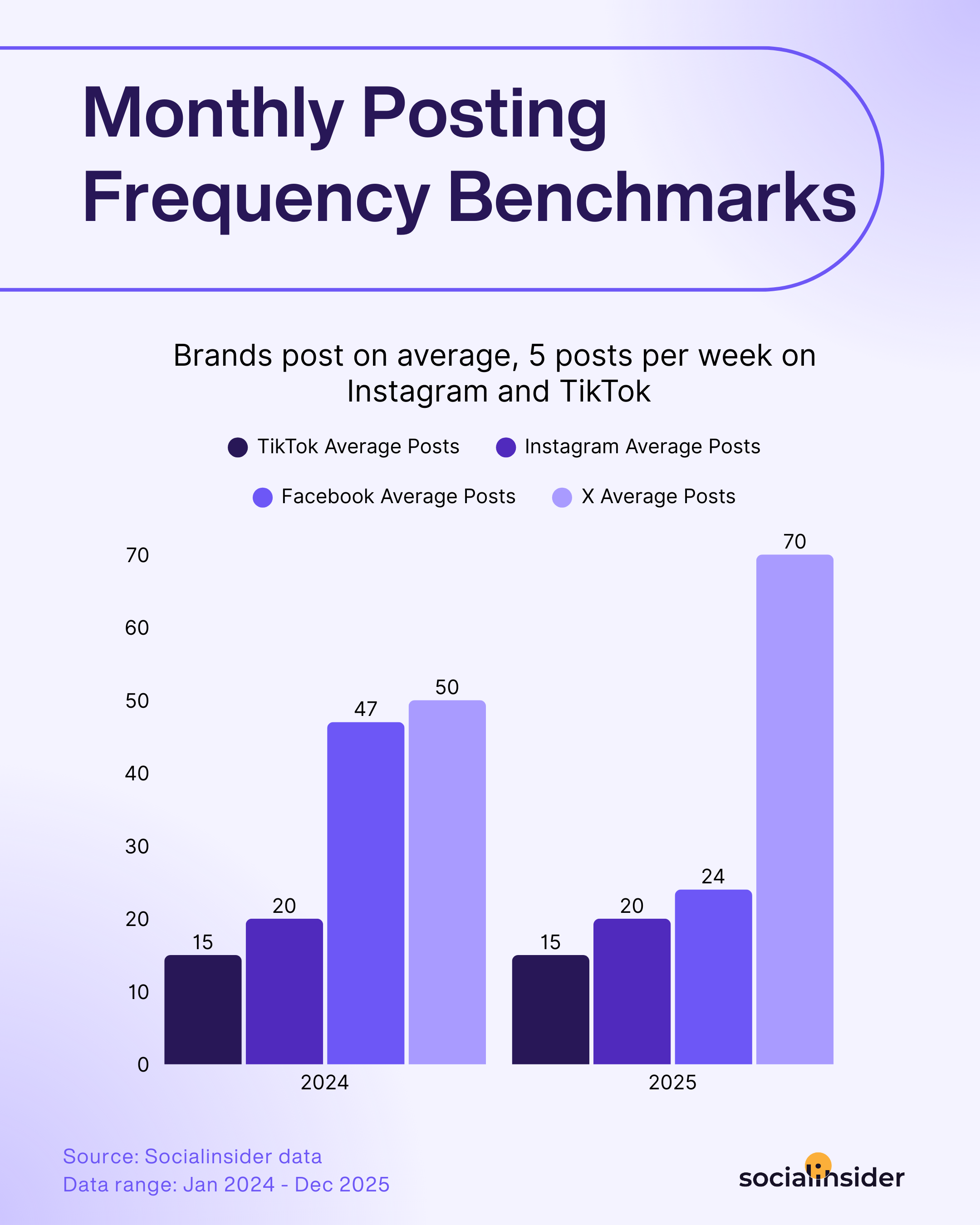
There's a note I have to make here, that being: there's no universal right number, but there is a right number for your account, and you find it by looking at what correlates with your engagement target.
Run your Twitter follower analysis
Here's where most audit guides tell you to go hunting for bots manually. I'd push back on making this the centerpiece. It's worth ten minutes, not the whole audit.
The manual checklist still holds, if you want it, especially when engagement doesn't scale with the follower count, and when you're getting duplicate or generic replies on your posts.
If you want a faster Twitter followers audit, dedicated bot-detection tools exist that sample a chunk of your follower list and flag likely fakes. Useful for a quick sanity check, but they won't tell you anything about whether your content is working, which is the part that actually moves the needle on strategy.
Benchmark against competitors
This is the step that turns a solo audit into something with context. A follower count or engagement rate means very little in isolation. What matters is where you sit next to the accounts you're actually competing with for attention.
And the good news is that you can track your Twitter analytics alongside your competitors, so you can compare follower growth, engagement rate, and posting cadence side by side.

How to turn your Twitter audit findings into strategy decisions
A useful audit ends with an assigned action, not a folder of screenshots. Convert each finding into a decision with an owner, a review date, and a metric that will show whether the change helped.
Match findings to actions, owners, and review dates
Use the table below as a reusable decision layer. It keeps the team from reacting to one surprising post and makes trade-offs visible to managers.
Build a repeatable audit and reporting cycle
A one-time account check gives you a snapshot. A reliable operational audit records the measurement period, metric definitions, findings, actions, owner, and next review date so the team can compare results over time.
And by the way, have I mentioned that Socialinsider supports this recurring workflow with historical profile and post analysis, follower-growth tracking, and auto-reporting to reduce manual collection?

Twitter audit tools worth using
You don't need five tools for this. You need one that covers performance and a lighter option if follower authenticity is your only concern.
Socialinsider is built for teams that need an actual Twitter audit tool, not just a follower checker. It tracks follower count and growth, engagement rate by both followers and impressions, replies, reposts, views, and posting frequency, and it breaks all of that down by content pillar, with historical data so you're auditing trends instead of a single snapshot.
For a competitive Twitter account audit, it tracks any public X account alongside yours, so follower growth, engagement rate, and posting cadence comparisons are side by side rather than something you're stitching together manually.
If follower authenticity is genuinely your only question, a dedicated bot-detection tool that samples your follower list can answer that narrower question faster. But it won't tell you anything about whether your content strategy is working, and that's usually the more expensive problem.
Final thoughts
A Twitter audit isn't about producing a tidy report for its own sake. It's about knowing, with actual data instead of a gut feeling, whether the time your team spends on X is earning its keep, and what to change if it isn't.
Run it quarterly if X is a core channel, monthly if you're actively testing changes. Either way, save your results. The audit itself is a snapshot. What makes it useful is comparing this one to the last one.
FAQs on Twitter audit
How often should you run a Twitter audit?
That depends on how much weight X carries in your channel mix. If it's a core part of your strategy, quarterly is a reasonable default, timed to match your regular reporting cycle. If you're testing a new approach or trying to recover from a drop in performance, monthly gives you a tighter feedback loop.
What metrics should you include in a Twitter audit?
Include follower growth, post volume, engagement, engagement rate, impressions, content format, content pillars, and performance over time. Compare each result with the account’s historical baseline and a relevant industry benchmark, and interpret engagement rate only after confirming its denominator.
Elena Cucu
Content & SEO Manager @ Socialinsider with 8 years of experience in marketing. I like to describe myself as a social butterfly with a curious mind, passionate about dancing and psychology.

Know what your competitors do — before your manager asks
Get instant social benchmarks & reports without manual work.