How to Calculate the Engagement Rate for All Social Media Platforms
Learn how to calculate engagement rate on Instagram, Facebook, LinkedIn, TikTok, X, and YouTube, with the correct current formulas for each.


I've been in the room when leadership suddenly starts paying attention to social, and it's rarely gentle. One quarter nobody asks a single question about the Instagram account; the next quarter, someone wants a number that proves it's working. If you're the one who has to produce that number, engagement rate is where I'd start.
In this guide, I'll walk you through the correct current formula for calculating engagement rate on every major platform, why the base you divide your engagement rate by changes everything, and how I use these numbers day to day to make informed social decisions. Let's dive in!
Key takeaways
- Engagement rate reveals which content actually resonates with an audience, providing marketers with a defensible, data-based metric to prove content quality and guide strategic decisions, beyond just follower growth or reach.
- The same post can produce different engagement rate percentages depending on the denominator used, followers, reach, or impressions, so choosing one basis and applying it consistently is essential for accurate comparison over time or against competitors.
- Manually calculating engagement rate becomes unsustainable once tracking multiple accounts, several competitors, and several platforms on a monthly cadence, which is why automated tools that apply consistent formulas across accounts save time and reduce reporting risk.
Engagement rate by followers vs. reach vs. impressions: what's the difference
Before I get into platform formulas, I want to clear up something that trips up almost everyone the first time they calculate engagement rate: the same post can produce wildly different percentages depending on what you divide by. This is, in my experience, the single biggest source of confusion in engagement rate calculation, and getting it wrong makes your numbers impossible to compare against anyone else's.
- Engagement rate by followers divides total engagement by your total follower or fan count. It's simple to calculate and easy to explain, but it has a real flaw: it overvalues small accounts and undervalues large ones. A post seen by only 10% of your followers can look "weak" by this formula, even if it performed genuinely well among the people who actually saw it.
- Engagement rate by reach divides total engagement by the number of unique people who actually saw the post. This corrects the follower-count problem, since it's measuring engagement against people who had a real chance to interact, not your entire follower base, most of whom never saw the post at all.
- Engagement rate by impressions divides total engagement by total views, including repeat views from the same person. This is the version some platforms actually use, and it's generally considered the more precise way to measure engagement rate, since it reflects total exposure rather than just unique reach.
Here's a quick guide that helps you decide the best formula for different scenarios:
Why is it important to calculate your engagement rate on social media?
For marketers, engagement rate is arguably the most important metric to track, more telling than follower growth, reach, or impressions on their own.
That's not always true for leadership, though, who might care more about reach or conversions depending on what they're trying to prove.
Still, engagement is what shows interaction, not just visibility, which is why it's the number I lean on to make my own case, even when I need to translate it into something leadership cares about. When you're in a role where clarity or accountability is being asked of you, engagement rate:
- reveals which content actually works;
- proves audience interest;
- gives you a defensible, data-based argument for your recommendations;
- helps you show immediate value in your reporting;
At Socialinsider, engagement sits at the center of our own reporting philosophy, because it's usually the clearest, fastest signal of whether a content strategy is actually aligned with what an audience expects.
When you're responsible for proving that social matters, having clean engagement dashboards and competitor context lets you present insights with confidence, even in an organization with no prior analytics structure in place.

How to calculate your engagement rate for each social media platform
How to calculate engagement rate on Facebook
Facebook often remains a core platform for established audiences, which is why calculating Facebook engagement rate by both followers and reach matters; one gives you a high-level view, the other a more precise read on content quality.
Facebook's own definition of post engagement is the number of times people engaged with your posts through reactions, comments, shares, and clicks.
Within Socialinsider, however, the calculation of the engagement rate includes reactions, comments, and shares, meaning the non-private metrics.
It's worth being precise about a distinction that gets blurred a lot: engagement rate applies to a single post, average engagement rate applies to a profile across multiple posts over a period. Here's both, by followers:
Engagement Rate by Followers (Facebook) = Post Engagement ÷ Total Followers × 100
Average Engagement Rate per Post by Followers (Facebook) = (Total Engagement ÷ Number of Posts) ÷ Total Followers × 100

For a more precise read on performance, you can also calculate by reach instead of followers.
Engagement Rate by Reach (Facebook) = Post Engagement ÷ Post Reach × 100
Average Engagement Rate per Post by Reach (Facebook) = (Total Engagement ÷ Number of Posts) ÷ Total Reach × 100

How to calculate your Instagram engagement rate
Instagram is often the first platform leadership wants updates on once social starts getting internal visibility, so knowing exactly how to calculate Instagram engagement rate matters more here than almost anywhere else.
Instagram's own definition of engagement includes likes, comments, and saves. Socialinsider's total organic engagement, however, is calculated as likes plus comments only. That's not an oversight, it's a deliberate choice: Instagram's API doesn't expose the saves metric for competitor profiles, and excluding it keeps the formula consistent whether you're calculating your own Instagram engagement rate or comparing yourself against a competitor in a social media competitor analysis.
Engagement Rate by Followers (Instagram) = Post Engagement (Likes + Comments) ÷ Total Followers × 100
Average Engagement Rate per Post by Followers (Instagram) = (Total Engagement ÷ Number of Posts) ÷ Total Followers × 100
The Instagram engagement rate by reach follows the same logic.
Engagement Rate by Reach (Instagram) = Post Engagement (Likes + Comments) ÷ Post Reach × 100
Average Engagement Rate per Post by Reach (Instagram) = (Total Engagement ÷ Number of Posts) ÷ Total Reach × 100
How to calculate your X (Twitter) engagement rate
X/Twitter engagement matters most when leadership wants proof of brand relevance, thought leadership, or genuine customer interaction.
Because X surfaces impressions so prominently in its own native reporting, being able to explain both engagement by followers and engagement by impressions gives you a more confident, executive-ready story.
X defines engagement as the total number of times a user interacted with a post, including reposts, replies, follows, likes, links, cards, hashtags, embedded media, username, profile photo, or post expansion. The platform itself calculates engagement rate by impressions: total engagements divided by impressions.
Socialinsider's total engagement on X is calculated as likes, plus replies, plus reposts, plus quote posts.
Engagement Rate by Followers (X) = Post Engagement (Likes + Replies + Reposts + Quote Posts) ÷ Total Followers × 100
Average Engagement Rate per Post by Followers (X) = (Total Engagement ÷ Number of Posts) ÷ Total Followers × 100
X's own formula runs on impressions rather than followers, so here's that version too:
Engagement Rate by Impressions (X) = Post Engagement ÷ Post Impressions × 100
Average Engagement Rate per Post by Impressions (X) = (Total Engagement ÷ Number of Posts) ÷ Total Impressions × 100

How to calculate your LinkedIn engagement rate
Engagement is one of the most important LinkedIn metrics you can track, because once social becomes strategically important inside a company, LinkedIn is usually the first place executives actually look.
A strong LinkedIn engagement rate by impressions can validate your content strategy, help you explain competitive positioning, and support leadership's need for industry visibility.
LinkedIn's own definition of engagement is the sum of clicks, likes, comments, shares, and follows, and the platform calculates its engagement rate by the number of impressions.
Socialinsider's total engagement on LinkedIn is calculated as likes, plus comments, plus shares, plus clicks, which lines up closely with LinkedIn's own definition.
Engagement Rate by Impressions (LinkedIn) = Post Engagement (Likes + Comments + Shares + Clicks) ÷ Post Impressions × 100
Average Engagement Rate per Post by Impressions (LinkedIn) = (Total Engagement ÷ Number of Posts) ÷ Total Impressions × 100
How to calculate your YouTube engagement rate
If your team invests in video, YouTube engagement metrics help you quickly show where content is actually driving reactions, not just accumulating views.
According to YouTube's own insights data, engagement metrics (views, likes, and comments) reflect how many times a video or channel has been interacted with. Socialinsider's total engagement on YouTube is calculated as likes, plus comments, plus dislikes, for both videos and Shorts.
Here's an important caveat worth knowing before you use this formula to compare yourself against a competitor: YouTube made dislike counts private to the public back in 2021. That means dislikes can only be counted for your own connected channel, where authenticated access still allows this data through, not for a competitor's channel, which no longer exposes it publicly. If you're calculating engagement rate for your own account, the formula holds up as documented. If you're benchmarking against a competitor, know that their dislike count effectively won't be part of the comparison.
Engagement Rate by Subscribers (YouTube) = Video Engagement (Likes + Comments + Dislikes, owned channels only) ÷ Total Subscribers × 100
Average Engagement Rate per Video by Subscribers (YouTube) = (Total Engagement ÷ Number of Videos) ÷ Total Subscribers × 100
How to calculate your TikTok engagement rate
If your organization is exploring TikTok for the first time, engagement rate becomes the primary signal of whether content resonates beyond trend or virality assumptions.
TikTok presents its own engagement formula as the sum of video views, profile views, likes, comments, saves, and shares. Unlike platforms oriented around community size, where follower count is the clearest popularity signal, TikTok is different: since going viral is the platform's whole premise, views matter more than followers, which is exactly why TikTok's own formula centers on views rather than audience size.
Socialinsider's total engagement on TikTok is calculated as likes, plus shares, plus comments, plus saves.
Engagement Rate by Views (TikTok) = Post Engagement ÷ Video Views × 100
Average Engagement Rate by Views (TikTok) = Average Engagement ÷ Video Views × 100
Why manual calculation breaks down at scale
The formulas above are straightforward when you're calculating engagement rate for one account, on one platform, for a specific week. But that's rarely the actual job.
In practice, you're managing multiple accounts, tracking several competitors, reporting across five or six platforms, and doing all of this on a monthly cadence while also running the day-to-day. At that point, manual engagement rate calculation doesn't just take time, it introduces real risk.
Here's where it tends to fall apart:
- Competitor tracking becomes unsustainable. Calculating your own engagement rate by hand is manageable, if tedious. Doing it for three to five competitors across multiple platforms, every month, without a tool that aggregates the data, is a different problem entirely. Most teams either skip it, do it inconsistently, or shrink the competitor set down to whatever's easiest to pull, not whatever's most strategically relevant.
- Reporting becomes the bottleneck. When pulling, calculating, and formatting engagement data is a manual process, it eats hours that should be going into analysis and strategy instead. The function ends up spending more time producing the report than acting on what it says.
The shift I've seen high-performing social teams make is treating engagement rate as something that should be automatically tracked, not manually assembled every month.
A tool like Socialinsider pulls engagement data across platforms, surfaces competitor benchmarks, and delivers numbers in a format that's ready to present, without anyone rebuilding a spreadsheet from scratch. That frees up the time and mental space to actually think about what the data is telling you, instead of getting stuck on the mechanics of producing it.

How to use your engagement rate insights to make adjustments in your content strategy
Once you've calculated engagement rate consistently for a while, the number stops being a reporting exercise and starts being a decision-making tool. Here's how I use it to actually adjust what gets made next:
- Reallocate production time toward what's proven, not what's assumed. Rank your posts by engagement rate over the last quarter, not just the last month, and look for a pattern rather than a single outlier. If one content pillar or format consistently comes out ahead, that's your evidence to shift the content calendar toward more of it, and to actively cut time spent on whatever's consistently at the bottom, even if it's something the team personally enjoys making.
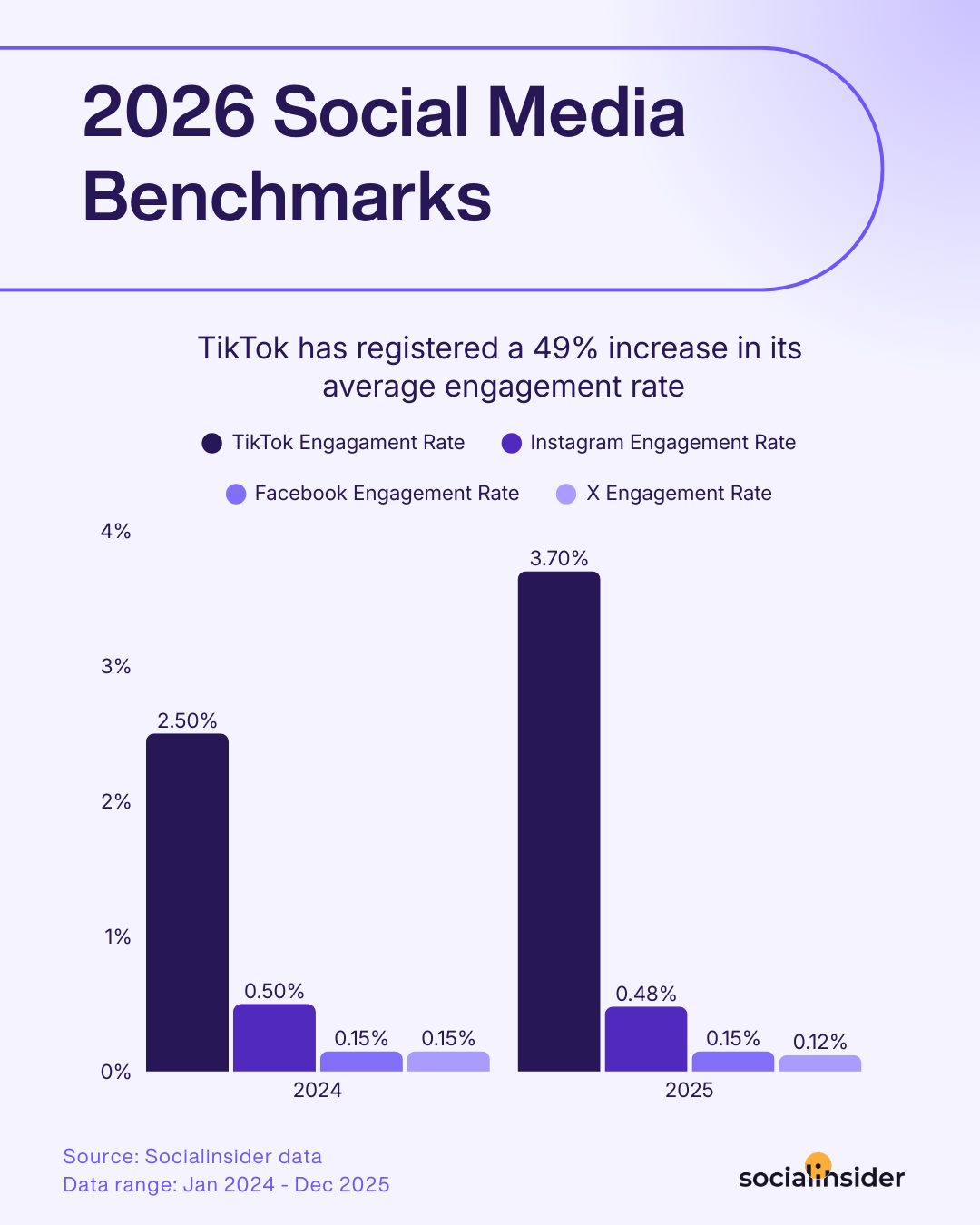
- Use benchmark comparisons to decide where to actually push harder. A platform where you're already beating the industry average is a platform where incremental effort compounds, you're already winning the algorithm's favor, so more consistent posting tends to pay off. A platform where you're well below benchmark is either a fit problem (wrong content for that audience) or a fundamentals problem (posting frequency, timing, format), worth diagnosing before pouring more budget into it.
- Treat a declining engagement rate as an early warning, not just a monthly footnote. Because engagement rate is sensitive to real changes in algorithm behavior and audience mood, a sustained drop is often the first visible sign that something needs to change, before reach or follower growth numbers catch up to reflect the same problem. Catching it here gives you time to adjust before it shows up in bigger, harder-to-explain numbers later.
Final thoughts
When you're in a role where social is newly important, or where leadership wants sharper performance insight, engagement rate is one of the most reliable indicators of whether your strategy is actually working.
A social media analytics tool like Socialinsider gives you fast clarity, competitor context, and leadership-ready reports without manual spreadsheets. That's what lets you show value early, make confident recommendations, and build the trust you need to keep driving strategy forward.
FAQs on social media engagement rate
What is engagement rate?
Engagement rate measures how actively people interact with the content you publish, likes, comments, shares, saves, clicks, replies, and more, depending on the platform, rather than just how many people saw it.
What can influence engagement rate?
Quite a few factors: content quality and relevance, audience demographics and preferences, posting timing and frequency, and platform-specific factors like which actions each network actually counts as engagement.
What is a good engagement rate?
It depends heavily on the platform. A 1% engagement rate might be strong on Instagram but underwhelming on TikTok. Check our social media benchmark reports for the current average engagement rate on each platform.
Elena Cucu
Content & SEO Manager @ Socialinsider with 8 years of experience in marketing. I like to describe myself as a social butterfly with a curious mind, passionate about dancing and psychology.

Know what your competitors do — before your manager asks
Get instant social benchmarks & reports without manual work.