Twitter Analytics Tools Compared: Top 10 Picks For 2026
Discover the best Twitter analytics tools for 2026—compared by use case, pricing, and what each one actually does well.


X (formerly Twitter) removed free access to its built-in analytics a while back. So if you want to track your performance, understand what's working, or keep an eye on competitors, you need a third-party tool.
The problem: there are a lot of options, and most roundups don't tell you much beyond a feature checklist. That's why I've put together this list of the best Twitter analytics tools based on actual use cases — what each tool is genuinely good at, where it falls short, and who it makes the most sense for. Let's dive in!
Key takeaways
- The best Twitter analytics platforms go beyond basic metrics by offering competitor benchmarking, deep historical data, content-level insights, cross-platform analysis, and automated reporting that helps turn data into actionable strategy.
- The top Twitter analytics tools each serve a different purpose—from Socialinsider for competitive benchmarking, Audiense for audience intelligence, and Brand24 for social listening, to Buffer for publishing workflows and Keyhole for campaign tracking.
- The right Twitter analytics tool depends on your primary use case, team size, reporting needs, and required features, with the best choice being the one that delivers meaningful insights while reducing manual work and scaling with your needs.
Why bother with a dedicated Twitter analytics tool?
X's native analytics moved behind the Premium paywall — and even with access unlocked, what you get is pretty limited. You can see impressions, likes, and reposts on individual posts. That's about it.
No competitor comparison. No cross-channel context. No content tagging. No historical trends beyond 28 days.
If X is an active part of your social strategy, it has a lot of weight. The best Twitter analytics tools don't just hand you the same numbers X shows you — they add the layer of strategic context that tells you what to actually do with that data.
What to look for in a Twitter analytics platform
The right Twitter analytics software depends on your goal. But across the best tools for Twitter analytics on the market, a few capabilities separate genuinely useful from ones that just look good in screenshots:
- Competitive benchmarking. Your own performance numbers mean nothing without a reference point. The best tools let you track competitor accounts and compare against industry averages — not just your own historical data.
- Twitter analytics for other users. The ability to analyze any public X account — not just accounts you own — is what separates a real analytics platform from a basic dashboard.
- Historical data depth. Strategy is built on patterns. Look for at least 6–12 months of data, ideally more.
- Content-level breakdown. Account-level stats are a starting point. You need post-level analysis — what format, topic, and timing drove results — to actually optimize.
- Cross-platform context. X rarely works in isolation. Knowing how it compares to your Instagram or LinkedIn performance helps you allocate effort properly.
- Reporting you can share. For most teams, analytics eventually need to go into a deck or a client report. Twitter analytics reporting tools that automate this save hours every month.
The 10 best Twitter analytics tools for 2026
#1. Socialinsider: best for competitive benchmarking and cross-platform analytics
Socialinsider is a social media analytics platform that tracks X (Twitter) performance and enables competitive benchmarking against other X accounts — filling the gap left by X's native analytics moving behind a paywall.
For sure, the tool's biggest strength is its benchmarking capabilities, not just tracking. It helps teams compare X performance against competitors, spot format trends, and turn social media data into a clearer strategy.

With Socialinsider, you can track follower growth, engagement rate (by followers and by impressions), reposts, replies, and posting frequency for any public X account. And beyond that, its AI-based content pillars feature tags your posts into content groups, so you can see which content themes drive engagement on X specifically, for you and your competitors as well.

Socialinsider is also strong when X needs to be read alongside other platforms. That cross-channel view makes it easier to tell whether a dip in X engagements is a channel issue, a content issue, or just part of a broader mix.

- Pros: Strong benchmarking, clean reporting, content tagging, and useful historical context.
- Limitations: No publishing or inbox workflow.
- Best for: Social teams that need reliable competitor comparison and cross-platform context.
- Pricing: Paid plans start from $74, and it allows a 14-day free trial.
What users say:
- Reviewers highlight Socialinsider's competitive data as exceptionally accurate and deep, with insights into competitor strategies they haven't found in other tools. (G2)
- Users appreciate the clean, intuitive interface and the ability to access in-depth stats without connecting a social account. (G2)
#2. X (Twitter) native analytics: best for a baseline on your own account performance
Before reaching for a third-party tool, it's worth understanding what X's own analytics can and can't do — because for some teams, it's enough to start with.
X moved its analytics features behind the Premium paywall as part of broader changes to its API access model.
With an active X Premium subscription, you get account-level performance data directly inside the platform: impressions, engagements, engagement rate, replies, likes, reposts, new followers, and some basic audience breakdowns like top countries and device type.
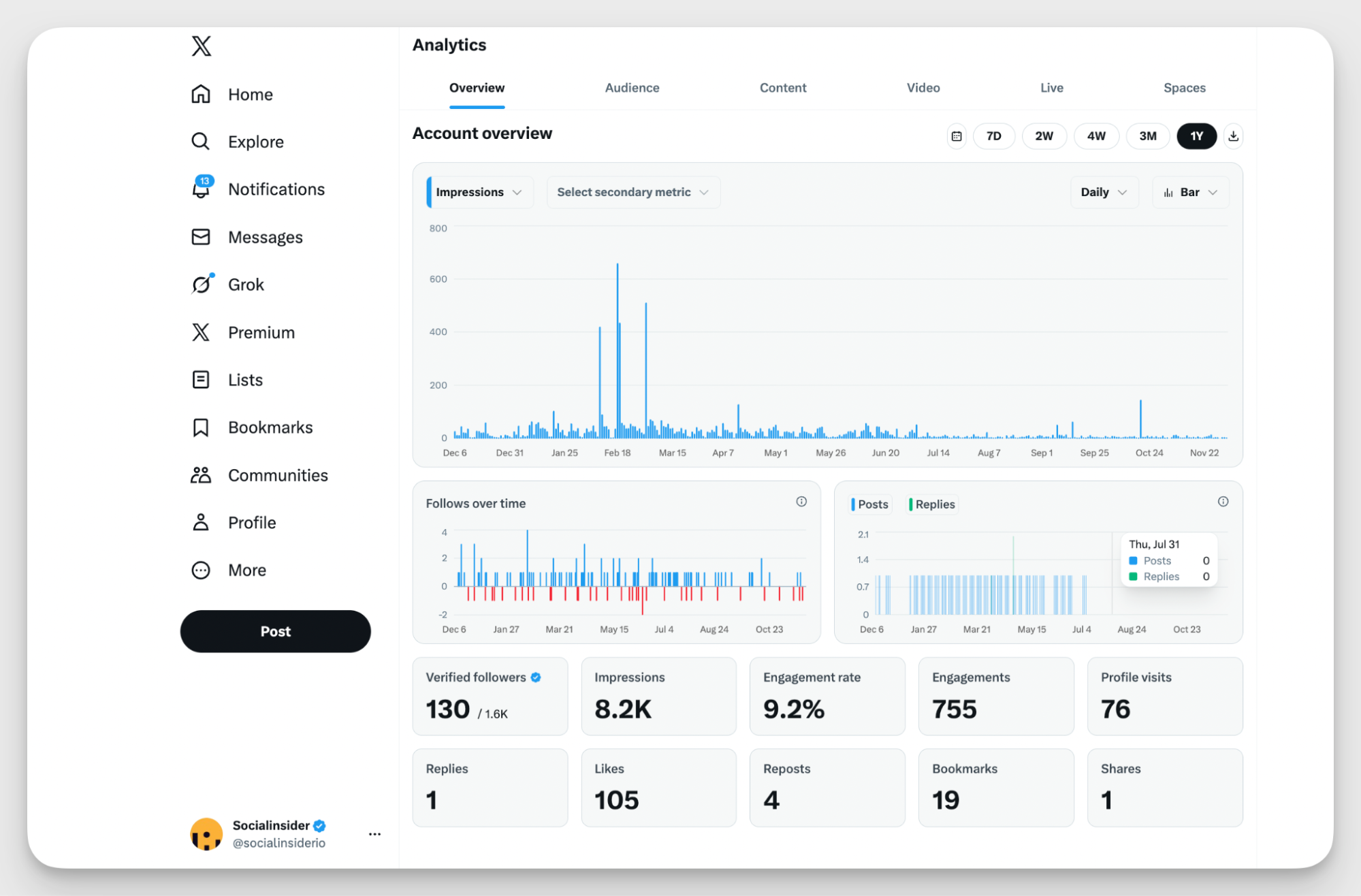
- Pros: Built directly into the platform with no setup required. Data comes straight from X. Included with X Premium at a low monthly cost.
- Limitations: No competitor or cross-platform analytics. No content tagging or campaign grouping. Limited to 28 days of historical data. Minimal reporting and export options.
- Best for: Teams just getting started on X who need a free baseline on their own performance before investing in a dedicated twitter analytics platform.
- Pricing: Included with X Premium, which starts at approximately $8/month.
#3. Audiense: best for Twitter audience segmentation and persona research
What I found particularly interesting about Audiense Connect is that it takes a completely different angle from most X analytics tools. Rather than tracking how your posts perform, it focuses on understanding who your audience actually is — and how to segment, target, and activate them at scale.
That makes it less of a traditional Twitter analytics app and more of an audience intelligence layer. The core job it does well is turning a follower list into something strategically useful: distinct segments with real behavioral and interest data attached.
With Audiense, you can break down your followers by interests, behavior, location, and activity level, identify inactive or fake accounts in your following, and see how different X audiences overlap with each other.

- Pros: Best-in-class X audience segmentation, useful for influencer targeting and paid campaigns, identifies fake and inactive followers.
- Limitations: Limited post and content performance analytics. Can feel complex for teams new to audience intelligence.
- Best for: Social teams and strategists who need to deeply understand their X audience rather than just measure tweet performance.
- Pricing: Limited free plan available. Paid plan starts at $62.99/month.
- Users say the audience clustering functionality makes it easy to present segmentation insights to stakeholders in a clear, digestible way.
- Reviewers highlight the IBM Watson personality profiling integration as a standout feature for building detailed audience personas.
#4. Twitonomy: best for follower analysis and account-level deep dives
Twitonomy is one of the few Twitter analytics apps built specifically and exclusively for X.
I would say its angle is granularity on a single account rather than competitive or cross-platform analysis. For teams that want to go deep on their own X account — specifically who's in the audience and how engagement breaks down at the tweet level — Twitonomy gives you more detail than most generalist tools.
The standout feature is follower and following analysis: you can track follower growth over time, and view a geographic map of where your mentions are coming from. The tweet-level analytics cover retweets, replies, hashtags, and links per post, and reports can be exported to Excel or PDF for stakeholder sharing.

- Limitations: No competitive benchmarking. No cross-platform analytics. Interface feels dated.
- Best for: Social media managers who want granular data on their own X account and audience without a large price tag.
- Pricing: Free plan available. Paid plans from approximately $19/month.
- Pros: Free plan available, deep follower and following analysis, Excel and PDF export, mobile app for iOS and Android.
- Users appreciate the depth of account-level insights Twitonomy provides, particularly for analyzing follower behavior and tweet engagement patterns.
- Reviewers highlight the export functionality as practical for sharing performance data with teams and clients.
#5. Buffer: best for small teams that need publishing and basic analytics in one place
Buffer is a simple, no-frills social media management tool that handles scheduling, community management, and analytics across all major platforms — including X. For a small team running one or two accounts, it's one of the more practical answers to the question of where to start.
The appeal isn't depth of analytics. It's having publishing and performance data in a single, affordable tool without the complexity that comes with enterprise-grade platforms.
For X specifically, Buffer tracks daily tweet performance, account-level impressions and engagements, top hashtags, and best times to post based on when your audience is most active. You can export that data into a report to share with stakeholders, and the AI assistant helps generate and refine post ideas when you need them.

- Pros: Publishing and analytics in one affordable tool, clean and easy-to-use interface, flexible per-channel pricing.
- Limitations: Analytics are basic even on higher plans. No competitor benchmarking or cross-channel context.
- Best for: Small teams or solo managers who want a simple, low-cost starting point for X publishing and basic performance tracking.
- Pricing: Free plan available. Paid plans from $6/month per channel.
- Users praise the simple, intuitive interface that's fast to onboard into and easy to use day-to-day.
- Some reviewers note that analytics fall short for larger teams that need more detailed performance data.
#6. Agorapulse: best for agencies managing multiple client X accounts
For agency teams juggling several clients on X, the structural problem is coordination: approvals, calendar visibility, inbox management, and reporting all happening across different accounts. And Agorapulse is built around solving exactly that.
On the analytics side, you get customizable X reports, community management breakdowns showing average response time and manager performance, and AI-powered recommendations on posting times and content types based on past data.
The platform also gives you dedicated workspaces per client, a unified inbox that pulls replies, mentions, and comments from all accounts into one place, and an approval workflow for post review before publishing.

- Pros: Strong multi-account management, built-in approval workflows, UTM builder, and responsive customer support.
- Limitations: X competitor analytics limited on standard plans. Historical data import requires a custom plan.
- Best for: Agencies and multi-client teams that need operational control across multiple X accounts alongside solid client reporting.
- Pricing: Plans start at $99/month.
- Reviewers appreciate the responsive support team and the ease of navigating the platform day-to-day.
- Users highlight the built-in UTM builder as particularly valuable for managing and reporting campaign performance to clients.
#7. TweetBinder: best for hashtag tracking and event campaign analytics
TweetBinder is built around hashtag and keyword tracking on X, which makes it the natural fit for campaign measurement, event coverage, and conference monitoring.
I'd say that if post-level account analytics aren't the main need — but measuring what a campaign or event hashtag generated is — TweetBinder covers that ground better than most of the other top twitter analytics tools on this list.
The core use case is straightforward: you launch a campaign or run an event with a hashtag, and TweetBinder tells you exactly what that hashtag produced — reach, impressions, participants, top posts, and the overall sentiment of the conversation around it.

- Pros: Real-time and historical hashtag tracking, strong for events and product launches, social wall for live activations, free plan available.
- Limitations: Not designed for ongoing account analytics or competitive benchmarking. No cross-platform coverage.
- Best for: Marketing teams running campaigns, events, or conferences where hashtag and mention tracking is the primary analytics need.
- Pricing: Free plan available. Paid plans from approximately $33/month. Custom plans available.
- Reviewers say TweetBinder provides excellent hashtag insights and makes it easy to generate professional statistical reports in just a few clicks.
- Users highlight how useful the tool is for accurately assessing campaign reach and identifying the most engaged participants.
#8. Brand24: best for real-time mention tracking and AI-powered social listening
The core job it does of this tool is making sure you know when and how your brand is being discussed online, before a conversation becomes a problem or an opportunity you missed.
What makes Brand24 worth including in a list of top Twitter analytics tools is how much of the heavy analysis happens automatically.
The AI Insights feature detects trends and anomalies in your mention data, classifies sentiment as positive, neutral, or negative, and generates summary reports you can share with stakeholders without manual analysis.
The Influence Score helps identify the most impactful voices driving conversations around your brand on X — useful for both crisis triage and influencer identification.

- Pros: Real-time monitoring across 25M+ sources, AI-generated insights and automated reporting, LLM mention tracking, unlimited user seats on all plans, 14-day free trial.
- Limitations: No post-performance analytics for your own X account. No publishing or engagement features. Keyword limits feel tight on lower plans.
- Best for: Marketing and comms teams that need real-time brand monitoring and AI-assisted listening across X and the broader web.
- Pricing: Plans start at $79/month (annual billing). 14-day free trial available.
- Reviewers consistently highlight the AI Insights report for making it easy to share concise data summaries with clients and leadership with minimal manual effort.
- Users appreciate the breadth of mention tracking and the ability to compare their brand's share of voice against competitors.
#9. SuperX: best for X-native growth, content, and analytics for creators and brands
SuperX is an X-first growth platform that combines analytics, AI-assisted content creation, scheduling, and automation in a single tool — available as both a web app and a Chrome extension. It's built for creators, social media managers, and brands who want to understand what's driving their X performance and build a repeatable system around that insight.
I would say the the distinction from this app and most Twitter analytics software is the tight loop between analysis and action. Most analytics tools show you what happened. SuperX is designed to help you do something about it without switching platforms.
On the analytics side, SuperX covers follower growth broken down daily, weekly, and monthly, content performance by type and topic, best time to post based on your audience's activity, and competitor follower growth comparison

- Pros: Analytics, publishing, AI writing, and automation in one X-native platform. Affordable pricing. Covers competitor follower growth comparison. Responsive product development.
- Limitations: X-only — no cross-platform analytics or publishing. Not suited for deep competitive benchmarking.
- Best for: Creators and social media managers who live primarily on X and want one tool that closes the loop from performance data to content to scheduling.
- Pricing: Free plan available. Paid plans start at $39/month.
- Users highlight that the analytics are genuinely insightful and the Chrome extension integration is seamless, making it easy to access performance data without leaving X.
- Reviewers appreciate that the founders ship features quickly and are notably responsive to user feedback.
#10. Keyhole: best for real-time campaign tracking and influencer analytics on X
The core strength of this tool is real-time campaign intelligence. With Keyhole, you can track how a hashtag or keyword is performing on X as it happens, see who the most impactful voices in that conversation are, monitor competitor accounts alongside your own, and pull it all into a shareable report with sentiment analysis and reach summaries included.
A note that I have is that it sits in a slightly different lane from TweetBinder: where TweetBinder is focused purely on hashtag and event reporting, Keyhole combines that with account-level analytics, competitor tracking, and influencer identification in one place.

- Pros: Real-time hashtag and campaign tracking, five years of historical X data, influencer identification and engagement metrics, clean exportable reports.
- Limitations: No free plan and entry pricing starts at $179/month. Only 3 trackers on the Professional plan. Some users report occasional data accuracy issues on X. No publishing or scheduling.
- Best for: Brands and agencies that need real-time campaign tracking, influencer analytics, and competitor monitoring on X in one platform.
- Pricing: No free plan. Paid plans start at $179/month. 14-day free trial available.
- Reviewers highlight that the metrics Keyhole provides are unmatched for setting KPIs and measuring campaign results, with a layout that's easy to navigate and fully exportable.
- Some users note that Keyhole has generated inaccurate data for X in certain reporting scenarios, which is worth factoring in for high-stakes campaign measurement.
How to choose the right Twitter analytics tool ?
Here's how I'd frame the decision based on what you actually need:
Define your main use case
A solo marketer may want basic performance tracking and simple exports. A small team may need scheduling plus analytics. An agency may need approvals, client reporting, and account separation. Enterprise teams often want benchmarking, listening, and historical analysis across multiple brands.
Check feature depth against team needs
Some tools are built for publishing first, and analytics second. Others are built for listening, reporting, or competitive intelligence. If your biggest pain is manual reporting, don’t pay for features you won’t use.
I’d also check whether the tool supports:
- content tagging,
- historical trends,
- competitive benchmarking,
- exportable reports,
- and clear metric definitions.
That mix is often more valuable than a long feature list.
Review pricing, support, and integrations
Price matters, but so does fit. A cheaper tool that creates extra manual work usually costs more in the long run. Check whether the tool integrates with your reporting stack, whether support is responsive, and whether onboarding is realistic for your team.
Confirm reporting and export options
Reporting is where many teams hit friction. Can the tool export clean charts, recurring reports, and client-ready summaries? Can it handle multiple accounts? Can it support leadership updates without extra formatting work?
That’s especially important for agencies and teams that need to prove value fast. A tool that makes reporting easier usually pays for itself in saved time alone.
Final thoughts
For most marketers, the winning move is simple: pick the tool that reduces manual work, shows meaningful context, and helps the team act on the data faster.
FAQs on Twitter analytics tools
What's the difference between Twitter analytics tools and social listening tools?
Twitter analytics tools track performance metrics — engagement, follower growth, content performance — for specific accounts you monitor. Social listening tools like Brand24 track mentions, sentiment, and conversations happening across X and the broader web about a topic, brand, or keyword. Some tools do both; most are stronger at one than the other.
What should I look for in Twitter analytics tools for business?
For business use, prioritize: competitive benchmarking (how you compare to others in your space), cross-platform context (how X performs relative to your other channels), historical data depth (pattern recognition requires more than 28 days), and reporting capabilities that let you share insights with leadership without manual work. Socialinsider, Agorapulse, and Brand24 each cover different parts of that brief.
Elena Cucu
Content & SEO Manager @ Socialinsider with 8 years of experience in marketing. I like to describe myself as a social butterfly with a curious mind, passionate about dancing and psychology.

Know what your competitors do — before your manager asks
Get instant social benchmarks & reports without manual work.