Top 10 TikTok Analytics Tools In 2026: Tested & Compared
Discover the 10 best TikTok analytics tools to track performance, analyze competitors, monitor trends, and measure influencer campaigns.


If you’ve ever spent hours trying to recreate a viral TikTok, only to watch it flop, you know how unpredictable the platform can feel.
I’ve found that understanding my TikTok analytics makes that process a lot less frustrating. It helps me figure out what my audience actually enjoys, which content formats deserve more attention, and how my results compare with TikTok benchmarks.
A good TikTok analytics tool helps you connect the dots between individual posts and your overall performance.
The good news is that there are plenty of tools to help. The tricky part is figuring out which one fits your needs.
So, I’ve rounded up 10 TikTok analytics tools, categorized by use case to help you find the right fit for your budget and specific needs.
Key takeaways
- TikTok analytics tools serve different needs. Some focus on performance tracking and competitor analysis, while others specialize in influencer marketing, social listening, or reporting.
- Choose a tool based on your workflow and budget. Features, pricing, integrations, and recommendations are among the factors marketers consider when selecting an analytics platform.
- Go beyond basic performance metrics. Content analysis, competitor monitoring, and trend tracking can help you understand what resonates with your audience.
- Free tools can be a good starting point. TikTok Studio and Socialinsider’s free TikTok Audit tool offer basic performance insights, while paid platforms provide more advanced analytics and reporting.
- Match the tool to your primary goal. Socialinsider supports cross-platform analytics and competitor benchmarking, Shortimize tracks short-form video performance, and Modash and HypeAuditor focus on influencer marketing.
What marketers look for when selecting a TikTok analytics tool
Recently, Socialinsider conducted an extensive survey with social media professionals and marketers to uncover the key factors they consider when selecting an analytics tool.
Here are the results.
The features offered by a tool came first, followed by price, integrations, and recommendations.
The results highlight how important it is to find a tool that fits your workflow and budget.
That's why I've organized the following tools by their primary use cases, so you can compare options based on what matters most to your team.
Top 10 TikTok analytics tools on the market right now
Before we cover each tool and what it offers, here's a quick peek at the tools I shortlisted.
Free TikTok analytics tools
#1 TikTok Studio — best for free native TikTok analytics
If you're looking for TikTok analytics without adding another subscription to your marketing budget, TikTok Studio is a good place to start. It's TikTok's own analytics and content management platform, giving you a closer look at how your videos perform, who's watching, and how your audience is growing.

What I like about TikTok Studio is that it keeps things simple. You get all the basic data you need to analyze your performance.
The biggest advantage? It's completely free. You don't need to invest in a third-party analytics tool to get started.
Key capabilities
- Account analytics: Track account performance, audience growth, and engagement metrics.
- Video analytics: Check how individual videos perform and identify your top-performing content.
- Audience insights: Explore available information about your viewers and followers to better understand your audience.
- Content management: Access tools to manage your content and explore ideas for future posts.
Pros and cons
#2 Socialinsider TikTok Audit tool — best for a quick TikTok performance check
Ever feel like your TikTok account needs a little spring cleaning? That's where a TikTok audit comes in. And if you're anything like me, you'd probably rather get a quick performance overview first than spend an afternoon buried in spreadsheets.
Socialinsider's free TikTok audit tool helps you get a snapshot of your TikTok account's performance and identify areas worth investigating.

It's a handy starting point for marketers who want to assess their TikTok performance without committing to a paid analytics platform.
Key features
- Account performance overview: Get a snapshot of your TikTok account's overall performance like engagement rate, average likes and comments.
- Content performance insights: Identify posts that stand out and explore which content deserves more attention.
- Engagement analysis: Get a clearer picture of how audiences interact with your content.
- Content distribution: Gives you a quick idea of total posts and average posts per day to analyze your posting frequency
Pros and cons
Paid TikTok analytics tools
#3. Socialinsider — best for cross-platform analytics and competitor benchmarking
Socialinsider is a TikTok analytics platform that helps you dig into your TikTok performance, from engagement trends to content performance, while keeping an eye on how your other social channels are doing.
I find this particularly useful when you want to understand which TikTok content resonates with your audience and how the platform contributes to your broader social media strategy.
You can also use the tool to analyze content pillars, track TikTok campaigns through its Query Builder, and measure Organic Value, which estimates the paid media equivalent of your organic TikTok results.
Key capabilities
In-depth TikTok analytics
With Socialinsider's TikTok analytics tool, you can track all the core TikTok metrics at both the video and account levels: engagement rate, views, likes, comments, shares, saves, and follower growth.

But then it adds another layer of data and interpretation on top of performance metrics. With this TikTok analytics app, you can analyze top-performing posts and break down results by content pillar to see what topics are consistently performing better than others.

My personal favorite metric, and one of the reasons I love the tool, is Earned Media Value — a metric that estimates what your organic TikTok results would cost if you were running paid ads instead. It's particularly useful when reporting to stakeholders who want to understand the business impact of your content.

Cross-platform performance data
In a solid social media strategy, channels work together, and Socialinsider reflects that.
You can analyze TikTok performance on its own or switch to a cross-channel view to compare TikTok to Instagram, Facebook, LinkedIn, YouTube, and X. Socialinsider also provides an aggregated report for brands, bringing together data from different sources.

Organic Value can also be broken down by channel. This makes it easy to compare how TikTok stacks up against other platforms and prove its value to the strategy.

Query builder for campaign performance analysis
Socialinsider’s Query Builder is a part of the content tagging system that helps you categorize TikTok content.
With this TikTok analytics platform, you can create custom queries based on keywords, hashtags, or captions to automatically group content into larger buckets like campaigns, product launches, educational posts, creator partnerships, or promotions.

Automated reporting
Socialinsider lets teams build fully customizable reports and schedule them to send automatically to stakeholders regularly.

In August, 2026, Socialinsider launched shareable dashboards that let you share the dashboard with a quick link valid for 5 days. It helps you give stakeholders a look at current performance without having to update the data multiple times.
AI Assistant
Socialinsider’s AI Assistant adds an interpretation layer on top of your analytics and competitor data. Instead of manually digging through charts, you can ask questions about performance trends, competitor strategies, content gaps, or sudden spikes in engagement.
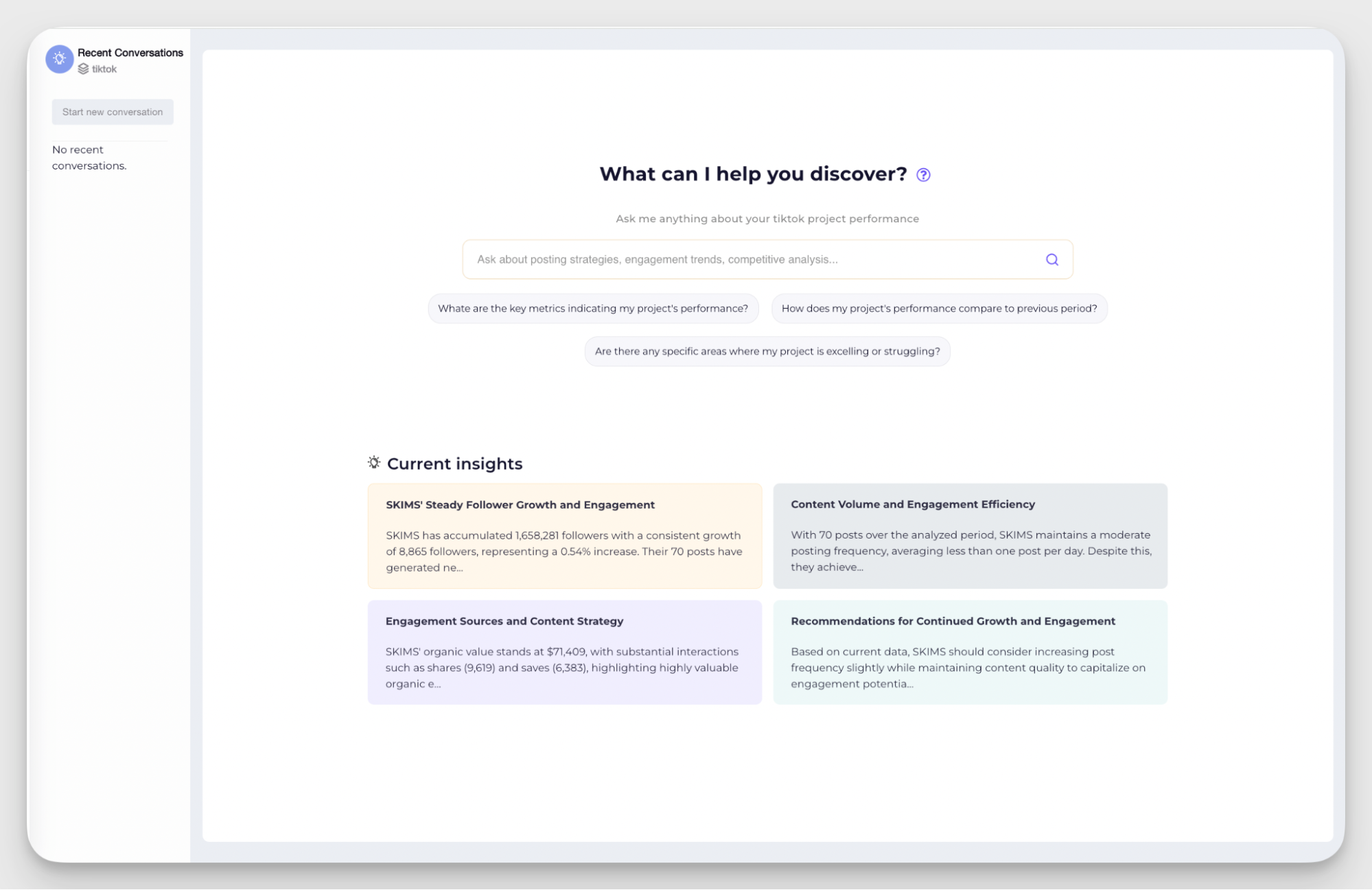
Concise AI-driven insights help you create executive summaries and give a bird’s-eye view of the performance.
Historical data and Looker Studio integration
Socialinsider is a TikTok analytics tool that integrates directly with Data Studios (formerly Looker Studio) — Google’s reporting and data visualization platform. This allows teams to pull both current and historical social media data into fully customizable dashboards and reports.
Note that you can get historical data for up to 2 years in Socialinsider.
Pros & Cons
What users say
- Reviewers highlight the depth of analytics and competitor insights, especially for teams doing detailed social media research or strategy planning. (G2)
- Many reviewers mention that despite the platform’s advanced analytics capabilities, the interface remains easy to navigate and understand. (G2)
- Some users note that adding and organizing multiple brand profiles could be more automated. (G2)
Pricing
Socialinsider offers three paid plans, along with a custom Enterprise plan. Annual billing comes with a discount, and all plans include a 14-day free trial.
#4. Exolyt — best for TikTok-only strategy
Exolyt is a TikTok-focused analytics platform designed for brands and marketers who want to understand content performance, audience behavior, and trends on the platform.

If TikTok is a major part of your social media strategy, Exolyt offers a dedicated environment for analyzing TikTok activity.
Key capabilities
- Account overview. Analyze views, engagement, likes, shares, comments, and top-performing sounds from any TikTok account. Use audience insights and recommendations on the best posting times based on historical engagement patterns.
- Trending sound monitoring. Track trending TikTok sounds relevant to your brand and monitor how their popularity changes over time. Check rising and declining audio trends, and current hotness scores.
- Hashtag analytics. Explore hashtag performance and monitor how conversations evolve around specific topics, campaigns, or industries. Spot patterns, discover niche trends, and evaluate visibility around branded hashtags.
- Content score. Measure how individual TikTok videos perform compared to other posts and understand how specific content contributes to overall account growth.
Pros & Cons
What users say
- Users like that Exolyt is focused on TikTok and helps them analyze the volume of conversation for certain hashtags to evaluate the impact of a certain topic. (G2)
- Reviewers also mention that Exolyt understands the TikTok culture, trend, and mechanics well, making it a reliable tool for building a strategy. (G2)
- Some users mention that the dashboard view can be improved, as well as options to share the report or dashboard with clients or other non-users. (G2)
Pricing
Exolyt has a free plan limited to one tracked account. Two paid plans begin at €250/month.
#5. Shortimize: Best for analyzing short-form videos on TikTok
Shortimize is a short-form video analytics platform that helps you track and compare content performance across TikTok, Instagram Reels, YouTube Shorts, and other platforms.
I find it particularly useful when you want to understand which videos are gaining traction, monitor competitors, and compare performance across multiple accounts without switching between platforms. You can track public accounts, analyze individual videos, and organize data into collections for easier reporting.
Key capabilities
- Video performance tracking: Monitor views, engagement, and performance trends for individual videos.
- Competitor benchmarking: Track public TikTok accounts and compare their content performance with your own.
- Cross-platform analytics: Compare short-form video performance across TikTok, Instagram Reels, and YouTube Shorts.
- Viral content identification: Identify videos that outperform an account's typical engagement and view counts.
- Reporting and exports: Export data and organize accounts into collections for campaign tracking and reporting.
Pros and cons
What users say
- Users like being able to track videos across TikTok, Instagram, and YouTube in one place, with graphs and collections that make performance data easier to organize. (G2)
- Reviewers highlight how easily they can analyze their own content and competitors' videos by simply adding URLs, helping them identify engagement patterns and viral content. (G2 )
Pricing
#6. Sprout Social — best for paid and organic performance reporting
Sprout Social is a social media management and analytics platform that helps you track TikTok performance alongside other social channels.

I find it particularly useful when you want to measure both organic content performance and paid campaign results. You can connect your TikTok profile and ad account to monitor video engagement, audience growth, ad spend, and conversions from one platform.
Key capabilities
- Organic TikTok analytics: Track video views, likes, comments, shares, follower growth, and top-performing posts.
- Paid campaign tracking: Monitor ad spend, impressions, clicks, engagements, video views, and conversions through the TikTok Paid Performance Report.
- Campaign-level reporting: Compare performance across TikTok ad campaigns and individual ads to identify which ones are generating results.
- Cross-platform reporting: Consolidate paid campaign performance across TikTok and other supported social networks.
Pros & Cons
What users say
- Users appreciate the ability to manage paid and organic social activities together, making it easier to coordinate campaigns and monitor performance across channels. (G2)
- Reviewers highlight the reporting tools for paid campaigns, noting that they make it easier to generate visually appealing reports and share results with stakeholders. (G2)
Pricing
#7. Social Status — best for automated reporting
Social Status is a reporting-focused analytics tool built specifically for social media managers and agencies. It does one thing well: pulling performance data from multiple platforms into clean, client-ready reports that they can customize and label.

Key capabilities
- White-label TikTok reporting. Build automated TikTok reports with video performance, engagement rate, follower growth, reach, and audience metrics, then export them as branded PDFs, PowerPoints, Google Slides, CSVs, or Excel files ready for clients and stakeholders.
- TikTok profile and video analytics. Track views, likes, comments, shares, watch engagement, and posting frequency. Compare the metrics with other channels you manage in a cross-platform report.
- Influencer analytics and campaign tracking. Monitor influencer performance across TikTok campaigns with metrics such as engagement rates, audience growth, reach, impressions, and top-performing content.
Pros & Cons
What users say
- Reviewers appreciate that Social Status is laser-focused on analytics — no extra features cluttering the workflow, just the data they need. (G2)
- Users highlight how clear the metrics are and how easy it is to adjust charts to fit different reporting needs. (G2)
Pricing
Social Status has separate plans for different requirements.
#8. Modash — best for influencer discovery on TikTok
If you work with influencers on TikTok a lot, this is the tool that should be there in your tech stack.
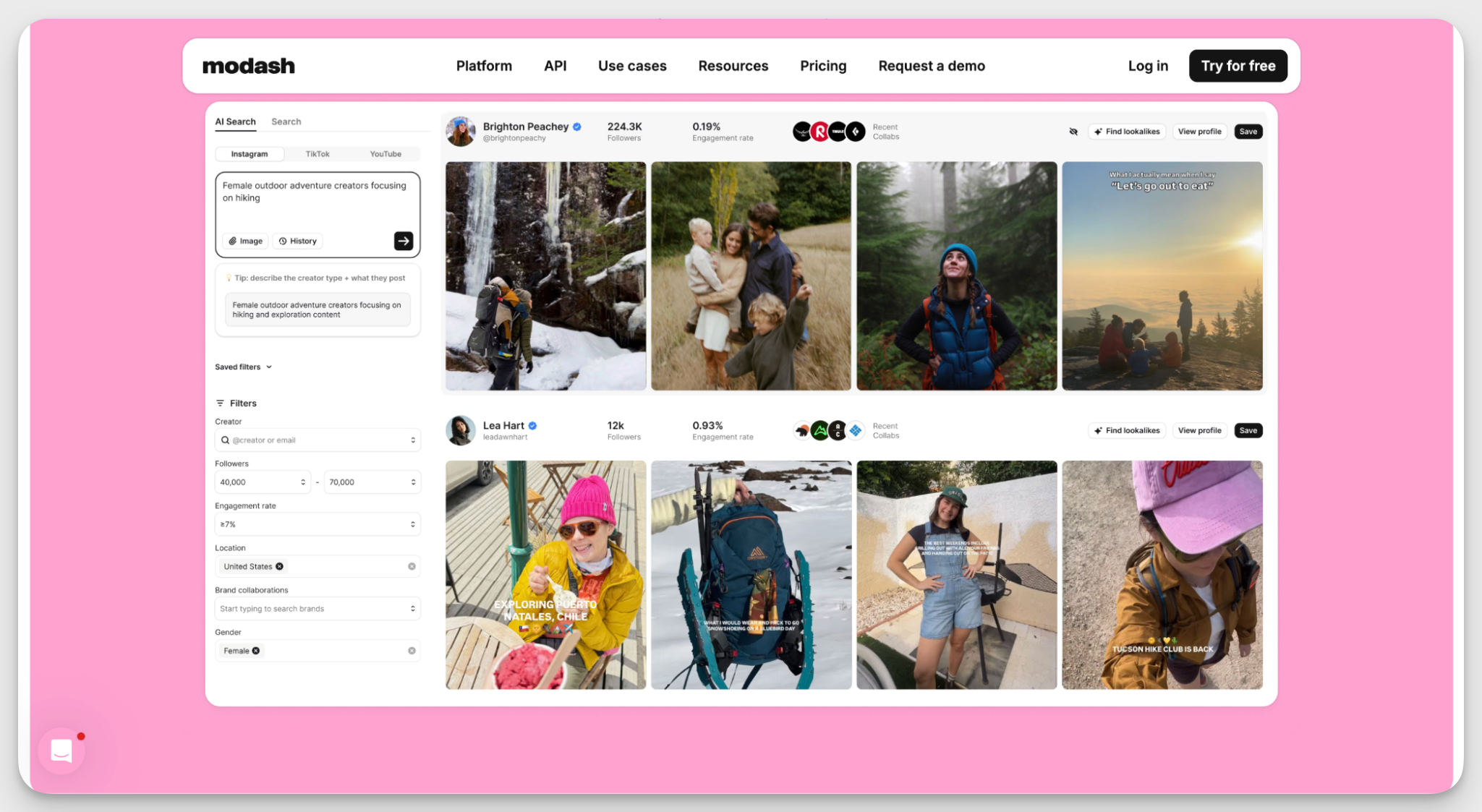
Modash is a TikTok profile analytics tool built entirely around influencer partnerships. If your TikTok strategy relies on influencer marketing, Modash covers the full workflow: finding creators, managing relationships, running campaigns, and tracking results.
Key capabilities
- AI-powered creator search. Modash scans bios, captions, and visuals to find relevant TikTok profiles for your brand. You can even upload an image to find creators who do content in a similar style.
- Precise audience filters. Filter potential partners by audience demographics, location, engagement rate, and content topics to find the right fit without manually checking every single profile.
- Automated campaign tracking. Modash collects all brand mentions from your selected creators during the campaign window and tracks total posts, influencer participation, views, clicks, and sales.
- Influencer CRM. Keep full conversation history, past campaign performance, custom labels, and bulk actions in one place to manage your TikTok creator roster.
Pros & Cons
What users say
- Reviewers love the Modash discovery engine for helping teams quickly find niche creators and vet their audience demographics. (G2)
- Users highlight how straightforward it is to communicate with influencers and monitor partnership performance from one dashboard. (G2)
- Some marketers note that the pricing gap between the plans is significant, making it challenging for the teams where influencer work is one part of a broader strategy. (G2)
Pricing
#9. HypeAuditor — best for influencer audience vetting on TikTok
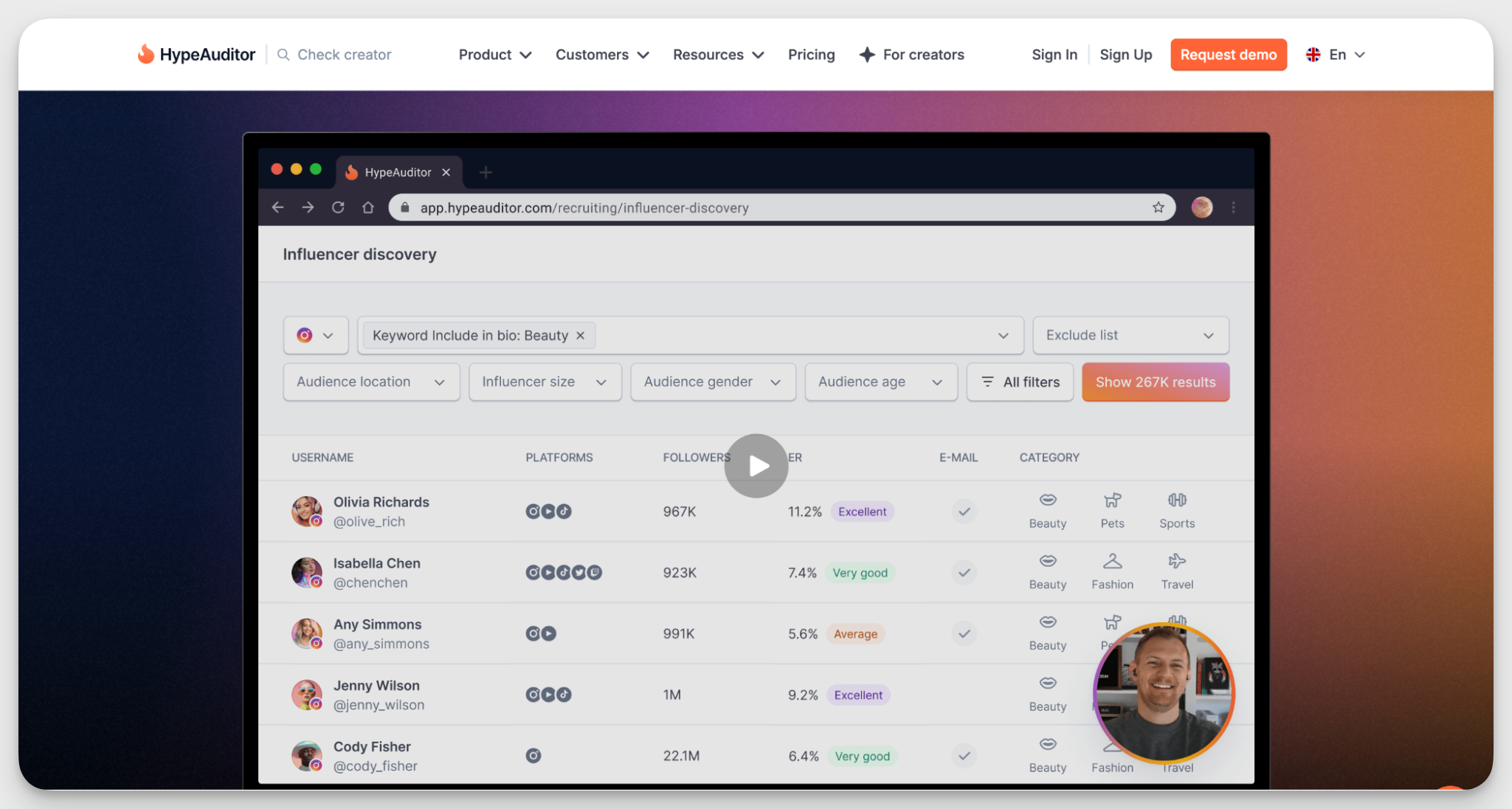
HypeAuditor is another influencer marketing platform with strong TikTok coverage. Compared to Modash, it emphasises audience quality analysis and authenticity. This TikTok influencer analytics tool helps teams that want to vet creators thoroughly before committing to a collaboration.
Key capabilities
- Influencer discovery and management. Search a database of over 104.7M TikTok creators using filters like location, niche, audience demographics, and engagement rate.
- TikTok account quality scoring. The AI-powered analytics rates any TikTok account on a scale of 1 to 100 based on follower-to-following ratio, views-to-follower ratio, views spread, and engagement rate.
- Video performance analysis. See which videos from any TikTok creator performed best, track likes, comments, shares, and engagement rates, and identify what types of content tend to go viral for this particular account.
- Influencer pricing calculator. Estimate a creator's rate based on their follower count, average video views, and engagement rate.
Pros & Cons
What users say
- Reviewers describe HypeAuditor as intuitive and easy to get started with, even for teams new to influencer marketing platforms. (Capterra)
- Users appreciate that the platform ranks creators not just by engagement metrics but also by audience quality and influence score. (G2)
- Some reviewers mention that HypeAuditor lacks analytics for livestreams (G2)
Pricing
HypeAuditor uses custom pricing. You'll need to book a demo to get a quote.
#10. Brand24 — best for brand mention & sentiment monitoring
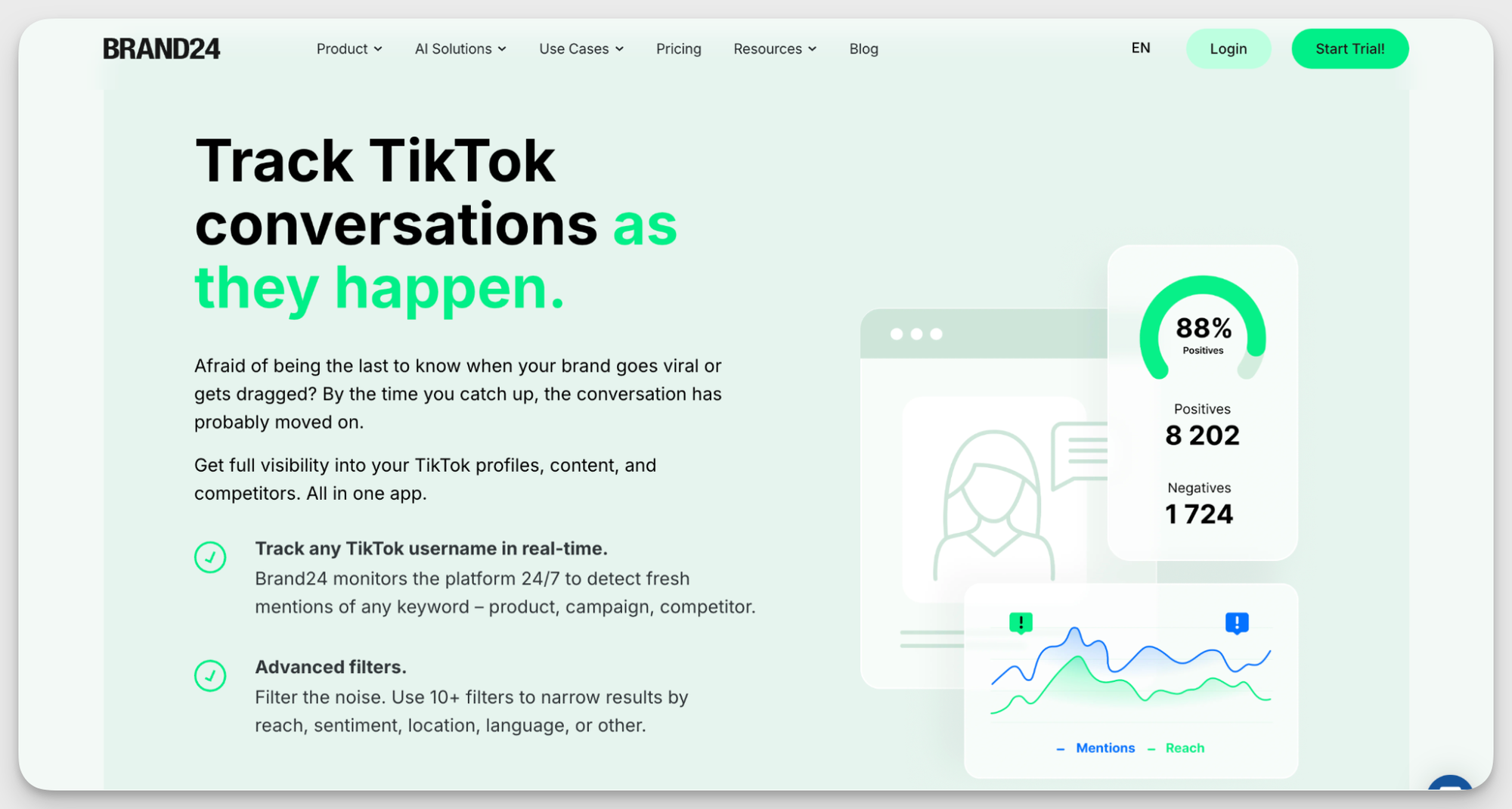
Brand24 is a social listening tool built to help brands understand how people talk about them online, TikTok included. It tracks mentions, hashtags, and conversations in real time, making it easier to monitor brand sentiment, measure share of voice, and jump into relevant discussions.
Key capabilities
- Real-time TikTok monitoring. Track mentions of your brand, products, campaigns, competitors, or hashtags as they happen.
- Reach and engagement tracking. Map out changes in reach and engagement on trend charts to see what campaigns, creators, or viral moments affect your performance.
- Topic analysis. Discover hot topics around your brand and niche. Use trending themes and recurring conversations to shape future content ideas and campaigns.
- Sentiment and emotion analysis. See whether people talk about your brand positively, negatively, or somewhere in between.
Pros & Cons
What users say
- Reviewers highlight that the real-time alerts and sentiment analysis features help teams make faster communication and PR decisions. (G2)
- Teams mention that Brand24’s support is helpful and quick to act. (G2)
- Some users mention that plans can feel limiting if you want to track multiple brand names, products, and competitors at the same time. (G2)
Pricing
How to choose the right TikTok analytics tool for your brand?
The right TikTok analytics tool depends on what you want to measure, how deep you need to go with your analysis, and what you plan to do with the data afterward. Here are a few things to consider:
- If you're looking for free TikTok analytics, TikTok Studio gives you a straightforward way to track account performance, understand your audience, and monitor individual videos. Socialinsider's free TikTok Audit tool is another option if you want a quick snapshot of your account's performance.
- If you need in-depth analytics and competitor benchmarking, Socialinsider helps you compare TikTok performance with other social channels, analyze content pillars, and track competitors. Exolyt is another option if you want to focus specifically on TikTok trends, hashtags, and account performance.
- If you want to compare short-form video performance across platforms, Shortimize helps you track videos on TikTok, Instagram Reels, and YouTube Shorts. It's particularly useful when you want to understand which videos are gaining traction and how content performs across channels.
- If you're managing campaigns and need reporting, Sprout Social combines paid and organic performance reporting, while Social Status helps you create automated, client-ready reports. Brand24 is worth considering if your focus is on monitoring brand mentions, campaign conversations, and audience sentiment.
- If influencer marketing is a major part of your TikTok strategy, Modash and HypeAuditor help you discover creators, evaluate audience quality, and measure campaign performance.
Final thoughts
Choosing a TikTok analytics tool is a process. Your perfect tool has to support your specific workflow and solve the issues your team deals with every day. Make sure you focus on your real needs rather than an extensive list of features.
And the best course of action is always to try the tool before you commit. Socialinsider offers 14 days of free trial — try it today and see if it fits you like a glove.
FAQs about TikTok analytics tools
Why do marketers need a third-party tool for TikTok analytics?
TikTok, like any other social media platform, offers a built-in analytics suite. It's relatively easy to use and can be enough when you're just starting out on TikTok.
But for in-depth, ongoing analysis that supports a content strategy and gives you meaningful signals, I'm not a fan of native TikTok analytics. Here's why:
- Historical data is capped at one year. If you want to run a TikTok audit or compare results year-over-year, that data simply isn't there.
- The experience is inconsistent across surfaces. The analytics look and read differently on mobile, desktop, and TikTok Studio, and I personally find that really frustrating to work with.
- Trend analysis is too generic. TikTok has an "Inspiration" tab that surfaces trending topics, but the recommendations are broad, and you have very little control over fine-tuning them.
- No competitive insights. There's no way to track competitor accounts within TikTok. You're left manually checking their posts and counting likes and views yourself.
- No cross-platform view. Unless you're copy-pasting data into a spreadsheet, TikTok gives you no way to see how it fits into your wider channel mix.
Can you track TikTok competitors with analytics tools?
Yes. Some third-party TikTok analytics tools let you monitor public competitor accounts, compare engagement rates, analyze top-performing videos, and track posting frequency.
Tools like Socialinsider, Exolyt, and Shortimize offer competitor analysis capabilities that help marketers understand what works for similar brands and identify opportunities to improve their own content strategy.
Are there free TikTok analytics tools?
Yes. TikTok Studio is TikTok's native analytics platform, offering account performance, video analytics, and audience insights at no cost.
Socialinsider also offers a free TikTok Audit tool that provides a quick overview of account performance. These free options are useful for basic analysis, while paid tools typically offer more advanced reporting, competitor benchmarking, and historical data.
How can you track TikTok hashtag and campaign performance?
You can track TikTok hashtag and campaign performance using analytics tools that monitor hashtags, keywords, captions, and campaign-related content.
Exolyt helps analyze hashtag performance and monitor conversations around specific topics. Socialinsider's Query Builder lets you group content using keywords, hashtags, and captions to analyze campaign performance and compare results across content categories.
How often should you check TikTok analytics?
You should check TikTok analytics regularly, depending on your posting frequency and goals. Reviewing performance weekly helps you identify short-term trends, while monthly analysis gives you a broader view of audience growth and content performance.
For campaigns, monitor results throughout the campaign and conduct a final analysis once it ends.
Can you see who viewed your TikTok videos?
TikTok analytics provides aggregate data about video views and audience engagement, but it doesn't reveal the identity of every person who watched your videos.
TikTok's Profile View History feature may show certain profile visitors if they meet the eligibility requirements and have the feature enabled. This is separate from video analytics.
Can you export TikTok analytics data?
Yes. TikTok Studio provides native analytics, but export options may be limited depending on the interface and data type.
Third-party analytics platforms such as Socialinsider and Social Status offer reporting and export capabilities, allowing marketers to organize performance data and share reports with stakeholders.
Nidhi Parikh
Having worked with several brands in the social media space, Nidhi writes about all things social. With 13K followers on LinkedIn, she's always up for a chat about books or her next travel plan

Know what your competitors do — before your manager asks
Get instant social benchmarks & reports without manual work.