AI in Social Media: Practical Uses for Social Media Leaders
AI is reshaping social media from content to analytics. Discover the 7 core use cases social media leaders are implementing right now.

AI in social media helps teams move faster on content, analysis, monitoring and paid decisions without losing strategic control. But many teams start with the writing and stop there, missing the bigger opportunity: using data to decide what to write in the first place.
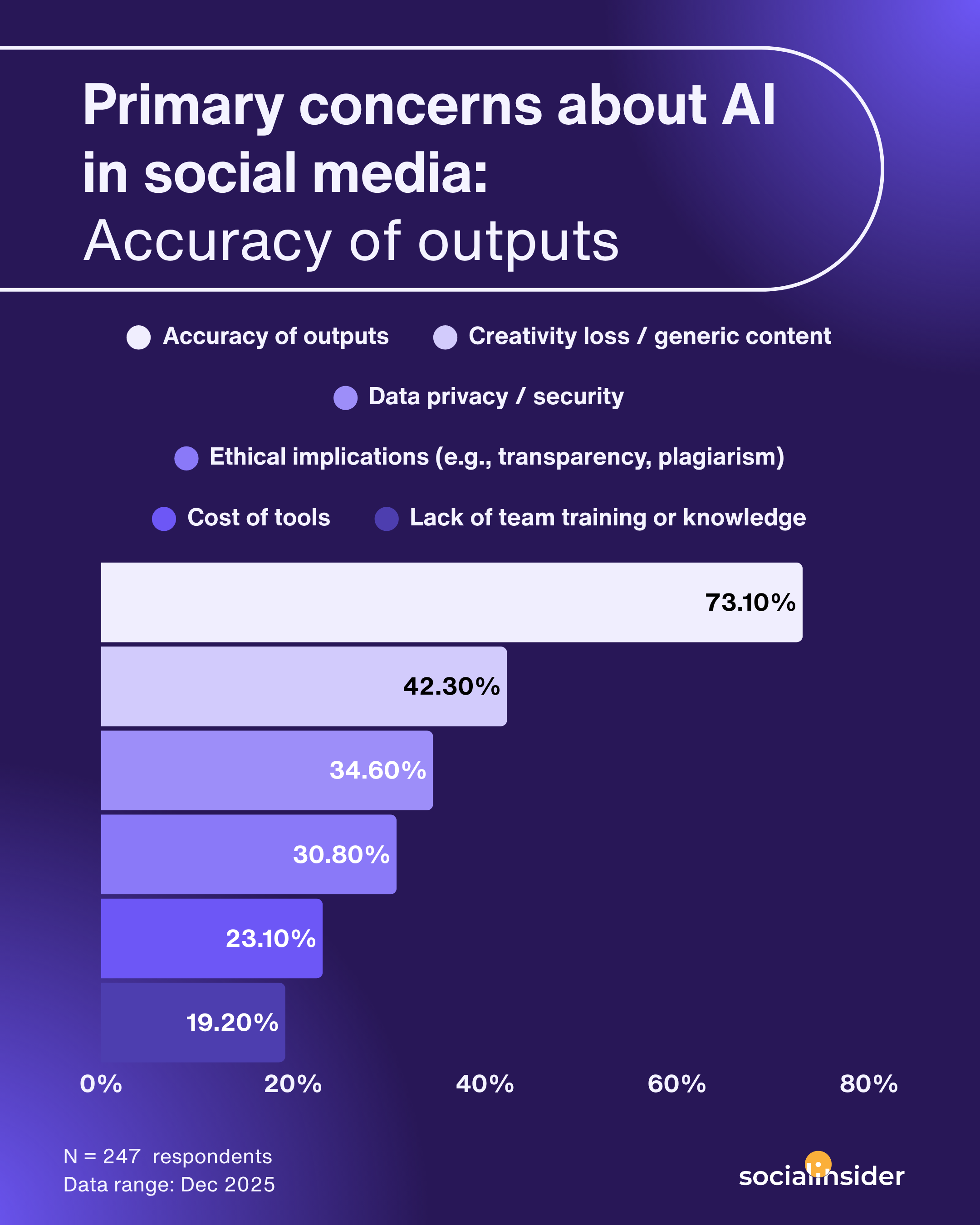
In Socialinsider’s AI usage survey of 247 social media professionals, accuracy of output was the biggest concern, which is exactly why the teams getting the most from AI treat it as a workflow with human checkpoints, not a caption generator.
In this guide, we’ll walk you through a step-by-step process for using AI across your content system, from performance-driven briefs to drafting, brand voice and measurement. Then we’ll cover the seven use cases social teams rely on most, and the mistakes to avoid.
Key takeaways
-
AI works best when it starts with performance data: audience insights, past results and brand rules should shape every AI brief.
-
Use AI for speed and people for judgment. AI handles drafts, variations, formatting and pattern recognition; humans own brand voice, sensitive topics and final approval.
-
Draft by platform and post purpose (educational, entertaining, inspirational or promotional), not with one generic prompt.
-
Tag AI-assisted posts separately from human-led ones so you can compare performance and refine your prompts.
-
AI is shifting social media roles from producing content and building reports to editing, analyzing and deciding.
What AI in social media marketing can and cannot do?
AI can accelerate repetitive work, but it cannot replace a context-based strategy or final judgment.
Yes, AI can summarize comments, cluster themes, detect anomalies, and produce faster first drafts, and many more. But it can also misread nuance, flatten brand personality, and confidently repeat errors if the input data is weak. That is why I treat AI as an assistant, not an author.
To be honest, from what I've seen, I would say the best social media workflows use AI as a shortcut for analysis and drafting, then keep a human in charge of interpretation and approval.
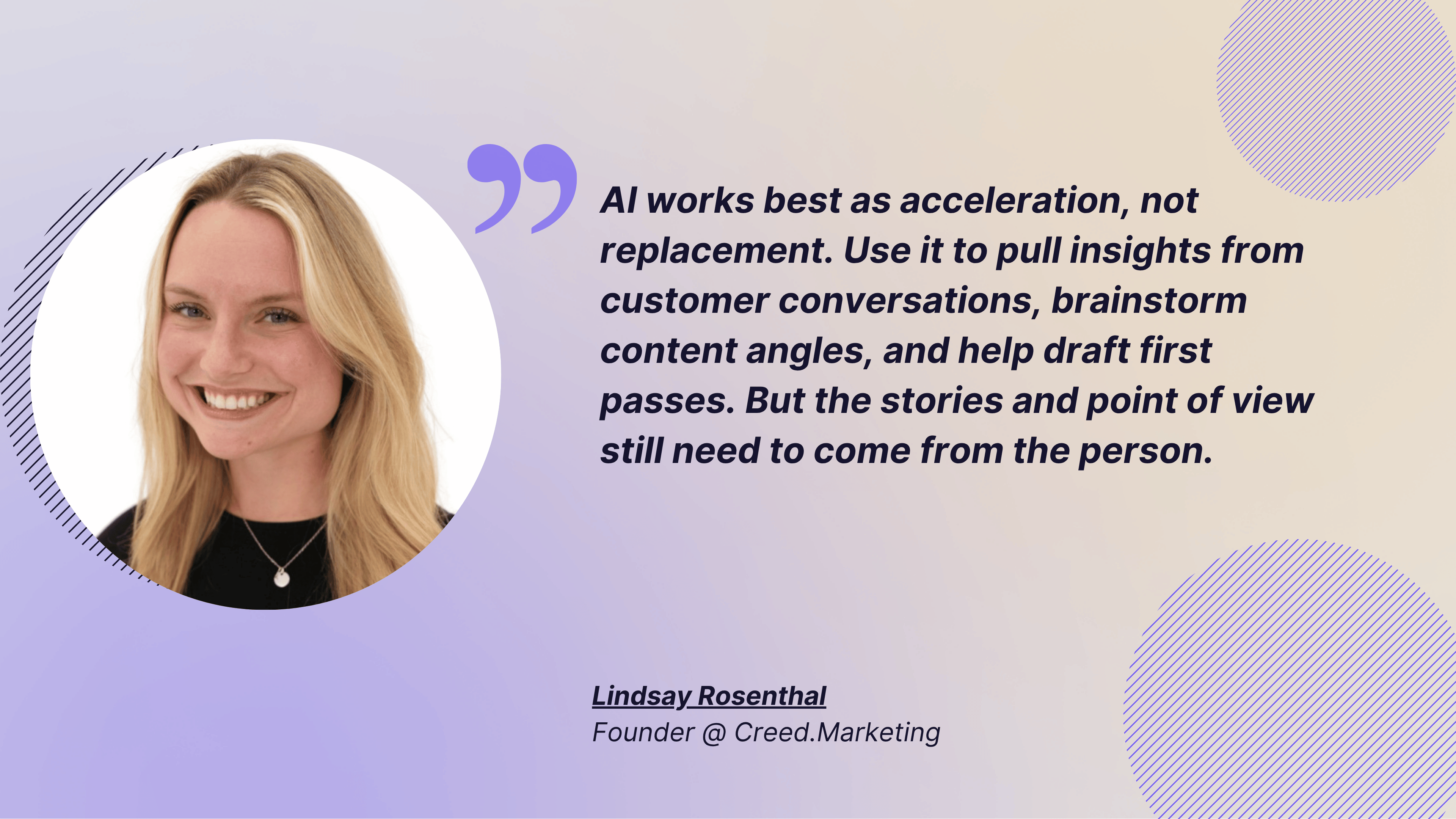
Lindsay Rosenthal, Founder of Creed.Marketing, mentioned this as well:
AI works best as acceleration, not replacement. Use it to pull insights from customer conversations, brainstorm content angles, and help draft first passes. But the stories and point of view still need to come from the person. The content that performs today has a human fingerprint + your own unique taste. AI should make your perspective sharper, not more generic. - Lindsay Rosenthal
How to use AI in social media: a 7-step process
Using AI in social media works best as a sequence, not a single task. Start with data, move into ideation and drafting, and end with measurement that feeds the next round of prompts.
Step 1: Brief AI with performance data, not a blank page
“Write a LinkedIn post about social media analytics” gets you generic output. A brief with real data gets output that sounds like it knows your account. Before asking AI for anything, pull together four inputs:
- Audience data: who’s engaging, where and how
- Past performance: which formats and topics have worked
- Brand rules: tone of voice, writing guidelines, do’s and don’ts
- Competitive insights: what’s working in your niche
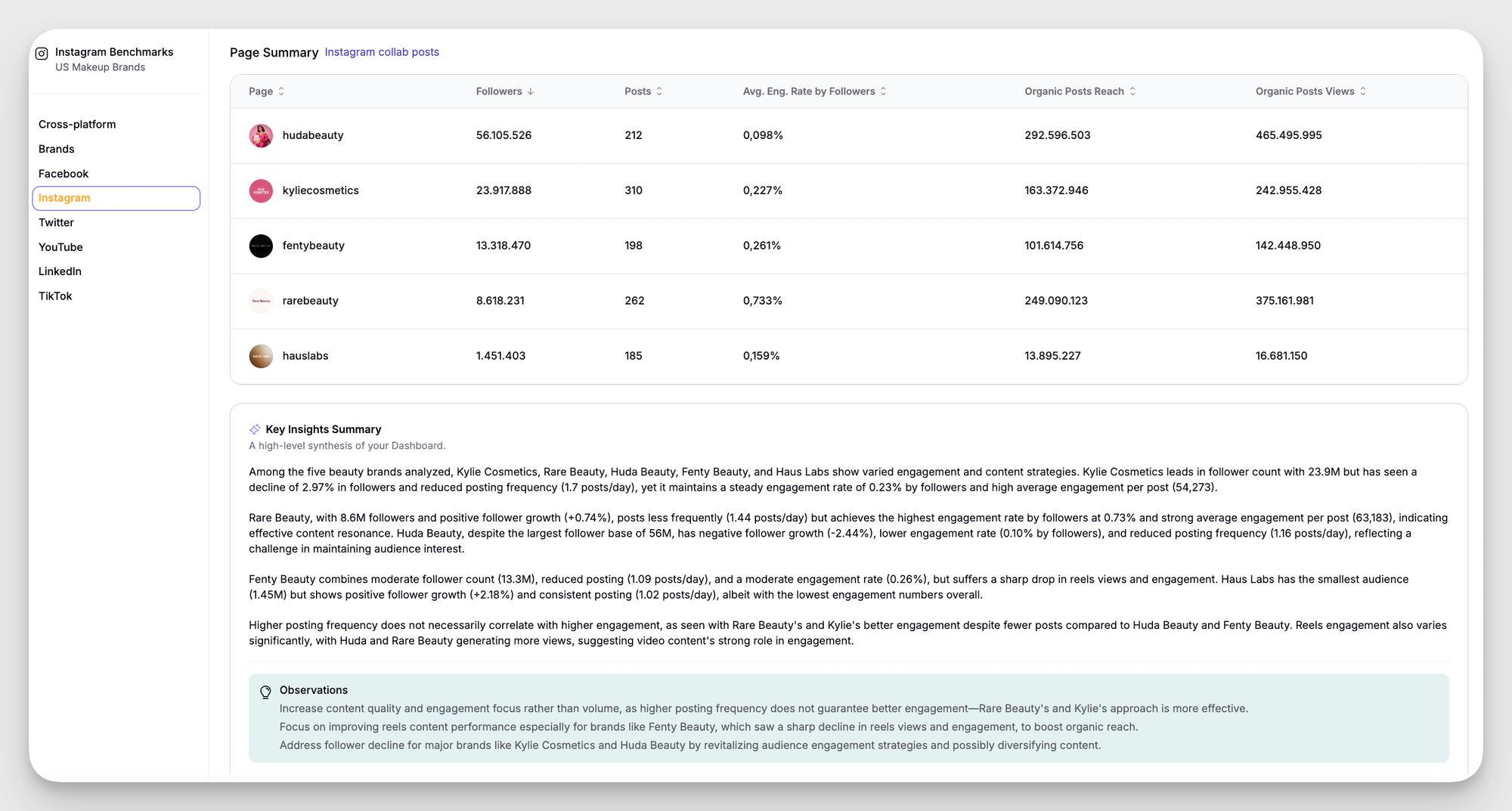
Socialinsider’s Key Insights Summary gathers this in one view, with an AI-written narrative of a profile’s posting activity, engagement and follower growth you can paste straight into a brief.

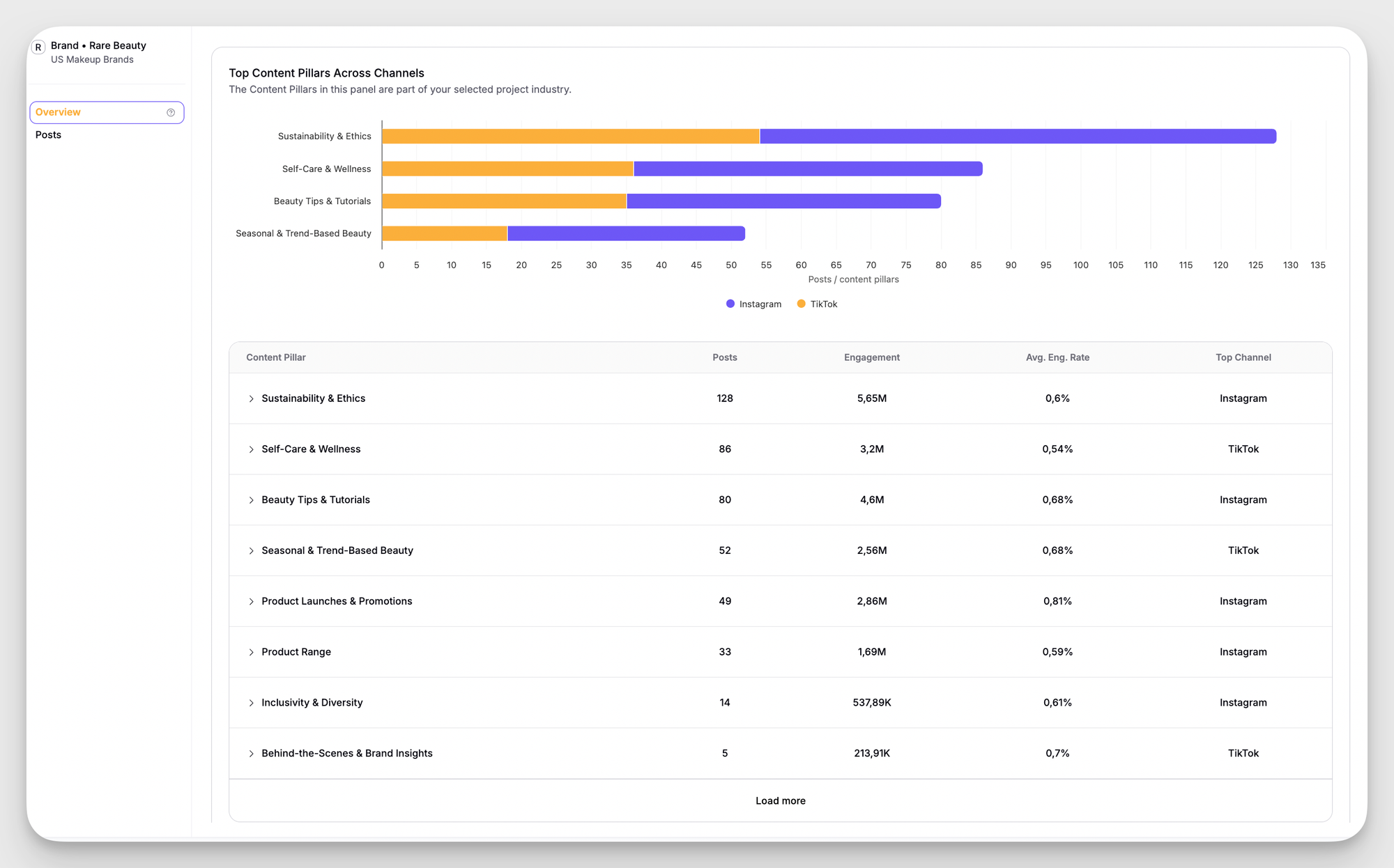
Add a competitor content gap check. Socialinsider’s industry benchmarking view shows each competitor’s top content pillars, post counts and engagement rate side by side, so you can see which themes your audience rewards and which you’re missing. For the interpretation side, see our guide to AI competitive analysis.

Step 2: Turn data into content angles
“Give me 10 Instagram post ideas” gets the same ideas everyone else gets. “Give me 10 post ideas based on what drove the highest engagement rate on my account this quarter” gets ideas that fit your audience. Turn your top themes, formats and posting times into a brief with a goal, topic, format and tone.
With the Socialinsider MCP connected to Claude, you can ask those questions of your own data inside the assistant, so the ideas come back grounded in your account history.

Step 3: Draft by platform and post purpose
Don’t give AI one prompt for every format. For each draft, specify the platform, the typical length there, what performs there (carousel or single image, short caption or long context) and any insight from your data. Then say what the post is for: educational, entertaining, inspirational or promotional. Mixing purposes in one prompt produces a post that does none of them well.
Step 4: Protect your brand voice
The same tool produces very different output depending on whether it has voice guidelines. Build a brand voice document AI can use, with:
- A description of the brand persona (polite or playful, authoritative or approachable)
- Examples of on-brand captions
- Words and phrases to avoid
- Preferred writing style and formatting
Treat AI like a new team member who needs onboarding on how you do things.
Step 5: Repurpose one strong asset into many formats
Start from your best-performing content and reshape it: a webinar or long article can become a LinkedIn post, carousel slides, a short-video script and a thread. Tell AI what must stay fixed (core message, data points, call to action) and what can change (length, tone, formatting).
Step 6: Review every AI-assisted post before it goes live
Fluent output can still be wrong. Use one checklist across the team, with a named owner at each stage, and check for:
- Accuracy: dates, claims and statistics
- Tone: does it sound like your brand or like a generic assistant?
- Context: is anything happening right now that could make it land badly?
Set a rule for rejecting rather than editing: if the angle is off or the tone is generic, a sharper prompt is faster than line edits.
Step 7: Measure AI-assisted content separately
To know whether AI is actually helping, tag AI-assisted posts separately from human-led ones and compare them. Socialinsider’s tagging lets you label posts by source, pillar or campaign and filter performance by tag.

Compare reach, engagement, views, comments, shares and saves. If AI-assisted posts on a topic keep underperforming, change the input (more specific direction, better examples, tighter constraints) before you give up on AI for it.
The 7 core use cases of AI in social media today
AI is most useful when it solves a specific bottleneck. In practice, that means using AI for social media marketing to draft, classify, summarize, compare, and optimize, then letting the social team decide what should go live. Here are the seven use cases I see matter most.
Content creation
AI helps social teams create social media content faster, but the real win is variation, not volume. I like using AI for social media marketing to draft captions, test hooks, repurpose long-form ideas into short-form posts, and adapt one idea across Instagram, LinkedIn, and Facebook.
AI used in social media should reduce blank-page time, not replace the thinking behind the campaign.
A few examples make the difference clearer:
- On Instagram, AI can turn one webinar takeaway into a carousel intro, a caption, and three story prompts.
- On TikTok, AI can draft three hook options, then reshape the best one into a 20-second script.
- On LinkedIn, AI can convert a product update into an executive-friendly post with a sharper point of view.
Audience segmentation
AI is useful for audience segmentation because it can group people by behavior, engagement patterns, or topic preference faster than a manual review. That gives a social media team a clearer picture of who responds to educational posts, who prefers product stories, and who engages with proof-driven content.
The practical payoff is simple: instead of saying “our audience likes everything,” a marketer can say “our audience splits into three clear groups, and each group reacts differently.” That is much easier to brief, budget, and defend.
Social listening and sentiment analysis
AI makes social listening faster by tagging themes, spotting sentiment shifts, and pulling recurring questions from large comment sets. The goal is not to collect more noise. The goal is to identify what people actually care about and whether a spike in conversation reflects real demand or just a temporary moment.
Here is the distinction I use:
- Signal: repeated pain points, repeated phrases, repeated product questions, or a sustained rise in discussion volume.
- Noise: one-off complaints, or comment spikes with no clear pattern.
That distinction matters because AI used for social media can easily overreact to a single viral post. Manual review still matters when tone is ambiguous, sarcasm is involved, or the topic could affect brand safety.
When I’m setting up listening, I monitor four things first:
- Brand mentions and product mentions.
- Competitor mentions and category comparisons.
- Repeated questions in comments.
- Creator or influencer mentions that shape buyer perception.
For teams building content pillars, AI can also help cluster themes into clear topic groups. That gives the social team a more useful view of what the audience repeatedly rewards.
Performance analytics and reporting
AI is strongest in reporting when the workflow is simple: collect, classify, compare, interpret, and act. That sequence turns raw social media analysis into something that a manager, a board, or a client can actually use.
Here is the workflow I’d use:
- Collect data from each platform.
- Classify posts by theme, format, and campaign.
- Compare performance across channels and competitors.
- Interpret what changed and why.
PS: Socialinsider’s Key insights summary can condense the busy middle of a report into something leadership can read quickly.
And besides that, its AI-based content pillar analysis can show which themes are actually pulling weight.
- Act with one or two specific recommendations.
Ask AI to do three jobs in a monthly report: summarize the top change, explain the likely cause and suggest the next test. For a deeper look at what AI can measure, see our guide to AI social media analytics.
Trend detection
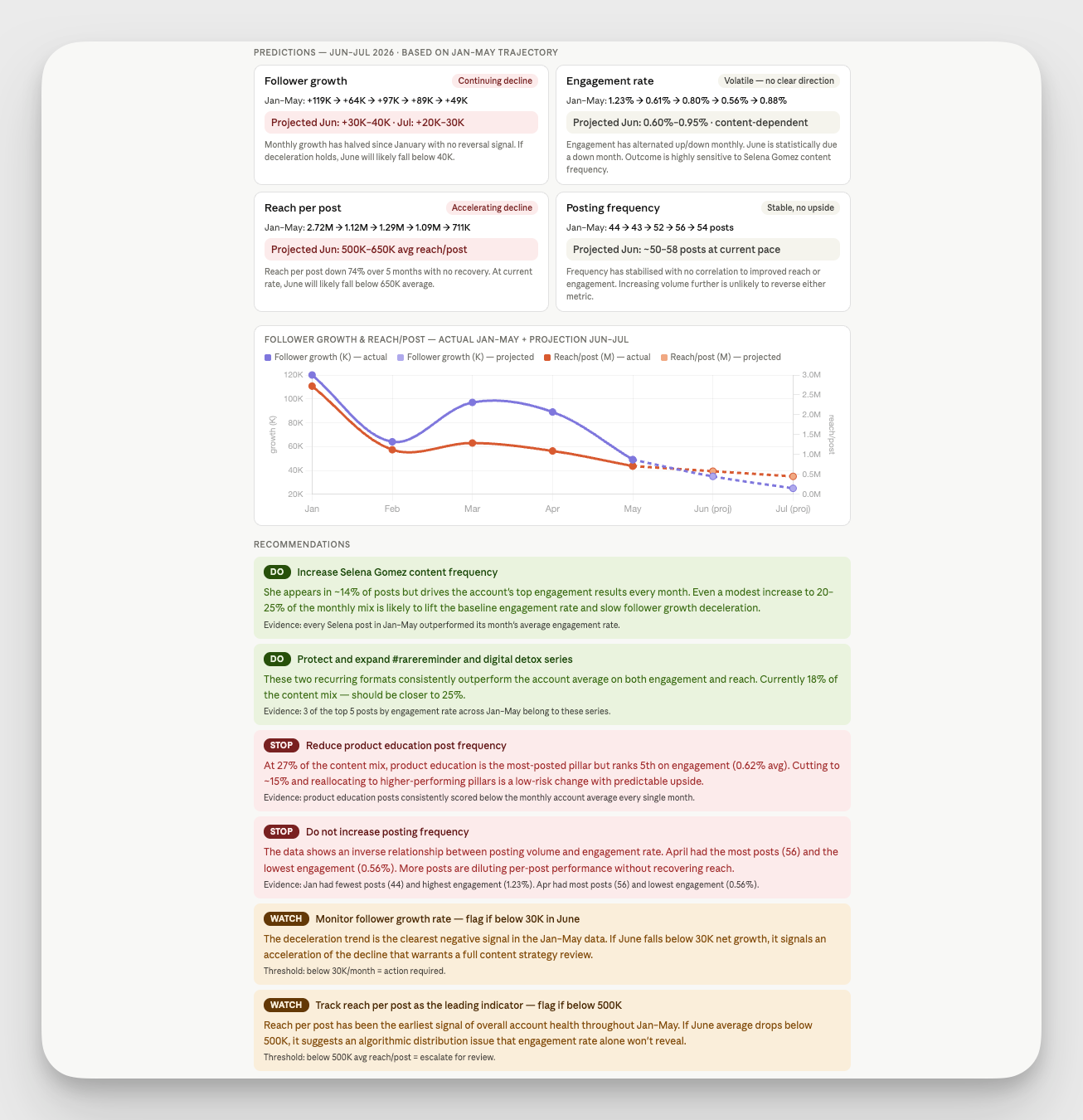
AI helps trend detection by scanning topics, captions, hashtag clusters, and engagement spikes faster than a human team can. The win is speed, but the real advantage is pattern recognition across channels.
I’d use AI for social media here in three ways:
- Build a weekly trend watchlist from recurring topics.
- Compare rising themes against your existing content pillars.
- Flag posts that are climbing unusually fast so a team can respond while the topic still has momentum.
That said, not every trend is worth chasing. A one-day spike can disappear before a content team gets through approvals. Socialinsider’s MCP capabilities can help a team move from manual checking to a more continuous workflow, which matters when trend timing is the difference between relevant and late.
Influencer Discovery
AI helps influencer discovery by filtering for audience fit, content quality, comment sentiment, and posting consistency. That is more useful than chasing follower counts alone, because follower count does not tell a social team whether an influencer actually drives attention or trust.
For example, a creator with modest reach but strong comments may be a better fit than a larger creator with passive engagement. AI can surface that pattern faster, but the decision still depends on campaign goals and brand fit.
A practical screening process looks like this:
- Review recent posts from the last 30 to 60 days.
- Check engagement quality, not just volume.
- Read comment sentiment for fit and authenticity.
- Compare audience overlap with campaign goals.
- Confirm whether sponsored posts still feel native.
This is where AI for social media can save time without replacing judgment. A tool can narrow the list, but the marketer still has to decide whether the creator matches the brand’s tone, timing, and risk tolerance.
Here's some advice from Lindsay as well:
Start with the bottleneck you need to solve, not with the tool. Is the issue idea generation, editing, repurposing, or scheduling? Identify the friction point, then choose the tool that reduces that specific friction. Most people get overwhelmed because they try to adopt everything at once.
Paid social optimization
AI matters in paid social because speed is the main advantage of paid media. If a campaign is underperforming, a social team needs faster signals, better audience segments, and fewer manual reporting loops.
In practice, AI changes paid work in four ways:
- Better audience segments.
- Faster creative testing.
- Clearer optimization signals.
- Fewer manual reporting loops.
That makes social media optimization easier to manage across platforms. AI can suggest which creative variation deserves more spend, which audience cluster is responding, and which ad set needs to be cut before budget is wasted.
A useful way to think about it: AI does not make paid decisions for the team. AI reduces the time between “something is off” and “we know what to change.” That matters when budgets are tight and the next weekly report is already late.
When AI helps most, and when human oversight still matters?
AI helps most when the task is repetitive, data-heavy, or fast-moving. Human oversight matters most when the task affects voice, trust, compliance, or customer perception. The smartest AI and social media teams build clear boundaries instead of assuming every output is ready to publish.
Here are the guardrails I’d keep in place:
- Brand voice review: Every caption, summary, and recommendation should pass through brand guidelines.
- Bias check: Audience segments should be checked for missing groups, weak assumptions, or stereotypes.
- Fact check: Claims, benchmarks, and comparisons should be verified before publication.
- Transparency rule: If AI supports the workflow, the team should know where the machine helped and where a human edited.
The reason this matters is simple. AI can sound confident even when the underlying answer is weak. That is dangerous in social media, where one off-brand post or one lazy summary can weaken trust quickly.
A good way to reduce risk is to use AI for the first pass and humans for the final pass. That keeps the process fast without making the brand sound robotic.
Based on the experience of 247 marketers, Socialinsider's AI usage survey has shown that accuracy of outputs is the number one concern when using AI in social media marketing.
How is AI changing the role of social media teams?
AI is moving social media teams away from manual production and toward interpretation, prioritization, and quality control. The job is becoming less about copying numbers into a deck and more about deciding what the numbers mean.
The new model is more strategic. A social media manager becomes a translator between raw platform activity and business decisions. That means spending less time on spreadsheet cleanup and more time on content direction, executive reporting, and market context.
In practice, AI changes the team’s role in three ways:
- Editor: AI drafts, but the social lead refines tone and message.
- Analyst: AI summarizes, but the marketer decides what changed and why.
- Strategist: AI surfaces patterns, but the human chooses the next move.
From what I've seen from our clients, teams often adopt AI tools when board reporting by screenshots and Excel breaks down, or when competitive benchmarking becomes too manual to trust, for example.
AI adoption stages: from experimenting to scaling
AI adoption usually starts small and gets more valuable as the workflow matures. The smartest teams do not try to automate everything at once. They move from experiments to repeatable systems.
This is where using AI for social media marketing becomes a process rather than a prompt. A team that starts with one task, such as repurposing a LinkedIn article into five post variations, can later expand into sentiment analysis or reporting automation.
How to build an AI-ready social media stack?
An AI-ready stack should reduce friction, not add another layer of complexity. If a tool creates more manual work than it removes, the stack is not ready yet.
For example, I’d choose specialized AI social media analytics tools when reporting, benchmarking, or cross-channel comparison starts taking too long. That is where a platform like Socialinsider earns its place. A social media leader who used to spend hours stitching together screenshots can use automated summaries to produce a cleaner narrative faster.
Common mistakes when using AI in social media
- Over-automating without quality standards. Speed without a clear bar for “good” just means publishing weak content faster. Write AI guidelines and train the team on them.
- Prompting without performance data. Social media prompts built on guesses produce generic output. Feed AI what has actually worked.
- Letting AI flatten your brand. Without voice guidelines, AI defaults to safe, average phrasing you’ll see on every other account.
- Skipping the human review. Fluent output can still be inaccurate or tone-deaf. Keep a named reviewer between drafting and publishing.
- Treating AI as the strategy. AI executes fast, but decisions stay with the team. Use AI-supported reports to inform the next move, not to make it.
- Giving up too soon. Weak results usually mean weak inputs. Check how the team is prompting and editing before dropping AI for a task.
Final thoughts
AI in social media works best when it starts from data and ends with a human decision. Brief it with real performance insights, draft by platform and purpose, protect your brand voice, review everything, and measure AI-assisted posts separately so you know what’s working.
If your next bottleneck is reporting, benchmarking or content pillar analysis, start there. Start a 14-day free trial with Socialinsider and see what your own content data can tell AI to write next.
FAQs on AI in social media
What is AI in social media marketing?
AI in social media marketing is the use of machine learning, language models, and pattern detection to support content creation, audience analysis, reporting, listening, and ad optimization. The best AI in social media marketing keeps humans in control of strategy, approvals, and brand voice. AI should speed up work, not replace editorial judgment.
What are the main uses of AI in social media?
The seven most common are content creation, audience segmentation, social listening and sentiment analysis, performance analytics and reporting, trend detection, influencer discovery and paid social optimization.
Can AI keep my brand voice consistent?
Yes, if you give it a brand voice document with your persona, on-brand examples, words to avoid and formatting preferences. Without one, AI defaults to generic phrasing, so a human review pass is still essential.
How do I know if AI is improving my social media results?
Tag AI-assisted posts separately and compare their reach, engagement, saves and shares with human-led posts over the same period. If they underperform, adjust your prompts and inputs before dropping AI for that task.

Anda Radulescu
Anda Radulescu is a SaaS content writer and copywriter with 5+ years in digital marketing, turning social media data into practical ideas for Instagram, LinkedIn, and beyond

Know what your competitors do — before your manager asks
Get instant social benchmarks & reports without manual work.