YouTube Analytics Tools Comparison: 9 Best Apps In 2026 For Different Use Cases
Compare 9 YouTube analytics tools by use case and pricing, including which ones show analytics for channels you don't own.

With TikTok on everyone's lips when it comes to leveraging video marketing for social media, I get the feeling that brands overlook the potential of YouTube, which, in my view, is an oversight, considering that, in the end, the platform is the second-greatest search engine in the world.
According to Socialinsider's short-form video performance study, YouTube Shorts, for example, get the highest number of views when compared to TikTok and Instagram Reels, scoring a difference of 23% in the case of the smallest profiles. That means a huge awareness and visibility potential offered by Shorts alone. So, for the brands not investing in YouTube marketing, I'd say this is your sign to start doing it.
And because simply posting without tracking performance is not enough, because without understanding what works and what doesn't, resources can go to waste (and that's just a shame), I'll give you some insights on how to use the best YouTube analytics tools available to make more informed decisions and start gaining with YouTube. Let's dive in!
Key takeaways
- To evaluate the best tools for YouTube analytics, compare them on metrics depth, competitor tracking, cross-channel analysis, and automated reporting, then check whether their AI features actually speed up your analysis.
- The best YouTube analytics tool for your team is the one that matches the decisions you make every month, whether that's leadership reporting, competitor benchmarking, SEO, creator partnerships, client reporting, or revenue attribution.
How I evaluated the best tools for YouTube analytics?
The best tools for YouTube analytics are simple to use and still detailed enough to guide your decisions. With video, it's easy to get too nitty-gritty with metrics and end up drowning in numbers instead of getting clarity on how to improve your content and grow.
My personal checklist comes down to four things:
- Metrics depth. Depth doesn't equal the number of metrics available. A well-designed audience retention graph that shows exactly where viewers drop off tells you more than five numerical metrics ever could. Look for tools that visualize data in a way that tells a story instead of just showing you a number.
- Competitor tracking. Benchmarking gives you the context to understand whether your YouTube metrics are good or bad for your niche. I look for tools that offer comparisons against both similar accounts, for realistic context, and aspirational ones, for inspiration and direction. These serve very different strategic purposes, and ideally, you want both.
- Cross-channel analysis. YouTube doesn't work in isolation. Video content travels: what works on TikTok can often perform well on YouTube, and vice versa. Without cross-channel data, spotting these patterns becomes a lot more tedious, and you risk missing opportunities hiding in plain sight.
- Automated reporting. I like to set up a report once and have it land in the same format, on schedule, without tweaking it every week. Consistent reporting removes the human factor. Even when I'm on vacation, leadership still gets their YouTube updates in a format they already know how to read.
A separate point worth noting is AI features. Frankly, I don't rely on AI for content creation or scripting. But having AI in your analytics corner to help read metrics, identify patterns, spot trends, or surface keywords worth exploring is useful and speeds you up a lot.
Top YouTube analytics tools compared
I know time means money; therefore, wasting hours reading about what each tool does and what it's best for is not ideal, to say, at least. That's why I've put together this quick and easy-to-read tool-comparison table for you to quickly identify your winner.
Table of contents:
- Socialinsider: best for competitive benchmarking and cross-channel analytics
- YouTube Studio (native analytics): best for detailed metrics performance
- vidIQ: best for YouTube SEO analysis and growth recommendations
- ContentStudio: best for publishing, AI content, and YouTube reporting in one dashboard
- Tubular Labs: best for video audience research and creator partnerships
- Vidyard: best for connecting YouTube video to pipeline and revenue
- SocialPilot: best budget all-in-one tool with YouTube data
- Viewstats: best for outlier research and video ideation
- AgencyAnalytics: best for white-label client reporting
#1. Socialinsider: best for competitive benchmarking and cross-channel analysis
Socialinsider is a social media analytics and benchmarking platform that lets teams analyze any public YouTube channel without requiring account access. It covers subscriber growth, engagement rate, views, likes, posting frequency, and top-performing content, among many others. Let me quickly show you what I'm talking about.
Key features
- Competitive benchmarking: Socialinsider lets you add competitor YouTube channels and track them side by side with your own.

One thing that I really appreciate within the platform is that it allows you to choose the metrics list, making reporting tailored to your specific metrics and objectives.

- Cross-channel performance analysis. The cross-channel view compares YouTube performance alongside TikTok, Instagram, Facebook, LinkedIn, and X. No more headaches or extra time switching between tabs and getting overwhelmed by copying the right values into the right columns in an Excel file that makes you question your life choices (or at least your career-related ones). Am I right?

- Content pillars analysis: Socialinsider uses AI to automatically tag and group videos by topic, based on your industry, so you can see which themes consistently drive engagement for your channel or your competitors'.

What I find particularly useful here is the competitive angle. You can be well aware of your own best-performing topics, but it's a whole other thing to see a competitor winning on a content pillar you've barely touched. That kind of insight is hard to spot without a tool that organizes content for you.
If you prefer more control, you can also create custom Brand Content Pillars to track campaign-specific performance over time.
Now be honest, how cool is that?
- Earned media value calculation: Socialinsider calculates how much your organic YouTube performance would cost in paid media, converting views and engagement into an ad-spend equivalent. This is a Socialinsider special; you won't find it in any other tool on the list.

And by the way, you should know that you can use industry benchmarks or plug in your own CPM and CPE data for a more accurate estimate if you don't want to roll with the pre-defined values. I think it's one of the most helpful features added in the tool because it offers an easy way to communicate the monetary value of organic social media to stakeholders who like to speak ROI.
- Automated reporting. Socialinsider lets you build a YouTube report once and have it delivered on schedule, straight to your inbox or your stakeholders', without rebuilding it every week.

This is the feature I'd miss most if it disappeared. You pick the channels, competitors, metrics, and period, brand the report, and set the frequency. From then on, leadership gets the same format every time, which makes month-over-month changes much easier to read.
- AI-driven performance summary: I know you probably got tired of having AI everywhere by now. But hear me out for a bit. What if you let AI do all the heavy lifting of pulling the data together, and you spend more time focusing on the strategy? Because yes, that's very much doable, and I know you'd rather be more involved in the creative, fun part of your job. Or am I wrong? Well, with Socialinsider's AI, you can get quick summaries of your performance for a given period, have patterns highlighted, and have notable changes in your metrics flagged.
Additionally, you can also use it for conversational data analysis, like ChatGPT or Claude, but grounded in your own dataset and the context of your performance. Ask specific questions about your data, benchmarks, or competitors and get targeted answers without digging through dashboards.
Most suited for:
Heads of social and social media managers who report YouTube performance to leadership and need competitor and industry context behind every number.
Pricing:
As a fellow marketer, I like to see transparency and adaptability when it comes to pricing. Because I know things move differently when working for a smaller vs a bigger company. Or, in other cases, in different agency sizes.
Socialinsider has three paid plans (Adapt, Optimize, and Predict) starting at $82/month billed annually, or $99/month billed monthly, plus custom Enterprise pricing. Every plan includes cross-network analytics, competitor benchmarking, automated reports, and unlimited exports. There's a 14-day free trial with no credit card required. Also, if you want a quick look before committing, you ca try the free YouTube analytics tool.
Reviews
I like the competition analysis summary and suggestions that Socialinsider provides. The accuracy of the numbers is wonderful, and it gives me a great support to plan my social media strategy and outperform the competition. I find it really helpful to understand the content bucket and approach each of my competitors is taking. Also, knowing what's performing better helps me rework my approach. It's one of the best for competitive analysis, and the initial setup was pretty easy. - Farhin Q, Marketing Chief Deputy Manager
#2. YouTube Studio (native analytics): best for in-depth metrics
While we're here, I gotta admit something. To me, ideal YouTube performance reporting combines native data with a third-party YouTube analytics tool.
How so?
Well, for own-account reporting, YouTube Studio is unquestionably the best choice because it offers A LOT of data. And it's all free. So, how to top that?
The real struggle comes when you need competitive data to add context to your own numbers. And for that, I already covered my top choice. <wink, wink, Socialinsider>.
To me, what's most valuable about YouTube Studio is the solid amount of data on video performance and audience behavior. But let me explain that in greater detail.
Key features
- Audience tab. Age, gender, geography, viewing habits, and new vs. returning viewer splits: everything you need to understand who's watching.
- Audience retention curves. Every video gets a retention graph showing where viewers drop off, where they rewatch, and which moments hold attention. For long-form content, this is one of the most actionable views available.
- Shorts-specific engagement. YouTube Studio tracks how many people watched your Short versus those who swiped away, which gives you a better picture of how engaging the content really is.
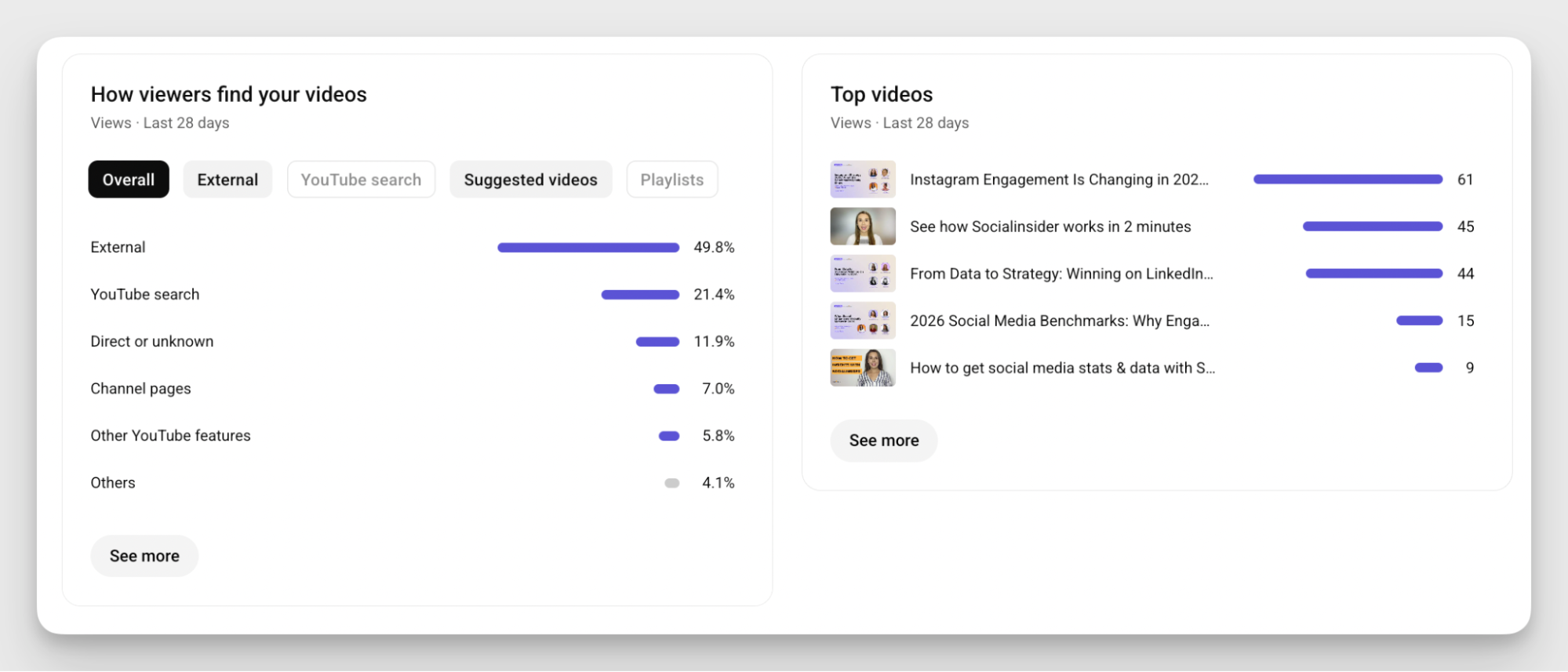
- Traffic sources. A breakdown of where views come from: search, suggested videos, browse features, or external links. It's useful for understanding whether growth is algorithm-driven or search-driven. To me, it is by far the most helpful feature within YouTube Studio.
Most suited for:
Every team with a YouTube channel, needing basic performance data, including traffic sources to improve individual videos.
Pricing:
As mentioned before, YouTube Studio is totally free, being integrated into your YouTube channel.
#3. vidIQ: best for YouTube SEO and growth recommendations
vidIQ is a YouTube SEO and growth tool built to help your videos get found. Where YouTube Studio tells you what happened after you published, vidIQ focuses on the decisions you make before you hit upload: which topics people are searching for, which keywords you can realistically rank for, and how well your titles, descriptions, and tags are optimized.
When I first heard about this tool, I really liked the idea behind it. And what I mean by that is its use case. Because SEO is an important part of an effective YouTube Strategy, which means in-depth research in this area alone has to be quite thorough. Not to mention creative ideas and other execution parts.
Also, I'm a big fan of SEO. Don't blame me.
Key features
- Keyword research. vidIQ pulls YouTube search data to show search volume, competition scores, and trending keywords in your niche. Seeing volume next to competition helps you find topics where ranking is realistic.

- SEO scorecard. Before publishing, vidIQ checks your title, description, tags, and thumbnail against your target keywords and gives you an optimization score. It's a useful pre-publish checklist, especially for teams without an SEO person.
- AI Coach and daily ideas. vidIQ generates personalized content ideas based on your channel's history and niche, each with a predicted performance score. The AI Coach answers strategy questions specific to your channel data. When testing the tool, I particularly liked this feature, which I see as a real helper for getting some traction for YouTube marketing.

- Views per hour tracking for competitors. vidIQ shows how quickly videos are gaining views in real time, so you can see which ones are picking up momentum right now. Sort competitor videos by views per hour to spot trending content early and understand what's resonating with your audience before a topic peaks.
Most suited for:
Teams where YouTube search is a primary growth channel and titles, tags, and topics need to be data-backed.
Pricing:
vidIQ offers a free plan with 150 AI credits per month. Paid plans start with Boost at about $16.58/month billed annually or $19 billed monthly. The higher tier (priced at $39/month billed annually or $49 billed monthly) adds more AI credits and features.
Reviews
The script writing feature is quite good, and it also helps in generating next video ideas for your channel. The thumbnail maker is also an excellent tool. The best part is that even if you don't have the money to get the Pro plan, you can still use about 70% of the app's features for free. Additionally, you get 20 free points every day, which you can use for YouTube video research. - Nami U, Designer in Worthscop
#4. ContentStudio: best for publishing, AI content, and YouTube reporting in one dashboard
I gotta be honest with you, to me, a platform that helps me automate as much as possible from my recurring tasks is a real lifesaver.
That's why I'm a big fan of management tools, with ContentStudio being one of them. This YouTube analytics app brings YouTube scheduling, AI content creation, and data into one dashboard. If your team's YouTube workflow is "plan it, publish it, report on it," and you don't want three tools for that, this is where I'd look.
Key features
- YouTube analytics dashboard. Subscribers, views, watch time, average view duration, likes, shares, and comments at channel and video level, with exports for further analysis.
- YouTube and Shorts scheduling. Queue long-form videos and Shorts in a shared content calendar, with bulk scheduling and approval workflows for teams.

- AI content creation. Generate scripts, titles, descriptions, and thumbnails, and repurpose long videos into Shorts, from the same place you schedule.

- Automated, branded reports. Schedule weekly or monthly reports to land in inboxes, add your logo and brand colors, and export to PDF or CSV.
Most suited for:
Small and mid-sized teams that want to plan, publish, and report on YouTube without juggling separate tools.
Pricing:
ContentStudio has three self-serve plans: Standard at $29/month, Advanced at $69/month, and Agency Unlimited at $139/month (billed annually; $19, $49, and $99 month-to-month), plus custom Enterprise pricing. A free trial is available.
Reviews
ContentStudio is a massive time saver for social media management. It eliminates the need to log in to multiple platforms by centralizing and scheduling posts. I like its seamless automation, it truly feels like "set it and forget it." - Munaza F, Seo Expert & Web Specialist
#5. Tubular Labs: best for video audience research and creator partnerships
Usually, YouTube analytics tools focus on how your videos are performing. Tubular Labs adds another layer on top: your audience. Who they are, and what else they watch, buy, and care about.
Tubular Labs also helps you find the most suitable influencer partnerships and sponsorship opportunities on YouTube. Beyond performance metrics, it highlights creators with the biggest overlap with your existing audience. For brands running serious creator programs, this is YouTube analytics software at the enterprise end of the spectrum.
Key features
- Audience Ratings and quality views. The Audience Ratings module distinguishes unique viewers from repeat views and tracks "quality views" lasting at least 30 seconds. That gives you a more honest picture of how many people actually locked in, instead of just scrolling by.
- "Audience Also Watches." See what other content your target audience watches across platforms, which helps you spot partnership opportunities and understand the wider viewing habits of your audience.

- Video content performance. Tubular Viewpoint tracks cross-platform video performance and competitor benchmarks, including views, engagement metrics, heatmaps, and audience demographics.
- Creator Intelligence and DealMaker. Filter influencers by performance, audience demographics, upload patterns, and niche. DealMaker adds content performance data, so you can evaluate potential partners based on how their past brand deals performed. To be honest, in my case, this is the feature that really sold me.

Most suited for:
Enterprise brands and media companies running large-scale creator and sponsorship programs.
Pricing:
Tubular Labs is part of Chartbeat. You'll need to book a demo to get a price quote.
Reviews
Using Tubular has gotten us through challenging partner requests. We've used different Tubular features to answer different questions. It takes some time to build a view that will make pulling insights easier, but once it's done, it's definitely worth the effort. That's another great thing about Tubular, you can create different custom builds to pull the data in whatever way suits your needs! - Evelyn N,
#6. Vidyard: best for connecting YouTube video to pipeline and revenue
Talking about interesting use cases for this research, I've got one right here.
I would say Vidyard is the answer to a question I hear a lot from B2B teams: "Great, the video got views. Did it do anything for the business?"
Vidyard is an enterprise video platform that connects video performance to revenue activity. You can publish to YouTube from Vidyard, and a two-way sync brings YouTube view counts back alongside analytics from videos embedded on your own site. Its CRM and marketing automation integrations show which leads and accounts are engaging with your video, which is exactly the kind of proof leadership asks for when budgets get tight.
And something that surprised me (in the best way possible) when researching the tool was to find out Vidyard is also where a lot of B2B teams create their videos in the first place. You can record straight from the platform, swap your background if your space isn't camera-ready, and keep everything organized in one library, ready to publish to YouTube or share with prospects.
Key features
- Video creation with AI avatars. Train a lifelike avatar of yourself from a short recording, or use stock avatars, to generate personalized videos at scale. For teams sending the same message to dozens of accounts, it removes the need to record every video by hand.

- YouTube publishing and sync. Publish to YouTube directly from Vidyard, and a two-way sync brings YouTube view counts back into your dashboard. Your YouTube numbers sit next to the rest of your video data, with no jumping between tools.
- Owned-site video analytics. Vidyard tracks engagement on videos embedded on your website, landing pages, and sales pages. Seeing both audiences side by side shows whether a video builds awareness on YouTube, drives consideration on your site, or both.
- CRM and MAP integrations. Connect video engagement to Salesforce, HubSpot, or Marketo, tying views to specific leads and accounts. Video becomes something your sales team can act on, and something you can point to when leadership asks about pipeline impact.
- Viewer-level insights. See who watched and how much of the video they actually saw, not just total views. A prospect who watched your full demo twice is a very different follow-up from one who dropped off in the first ten seconds.

Most suited for:
Organizations that host video across YouTube, their website, and landing pages and want one view of engagement.
Pricing:
Vidyard has a free plan with limited videos. Paid plans start at Starter for about $89/user/month, (or $89 per month billed anually) while CRM and marketing automation integrations come with Teams which demand custom pricing. Also, the Enterprise package also has a custom price.
Reviews
Vidyard Hosting has given us a cleaner way to manage video without pulling storage, delivery, and player infrastructure into the frontend. We keep the library centralized and embed videos only where a page actually needs them. That also means marketing can swap out a demo without asking us to rebuild the surrounding page. - Yusup E.
#7. SocialPilot: best budget all-in-one tool with YouTube data
SocialPilot won't blow you away with one standout feature. (Or, at least, that's my impression). However, it does a good job of covering all the bases: scheduling, reporting, team collaboration, and analytics.
I see this tool as a practical and rather simple choice for small teams that need YouTube analytics as part of a wider social media workflow rather than a dedicated channel deep-dive.
For agencies, white-label reporting is probably the strongest card SocialPilot holds. You can pull YouTube data into a fully branded client report. Just note it sits on the Premium plan and up, not the entry tier.
Key features
- YouTube scheduling and publishing. Schedule YouTube videos and Shorts ahead of time alongside your posts for other networks, all from one content calendar. For small teams, it keeps a steady publishing cadence without anyone having to upload manually at the right moment.

- Video performance metrics. SocialPilot tracks the core YouTube numbers: views, watch time, average view duration, likes, and subscriber activity over time. Nothing groundbreaking, but enough to monitor how your content lands week over week.
- Top-performing content list. A straightforward overview of which videos drive the most engagement and watch time. It's useful for spotting patterns without digging through individual video stats.
- Audience demographics and traffic sources. See where views come from and who's watching, by age, gender, location, and device type.
- White-label reports. On Premium and above, SocialPilot's reporting generates customizable, branded PDF reports that include YouTube data alongside other platforms.

Most suited for:
Small teams that need scheduling, publishing, and basic YouTube reporting in one affordable tool.
Pricing:
SocialPilot has four paid plans, from Essentials at $30/month to Ultimate at $200/month, plus a custom Enterprise tier. White-label reports and advanced analytics start on Premium at $100/month. Annual billing saves 15%, and there's a 14-day free trial.
Reviews
I like how SocialPilot saves us the hassle of going into each platform individually to schedule posts by putting everything on one platform for us. I appreciate its simplicity, even though it hasn't evolved much over the years, and the fact that it alerts us when platforms are down has been a good experience. - Katie F, Vice President Operations
#8. Viewstats: best for outlier research and video ideation
Viewstats is a YouTube analytics and ideation tool built by the MrBeast team, and it feels like it. It's obsessed with what makes videos break out.
The free version covers public channel stats, rankings, and channel comparisons. The real value, though, is the outlier research in Pro: finding videos that performed far above a channel's usual numbers, then working backward to understand why. For a creative team stuck in an idea rut, it's a very fast way to get unstuck.
Key features
- Outlier discovery. Viewstats surfaces videos that performed far above a channel's usual numbers, across your niche. This is where I'd start any ideation session. Instead of guessing what might work, you're looking at topics and formats that have already broken out, and can work backward to understand why.

- Thumbnail research with Thumbnail Search. Search by keyword or video to see which thumbnail styles get clicks in your niche. When a creative team is stuck on packaging, a few minutes here beats hours of scrolling through YouTube for references.
- Idea organization with Collections. Save outliers, thumbnails, and video ideas into organized folders. It turns scattered research into a swipe file your team can come back to when planning the next batch of content.
- Trend monitoring with Alerts: Set up alerts for keywords, topics, or channels and get notified when videos in your niche start gaining momentum. It's a quick way to catch a trend while it's still early enough to act on, without checking dashboards every day.

Most suited for:
YouTube-first brands that want to study what makes videos break out in their niche.
Pricing:
Free account available. Pro is $43.93/month. Business plans for teams, with API access, start at $249/month.
Reviews
It's a pretty good website to see where you're at, and you're projected views and subscribers. - Parker Geller
#9. AgencyAnalytics: best for white-label client reporting
Last but not least, AgencyAnalytics is another software that left me a good impression when I went and tested the tools from this list.
Now, if you're an agency, I know that reporting is half the job, and AgencyAnalytics is built around exactly that. I would say that among all these YouTube analytics reporting tools, it's the one most focused on the "send it to the client" moment.
Its YouTube integration pulls channel and video metrics into client dashboards next to SEO, PPC, and other marketing data. However, I must set your expectations from the start and tell you that it won't give you deep YouTube analysis. What it gives you is one place to report on everything, for every client, in their branding.
Key features
- YouTube integration. Connect a client's YouTube channel and pull channel and video metrics straight into their dashboard, next to the rest of their marketing data. You're not exporting numbers from YouTube Studio every month and pasting them into a slide deck.
- White-label dashboards and client portal. Brand every dashboard and report with your agency's logo and colors, or your client's, and host it on your own custom domain. Clients log into a portal that looks like your platform, which does a lot for how polished your reporting feels.

- Automated reporting, alerts, and anomaly detection. Set reports to land in client inboxes on a schedule, and get flagged when a metric suddenly spikes or drops. You catch the unusual changes before the client does, which is exactly when you want to be the one explaining them.
- Multi-channel reporting. Combine YouTube with SEO, paid media, and social data from 80+ integrations in a single report. For clients who ask how everything is performing together, it answers the question in one view instead of five separate exports. I really liked the thought behind this.

Most suited for:
Agencies reporting YouTube alongside SEO, PPC, and other channels for many clients.
Pricing:
AgencyAnalytics has two plans: a single all-features plan at $20 per client per month billed annually, and a custom Enterprise plan for larger agencies. A free trial is available.
Reviews
Being able to amalgamate many platforms into one dashboard is vital for us. We've tried various alternatives, but AA does more of the things we need whilst also loading quicker and offering really responsive support.
- Pete G, Junior Marketing Manager
How to choose the best YouTube analytics tool for your team?
My core advice when choosing any analytics tool comes down to one idea: pick the tool that supports your workflow instead of overpowering or overriding it. A tool with 50 features you'll never use only adds more noise.
That's still a bit vague on its own, so start from the decisions your team makes every month:
- "Leadership wants to know if YouTube is working." You need benchmarks, trends, and scheduled reports. Choose Socialinsider.
- "Are we winning against competitors?" You need competitor channel data and industry context. Choose Socialinsider, with Social Blade for quick checks.
- "We need more search visibility on YouTube." Choose vidIQ, and add Viewstats for ideation.
- "Which creators should we partner with?" Choose Tubular Labs.
- "We want to publish and analyze YouTube in one place." Choose ContentStudio for AI content and Shorts, or SocialPilot for a simpler budget option.
- "We report YouTube to multiple clients." Choose AgencyAnalytics, or ContentStudio or SocialPilot if you also need publishing.
- "We need to prove video drives pipeline." Choose Vidyard.
- "We're a small team on a tight budget." Pair YouTube Studio with SocialPilot, ContentStudio, or Social Blade.
Then run every shortlisted YouTube analytics tool through a practical checklist. Here's how I usually make up my mind before committing:
- Feature list. Separate what your team genuinely needs from what's a nice-to-have. It's easy to get distracted by flashy capabilities during a demo, so be honest about it.
- Budget. Always an uphill battle, but a real one. Balance your feature list against your actual budget, and factor in what scaling looks like. Some tools charge per seat, others per profile, per client, or per feature tier, and the feature you want might sit on a higher tier than the headline price. The more flexibility the pricing structure gives you, the better.
- Team size and setup. Collaboration features and multiple seats are non-negotiable for some teams and completely irrelevant for others. A one-person operation doesn't need five seats. An agency managing multiple clients might care about approval workflows and shared dashboards as much as the analytics themselves.
- Platform integrations. If you already have tools in your stack, check whether the YouTube analytics software plays nicely with them. Manually moving data between disconnected platforms seems minor until it's eating an hour of your week, every week.
- Data depth needed. Not every team needs a granular breakdown of audience behavior on YouTube, and that's completely fine. If YouTube is a secondary channel, a simpler solution might serve you better than an enterprise-grade tool you'll only use at 20% capacity.
Final thoughts
The right YouTube analytics tool depends entirely on the problem you're trying to solve. When evaluating your options, focus on what supports your workflow rather than what looks most impressive on paper.
My best tip: try before you commit. Some things only become clear once you're actually using a tool.
If competitive benchmarking and in-depth YouTube analytics sound like what your team needs, try Socialinsider free for 14 days and see for yourself!
FAQs on YouTube analytics tools
What is a YouTube analytics tool?
A YouTube analytics tool is software that tracks, visualizes, and interprets YouTube performance data, such as views, watch time, audience retention, subscriber growth, and engagement. Native tools like YouTube Studio cover only your own channel, while third-party YouTube analytics software adds competitor benchmarks, cross-platform comparisons, and automated reporting.
Why use a YouTube analytics tool?
A YouTube analytics tool turns raw numbers into decisions: which topics to double down on, which formats to drop, and whether your performance is actually good for your niche. Third-party tools also answer questions YouTube Studio can't, like how you compare to competitors, how YouTube performs next to your other platforms, and how to report all of it to leadership without building every report by hand.
What is the best YouTube analytics tool?
The best YouTube analytics tool depends on the job. YouTube Studio is best for free first-party data. Socialinsider is best for competitor benchmarking and cross-channel reporting. vidIQ is best for YouTube SEO, and Tubular Labs is best for audience and creator intelligence.
Is YouTube Studio enough for a brand?
It's enough to understand your own videos, but not to judge whether your performance is actually good. It has no competitor, industry, or cross-platform data, which leadership reporting usually needs.
What's the difference between YouTube monitoring tools and YouTube analytics tools?
YouTube monitoring tools track channels, mentions, or growth over time, often for channels you don't own. YouTube analytics tools go further and explain why performance changes, through engagement, content, and benchmark analysis. Many of the tools above do both.
How often should you check YouTube analytics?
For most teams, a weekly check on recent uploads and a monthly review of trends is enough. Early performance in the first days after publishing shows how a video is landing, while monthly and quarterly comparisons reveal whether your strategy is working. Automated reports make this cadence easier to keep.

Nidhi Parikh
Having worked with several brands in the social media space, Nidhi writes about all things social. With 13K followers on LinkedIn, she's always up for a chat about books or her next travel plan

Know what your competitors do — before your manager asks
Get instant social benchmarks & reports without manual work.