Creating a Content Tagging System: How to Use Content Tags for a Stronger Social Media Strategy?
Learn how to create an effective content tagging system to gather powerful performance insights and get better at reporting with our speed guide.


Have you ever spent less than five minutes looking for a post from last year? For many teams, that sounds like a dream. But it is very much a reality when your content is neatly categorized.
Enter the content tagging system.
Content tagging adds a layer between granular, post-by-post views and a true bird’s-eye picture of your content strategy. It helps both with social media analysis and internal content management.
In this article, I’ve gathered best practices to create a well-rounded and balanced content tagging system for your social media team. Read on!
Key takeaways
-
What is content tagging, and why does it matter for social media teams? A content tagging system is a structure of tags and labels you use to categorize your content by a specific feature: campaign, intent, format, content pillar, etc.
-
How does content tagging improve social media analysis and reporting? Content tagging shifts analysis from individual posts to performance patterns, helping teams evaluate content pillars, campaigns, and competitors more efficiently and report insights at a strategic level.
-
Mistakes to avoid when setting your content tagging system: Overcomplicating tags, using inconsistent naming, tagging without purpose, or failing to act on tag insights can turn a content tagging system into extra work instead of a strategic advantage.
What is content tagging, and why does it matter for social media teams?
A content tagging system is the practice of categorizing your content and assigning labels (tags) to each category. These tags act like markers that help you group, find, and analyze content faster.
Think of content tagging as a visual way to split your social media content into clear buckets. Those buckets can be campaigns, formats, content pillars, themes, or any structure that makes sense for your team. One post can live in more than one bucket, and that’s completely a-okay.
When you use a content tagging system consistently, a few good things happen:
- Better internal discoverability. Finding a specific post from three months ago can feel like a scavenger hunt. Tags make it easier to pull up everything related to a campaign, topic, or format much faster, even when your content volume grows.
- Faster analysis and reporting. Not every analysis needs a post-by-post deep dive. Sometimes you need to zoom out. Tags let you analyze connected content together, so you can understand performance patterns instead of isolated wins or flops.
- A more balanced content strategy. Without tagging content, it’s easy to overdo one topic and forget another exists. With a tagged overview, you can quickly spot gaps, missed opportunities, or areas where you might be over-publishing.
How does content tagging improve social media analysis and reporting?
When your content is already sorted with tags, analysis becomes less about individual posts and more about patterns. Instead of treating every post as a standalone unit, you can evaluate content as a group effort.
For example, if you tag posts by content pillar, you can quickly compare performance across pillars. Some posts perform better, some worse. But a content tagging system allows you to see how the pillar performs overall. Tags help you uncover areas you barely touch or themes you rely on too heavily.
For example, Carmen Vincente, social media manager at Gorgias, mentions that content pillar tags help her A/B test content better:
If you have a tagging system in place, you gain a lot more room to test things properly. A content tagging system allows you to run more meaningful A/B tests because you can get granular about what exactly works and what doesn’t. When you’re tagging content consistently, you can isolate specific elements and understand why content performs or doesn’t perform.
Content tagging also helps with competitor analysis. Rather than manually reviewing their top-performing posts one by one, you can look for patterns. What content pillars do they lean into that you don’t? Which topics show up again and again in their feed? Tags reveal the structure behind their success (or failure, for that matter).
Reporting gets simpler, too. Most executives don’t need a granular breakdown of every single post. They want an overview and KPIs.
With a content tagging system in place, you can report on campaign performance executive-style. When you’re analyzing a campaign as a whole, it’s easier and faster to show which content types your audience responds to, whether campaign goals were met, and which approaches landed best.
What are the most common types of content tags for social media?
For a content tagging system to work, it needs balance.
A post can have more than one tag. That’s normal and useful. But if every post has every tag, the system stops being helpful. At that point, you’re not categorizing content but just adding labels for the sake of it.
So if you’re building a content tagging system, the first step is deciding how you want to divide your content.
For the sake of clarity, let’s say I’m a social media marketer for a skincare brand. What tags would actually make my life easier?
Campaign-based tags
The first broad category I usually reach for is campaign-based tags.
As a skincare brand, I might be running a new product launch, a Black Friday campaign, or an influencer partnership. Each of these deserves its own short but descriptive tag, so I can quickly find last year’s Black Friday posts, a previous creator collab, or examples from our last product launch.
The level of detail here is up to you, but I personally try to keep campaign tags unified in format and specific in meaning.
For example, instead of just “Black Friday”, I’d go with “Black Friday 2025”. This makes it much easier to differentiate between campaigns from different years when filtering content or reporting on results.
Content pillar tags
Another core category in a content tagging system is content pillars. These are the recurring topics your brand talks about regularly.
For a skincare brand, my content pillars might look like this:
- Educational content (which skincare works for which skin type)
- Community building (beauty memes, relatable skincare moments)
- Promotional content (discounts, sales, new launches)
- User-generated content (customers using our products)
- Behind the scenes (production, order packing, sourcing materials)
Tagging each post with a content pillar helps in two key ways.
First, it makes planning more consistent. I can open my content calendar, scan it quickly, and notice if I’ve planned a full week of educational posts with nothing lighter mixed in.
Second, it improves analysis. If educational posts consistently perform better and get more traction, that’s a clear signal. In that case, a full week of educational content might actually be a strategic choice, not an accident.
Mind it that your content pillars might shift throughout the year. Carmen says, B2C is more constant, but in B2B, you might need to change your pillars quarterly:
In B2C, which is where most of my experience lies, content pillars tend to stay fairly consistent throughout the year. At most, I’d say they change once or twice a year. In B2B, it’s a bit different. Content pillars often shift faster, sometimes quarterly, mostly because product features evolve more quickly. The content needs to reflect that pace of change.

However, even if your focus shifts from one set of pillars to another throughout the year, the high-level pillars (UGC, product updates, educational content, etc) remain fairly similar.
Format-based tags
Format-based tags help understand which content formats perform best with the audience or on specific channels.
In my own workflow, I don’t always use format-based tags for performance analysis. Most social media analytics tools already detect formats automatically, so I can easily see whether videos outperform carousels or images on a given platform.
But besides performance analysis, format-based tags help in production planning.
Tags like Short video, Long video, Carousel, Single image, or Text-based allow me to estimate how many visual or video assets I’ll need in a month. That makes it easier to plan workloads and coordinate with design or video teams ahead of time.
Performance-intent tags
When I create content, each post has a specific intention behind it. Some posts are meant to drive sales, others focus on engagement or brand awareness.
For a skincare brand, performance-intent tags might look like this:
- Brand awareness. This tag goes for educational reels about skin types, ingredient explainers, and skincare routines
- Engagement-focused. Polls about morning routines, memes about skincare mistakes, and comment prompts fall into this category
- Conversion-driven. This is what we tag product launches, limited-time discounts, and promotional offers with
These tags help me align content with monthly or quarterly goals. If the focus is brand awareness, I can quickly see whether I’m publishing enough awareness-driven content. If conversions matter most this quarter, I know exactly which posts support that goal and can analyze them separately.
Topic and theme tags
By now, you probably see the pattern. Topic and theme tags add one more layer of clarity.
This is the part that you can customize the most depending on your content system, audience, industry, and goals.
For my imaginary skincare brand, this group of tags might include:
- Industry-specific topics (acne care, sensitive skin, anti-aging)
- Seasonal and trending themes (summer skincare, winter dryness, viral ingredients)
- Product categories and features (serums, SPF, fragrance-free, sustainable packaging)
For example, a single post could be tagged as educational content, focused on sensitive skin, highlighting a fragrance-free product, tied to winter skincare within a Black Friday 2025 campaign. That combination makes it much easier to find, analyze, and reuse insights later.
How content tagging works in Socialinsider
Content tagging can start as a manual habit when you plan posts. But once you get into deeper analysis or competitor research, manual tagging alone quickly becomes too tedious.
If I want tags mainly for analytics purposes, or I’m analyzing competitors at scale, having a tool that applies tags automatically makes a big difference.
Socialinsider has a built-in content tagging system that helps me tag both my own content and my competitors’ content in bulk. Here’s how it can help organize your content, too:
Branded content tagging system
With Socialinsider’s Query Builder feature, you can easily create a branded content tagging system tailored to your own strategy. Simply set up custom tags or themes that reflect your brand’s key content pillars—such as campaigns, product launches, or unique messaging points. The Query Builder enables you to segment, filter, and group your social media posts by these branded tags across any platform.
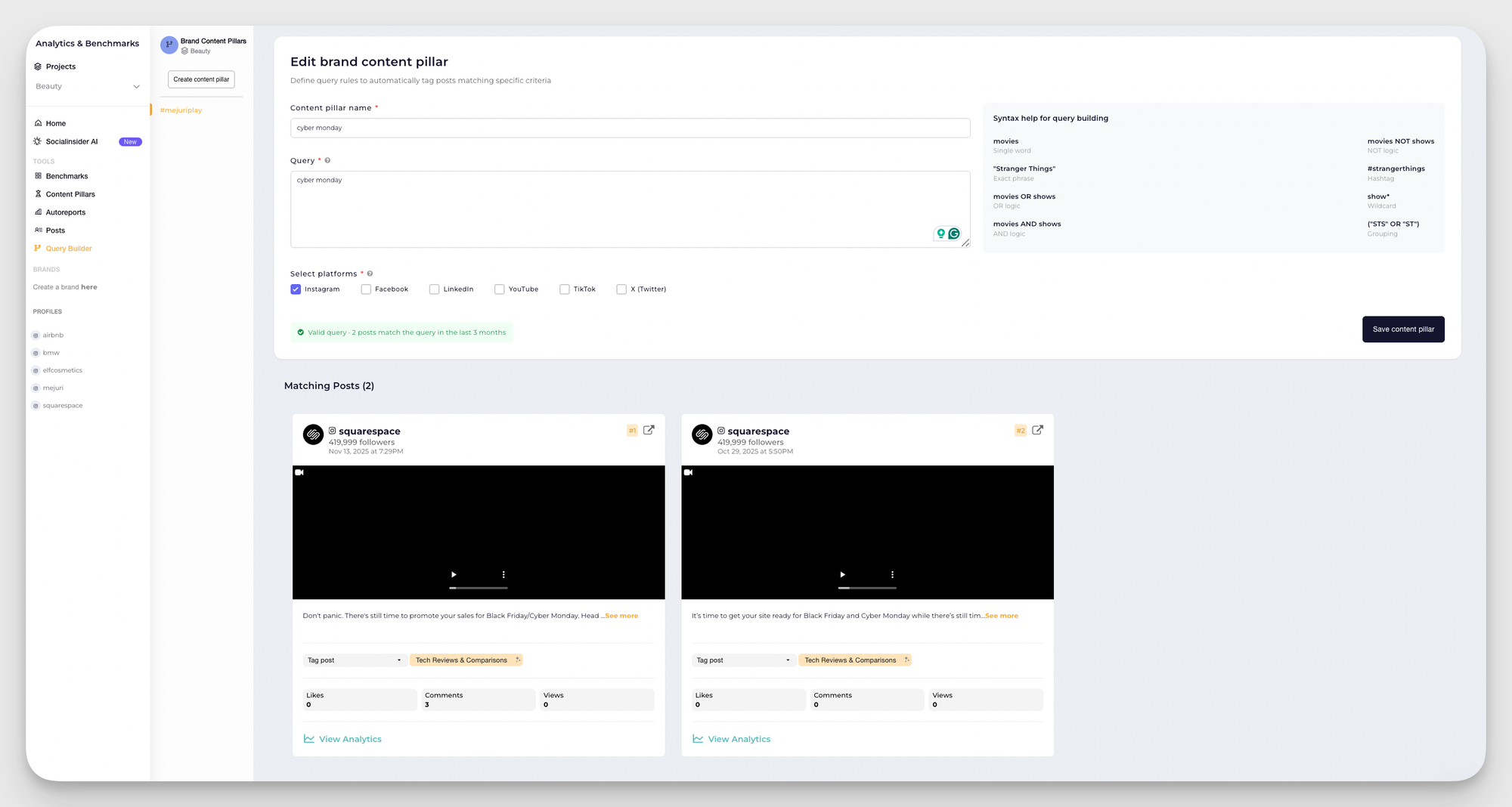
This allows you to monitor performance trends for each query, compare engagement across different content types, and make data-driven decisions for future content planning.
For example, if I want to create auto-tag rules for my skincare brand, I can go for multiple different options:
- If I just want to match a single word, I type it in: hydration
- If I need an exact phrase, I wrap it in quotes: "dry skin routine"
- If I want one thing or another, I use OR: serum OR moisturizer
- If I need both terms together, I use AND: vitamin C AND sensitive skin
- If I want to exclude certain mentions, I use NOT: NOT giveaway
- If I’m looking for hashtags, I simply type them: #skincaretips
Once the rules are set, the tag applies automatically going forward. I don’t have to remember to tag posts, and I don’t risk inconsistency across months of content.
AI-based content tagging
In Socialinsider, the automated tagging for branded content pillars is rule-based. But its AI-based content pillar tagging system is different.
On top of branded tags, Socialinsider divides your and your competitors’ content by industry content pillars. This system uses AI to automatically group content into predefined industry-level pillars. These pillars are designed to reflect common content themes across an entire industry, not just one brand.

AI-based tagging can automatically group posts into themes like Industry News & Trends, Insights, or Promotions. This happens without me setting up keywords or rules in advance.
This is especially useful when I’m doing competitor research. I can quickly see how different brands structure their content, which pillars they rely on most, and how their content mix compares to mine.
AI-based tagging helps me answer bigger questions faster:
- What topics dominate this industry?
- Which pillars drive the most engagement across competitors?
- Where does my content mix look similar or very different?
Want to know how else AI can help you in your social media analysis? Check out Socialinsider’s guide to AI-driven social media analytics!
Recommended platform-specific content tagging strategies
There’s no single correct way to tag content across platforms. The categories you choose depend on your setup, level of detail, and generally the way you want to approach your content management.
So the pillars stay consistent, but the way you bring them to life shifts based on the platform and the audience there.
Here are some of the tagging structures I personally find helpful in my own work when I want to understand platform-specific performance a bit better:
On Instagram, I mostly rely on content pillar tags.
Carmen mentions that content pillars should be high-level enough to stay consistent across your channels:
I don’t think the pillars themselves need to change. I see content pillars as the essence of what you’re talking about and what you’re sharing. They should be high-level enough that they apply across platforms. What changes is the delivery. The format, the tone, the hook — all of that depends on the platform. A hook that works on TikTok is very different from what you’d lead with on LinkedIn.
Format matters, too. Depending on the goal you’d like to achieve (e.g., attract new followers or push existing ones down the funnel), you choose different ways to wrap your information.
However, what you’re saying on Instagram affects the results more than the wrapping you choose. Educational posts, community content, and promotional updates tend to perform very differently, and knowing what floats your audience’s boat is key.
My go-to tagging setup here focuses on high-level pillars like:
- Educational
- Community/engagement
- Product updates
- User-generated content
- Behind the scenes
Tagging content this way helps me understand which pillars consistently resonate and which ones need a rethink. It also makes planning easier.
TikTok
For TikTok, I like to tag content based on what’s inside each piece form-wise.
TikTok is more trend-oriented, and they recommend using trending sounds, formats, and effects as the main part of your content strategy on the platform. However, trends alone don’t usually cut it, so you still have to include original content and some sneaky updates.
So my core TikTok tags include:
- Trend
- Original content
- Product updates
This structure helps me keep a healthy balance between platform-friendly, trend-driven visibility, my own original content agenda, and a very thin slice of product-related posts.
LinkedIn content benefits a lot from intent-based tagging, especially if you’re managing both brand and people-focused narratives.
On LinkedIn, I usually tag content into three buckets:
- Product content: Product updates, launches, feature announcements
- Employer brand content: Employee spotlights, team activities, behind-the-scenes, open roles
- Expert content: Industry insights, opinions, thought leadership, commentary on trends
This system helps me keep the balance between being a professional network for both clients and potential employees.
YouTube
YouTube tagging can stay refreshingly simple.
I mostly split content into:
- Long-form content
- Shorts
That’s it, plus a bit of content pillars or general topics.
These two formats behave very differently in terms of reach, watch time, and audience intent. Tagging them separately makes it much easier to understand where growth is coming from.
On Facebook, I find it more useful to tag content by purpose rather than by format.
Unlike more discovery-driven platforms like TikTok, Facebook is more on the community interaction and content redistribution side.
People engage differently here, so this tagging system helps me clarify what kind of outcome I’m expecting from each post.
Useful Facebook-specific tags include:
Useful Facebook-specific tags include:
- Community-focused content: Questions, conversation starters, group-style posts, comment-driven discussions
- Traffic-driving content: Blog links, announcements, long-form resources, external content
- Promotional content: Campaigns, offers, product updates, sales posts
- Evergreen content: Tips, guides, educational posts, or older content resurfaced intentionally
Mistakes to avoid when setting your content tagging system
A content tagging system is supposed to bring clarity. That’s the whole point. If the tagging system is set up poorly, it will slow you down instead of helping you move smoothly.
These are the most common mistakes I see teams make, and all of these pitfalls are avoidable if you know of them:
Overcomplicating the system
This is the most important rule: don’t overcomplicate your content tagging system!
You don’t need 30 or 40 tags to get insights. In fact, the more tags you have, the harder it becomes to use them consistently. At that point, the whole idea of analyzing content in bigger, clearer chunks gets lost.
Start small. Use only the tags you know you’ll actually use for planning, analysis, or reporting. You can always add more later if a real need shows up.
I recommend starting with content pillar tags — they provide the optimal data chunks to begin with.
Inconsistent tag naming
This one sounds small, but it breaks content tagging systems faster than anything else.
Tags like Video, Videos, and Video content create three separate buckets that mean the same thing. When it’s time to analyze or filter content, you’ll either miss posts or spend time cleaning up tags instead of learning from them.
Consistency makes tags searchable and useful over time. Decide early whether your tags are singular or plural, how you format dates, and how detailed names should be. Pick one naming format and stick to it.
Tagging without analysis
More tags don’t automatically mean better insights.
Tagging every post with every remotely relevant label usually comes from good intentions, but it defeats the purpose. If all posts are tagged with everything, you’re no longer categorizing content.
Each tag should answer a specific question. If you can’t clearly say why a tag exists and why it goes on this particular post, it probably doesn’t belong in your system.
Not turning tag data into strategic decisions
Tags on their own don’t improve your strategy. What you do with them does.
If you tag content consistently but never look at performance by tag, nothing changes. A content tagging system should help you decide what to double down on, what to pause, and what to rethink. This is why we collect data — to base our decisions on it.
If a content pillar consistently outperforms the rest, that’s a strategic signal. If a campaign tag underperforms across platforms, that’s feedback. Tags only matter when they lead to decisions.
Final thoughts
A properly set up content tagging system is a great help in content management. Tags help you categorize your content, analyze it in bigger data sets, and gain that good grip of your content on a medium level: not too granular, not too high-level.
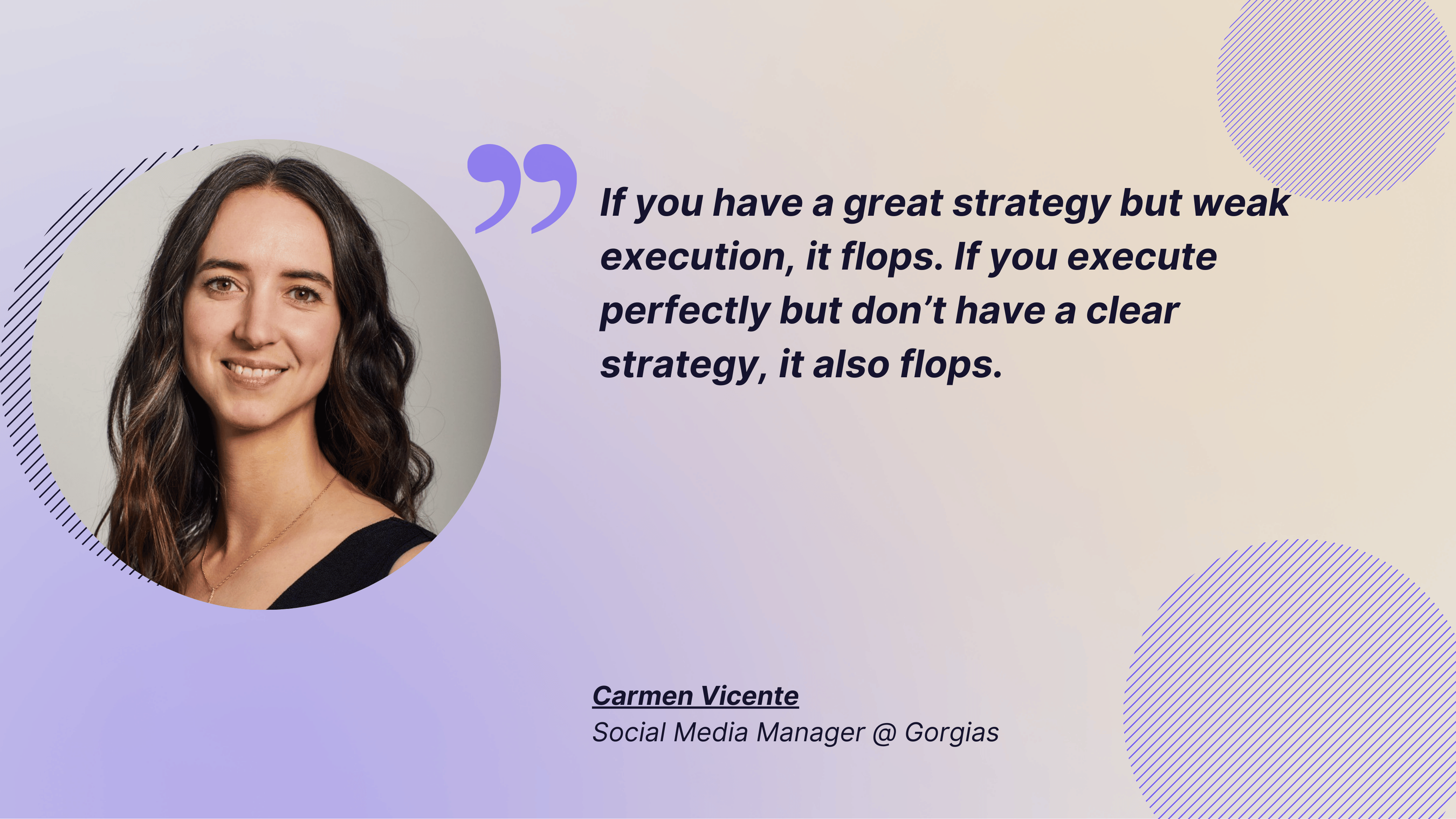
Content tagging system helps you keep that fragile balance between a great strategy, a clear content calendar, and sustainable execution. Carmen says:
If you have a great strategy but weak execution, it flops. If you execute perfectly but don’t have a clear strategy, it also flops. You need a clear content calendar, well-defined content pillars, and a shared understanding of how success is measured. And then you need people who can execute that strategy consistently, every single day. It’s a two-part system, and neither part works without the other.
You can start with manual tagging or use a tool like Socialinsider to automate your content tagging and bring the AI power into it. Try Socialinsider today — first 14 days are free!
FAQs on the content tagging system
What does taxonomy mean?
Taxonomy is the structure behind your content tags. It sets rules for naming, categories, and relationships between tags, like campaigns, content pillars, or formats.
A clear taxonomy keeps your content tagging system consistent, scalable, and easy to understand across the team.
How many content tags can one social media post have?
There’s no limit on how many tags a post can have, but fewer is usually better. My rule of thumb is no more than 3–4 tags per post: one for campaign, one for intent, one for pillar, and one for format.
Kseniia Volodina
Content marketer with a background in journalism; digital nomad, and tech geek. In love with blogs, storytelling, strategies, and old-school Instagram. If it can be written, I probably wrote it.
Know what your competitors do — before your manager asks
Get instant social benchmarks & reports without manual work.
You might also like





Improve your social media strategy with Socialinsider!
Use in-depth data to measure your social accounts’ performance, analyze competitors, and gain insights to improve your strategy.