9 Best X (Twitter) Analytics Tools For Successful Performance Evaluation
Discover the top Twitter analytics tools right now and enhance your strategy. Track engagement, analyze trends, and optimize your content for success.


If you try to find analytics on X (formerly Twitter), you’d be surprised — there’s none. Or, to be precise, there’s no built-in Twitter analytics you can use for free. That’s unfortunate for any social media manager.
Does it mean we’re flying blind without social media analytics? Not our style. Instead, we look for third-party Twitter analytics tools.
A proper Twitter analytics tool helps you move from “this tweet did well” to “here’s why it worked, and how to repeat it.”In this article, I’ve gathered my favorite Twitter (X) analytics tools, covering different needs, budgets, and team setups. Let’s go!
Key takeaways
-
Socialinsider — The right pick if you need competitive benchmarking and cross-platform context to turn X performance data into strategic insights.
-
X Premium (native analytics) — Makes sense when you only need surface-level, platform-native performance data and don’t require strategic comparisons or reporting.
-
Audiense — The right pick if understanding, segmenting, and activating your X audience matters more than post-level performance tracking.
-
Buffer — Well suited to small teams that want simple publishing and basic X analytics without managing multiple tools.
-
Metricool — Strong for teams that want affordable X analytics and scheduling with light competitor context.
-
Agorapulse — A solid choice when managing multiple X accounts, approvals, and client reporting is part of daily work.
-
Talkwalker — The right pick if monitoring sentiment, brand perception, and broader conversations on X is a priority.
-
Keyhole — Strong for tracking campaigns, hashtags, and emerging trends on X over time.
-
Brandwatch — Well suited to enterprise teams that need large-scale consumer insights, long-term historical data, and advanced market analysis.
Why do teams need a Twitter analytics tool?
X, formerly known as Twitter, hasn’t exactly made life easier for social media managers lately.
First came paid API access. Then several native features, including built-in analytics, moved behind the X Premium paywall. If you don’t pay, you’re left with likes and impressions on individual tweets. Yikes.
If your team wants to use X as an active platform and grow there, flying blind is not an option. You need to understand what content works and how your account evolves over time.
You can pay for X Premium. But even with access unlocked, native analytics feel a bit underwhelming. You get basic performance stats, but very little context, flexibility, or strategic depth.
So if analytics access costs money either way, it makes sense to choose a tool that gives you more than the bare minimum.
What are the key features of an effective Twitter analytics tool?
Not everyone uses X analytics for the same reason. Your goal shapes what features matter most.
Still, a solid X (Twitter) analytics tool usually includes the following:
- In-depth social media metrics. Basic engagement numbers only tell you what happened, not why. Deeper metrics help you understand underlying trends and use them for strengthening your strategy.
- Competitive benchmarking. Performance numbers mean very little in isolation. Benchmarking adds context by showing how your engagement and growth compare to similar accounts.
- Content tagging. Not all tweets have the same goal. Content tagging lets you group posts by campaign, content pillar, or theme, making it easier to see which types of messages support your strategy.
- Cross-channel analytics. X rarely works alone in a social strategy. Cross-platform analytics help you understand how X fits into the bigger picture.
- Historical data. Strategy is built on patterns. Access to historical data helps you spot long-term trends, seasonal changes, and growth trajectories that short timeframes simply can’t show.
How to choose the right Twitter analytics tool for your needs?
The first question to ask is simple: what problem do you want this tool to solve?
Some Twitter analytics tools focus on engagement data. Others lean toward sentiment analysis, competitor analysis, or audience research. Depending on your main task, the “best” tool can look very different.
Here are 5 other factors that I pay attention to when choosing a tool:
- Feature coverage. If one tool covers most of your needs, it’s usually better than juggling five smaller ones. Fewer tools mean less context switching and cleaner reporting.
- Interface and usability. A user-friendly UI is not a nice-to-have. If the tool feels cluttered or confusing, you’ll use it less, no matter how powerful it is.
- Integrations. If your analytics need to connect with other tools in your stack, check that upfront. Manual data transfers get old fast and often lead to gaps or errors.
- Customer support. Support quality matters more than most teams expect. Slow replies, time zone gaps, or generic answers can seriously slow you down.
- Budget vs quality check. Budgets are real constraints. Make sure the price fits your limits and matches the feature set. Paying less for a tool you can’t rely on rarely pays off in the long run.
Top 9 Twitter analytics tools on the market right now
Socialinsider — best for competitive intelligence and cross-platform benchmarking
Socialinsider is a tool built entirely around analytics and competitive insights. For teams serious about understanding how their X performance compares to competitors and industry benchmarks, this focus is what makes Socialinsider stand out.
Key features
- Performance data and competitive benchmarking: Competitive research is where Socialinsider really shines. You can track competitors’ performance on X and benchmark your account against individual profiles or industry averages.
For X analytics, Socialinsider has lots of benchmarking metrics: follower count and follower growth, engagement, average engagement rate by followers and by impressions, replies, reposts, and posting frequency.
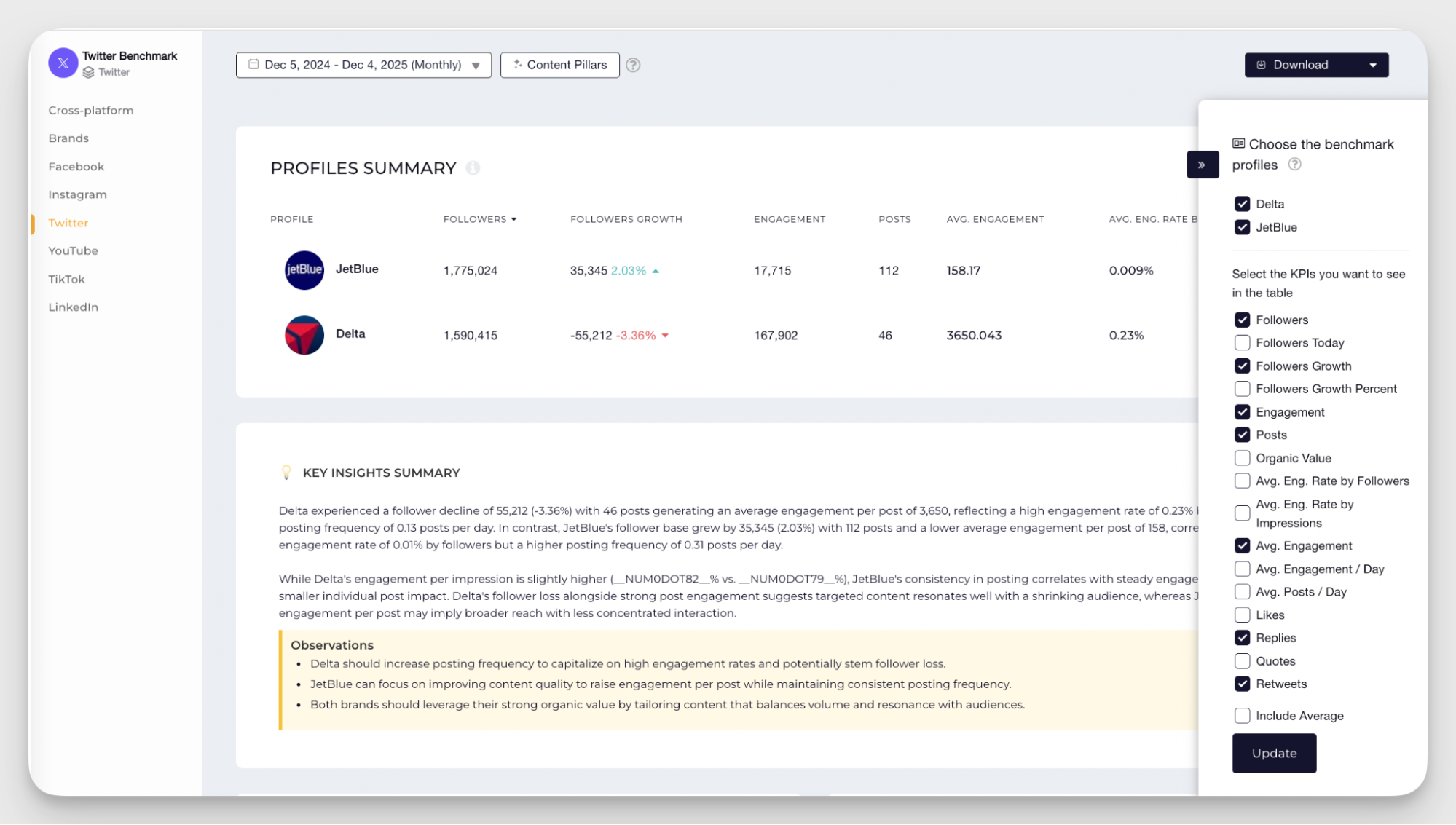
You can choose to analyze these benchmarks at the X-only level or view them across platforms. This adds useful context when you’re trying to understand whether X is underperforming or playing a different role in your competitors’ mix.
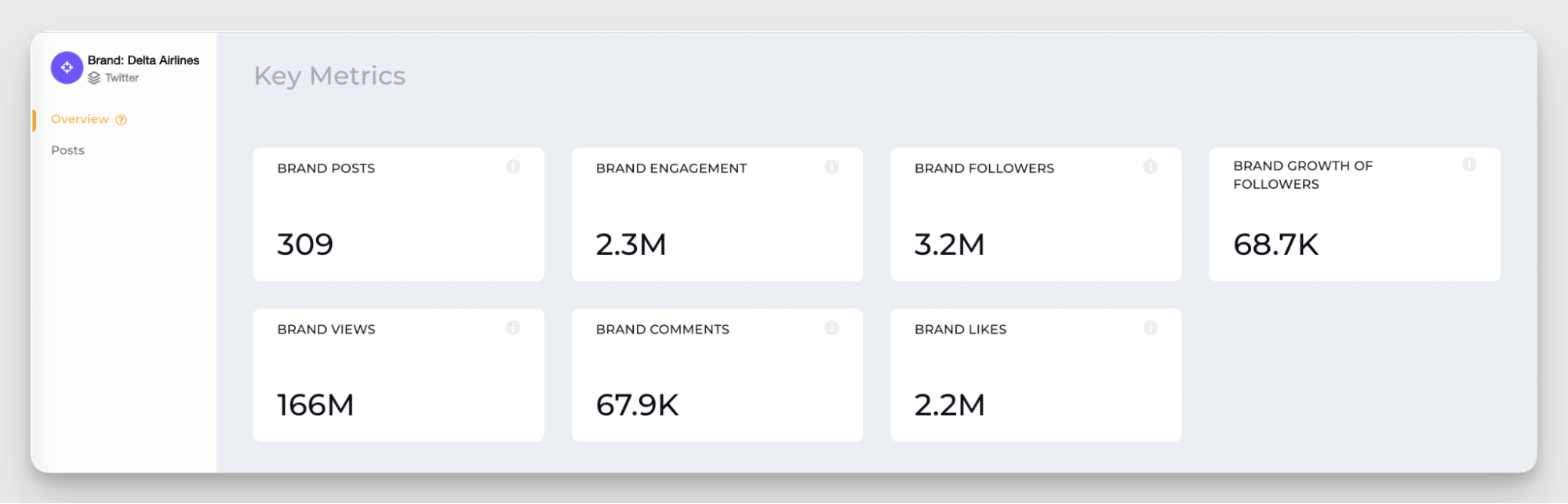
- Audience, engagement, impressions, and views breakdown: Socialinsider breaks down audience growth, engagement, impressions, and views in a way that’s easy to benchmark against competitors or industry standards.
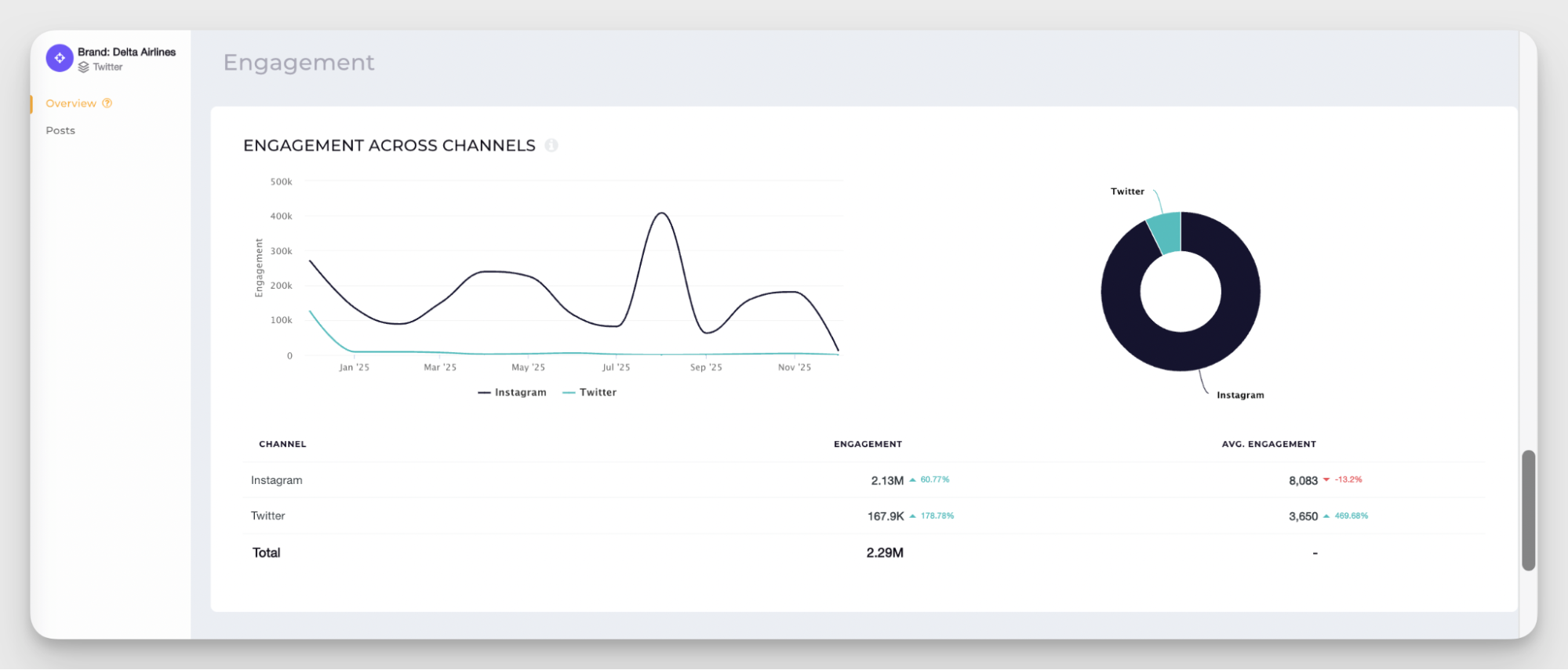
You can analyze this data specifically for X or switch to a cross-channel view. Seeing how X stacks up against other platforms helps you understand whether low engagement is a content issue, a platform trend, or just a difference in audience behavior.
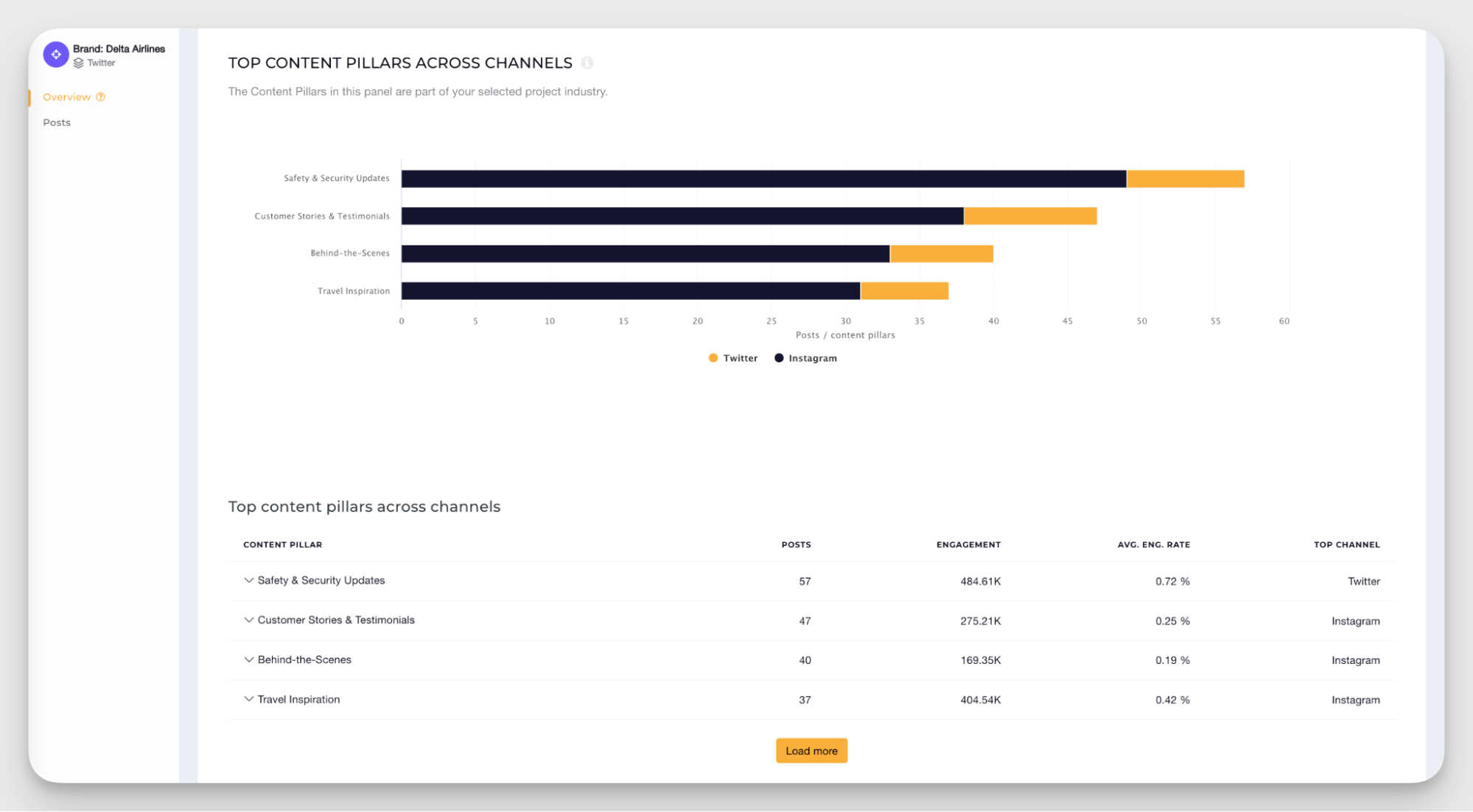
- Top posts and content pillars: Socialinsider lets you analyze top-performing posts for both your own account and your competitors’ X profiles. On top of that, it runs content pillar analysis using AI-powered tagging.
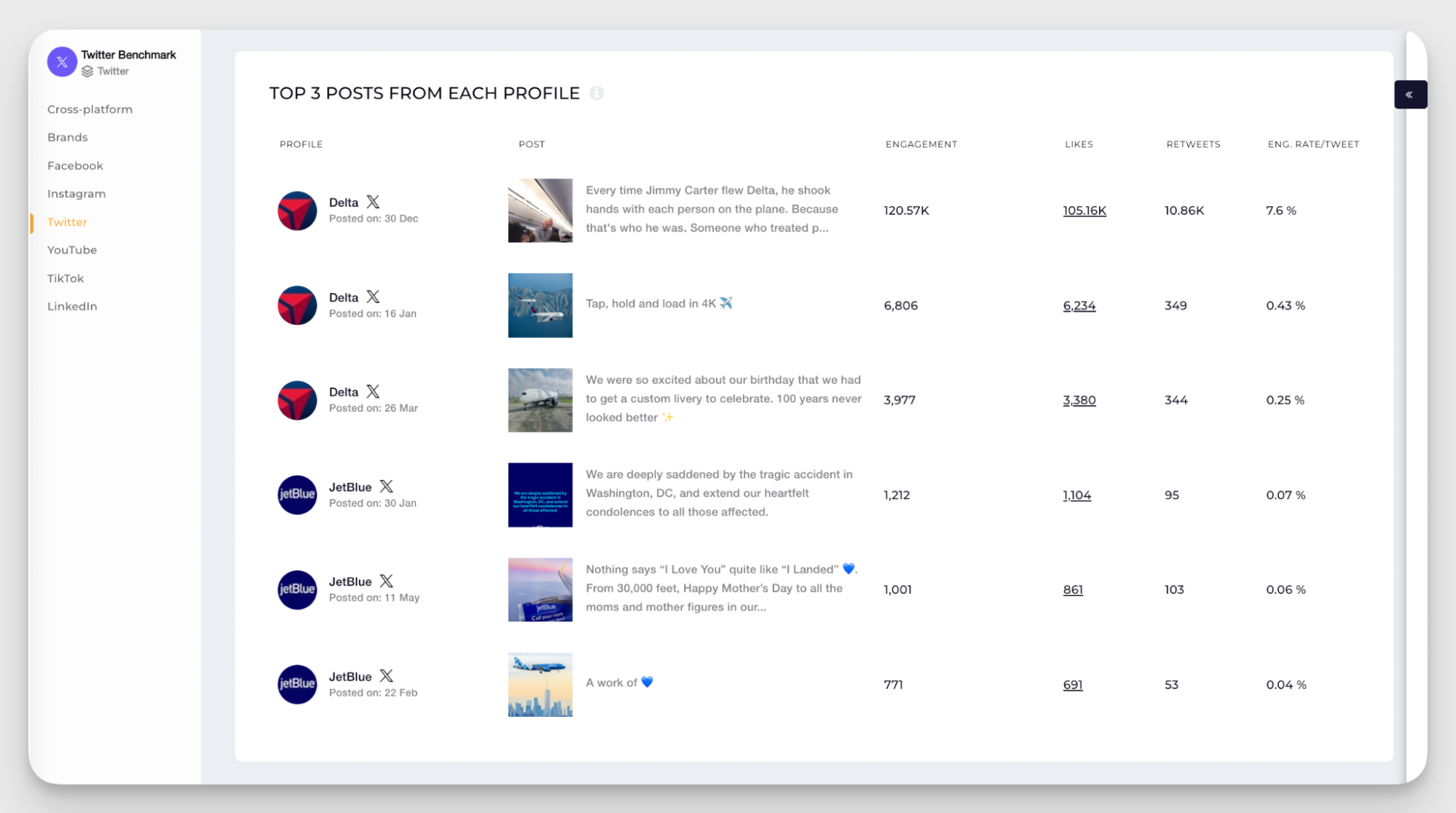
Posts are automatically grouped by content pillar, so you can quickly identify which topics and formats perform the best. This also helps you spot gaps in your own X content strategy.
You can keep this analysis X-focused or compare content pillars across platforms to see whether some pillars perform better on X or if it’s consistent.
- Organic Value: This metric estimates how much it would cost in ad spend to achieve the same results you or your competitors are getting organically. This helps quantify the real impact of organic performance and see the value of your X profile. Personally, it is one of my favorites.
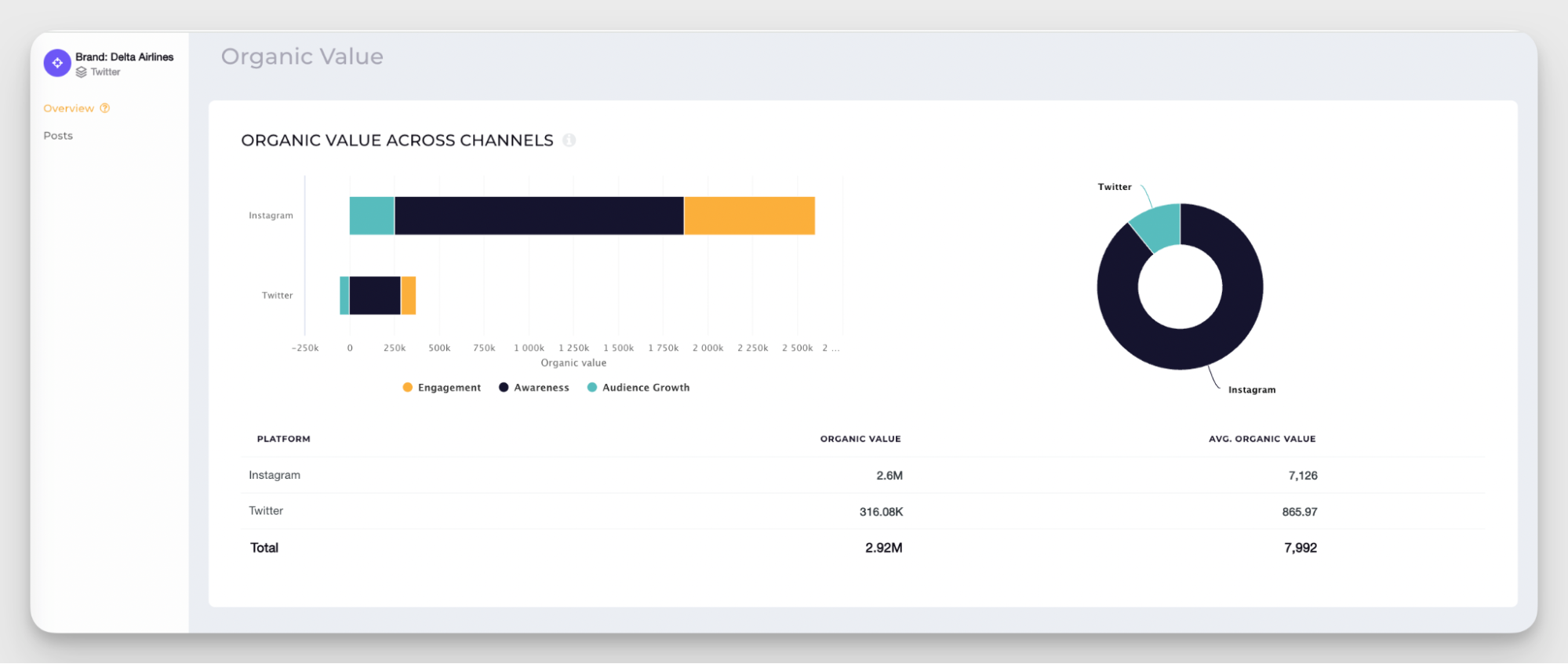
In cross-channel mode, you can see which channel is doing the heavy lifting in your competitors’ strategies. It might turn out that X plays a supporting role, which can influence your resource planning or simply correct the expected results.
Pricing:
Socialinsider plans start at $89/month, and it has 4 plans, including a custom one. The good news is that it also allows a 14-day free trial.
What users say:
- Reviewers highlight Socialinsider’s competitive data as exceptionally accurate and deep, saying it offers insights into competitor strategies they haven’t found in other tools. (G2)
- Users appreciate the clean, intuitive interface and the ability to access in-depth stats without connecting a social account. (G2)
- Some reviewers note that Socialinsider doesn’t support publishing to social platforms, which they’d like to see added. (G2)
Native Twitter analytics
Just to get this one out of the way first. Native Twitter analytics is the data available to X Premium users directly inside X.
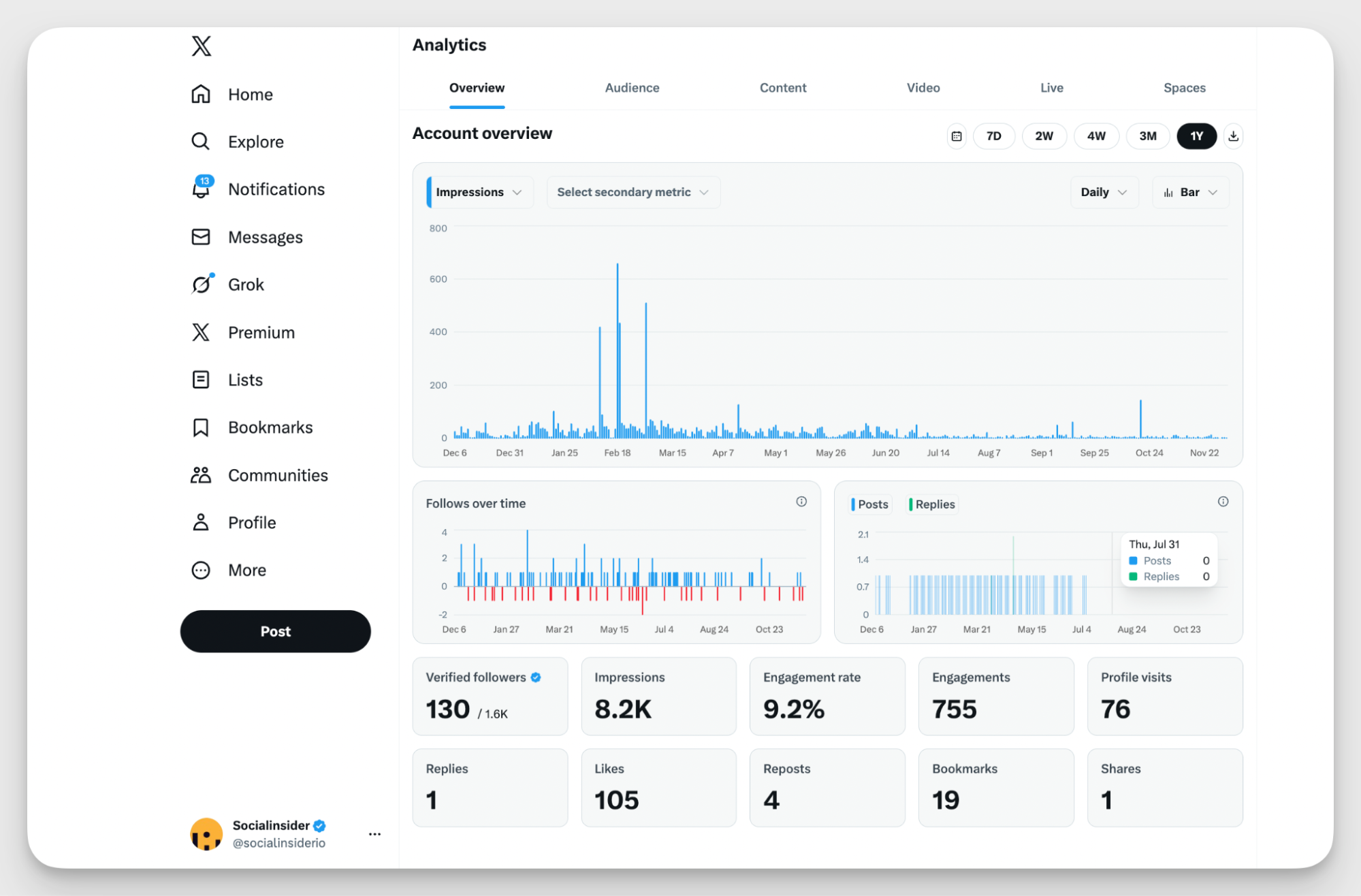
It’s the most “official” source of data you can get, because it comes straight from the platform itself. It’s also the baseline most teams compare other tools against.
Key features
- Account overview. Impressions, engagement rate, total engagements, replies, likes, reposts, and new followers over time.
- Audience insights. Basic audience breakdowns like location, gender, active hours, and device type.
- Content performance. A list of your posts (or posts and replies) that you can sort by impressions, likes, replies, and reposts.
- Video analytics. Video views, watch time, completion rate, and performance for individual videos.
Pricing:
Pricing depends on your country, but the cheapest X Premium plan starts at $8/month.
What are the limitations of X native analytics compared to third-party tools?
Native Twitter analytics works fine for surface-level tracking. Where it starts to fall short is anything strategic:
- No way to compare your performance to competitors
- No content tagging for campaigns or pillars
- No cross-channel view
- No advanced reporting.
Plus, it’s generally hard to rely on it long-term with pricing and feature access changes.
If X is your only channel and you just want basic stats, native analytics can be enough.
If you want context, comparisons, and insights you can actually build a content strategy on, third-party tools start to make a lot more sense.
Audiense — best for Twitter audience segmentation and persona development
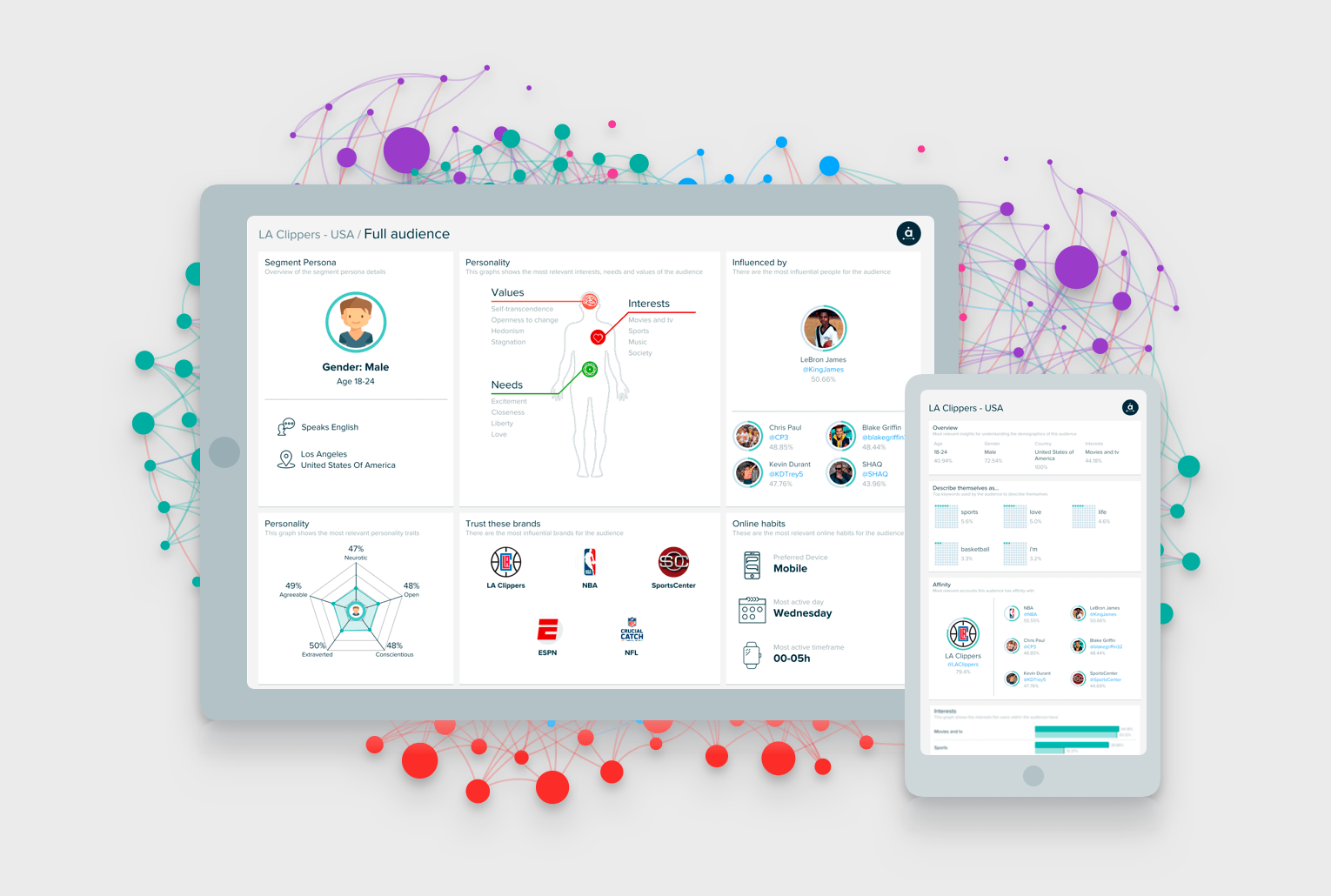
Audiense takes a very different angle from classic Twitter analytics tools. Instead of focusing on post-by-post performance, Audiense Connect helps teams understand, segment, and manage their X audience at scale.
Key features
- X audience analysis and segmentation. Audiense analyzes your followers and segments them based on interests, behavior, location, and activity. It also helps identify inactive, fake, or spam accounts.
- Audience overlap. The platform shows how audiences overlap between different X accounts. You can spot shared communities, niche groups, and potential partnership opportunities.
- Network management at scale. Audiense Connect works a bit like a CRM for X. You can filter accounts by criteria like location, bio keywords, or activity level, and clean up your following.
- Advanced ad targeting for X. Audiense allows you to create custom audiences for X ads, so you can be more precise in your targeting.
Pricing:
Audiense has a limited free plan. It’s paid plan costs $62.99/month.
What users say:
- Users mention that the clustering functionality helps present audience insights to stakeholders in a clear, easy-to-digest way (G2).
- Many reviewers highlight the IBM Watson integration, which uses machine learning to generate detailed personality profiles for target audiences. (G2)
Some users note that the interface could be clearer and that loading times can be slow. (G2)
Buffer — best all-in-one social media management solution for small teams
Buffer is a simple, no-frills social media management tool that covers the basics well. It combines publishing, community management, and analytics across all major platforms, including X.
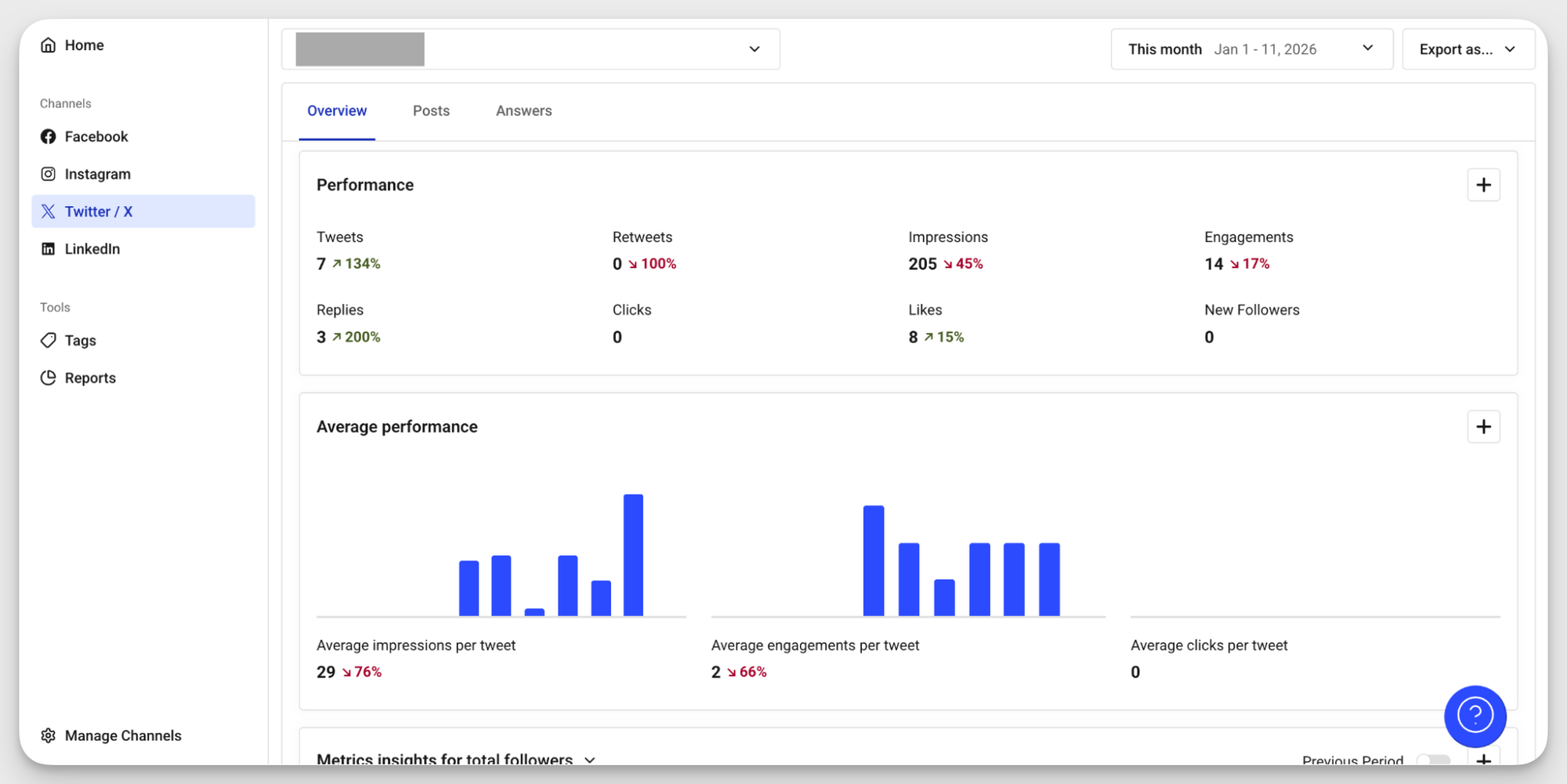
If you’re a small team looking for one tool that does a bit of everything, Buffer is a solid choice.
Key features:
- Best time to publish and audience insights. Identify when your X audience is most active and ready to engage. Buffer also provides basic demographic and location data to help with targeting.
- Performance data collection. Track day-to-day tweet performance with account-level overviews covering impressions, engagements, and most engaging hashtags. Export the data into a report and share with stakeholders.
- Automated publishing. Schedule and auto-publish tweets and threads to X. You can also post to Instagram, TikTok, Facebook, Pinterest, LinkedIn, YouTube Shorts, and Google Business Profile.
- AI idea assistant. Collect and organize content ideas in one place. When you’re short on inspiration, Buffer’s AI Assistant helps generate or refine posts.
Pricing:
Buffer offers a free plan with limited features and basic analytics. Paid plans start at $6 per month per channel.
What users say:
- Users mention that, beyond solid publishing for mainstream channels like X, Buffer is also a good choice for less common platforms such as Bluesky. (G2).
- Many praise it for its simple and intuitive interface that is easy to navigate and onboard into (G2).
- Some reviewers note that analytics fall short for larger teams that need more detailed performance data. (G2).
Metricool — best for X analytics and publishing on a budget
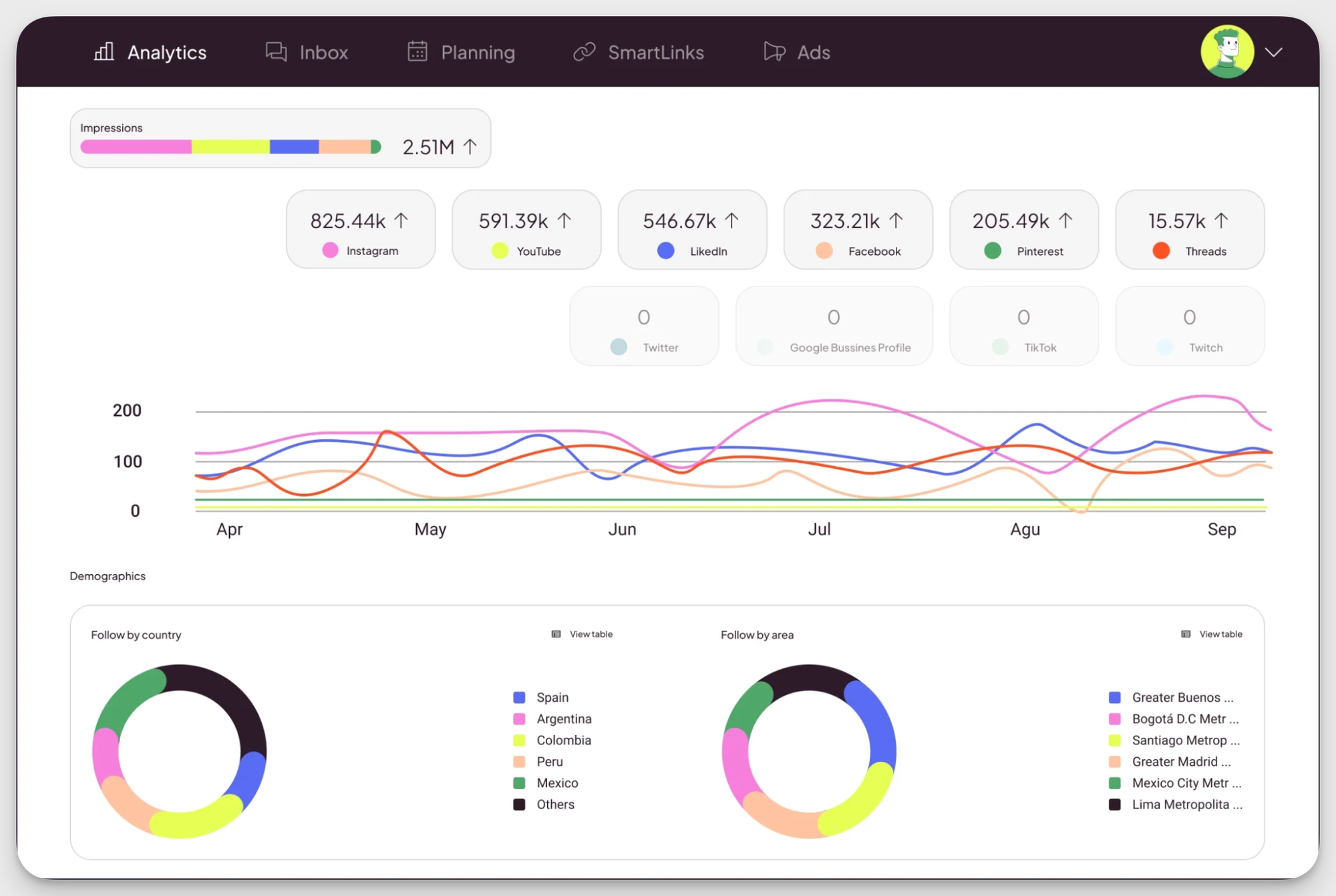
Metricool is a social media management tool that combines publishing, analytics, and competitor tracking across multiple platforms, including X. In its X analytics, Metricool covers the essentials: follower growth, post performance, and real-time comparisons.
Key features:
- X performance analytics. Monitor essential Twitter metrics like follower growth, impressions, engagements, and post-level performance. Metricool makes it easy to see which tweets drive interaction and how your account evolves.
- Post analysis and content insights. Analyze individual tweets to understand engagement patterns and identify content that performs best with your audience.
- Competitor comparison. Compare your X account against competitors in real time, tracking follower counts and engagement to add context to your performance.
- Publishing and scheduling. Schedule and publish tweets directly from Metricool, alongside content for other social platforms, keeping analytics and publishing in one place.
- Hashtag tracker. Track hashtag performance over time to see which tags increase reach and engagement.
Pricing:
Metricool has a limited free plan and two paid plans starting at $22/month.
What users say:
- Reviewers say Metricool provides valuable analytics and performance insights, and highlight that the platform is easy to set up and quick to learn. (G2)
- Users appreciate that Metricool supports multiple platforms, offers generous user seats, and delivers solid value for the price, with reliable account connections and helpful customer support. (G2)
- Some reviewers note that advanced analytics and benchmarking features are locked behind higher-tier plans, which can limit deeper analysis on basic plans. (G2)
Agorapulse — best for agencies managing multiple client accounts
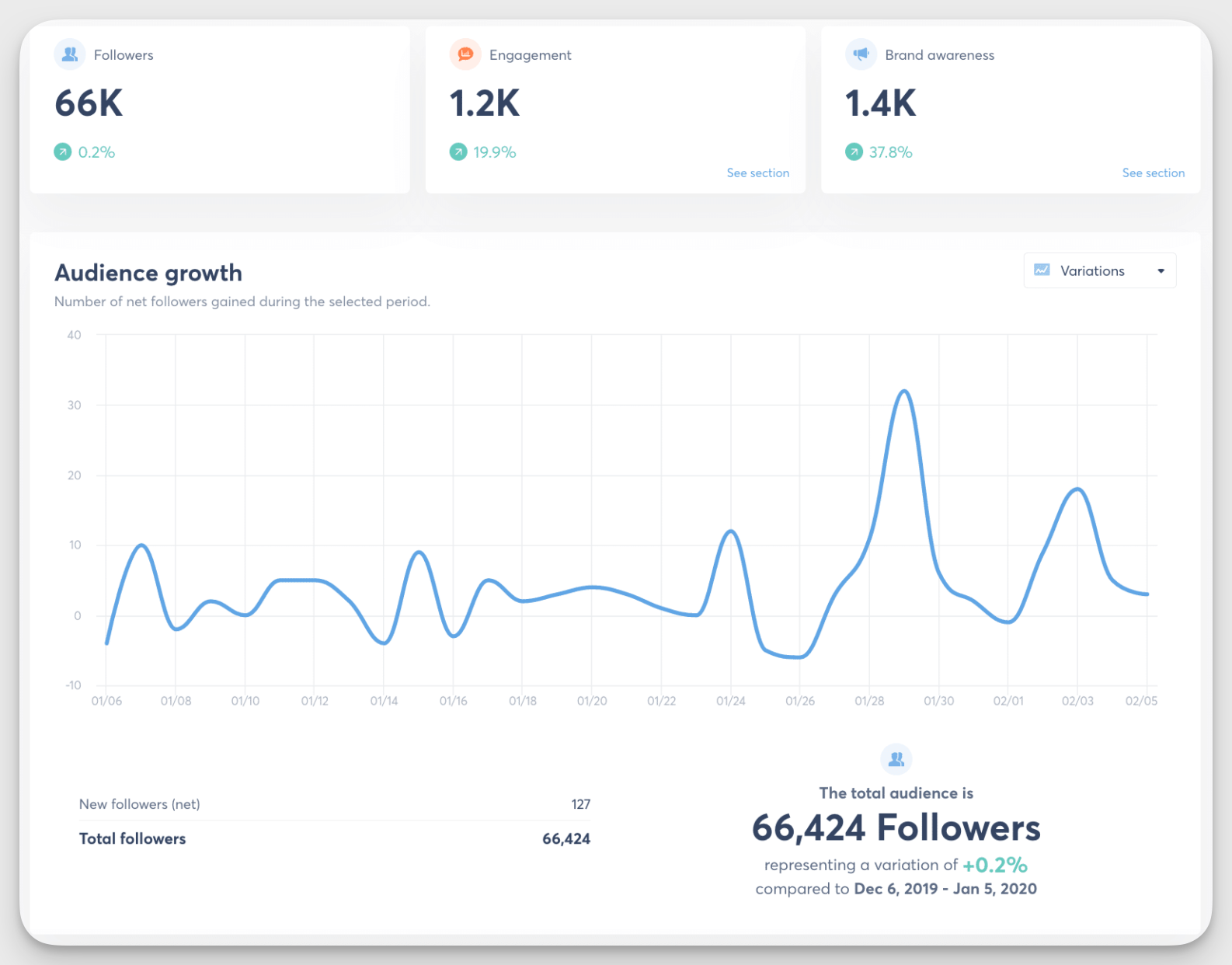
Agorapulse is a social media management and community-focused tool for agencies and project-oriented teams. Its biggest strength is a solid unified inbox, which makes handling replies, mentions, and comments across multiple X accounts far less chaotic.
Key features:
- Community management reports. Keep track of replies, reviews, items, and comments. The report also includes your average response time and how well each community manager performs.
- Detailed X analytics with customizable reports. Monitor account performance on X and generate branded, customizable reports for clients.
- Recommendations and AI summaries. Get insights based on past engagement, including best days and times to post, effective post types, and topics.
- Automated publishing to X. Schedule and approve posts and threads, with support for bulk uploads and structured approval workflows.
- Multiple workspaces and content calendars. Manage separate clients with dedicated workspaces, calendars, and permission settings to keep everything organized.
Pricing:
Agorapulse plans start at $99 per month.
What users say:
- Users highlight Agorapulse’s built-in UTM builder that comes in handy for managing and reporting to clients (G2)
- People highlight that the support team is highly responsive, and the tool itself is easy to use (G2)
- Some mention that the reporting is not as comprehensive as that in dedicated data analysis platforms (G2)
Talkwalker — best for sentiment analysis and brand monitoring
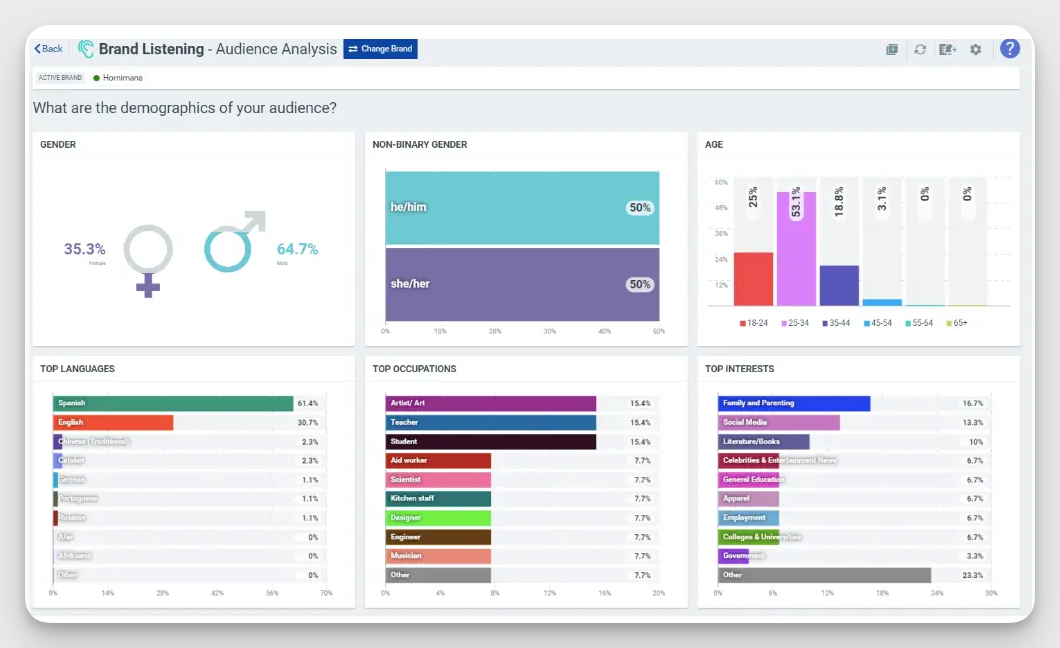
Talkwalker, now part of Hootsuite, focuses on social listening, media monitoring, and benchmarking. It helps you track sentiment around products or campaigns and jump on trending conversations for better visibility and engagement on X.
Key features
- Social listening across platforms and formats. Track keywords and brand mentions across dozens of social networks, including X. Talkwalker also supports visual listening, meaning it can detect brand mentions in images, videos, and even podcasts.
- Sentiment reporting. Monitor how sentiment around your brand, products, or campaigns changes over time.
- Competitor benchmarking. Compare your brand’s visibility, engagement, and sentiment against competitors to understand where you stand.
- Audience segmentation. Analyze how different audience groups talk about and react to your brand. Segment-level insights help teams adjust strategy when audience behavior or expectations shift.
Pricing:
Talkwalker has custom pricing. You can book a demo to get a personalized quote.
What users say:
- Users mention extensive insights that other listening and monitoring tools can’t provide (G2)
- The customer support representatives are helpful in onboarding and setting up (G2)
- Reviewers say that Talkwalker has a significant learning curve and takes time to set up and get used to (G2)
Keyhole — best for trend spotting and campaign tracking
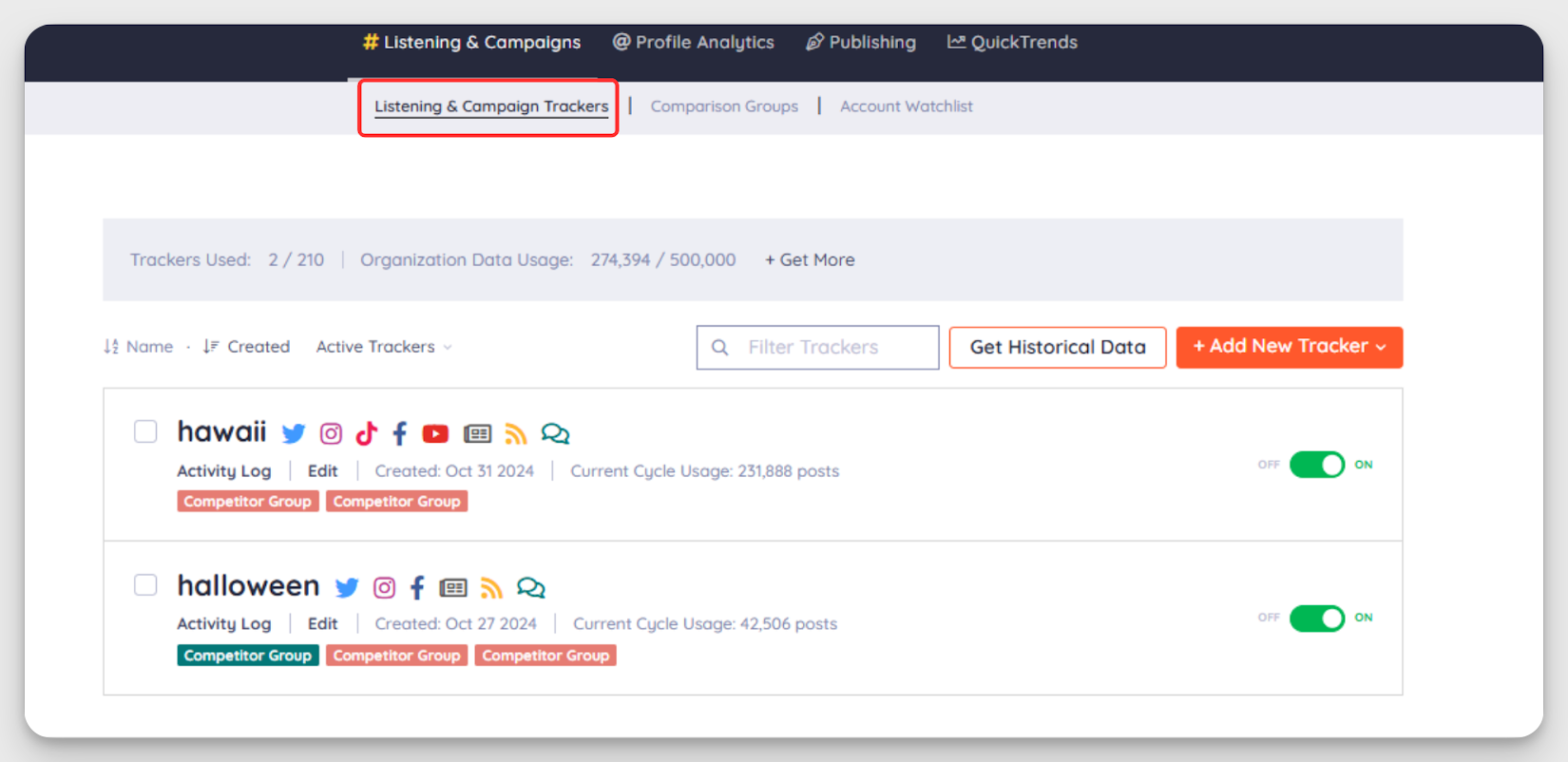
Keyhole, now part of Muck Rack, focuses on social listening and trend tracking. It helps teams spot emerging topics, analyze historical data, and track performance at both campaign and day-to-day levels on X.
Key features:
- Trend spotting. Keyhole monitors conversations around your brand, competitors, and industry to help you identify emerging topics and shifts in attention.
- X performance analytics. Track engagement, identify top-performing posts, and analyze hot hashtags to understand what content resonates on X.
- Audience insights and sentiment. Analyze how audiences respond to posts and campaigns over time and what they think of your brand, products, and competitors.
- X historical insights. Access long-term data on tweets, reach, impressions, top content, influencers, and geographic distribution.
- Social comparison and campaign tracking. Benchmark competitors, compare your own accounts, and track influencer or campaign performance using custom tags.
Pricing:
As part of Muck Rack, Keyhole doesn’t have standalone plans. You can book a demo for a Muck Rack + Keyhole bundle and get a custom quote.
What users say:
- Reviewers mention that Keyhole’s analytics, especially around hashtags, are solid and high quality, and that the platform is easy to navigate. (G2)
- The users say that the flexibility in the data that can be tracked and captured makes Keyhole a good fit for campaign tracking. (G2)
- People mention that Keyhole’s support is pretty slow to react. (G2) Some also say the data is not always consistent with other resources (G2).
Brandwatch — best for enterprise-level consumer insights
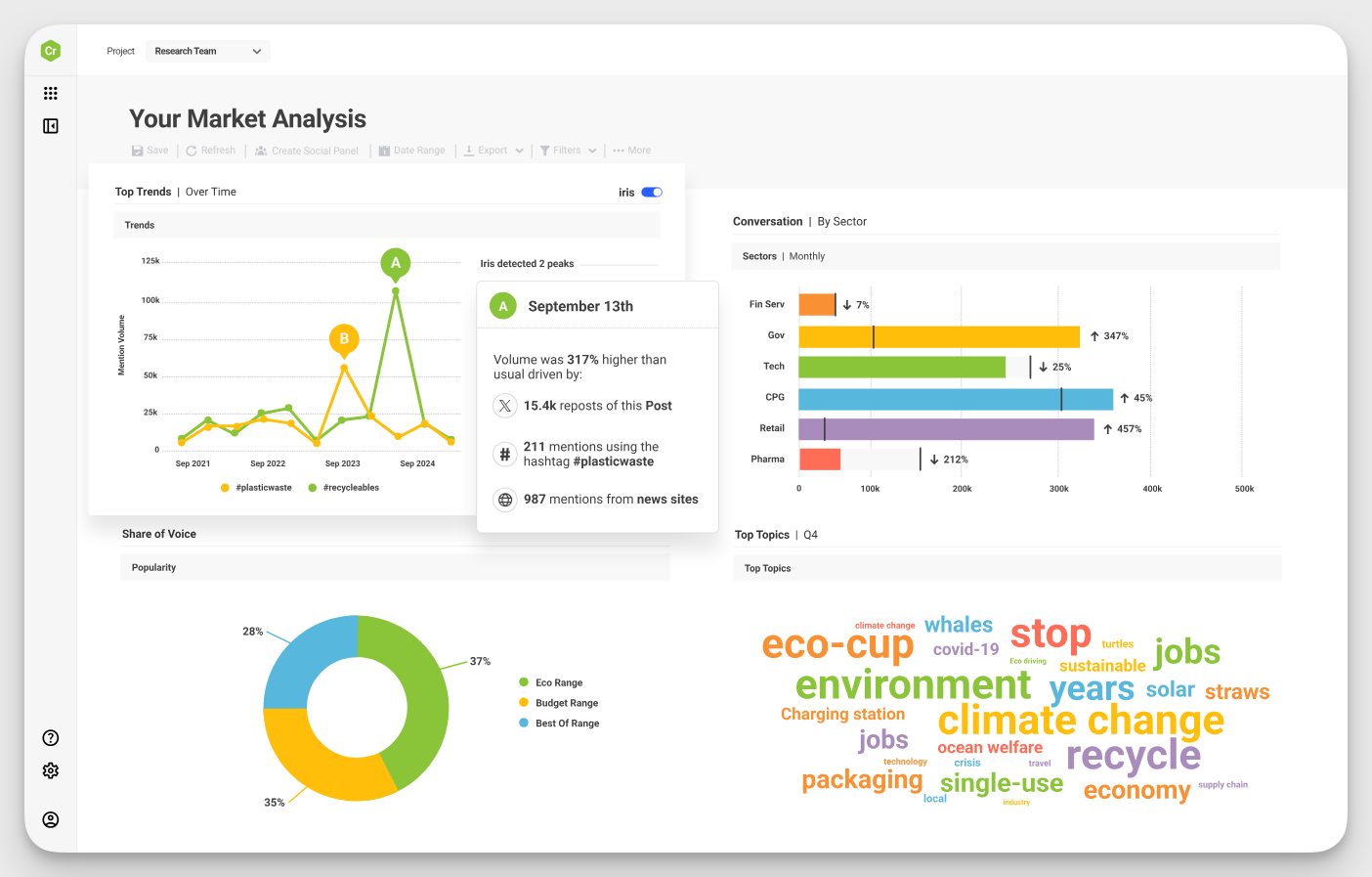
Brandwatch has two core offerings: a social media management solution with scheduling and analytics, and a consumer intelligence platform focused on searching, segmenting, and analyzing conversations, feedback, and brand mentions.
It’s a strong fit for enterprises that need precise, research-grade analytics on brand performance.
Key features:
- Brand mention monitoring. Track brand, product, and keyword mentions on X and other resources in real time and historically, with custom filters to separate noise from data.
- Scheduling and performance analysis. Plan and publish posts to social media platforms while tracking engagement, reach, and account-level performance.
- Historical data access. Analyze up to 12 months of consumer conversation data and up to 7 years of competitive channel analytics, which makes Brandwatch especially useful for long-term strategy and trend validation.
- Competitor benchmarking. Compare your brand’s visibility, engagement, and conversation share against competitors to understand where you stand in your market.
- Trend analysis and discovery. Use Brandwatch’s large archive of consumer opinion and AI-powered analysis to detect trends early on.
Pricing:
Brandwatch uses custom pricing and requires booking a demo.
What users say:
- Reviewers say Brandwatch makes it easy to surface and analyze conversations, even for complex queries, and highlight the intuitive interface. (G2)
- Users also mention the highly detailed and comprehensive database (G2).
- Many mention a steep learning curve and an overwhelming amount of data in some reports that takes time to get used to. (G2)
Final thoughts
Choosing the right X analytics tool comes down to one thing: what problem are you trying to solve? Before committing, define your focus and test the tool in real conditions. A demo or trial helps you see whether it fits your workflow and if it’s worth the budget.
If competitive benchmarking and cross-channel context matter to your strategy, give Socialinsider a closer look. You can try it free for 14 days — no strings attached.
FAQs on Twitter analytics tools
Why does cross-channel analytics matter?
Cross-channel analytics provide context for Twitter performance by showing how X compares to other platforms in your or your competitors’ social media strategy. This helps you set more realistic expectations about X’s role in the bigger picture.
How to use Twitter analytics to improve your strategy?
- Identify your best-performing content types. Look at which tweets drive replies, reposts, and engagement to understand what resonates with your audience.
- Optimize posting times based on audience activity. Posting when your audience is most active helps increase reach and engagement.
- Benchmark against competitors in your industry. Comparing your Twitter performance to similar accounts adds context to your results.
- Use analytics insights to guide content creation. Let performance data shape what you post next.
What are common Twitter analytics mistakes?
- Not tracking performance consistently over time. Looking at short timeframes can lead to wrong conclusions and missed long-term trends.
- Ignoring people’s sentiment. Focusing only on impressions or likes can mislead you and hide negative feedback, confusion, or opportunities.
- Collecting data without acting on it. Twitter analytics only matter if they influence what you post, how often you post, or what you stop doing.
Kseniia Volodina
Content marketer with a background in journalism; digital nomad, and tech geek. In love with blogs, storytelling, strategies, and old-school Instagram. If it can be written, I probably wrote it.
Analyze your competitors in seconds
Track & analyze your competitors and get top social media metrics and more!
You might also like



Improve your social media strategy with Socialinsider!
Use in-depth data to measure your social accounts’ performance, analyze competitors, and gain insights to improve your strategy.