Instagram Reels Analytics: Guide, Metrics & Benchmarks
Learn what Instagram Reels analytics actually measure, the engagement and length benchmarks that count as good, and how to read your dashboard.

While most people evaluate Reels performance based on the number of views they generated, the pool of Instagram Reels analytics is way bigger, and evaluating Reels' effectiveness solely on this metric is a rookie mistake.
I get it, views are the easiest number to check, and it feels good to watch that count climb. But a view doesn't tell you if anyone actually stuck around, if they liked what they saw enough to follow you, or if the Reel did anything for your account beyond a quick scroll-past.
The real story is in how a Reel drives discovery, retention, engagement, and follower growth, and each of those shows up in a completely different metric.
In this guide, I'll walk you through how to read your instagram Reels analytics dashboard, the benchmarks I use to figure out whether a Reel is pulling its weight in a broader Instagram Reels strategy, not just looking good on the surface, and give you some tips from Socialsindier's very own social media manager.
Key takeaways
- Reels are built around growth-and-discovery metrics like new followers per Reel and watch time, while carousels rely on slide-level drop-off and images lean on engagement rate and reach, since each format serves a different role in reaching new versus existing audiences.
- The most important Instagram Reels metric, besides vuiews are watch time, reach trends, engagement, and new followers from Reels.
- The Reels that perform best open with a scroll-stopping hook in the first second, use bold on-screen text for sound-off viewing, include a clear CTA, and end on a rewatch-friendly moment that earns replays.
What Instagram Reels analytics actually measure?
Here's the thing about Reels analytics: they're not one number, they're a whole set of signals, and each one is answering a different question about your content.
Instagram recently simplified things a bit. Impressions and plays got replaced by a single Views metric, so at least tracking how many times a Reel got watched is more straightforward now. But that's really just the entry point.
At Socialinsider, here's what we're actually trying to answer when we pull up Reels engagement analytics:
- How many people watched my Reel? (Views)
- Did they stick around, or bail early? (Average watch time, retention)
- Is this Reel bringing me new followers, or just entertaining the ones I already have? (Subscribers gained)
- What's actually making people react? (Likes, comments, shares, saves)
How Reels metrics differ from carousels and images?
Not all Instagram analytics are speaking the same language, and it took me a while to stop treating them like they were.
Images and carousels mostly tell you how your existing audience feels about you. Reels are different. They're your growth engine, built for discovery, which is why you're handed metrics like new followers per Reel, total watch time, and replays instead of just likes.
Here's Miruna's takeaway:
You can't judge Reels by the same metrics as static posts or Carousels. Reels should be evaluated on watch-through and reach efficiency, while Carousels and images are better judged on engagement rate and saves. Comparing raw like counts across formats is misleading since Reels naturally reach far more non-followers, so their engagement rate often looks lower even when the content performs well.

And here's how I'd break down the priorities by format:
How to check your Instagram Reels analytics dashboard?
Needless to say, you need a business account for your data analytics. From there, you've got two options: Instagram's native insights or a dedicated Instagram Reels analytics dashboard like Socialinsider's.
Using Instagram's native insights
To check overall Reels performance:
- Go to your profile and tap the hamburger menu in the top-right corner.
- Scroll down and tap Insights.
- Under "Content you've shared," choose Reels to see analytics for all your recent videos, sortable by newest, highest, or lowest.
To check one specific Reel:
- Open the Reel from your profile's Reels tab.
- Tap the three dots on the post.
- Select View Insights.
Using Socialinsider's Reels analytics dashboard
Socialinsider has a whole section dedicated to Reels. Here's how you get to it:
- Connect or add your account to Socialinsider.
- Click on the account you want to check from the left-side menu.
- Go to the Reels tab.

From there, you'll find:
Reach
- Total Reels reach: how many unique accounts actually saw it.
- Reels reach distribution over time: a quick way to spot Reels with unusual results, whether that's an unexpected spike or a Reel that fell flat.

Engagement
- Total Reels and average engagement per Reel: your consistency check.
- Engagement rate by followers: how much your own audience cares.
- Engagement rate by reach: how appealing you are to people who've never seen you before.
- Likes, comments, saves, views, watch time, and average watch time, broken down per Reel or rolled up across your whole account.

Native insights vs. third-party tools: when to use each
Reach for native insights when: you need an instant read on a single Reel, you want the full unfiltered dataset, or you just need a quick gut check.
Reach for a third-party tool when: you need custom date ranges, exportable reports for a team or client, cross-platform comparison, or competitive benchmarking.
What are the Instagram Reels analytics metrics that actually matter?
Not everything in your Instagram Reels analytics dashboard deserves your attention equally. Here's how I sort through it.
Views: fun to watch, doesn't tell you much alone
A view just means your Reel got played. On its own, it's basically a vanity number. Pair it with average watch time, though, and suddenly it means something: a Reel with 10,000 views and a 3-second average watch time is telling you people are bailing almost instantly.
Watch time and average watch time: this is where the real signal lives
Watch time is the total minutes people spent watching. Average watch time is how long each person stuck around. Put them side by side and you'll start seeing patterns: a high total watch time with a low average watch time means your Reel was distributed but failed to retain attention; a low total watch time but high average watch time shows your content retained those who did see it, but it didn't reach enough people.
And when you see a sharp drop-off in the first few seconds, that usually points to a weak hook or a mismatch between the viewer's expectations and the content delivered.
Reach: don't get excited about one Reel, watch the trend
Reach is how many unique people actually saw your Reel. One Reel with huge reach could just be a lucky break from a viral sound. What actually matters is whether that reach holds up across several Reels in a row.
As Miruna puts it:
To get the full picture, you need to look at how your reach changes over time with several Reels. Maybe one Reel followed a viral trend and got more reach, but was it just luck, or is it constant? For me, the raw reach number shows how a single Reel performed, but the trend shows what's really happening with your content overall.
Engagement: never read it on its own
Likes, comments, shares, and saves show you whether your content is actually landing, sparking curiosity, or getting people talking. But I never look at engagement in isolation, I always pair it with something else:
- High views, low engagement: people saw it, but it didn't move them.
- Moderate reach, high engagement rate: smaller crowd, but a genuinely invested one.
- High comments, low likes: people felt something strongly enough to type it out, good or bad.
Saves dominating? Lean harder into practical, useful content. Shares outperforming? Try bolder hooks or more relatable humor.
New followers from Reels: the metric that actually feels like winning
This one shows you how many people saw a Reel and decided, right then, to follow you. Personally, I always cross-check it against other numbers:
- High reach, low follows: people found you, but weren't convinced.
- High engagement, high follows: you earned both interest and trust.
- Low views, high follows: small crowd, but one that meant it.
Keep track of which Reels consistently pull in new followers, and figure out why. Was it the topic? The tone? The pacing?
Instagram Reels benchmarks: what good performance looks like
This is the question I get asked more than any other, and it's the one most guides conveniently skip: what actually counts as a good number here?
Based on a Socialinsider analysis of 15 million Instagram posts collected from over 417,000 pages, here's how Reels compare to carousels and images:
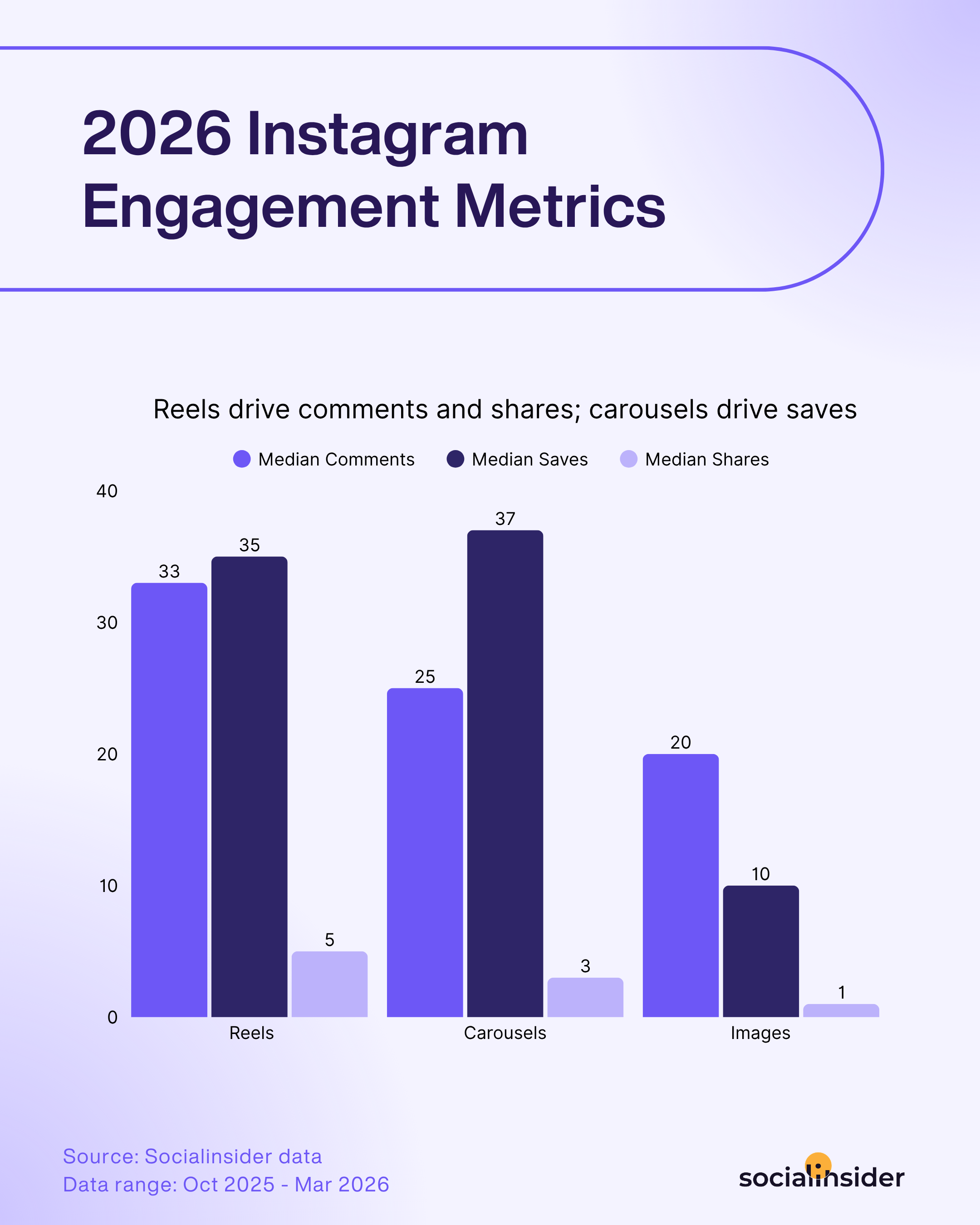
A couple of things jump out here. Reels lead on comment rate and share rate, which makes total sense, they're built to trigger an in-the-moment reaction, whether that's a quick reply or forwarding it to a friend. Carousels edge ahead on saves, since their step-by-step format naturally triggers that "I'll need this later" instinct.
If your Reels are falling below these comment and share rate benchmarks, that's a much stronger signal to act on than a raw view count, since it's telling you the content isn't landing as a reaction-worthy moment, no matter how many people scrolled past it.
Reels length and performance
Based on a Socialinsider analysis of 6 million Instagram Reels, here's your takeaway: the 45 to 60 second range wins on both engagement and views, and the fall-off past 3 minutes is steep across the board. That tracks: once a Reel crosses that mark, it stops reaching non-followers, so the pool of people left to engage with it just shrinks.
One more thing worth flagging: the shortest bracket, under 30 seconds, doesn't actually win on either metric, even though most people assume ultra-short is the safest bet. Start with 45 to 60 seconds, then check it against your own account's numbers, since a brand doing quick product highlights and one doing tutorials can both be right, just at different lengths.

Advanced Reels analytics that shape your strategy
Top sources of views
This tells you how people actually found your Reel in the first place. The usual suspects are Feed, Reels tab, Explore, Stories, profile, and Search, all visible in Instagram's native analytics.
Heavy Explore traffic means the algorithm is pushing you to new people. Mostly Home feed views? You're resonating with your existing crowd but not breaking out yet. Lots of profile views mean people are seeking you out on purpose, and shares mean you're spreading by word of mouth.
Top performing content pillars
This shows which categories of Reels, tutorials, behind-the-scenes, product showcases, are actually pulling their weight.

With Socialinsider, you can tag your Reels by content pillar and track performance across them, so you can spot not just which single Reel did well, but whether your educational content is consistently beating your trendy content over time.
I use this constantly. Some Reels I assumed were just filler ended up pulling in the most new followers, purely because they hit the right pillar.
Competitive Reels insights
This lets you see what's actually working for other brands instead of guessing. Add a competitor's profile to Socialinsider, sort by engagement, and you've got their top Reels in front of you.
Look for patterns: are their best performers behind-the-scenes clips, POV storytelling, group content? Also check their posting cadence. If they're putting out 10 Reels a month and you're doing 2, that gap is worth thinking about.
Reels optimization best practices from Socialinsider's social media expert
I asked Miruna what she actually relies on when managing our own accounts, here's what she shared.
Test different hooks within your content pillars
The first three seconds make or break a Reel. As she put it: "The first three seconds really matter. Start with something eye-catching, a bold visual, or a question that makes people stop and watch. When there's a person in the video, it usually works even better because it feels more real and personal."
Think of your content pillars as themes, then play around with different openers within each one, a punchy question, a surprising fact, a quick visual tease. Compare what actually hooks people.
Be relatable and human
This one doesn't need much of an introduction.
I know it sounds cliche, but you won't click with everyone, and that's okay. Think about the main groups in your audience and what they like. Maybe it's Gen Z humor and jokes, everyday office life, or helpful tips and hacks. Focus your Reels around those groups so your content feels real and speaks directly to the people who matter most. - Miruna Popa
Give people a reason to act, and to come back
Don't leave the CTA to chance, say it out loud, put it on screen, and repeat it in the caption. If you're using trending audio, only reach for it when it genuinely fits the content, forcing a sound onto a Reel it doesn't suit tends to backfire. And close on a hook rather than a flat ending; a Reel that rewards a second watch earns replays, and replays are one of the quieter ways to boost distribution.
Final thoughts
Reels were never just about the view count. They're about understanding what actually fuels discovery, engagement, and follower growth, and that means looking past the one metric that's easiest to check. Keep an eye on watch time, reach, and new followers, and use the benchmarks above to figure out if your numbers are genuinely good, not just present.
Native analytics are fine for a quick check. A tool like Socialinsider gets you the deeper, more competitive Instagram Reels insights analytics. Pair the data with actual creativity, testing hooks, using audio wisely, jumping on trends that genuinely fit, and you've got Reels that deliver both impact and long-term growth.
FAQs on Instagram Reels analytics
Do Reels or carousels get more engagement?
Depends what kind. Reels lead on comment rate and share rate, since they prompt in-the-moment reactions. Carousels lead on save rate, since their multi-slide format suits content people want to come back to.

Elena Cucu
As Content & SEO Manager at Socialinsider, Elena Cucu helps social media leaders make sense of the numbers behind their performance. Featured in TechCrunch, TNW, and ReadWrite.

Know what your competitors do — before your manager asks
Get instant social benchmarks & reports without manual work.