How to Quickly Put Together an Insightful Social Media Report Executive Summary
Learn how to craft a social media report executive summary to quickly and effectively deliver valuable information to stakeholders. Discover helpful strategies and tools!


You send the social media marketing report. Slack shows ‘Seen.’ Silence follows.
No follow-up questions. No comments. Just another neatly designed social media report quietly dying in someone’s inbox.
If that sounds familiar, the problem probably is not the data.
Executives do not open reports looking for charts and metrics. They want answers. What happened? Why it matters? What they should do next? If your executive summary reads like a compressed data dump, attention is gone before the second paragraph.
To help you get it right, I talked to dozens of Socialinsider customers who build reports week after week. In this guide, I share their insights on how to write a social media report executive summary along with a template you can easily use.
Key takeaways
-
What is an executive summary in a social media report? An executive summary is a concise, strategic overview that distills social media performance into the insights decision-makers need without reading the full report.
-
What is the executive summary’s role in a social media report? The executive summary helps stakeholders quickly understand what changed, why it matters to the business, and what actions should be taken next.
-
Essential components of a social media report executive summary: A strong executive summary clearly defines the reporting scope, highlights key performance changes, explains content and audience trends, surfaces risks, and outlines actionable next steps.
-
Step-by-step guide to writing your executive summary: Writing an effective executive summary starts with defining the audience and goal, analyzing performance data, selecting decision-driving metrics, and translating them into clear business insights.
-
Common mistakes in creating a social media report executive summary: The most common executive summary mistakes are overloading it with data, using unclear visuals, and failing to provide concrete recommendations for what to do next.
What is an executive summary in a social media report?
An executive summary in a social media report is the short, strategic overview designed for people who will never read the full report. It distills pages of data into a clear narrative that answers the most important business questions at a glance.
It usually includes key performance highlights, notable changes over time, standout wins or losses, and the insights behind them.
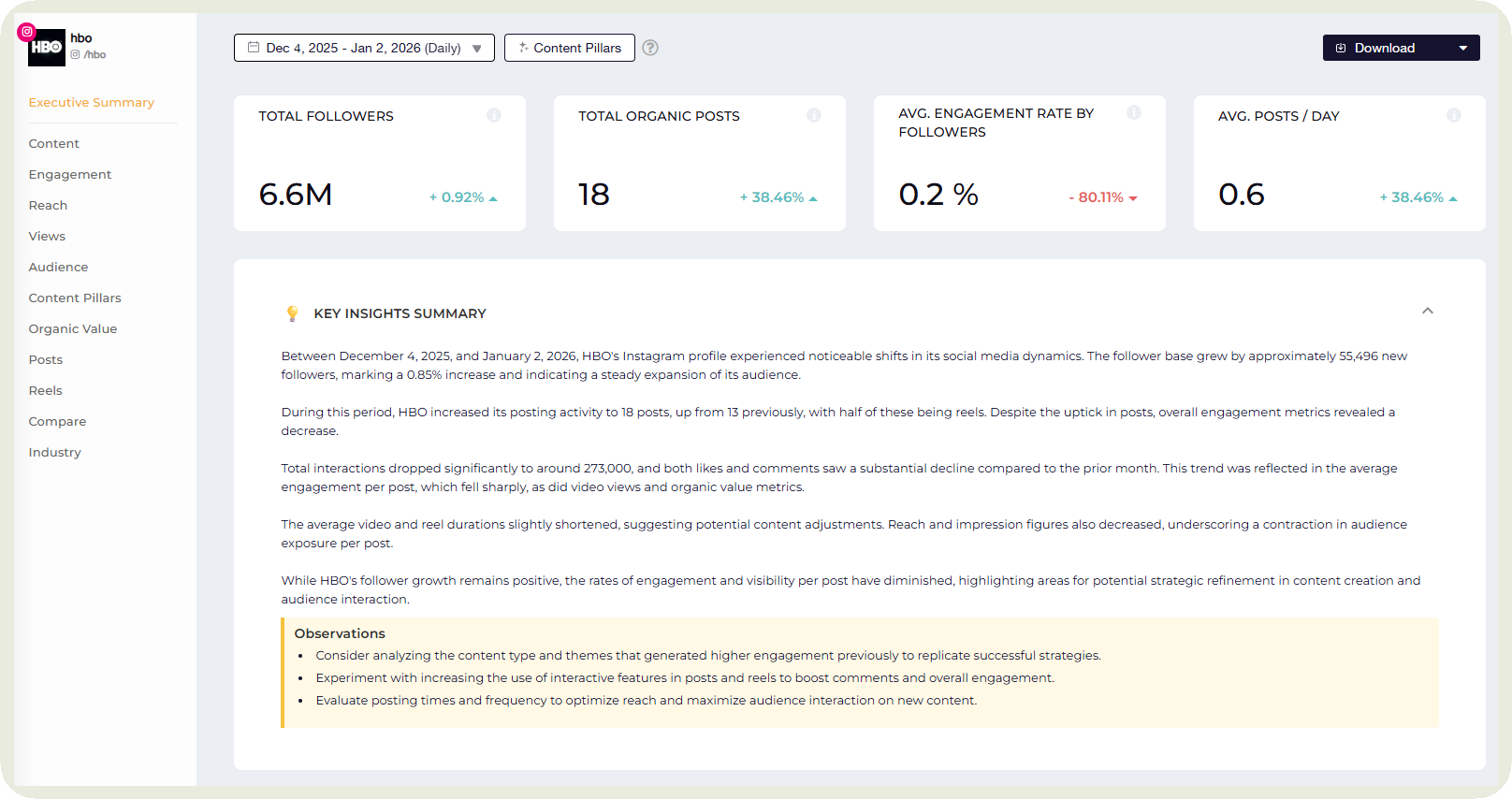
In Socialinsider, you can automatically generate an executive summary that can be customized and downloaded to showcase key metrics and highlights from the selected time period.
What is the executive summary’s role in a social media report?
Getting your executive summary right is one of the most important things while building a social media report. Here are four reasons why.
- Makes it easy for time-constrained stakeholders: The executive summary exists for people who make decisions but rarely have time to read full reports. Think CMOs, CEOs, CFOs, and clients. They can rely on it to understand performance quickly, without digging through charts, tables, or platform-specific metrics.
- Builds confidence: For the report owner, the executive summary sets the tone. It shows you understand the data and, more importantly, the business behind it. It translates raw social media metrics into outcomes leadership actually cares about, like growth, efficiency, and impact.
- Answers the unspoken ‘So what?’: Every executive summary should immediately answer the question hiding behind every report review. Why does this matter? What changed? What does it mean for the business? By addressing this upfront, you prevent confusion and keep attention where it belongs.
- Creates alignment on the next steps: A strong executive summary for social media report doesn’t just present data. It also signals on what the team needs to do next. For example, if paid spend increased while conversions stayed flat, the next step is obvious. Pause budget scaling, review targeting and creative, and fix inefficiencies before investing more.
Essential components of a social media report executive summary
While your executive summary may change depending on what your goals are, here are the common sections covered by most social media marketers.
Reporting period and platform considered
Start by clearly stating the time frame. Is this a weekly pulse check, a monthly performance review, a quarterly deep dive, or a yearly retrospective?
Each serves a different purpose and should be interpreted differently. For example, I would interpret a dip in a weekly social media performance report as noise, whereas the same pattern in a quarterly analysis would signal a trend worth investigating further.
Next, define the platforms covered. Is the analysis focused on all active channels or only specific ones, like LinkedIn and Instagram?
Platform mix matters because performance benchmarks, audience behavior, and content formats vary widely across networks.
Key performance highlights
The key performance highlights section should give stakeholders a fast, honest view of how social media performed and what that performance means.
I usually start with a short summary, then reinforce it with a few focused bullets:
- Overall performance direction: Clearly state whether performance improved, declined, or remained stable during the reporting period. This immediately sets expectations for everything that follows.
- Comparison point: A 5% engagement rate may not mean much to your audience. But a 5% engagement rate as compared to 3% in the previous period says a lot. That’s why I suggest anchoring results against goals, benchmarks, or the previous period. This shows whether the team is on track, ahead, or falling behind.
- Key metrics that moved the needle: Highlight only 2-3 metrics that matter to the business, such as engagement quality, reach, follower growth, or conversions.
- Action signal: Briefly indicate what to do next based on the trend. Double down on what worked, fix what underperformed, or test new approaches where results plateaued.
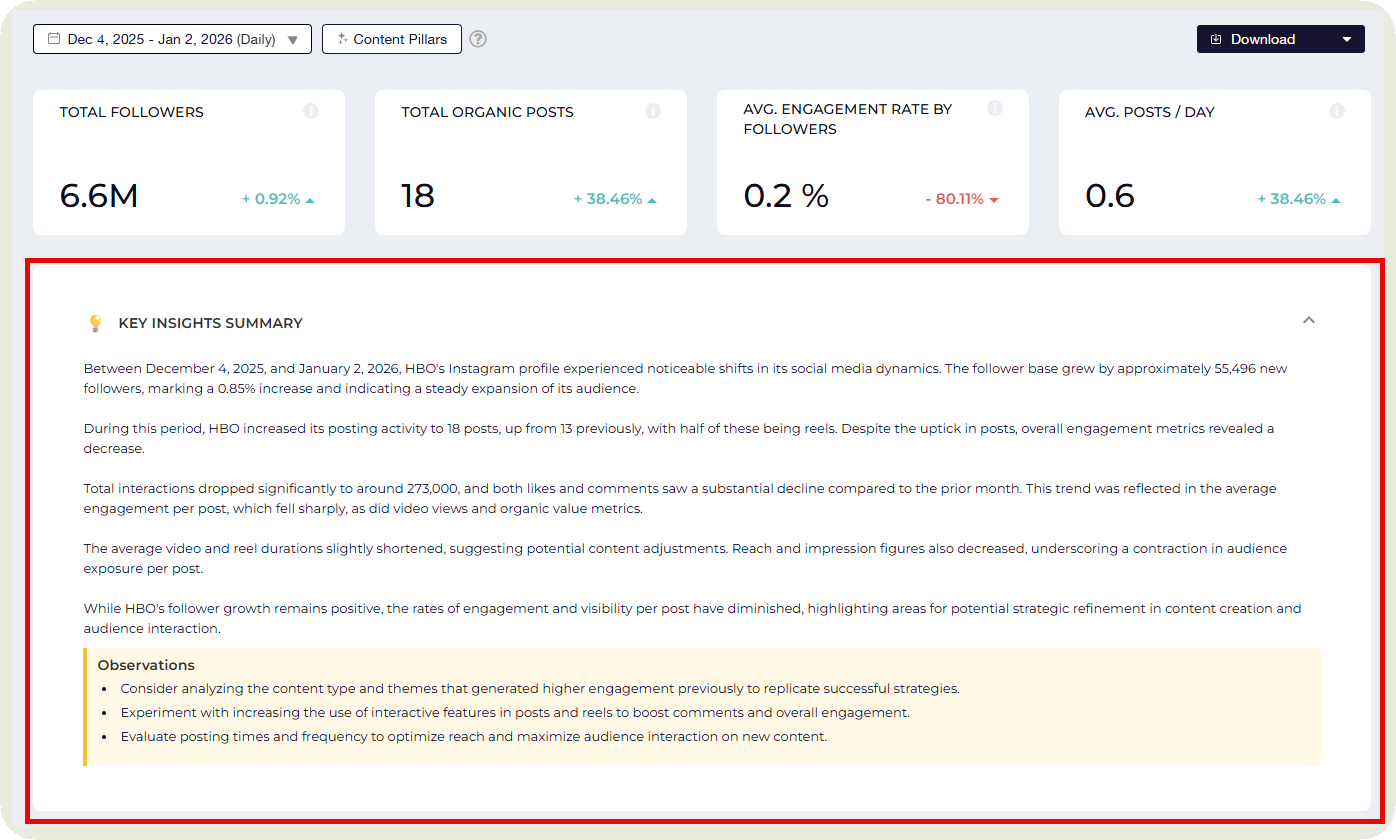
I love how Socialinsider automates this for me in seconds. It shows me a quick highlight of all that transpired, along with recommendations in the selected time period.
Content and campaign highlights
This is the main section of the social media report summary where you can show what kind of content brought strong results for your brand.
Here’s what it looks like in Socialinsider.
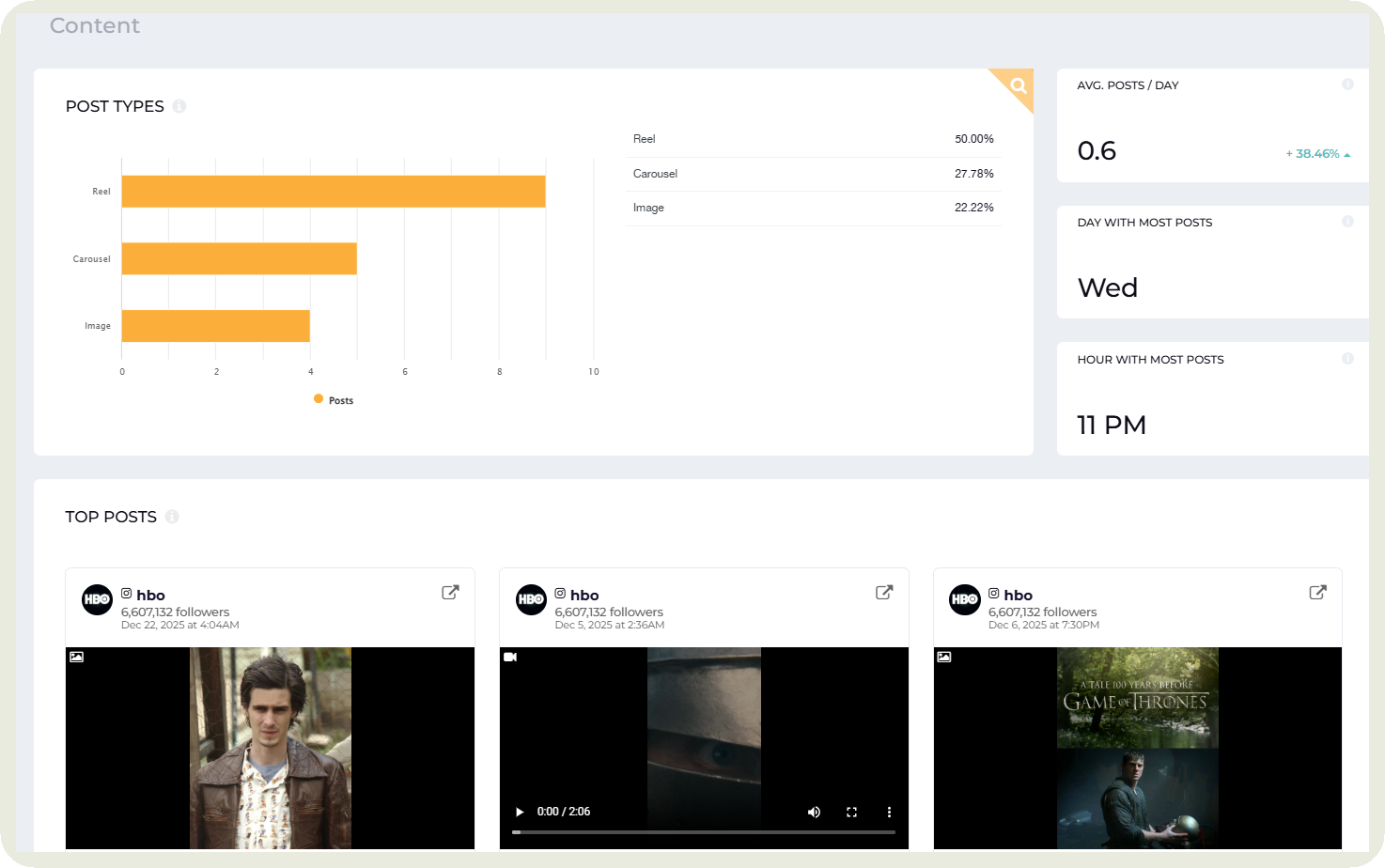
The sections most of our customers include here are:
- Campaign performance: Did you run any campaigns during the period? If yes, briefly state their objective and results. Highlight impact, such as lift in engagement, reach, leads, or conversions, and whether the campaign met expectations.
- Content performance: Summarize how content performed overall, then call out which content types delivered the strongest results. This could be formats (Instagram Reels), themes (customer stories), or posting strategies (posting in the evenings) that consistently outperformed others.
- Top-performing content: Which posts got a lot of traction? Instead of just including those 2-3 posts, I explain what made them successful in 1 or 2 lines.
- Key insights: Close with the insights that can be applied moving forward. What patterns emerged? What should be repeated, scaled, tested, or stopped based on this performance?
Top engagement or performance metrics
This section focuses on the metrics that show how audiences actually responded to your content.
I usually start by looking at how engagement changed compared to the previous period. For example, engagement might be up 18 percent month over month, driven mainly by more saves and comments, even if reach stayed flat. That tells me content is resonating more deeply, not just reaching more people.
From there, I look at which content types and themes generated the strongest engagement and which consistently underperformed. Socialinsider gets this data for you along with data on which days and times result in the highest engagement for your brand.
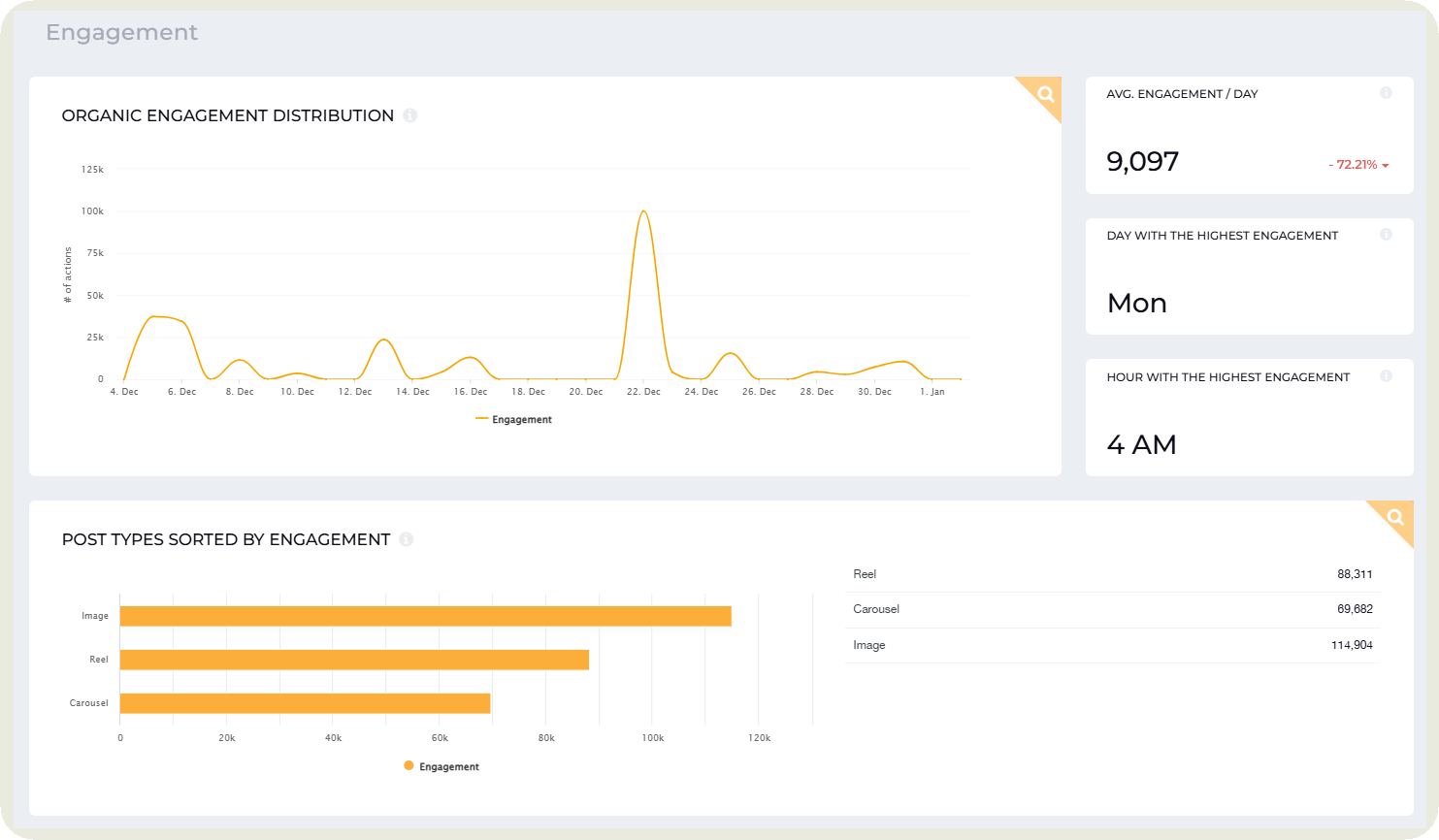
But all of this amounts to nothing without your analysis. Explain why certain formats resonated, whether it was timing, creative execution, relevance to the audience, or platform-specific behavior.
This gives your management a preview of what to expect from the content strategy going forward.
Audience growth
Are your social media goals centered around building brand awareness or a long-term community? Then this section should be one of your key ones for the executive summary.
For many stakeholders, this is one of the fastest ways to gauge whether visibility and relevance are increasing.
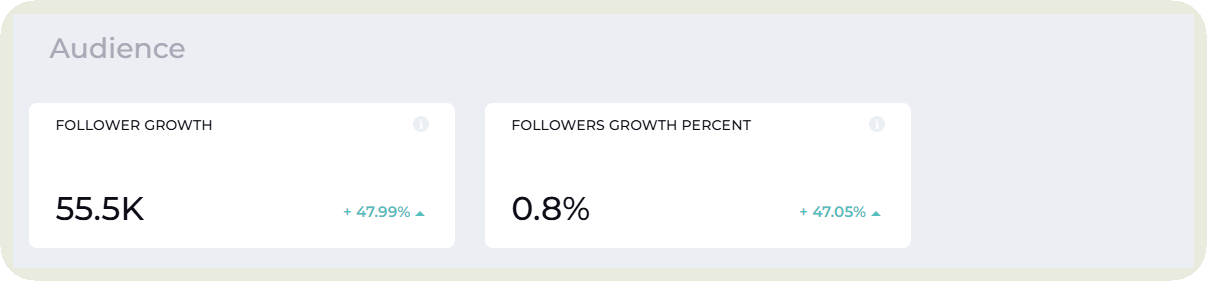
While covering this section, I show how the audience size changed during the reporting period and how that growth compares to the previous one. Net follower growth, growth rate, and platform level differences help paint a complete picture.
For example, steady growth on LinkedIn paired with a plateau on Instagram may signal where content and resources are paying off. If my focus is LinkedIn over Instagram, these stats make complete sense. Otherwise, I need to delve deep into how to get Instagram growth up.
Beyond the numbers, context matters. I often highlight what likely influenced growth, such as campaign launches, increased posting frequency, or high performing content themes.
This helps stakeholders understand not just how much the audience grew, but what drove that growth and whether it is sustainable.
Key risks or gaps
You don’t want to focus solely on the positives. You want to paint a realistic picture for your management.
In fact, calling out risks and gaps builds trust and shows a realistic understanding of performance.
Start by highlighting what did not work. This could be content formats that consistently underperformed, campaigns that failed to meet objectives, or platforms where social media engagement or reach declined. Be specific enough to be useful, without overexplaining.
Next, note any data limitations. Missing historical data, tracking issues, or platform reporting changes can all affect interpretation. Flagging these early helps prevent misaligned conclusions.
Finally, surface the signals leadership should care about. Sustained engagement drops, slowing audience growth, rising paid costs, or declining conversion efficiency are all early warnings.
Overall, this section ensures potential issues are seen and addressed before they become bigger problems.
Recommendations and next steps
This section should state what should happen next. And these next steps should be specific and tied directly to the data highlighted earlier.
This might include doubling down on high performing content formats, reallocating budget toward platforms showing stronger returns, pausing underperforming campaigns, or testing new approaches where growth has stalled.
It should also help the leadership make confident decisions based on the report. Whether it is approving budget changes, shifting priorities, or aligning teams around a new focus, the executive summary should remove uncertainty.
When done well, this final section leaves stakeholders knowing exactly what to do, why it matters, and what success should look like in the next reporting period.
Step-by-step guide to writing your executive summary
Now that you know what you need to cover with your executive summary, here’s a step-by-step process on how to actually create one.
Step 1: Define the audience and goal
Before you write a single line, decide who you are writing for. Get this wrong and even the best social media insights will miss the mark.
I always start by asking two simple questions.
- Who will read this?
- What decision do they need to make after reading it?
For example, A CMO reviewing budget needs very different information than a client checking campaign impact or a CEO looking for growth signals.
Once the audience is clear, define what you are trying to achieve with the report. Are you helping leadership approve spend, adjust social media strategy, or understand performance at a glance? That answer tells you exactly which data belongs in the summary and which does not.
For example, if the summary is for a CFO deciding whether to increase paid social budget, impressions and follower growth matter far less than cost efficiency and conversions.
Step 2: Gather and analyze your social media reporting data
This is the part where the real work happens. Before you summarize anything, you need to fully understand the data yourself.
Start by pulling all relevant metrics across platforms for the reporting period. Yes, all of them. This is not the time to filter. You want the full picture before deciding what deserves attention.
I use a combination of native analytics and Socialinsider to gather this data. The best part is that I can use Socialinsider’s AI assistant to help me gather all the metrics I need.
Next, look for trends and patterns. What is consistently going up or down? Where did performance spike or drop? The best way to do this is click on the upticks or downfalls in Socialinsider to see which posts caused those spikes and drops.
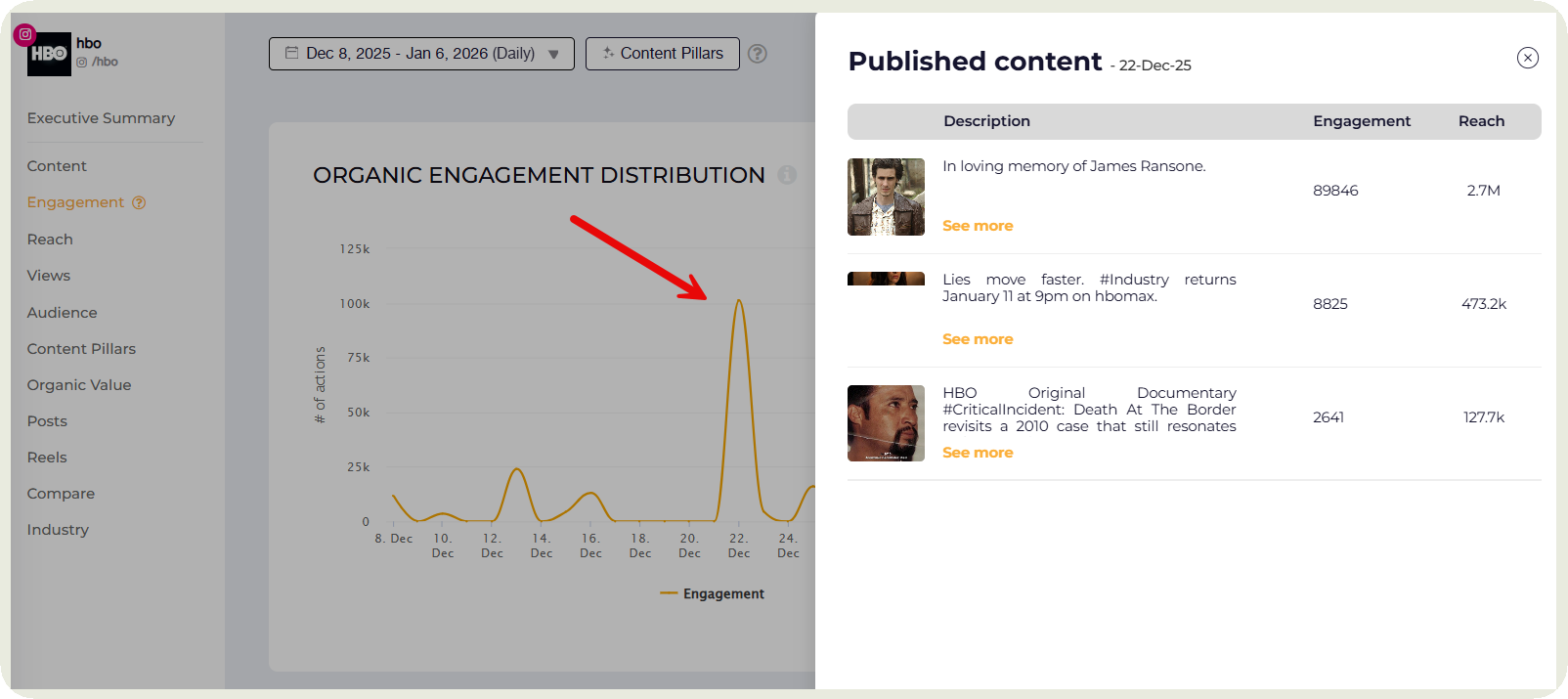
I also compare against the previous period or goals to see what actually changed.
Finally, analyze what the data is telling you. Ask why numbers moved the way they did. Was it content, timing, spend, audience behavior, or external factors? This step turns raw metrics into insights. Without it, your executive summary becomes a list of numbers instead of a story worth reading.
Step 3: Select relevant metrics for decision-making
You don’t want to overwhelm your management with too many numbers.
That’s why I focus on metrics that are directly tied to the business goal behind the report.
If the goal is brand awareness, audience growth and reach matter. If it is revenue or demand, engagement quality, conversions, and efficiency metrics take priority. Everything else stays in the appendix.
Next, I look for metrics that lead to action. A number is only useful if it helps someone decide what to do next. High impressions without engagement say very little. Rising saves, comments, or click through rates point to content that is actually working.
Finally, pressure test every metric with a simple question. So what. If you cannot clearly explain why a number matters or how it changes a decision, it does not belong in the executive summary.
Step 4: Translate metrics into meaningful insights
Once you have the right metrics, your job is to explain what they actually mean.
I always add a short line of context to every key number. For example, a 5% engagement rate on its own is just a statistic. That same 5% compared to 2% last month signals a real shift in how the audience is interacting with the content.
Context can come from comparisons over time, against goals, or across platforms. It can also come from behavior. Fewer likes but more saves might suggest content is becoming more useful.
When metrics are translated clearly, stakeholders do not have to guess what matters or why it deserves their attention.
Step 5: Draft your executive summary
This is where everything comes together. When drafting the executive summary, lead with what matters most. The first few lines should answer the biggest question on everyone’s mind — How did social media perform and why does it matter?
From there, support the story with two to four key visualizations.
Also, make sure to call out what went well. Stakeholders want to know what is working so it can be repeated or scaled. Balance that with clear, data driven recommendations. Each recommendation should tie directly back to a result in the report.
If creating things from scratch takes too much time (as it often does), head on to Socialinsider’s Executive Summary, which can be easily customized and downloaded.
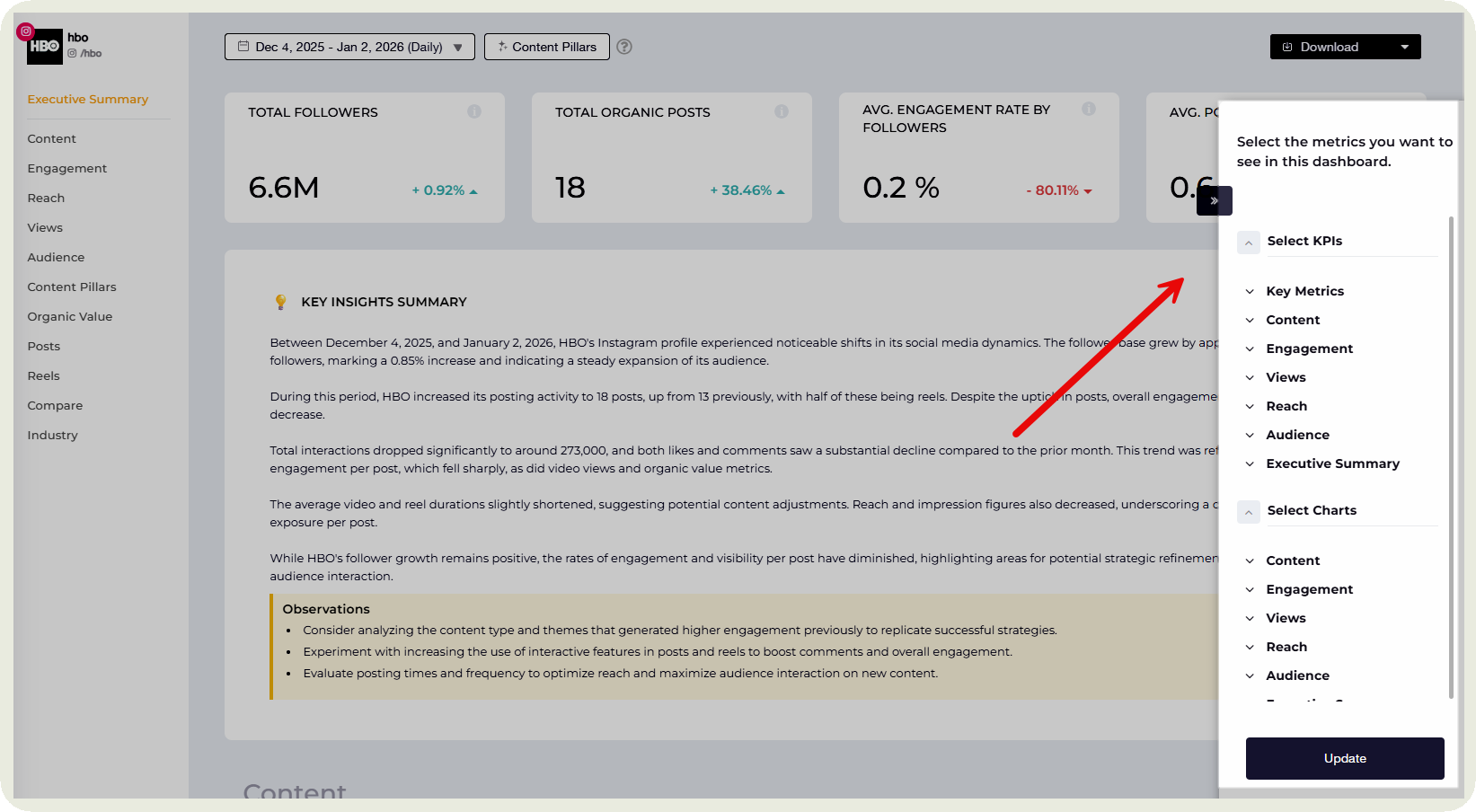
Social media executive summary template
A repeatable social media executive summary template removes guesswork and helps you focus on what decision makers care about most. Instead of starting from a blank page every reporting cycle, you can rely on a framework that consistently highlights performance, context, and next steps. The template below is designed to help you turn complex social media data into a concise, executive-ready narrative.
It works whether you are reporting weekly or quarterly, across one platform or many. Use it as a starting point, customize it for your stakeholders, and make your reports easier to act on.
Common mistakes in creating a social media report executive summary
You want to avoid minor but common mistakes that might deter your management from reviewing your executive summary. Here are three of them.
- Overloading information: A common mistake is treating the executive summary for stakeholders like a compressed version of the full report. Listing every metric, platform, and chart forces stakeholders to do the filtering themselves.
- Poor visual design: Insights lose impact when visuals are cluttered or hard to read. Dense tables, tiny labels, or five charts saying the same thing slow decision making. A simple trend line showing engagement growth is far more effective than multiple charts that require explanation to interpret.
- No clear next steps: An executive summary fails when it ends with data but no direction. For example, stating that engagement dropped without explaining what to adjust next leaves leadership stuck. The summary should clearly point to actions like shifting formats, reallocating budget, or testing new content themes.
Final thoughts
Your executive summary sets the tone for the entire report. When done well, it turns raw data into clarity. It helps stakeholders understand what changed, why it matters, and what to do next without digging through slides or charts.
Use the framework in this guide, keep the focus on outcomes, and always answer the question executives care about most — What should we do next?
And if you want to skip the manual work altogether, use Socialinsider to generate a customizable executive summary automatically. It surfaces key metrics, adds context, and gives you a report that actually gets read. Get your free 14-day trial now.
Nidhi Parikh
Nidhi Parikh is SaaS writer that believes scrolling through social media is research for work. When not working, find her binge watching the latest series or reading anything she can get her hands on.

Analyze your competitors in seconds
Track & analyze your competitors and get top social media metrics and more!
You might also like


Improve your social media strategy with Socialinsider!
Use in-depth data to measure your social accounts’ performance, analyze competitors, and gain insights to improve your strategy.