What to Post on LinkedIn: 28 Ideas for Brands
Discover here 28 LinkedIn post ideas grouped by category, backed by real engagement data, plus how to repurpose one idea across five formats.

You've opened LinkedIn, clicked "Start a post," and then just... stared at the blank box? Well, I've been there myself a couple of times, and over the years I've witnessed even the most experienced social media managers hit that moment eventually.
Luckily for you, this guide is built to fix that for good, covering 28 LinkedIn post ideas, grouped by category so you can actually find what fits your current content gap, backed by real 2026 engagement data on which types of LinkedIn posts are working right now, and a framework for turning one idea into five pieces of content instead of one.
And my advice for you: bookmark it, because you'll be back every time you're stuck on finding post ideas for LinkedIn. Are you ready to dive in?
Key takeaways
- Authority-building LinkedIn content includes industry stats, data-backed hot takes, expert tips, weekly news roundups, and contrarian posts, each earning credibility by pairing an opinion or insight with evidence rather than assertion alone.
- Engagement-driving LinkedIn posts, polls, dos-and-don'ts, open-ended questions, and myth-busting, work by lowering the effort required to interact while inviting a genuine response rather than passive scrolling.
- Human and narrative content, including company culture, founder stories, employee spotlights, career milestones, UGC, and recruitment posts, builds trust by putting a specific person or moment behind the brand rather than a polished corporate voice.
- Proof and trust content, customer testimonials, case studies, and before-and-after results, persuades skeptical B2B audiences by demonstrating a measurable outcome rather than describing a feature.
- Practical value content, tutorials, templates, tool roundups, checklists, and data visualizations, earns saves and shares by giving the audience something immediately reusable rather than something to simply read once.
- Community and timing content, webinars, product launches, AMAs, anniversaries, and event recaps, depends on posting at the right moment relative to a real event, since its value decays the longer it waits.
Which LinkedIn post formats actually perform in 2026
Before picking an idea, it's worth knowing which types of content to post on LinkedIn are actually earning engagement right now, since the same idea can perform very differently depending on how you package it.
Contrary to what most people would assume, according to Socialinsider's posting frequency study, the best-performing formats on LinkedIn are actually the most underused ones.
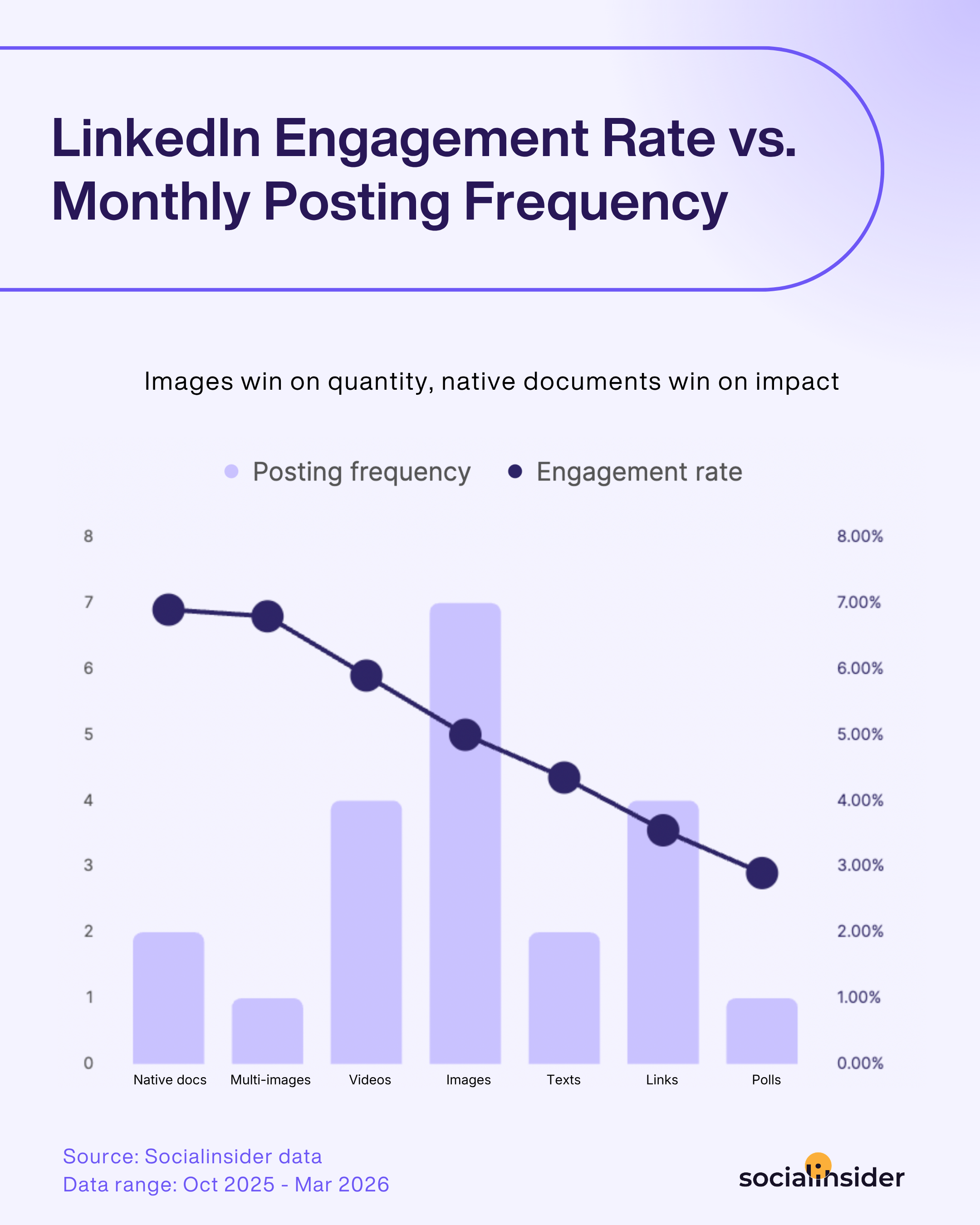
Native documents and multi-image posts post the highest engagement rates, 6.90% and 6.80%, while getting published the least, just 2 and 1 times a month on average. Images, meanwhile, are posted 7 times a month, more than any other format, yet only pull a 5.00% engagement rate.
What this means for the ideas below: if an idea below involves a framework, a checklist, or step-by-step information, package it as a native document first, that's the format delivering the strongest return for the least volume right now. Save images and text-only posts for lighter, faster content, not your highest-value ideas.
28 LinkedIn post ideas to nail LinkedIn marketing in 2026
Here's the full list of LinkedIn content ideas, grouped into six categories so you can pull post ideas for LinkedIn that fit your current content gap rather than scrolling through 28 unrelated entries.
Authority & expertise post ideas
This category covers some of the best content for LinkedIn if your goal is building credibility with a professional audience.
1. Industry insights and stats
Data-backed content sets you apart as a thought leader and consistently drives strong engagement. The key is pairing the number with a clear takeaway; a stat on its own invites a shrug, but a stat plus "here's what this means for your strategy" gives people a reason to save or share it.
2. Data-backed hot takes
An opinion becomes far more credible, and more shareable, when it's backed by a number rather than just a feeling. The stat doesn't need to be dramatic; even a modest, specific figure lands better than a vague claim like "most brands struggle with this."
3. Expert tips
Practical, immediately usable advice drives engagement through likes, comments, and shares because it's inherently useful to the reader. The format works best when the tip is specific enough to try today, not a broad principle like "communication matters," but something concrete like a script, a framework, or a one-line habit change. Tying it to your own credibility, a role, a track record, or firsthand experience, gives the advice more weight than the same tip posted anonymously would carry.
4. Weekly industry news roundup
This positions you as a curator your network can rely on, and creates a consistent rhythm of anticipation. The value isn't just summarizing the news, it's adding your own one-line take on why each item matters, which is what separates a roundup from a link dump.
5. Contrarian or hot-take posts
A respectfully argued unpopular opinion tends to spark more comments than a safe, agreeable one, since it invites people to weigh in. The key word is respectfully; a hot take that just picks a fight reads as engagement bait, while one backed by actual reasoning reads as a genuine perspective worth debating.
Engagement drivers
These are consistently among the best posts for LinkedIn when the goal is sparking conversation rather than just visibility.
6. Polls and interactive posts
This lowers the barrier to interaction to a single click, while giving you real audience insight in return. Polls also work as a low-cost research tool, the answer distribution can shape your next few pieces of content, not just sit as a one-off engagement play. Keep the options genuinely distinct rather than one obvious "correct" answer, since a poll where everyone picks the same option stops generating real signal.
7. Dos and don'ts ("instead of that, try this")
Breaking complex best practices into clear, contrasting advice is immediately applicable, which drives shares. It cuts through the noise by offering straightforward insight professionals can act on right away, rather than a wall of nuanced caveats.
8. Open-ended questions
A genuine question, not a rhetorical one, invites real discussion rather than passive scrolling. The failure mode here is asking a question with an obvious answer, that reads as fishing for engagement rather than genuine curiosity, and audiences can usually tell the difference.
9. Myth-busting
Challenging a common misconception is inherently more engaging than restating something everyone already agrees with. It works best when you can point to a specific reason the myth took hold in the first place, not just declare it wrong.
Human & narrative
This kind of content for LinkedIn tends to build trust faster than any polished brand messaging can.
10. Company culture and behind-the-scenes
This humanizes the brand and attracts both engagement and potential hires. It works best treated as a recurring feature rather than a one-off, a monthly team moment or a recurring "how we work" series gives your network something to expect, instead of a single culture post that never gets revisited. Unpolished, in-the-moment footage tends to outperform a staged photoshoot here, since the format is inherently about authenticity, not production value.
11. Founder or personal stories
A specific, honest personal narrative outperforms a polished corporate statement almost every time. Specificity is what makes this work, a vague "it's been a journey" post underperforms a story with a real turning point, a real number, or a real mistake named directly.
12. Employee spotlights
Distinct from general culture content, this puts a name and a face to the team, which builds trust and supports recruitment. Letting the employee write it in their own voice, rather than having marketing draft it for them, is usually what separates a spotlight that resonates from one that reads like a press release.
13. Career milestones and achievements
Celebrating anniversaries, awards, promotions, or completed projects inspires others and reinforces your position in the industry. These posts work best when they include a specific detail about what the milestone actually took, not just the achievement itself, since the effort behind it is often what people relate to most.
14. User-generated content (UGC)
This diversifies your content and taps into trust and community, key drivers of interaction on LinkedIn. It also solves a real production problem, a steady stream of UGC means your content calendar doesn't rely entirely on your own team generating every idea. Always ask before reposting and credit the original poster directly, since UGC done without permission tends to backfire and undercut the trust it's meant to build.
15. Recruitment and hiring posts
A specific, well-written hiring post reaches passive candidates a job board never will, especially when it's shared by employees. A post that names the actual day-to-day work and the team the person will join tends to outperform a repost of the formal job description almost every time.
Proof & trust
If you're wondering what kind of posts do well on LinkedIn for a skeptical B2B audience, this category is usually the answer.
16. Customer success stories and testimonials
These illustrate the real-world impact of your product or service in a way that's inherently more relatable than a feature list. The strongest ones let the customer's own words carry the post, a short video clip or a direct quote, rather than a marketing team paraphrasing the win in brand-safe language. Specific outcomes beat general praise here too, "cut our reporting time in half" does far more work than "great experience working with them."
17. Case studies
Distinct from a quick testimonial, a case study walks through the specific problem, approach, and result, giving skeptical B2B buyers the detail they actually need. The strongest ones name the actual metric that moved, not just a vague "we saw great results."
18. Before-and-after results
A visual or data-based transformation is one of the fastest ways to communicate value without a single word of sales copy. This works especially well when the "before" state is something your audience recognizes in their own work, not just an abstract baseline.
Practical value
This category earns saves and shares more than any other, since it gives people something they'll actually come back to use.
19. Educational content and tutorials
This demonstrates expertise while adding real value, and breaks complex information into a digestible format. Splitting a process into clear, numbered steps rather than one dense paragraph is usually the difference between a tutorial people finish and one they scroll past.
20. Templates and frameworks
A genuinely reusable template gives people a reason to save the post, which is a strong engagement signal in its own right. The word "genuinely" matters here, a template that requires heavy adaptation before it's usable won't get saved nearly as often as one that works close to as-is.
21. Tool roundups
Curating tools your audience actually needs positions you as a helpful resource rather than a brand pushing its own agenda. Including at least one tool you don't sell or partner with is what keeps this format from reading as a thinly veiled pitch.
22. Checklists
A checklist is instantly actionable and easy to save or share, which extends its shelf life well past the day it's posted. Keep it short enough to actually use, a 20-item checklist gets saved and forgotten, while a 5 to 7 item one gets opened again before the next launch or campaign.
23. Data visualizations and infographics
Complex data becomes scannable and shareable when it's visual rather than buried in a paragraph. One clear chart making one clear point consistently outperforms a dense infographic trying to communicate five findings at once.
Community & timing
These ideas are less about a fixed content pillar and more about showing up at the right moment, an event, a launch, a milestone, so timing matters as much as the content itself.
24. Webinars, workshops, and event promotion
This showcases expertise and invites direct interaction from professionals actively seeking to grow. Promotion works best as a short sequence rather than a single post, an early save-the-date, a reminder closer to the date, and a same-day nudge each catch a different segment of your audience instead of relying on one post to do all the work.
25. Product news and launches
A launch post gives your network a reason to engage right now, especially when it's tied to a specific, tangible benefit. Leading with the problem the feature solves, rather than the feature itself, tends to draw more comments from people recognizing their own frustration in the post.
26. "Ask me anything" posts
An open invitation to ask questions positions you as accessible and generates a comment thread that keeps performing over several hours. Committing to a specific response window (24 hours, end of day) creates urgency that an open-ended "ask me anything, anytime" doesn't.
27. Anniversaries and company news
Milestones and updates build credibility and keep your audience current on your progress, without needing a big campaign behind them. Naming a specific number, a year count, a customer count, a team size, gives the post more weight than a general "we've come a long way" statement.
28. Live event coverage and recaps
This gives people who couldn't attend a reason to engage, and extends the shelf life of a one-time event well past the day it happened. Posting it within a day or two, while the event is still top of mind for your network, matters more for this format than almost any other on the list.
How to repurpose one idea across formats
When hosting a webinar with LinkedIn marketing consultant Louise Brogan, we explored what really works when creating content for LinkedIn. Throughout the session, Louise shared practical tips on how B2B brands can use LinkedIn more strategically, including a framework called COPE (Create Once, Publish Everywhere) that makes content creation more sustainable.
Instead of reinventing the wheel for every platform or every post, think about how one strong piece of content from the list above can be adapted into several. For example:
- Record a short LinkedIn video → repurpose the transcript into a text post.
- Turn that same post into a carousel with the key takeaways.
- Expand the idea into a LinkedIn newsletter or blog article.
This approach makes your content more sustainable and ensures you get maximum value out of every idea.
Now, if you ask me, I'd say the part that's easy to get wrong is picking which post to repurpose in the first place. A tool like Socialinsider helps here by surfacing your actual best-performing LinkedIn posts, ranked by engagement rather than gut feeling, so you're building your next five pieces of content off something that's already proven to resonate, instead of guessing which post deserves the extra effort.

Final thoughts
I'll be honest: the list above is only useful once it's backed by an actual strategy, not just a rotation of ideas you pull from when you're stuck. What's worked for me is picking two or three categories that map directly to what I'm actually trying to achieve that quarter, whether that's authority, pipeline, or hiring, and building my posting cadence around those first.
From there, I let the data do the deciding. I check what's actually performing before committing to a format, and I treat every strong post as a starting point for four more, not a one-off. That's the whole strategy, really: fewer categories, chosen deliberately, repurposed relentlessly.
FAQs on what to post on LinkedIn
How can I create engaging LinkedIn posts that stand out?
To create engaging LinkedIn posts, mix rich media such as videos and photos, ask thought-provoking questions to encourage comments, and include calls to action that invite further interaction.
What are some creative LinkedIn post formats that stand out in a professional feed?
Experimenting with different post formats, such as short videos, carousel posts, or infographics, can help you stand out. Personal stories tied to professional lessons and spotlight features on innovations or achievements within the company are also effective.

Elena Cucu
As Content & SEO Manager at Socialinsider, Elena Cucu helps social media leaders make sense of the numbers behind their performance. Featured in TechCrunch, TNW, and ReadWrite.

Know what your competitors do — before your manager asks
Get instant social benchmarks & reports without manual work.