LinkedIn Algorithm - How It Works and How To Master It in 2026
Understand how LinkedIn's algorithm works and discover tips that will help you improve your content's performance.

LinkedIn has become so much more than a digital business card for brands—it’s where lasting connections, industry conversations, and real opportunities begin. But with the ever-changing algorithm, getting a brand’s message seen can feel a bit like chasing shadows.
After navigating these challenges myself, I’ve found that a mix of curiosity, creativity, and a willingness to dig into the numbers can make all the difference. In this article, I’ll share the practical lessons and insights that have helped our brand not just survive LinkedIn's algorithm, but truly thrive.
Key takeaways
-
How does the LinkedIn algorithm work? LinkedIn’s algorithm filters, scores, and rapidly re-ranks posts based on early engagement, so getting traction fast is crucial for broad reach.
-
What are the key ranking signals in LinkedIn's algorithm? The algorithm prioritizes posts that spark meaningful conversations, use preferred content formats, and engage strong connections within your network.
-
How to discover what works for your brand? Experimenting with different content types and analyzing your performance data regularly is the most effective way to identify what truly resonates with your LinkedIn audience.
Why is it important to understand the LinkedIn algorithm?
When you understand what makes your content stand out, you can give your brand the best chance at cutting through the noise and reaching the right people. Here’s why it matters:
- Maximizes your brand’s visibility by helping your posts reach a wider and more relevant audience.
- Increases engagement by aligning your content with what the algorithm rewards—like conversations and timely interactions.
- Enables smarter, data-driven decisions about content formats, timing, and messaging.
- Reduces wasted effort by focusing on strategies that consistently drive results, instead of relying on guesswork.
- Helps build meaningful relationships with your target audience and industry influencers.
- Positions your brand as a thought leader by making it easier for the right people to discover and interact with your content.
- Supports measurable growth in brand awareness, followers, and lead generation on LinkedIn.
How does the LinkedIn algorithm work?
Ever wonder why one of your posts on LinkedIn just takes off—lots of comments and new faces in your notifications—while another, that you felt was golden, fizzles with barely a like? You’re not alone. I used to agonize over this too, and then I went deep into LinkedIn’s algorithm.
Here’s what I discovered, with straight talk and zero jargon.
The initial filtering process: spotting spam and low-quality posts
First things first. When you hit “post,” your update goes through LinkedIn’s secret gatekeeper. It’s a filter whose job is to spot spam, bots, and low-value posts. If your update looks kind of spammy or just like another generic “Check out my business!” shout into the void, LinkedIn quietly pushes it aside. Moral of the story: treat every post as if you’re starting an actual conversation, not pitching at a networking event.
The scoring phase: what matters most
Passed the filter? Awesome. Now, LinkedIn assigns an invisible “score” to your post, almost like it’s auditioning for a bigger stage. It looks at your history, the type of post you shared (video, article, text, etc), and what you’re saying. Basically, LinkedIn is asking: “Would anybody care about this?” A smart, original, or helpful post? You’re sailing through.
Re-ranking based on engagement velocity
This is where the magic really happens. Think of it like opening night—if people in the front row start clapping right away (liking, commenting, sharing), LinkedIn takes note and shows your post to more people. It’s all about how quickly you get that first burst of attention. No reaction in the first hour? That post might sink fast.
What are the key ranking signals in LinkedIn’s algorithm?
Let’s be honest: winning on LinkedIn isn’t just about posting more. It’s all about the signals you send to the algorithm—with your content, your network, and how you interact.
Engagement signals
- Reactions, comments, and shares aren’t equal: A like is good, but a comment? That’s better. A share? Now you’re really playing the game. LinkedIn loves posts that spark actual conversations, not just quick thumbs-up reactions.
- Comments matter a great deal: A comment means you started a discussion—someone took the time to respond. LinkedIn’s algorithm sees this as way more valuable than a like.
So, ask questions, invite opinions, and keep the conversation going.
Here's an example of how we do it at Socialinsider:
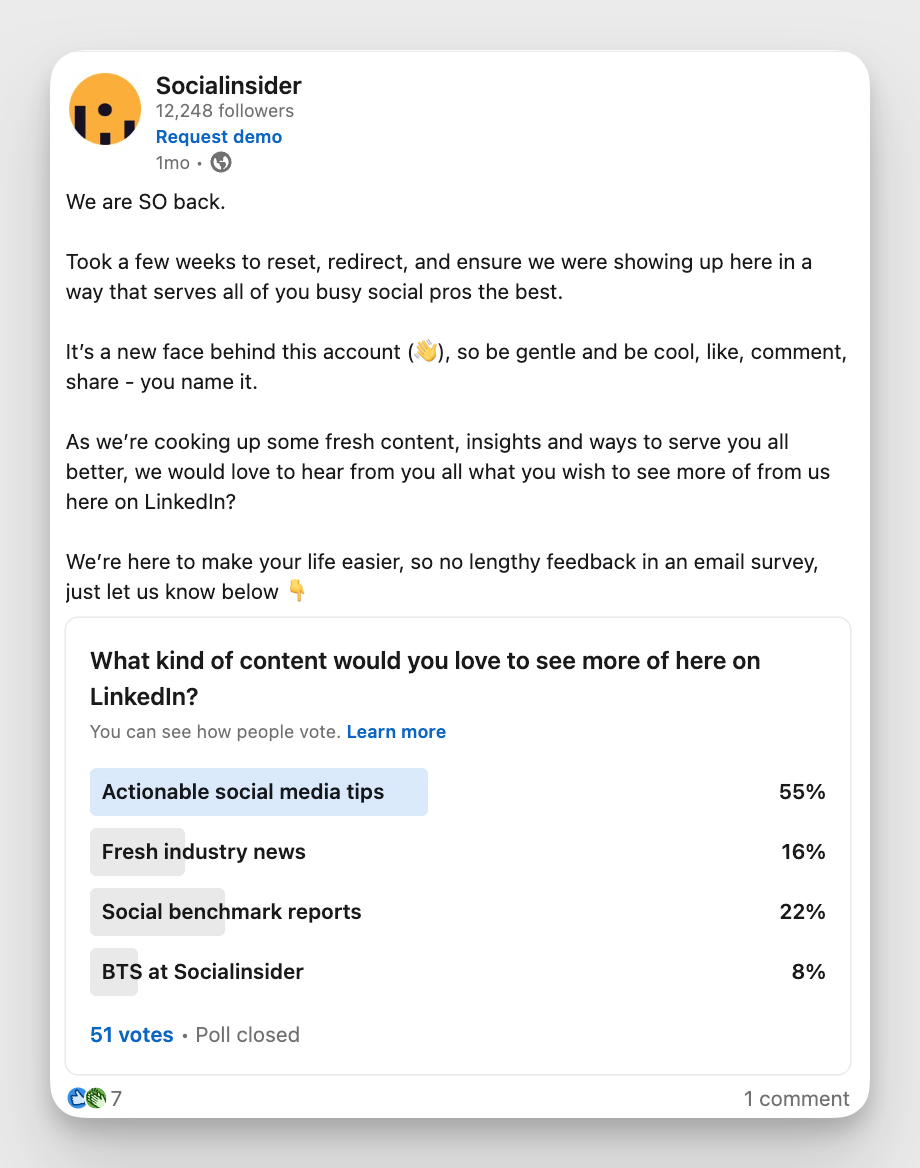
And while we're at it, let me tell you a little secret: LinkedIn is actually reading (okay, analyzing) the quality of comments. If folks are writing thoughtful responses or debating points, the algorithm sees your post as sparking “meaningful conversations” and boosts it even more.
- Velocity and timing: Timing is crucial. Get early engagement in the first hour, and your post will likely take off. This is LinkedIn’s way of saying: “Let’s see if this deserves a bigger audience.”
Content quality signals
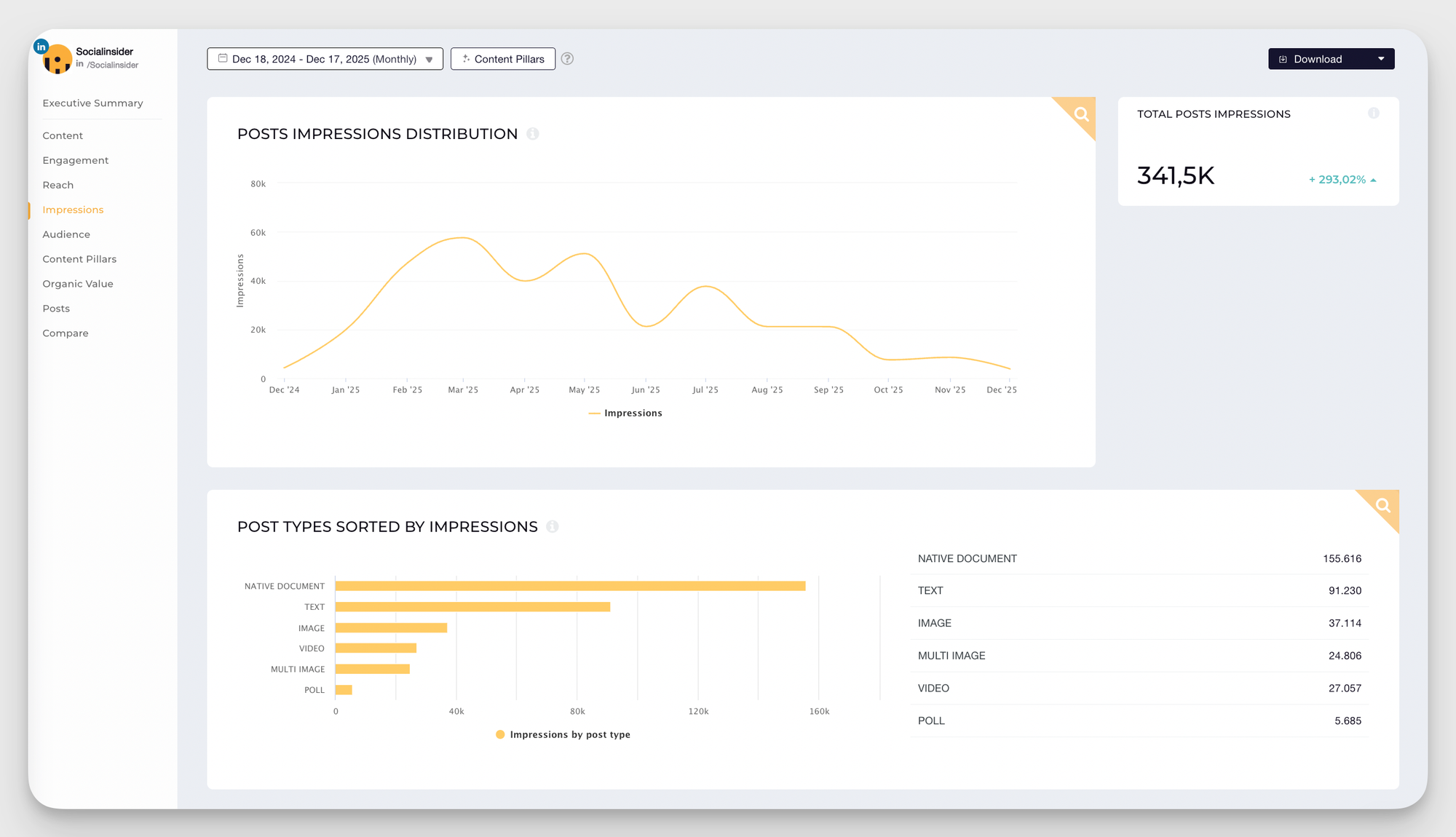
- Certain formats work better: According to Socialinsider's LinkedIn benchmarks report, PDF documents, carousels (think: mini slide decks) and videos are favorites right now.
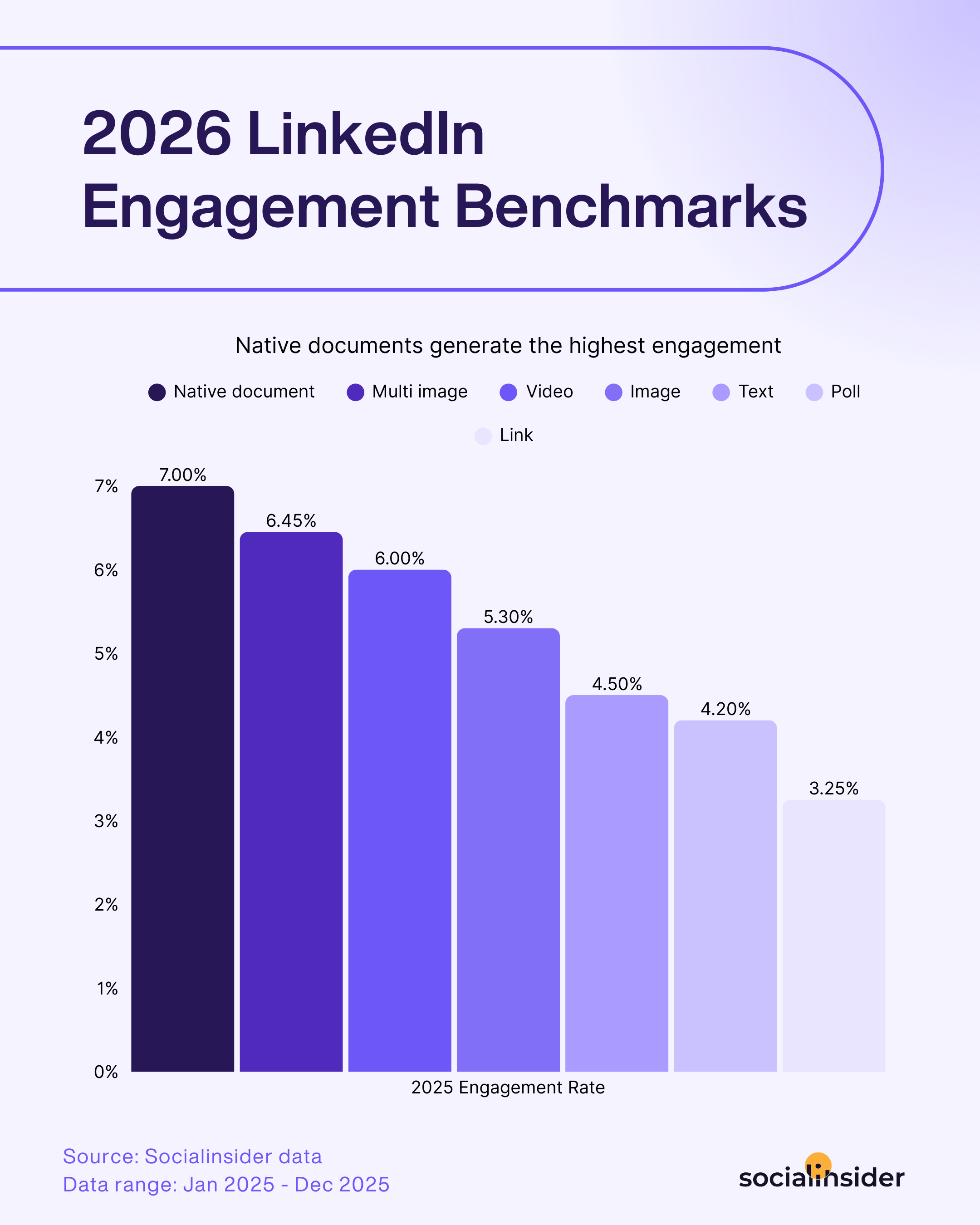
And text posts you ming wonder. Well, they still have power, especially for quick tips or stories that invite comments. And here’s something to try: LinkedIn’s built-in articles give you more space, but quick-hitting posts often rack up engagement faster.
- Relevance is super important: LinkedIn is always trying to match your content with people who are interested in your topic, based on profiles and past interactions. That’s why using the right hashtags, keywords, and even tagging relevant people can give you a big discoverability boost.
Connections/followers signals
- It starts with your first-degree network: Your updates always reach your first-degree connections first. If your close network bites—comments, likes, shares—LinkedIn widens the net to second and even third degrees.
- History and consistency matter: Those you chat with regularly, or who reliably show up in your comments? They’ll see you the most. Consistency and strong connections create a positive feedback loop.
Recency and posting consistency
You don’t have to post every day, but staying consistent is huge. Posting two to three times a week—in the mornings or just before lunch—works best for many, but check your own analytics. Sporadic posting often leaves you starting over.
Types of content that don’t work on LinkedIn
Getting a grip of how the LinkedIn algorithm changes helps you learn the rules of the game and start playing equipped with all the knowledge.
You must also know how the LinkedIn algorithm updates over time and what you can do to make sure you’re not blindsided by any sudden changes.
Here’s an up-to-date list of LinkedIn posts the algorithm gods don’t look favorably upon.
Avoid LinkedIn posts that undermine community-building
LinkedIn is a professional platform—professional connections, collaboration, and knowledge sharing. But not every post contributes to this vibe. Knowing what not to post is just as critical as knowing what works.
Let’s break down the offenders.
Promotional or off-topic content
Overly promotional posts or content that veers far from professional interests disrupts LinkedIn’s core purpose. A post like “Buy our latest product!” with no context or professional tie-in feels spammy and irrelevant.
Even if you want to share promotional posts, make them useful. Share how your product solves industry challenges, offer a compelling case study, or provide actionable insights.
Instead of:
❌ “We launched a new feature!”
Try:
✅ “This new feature helps social teams cut reporting time by 40%—here’s how.”
Better content = clearer reporting = stronger ROI conversations.
Engagement bait
You’ve seen it: “Comment ‘yes’ if you agree!” or those pointless polls asking whether people prefer coffee or tea.
These tactics are designed to game the algorithm, but they’re shallow and work against LinkedIn’s goal of meaningful interaction.
Even worse, LinkedIn’s algorithm is onto this trick. It deprioritizes engagement-bait posts, tanking their reach. Instead, focus on content that sparks authentic discussion.
Thought-provoking questions, insights on industry trends, or sharing challenges you’re tackling invite genuine social media interaction. Quality > cheap tricks every time.
Unoriginal content
Don’t simply rehash opinions. LinkedIn users value genuine, original content that offers real insights and professional value.
Sharing recycled material can make your brand seem uncreative and unengaged. Additionally, LinkedIn’s algorithm favors posts that encourage meaningful interactions, so generic content often gets less reach and fewer reactions.
Plus, with so many updates and articles competing for attention, it’s easy for repetitive posts to be ignored. To stand out, focus on sharing fresh ideas or tailoring industry insights to their audience.
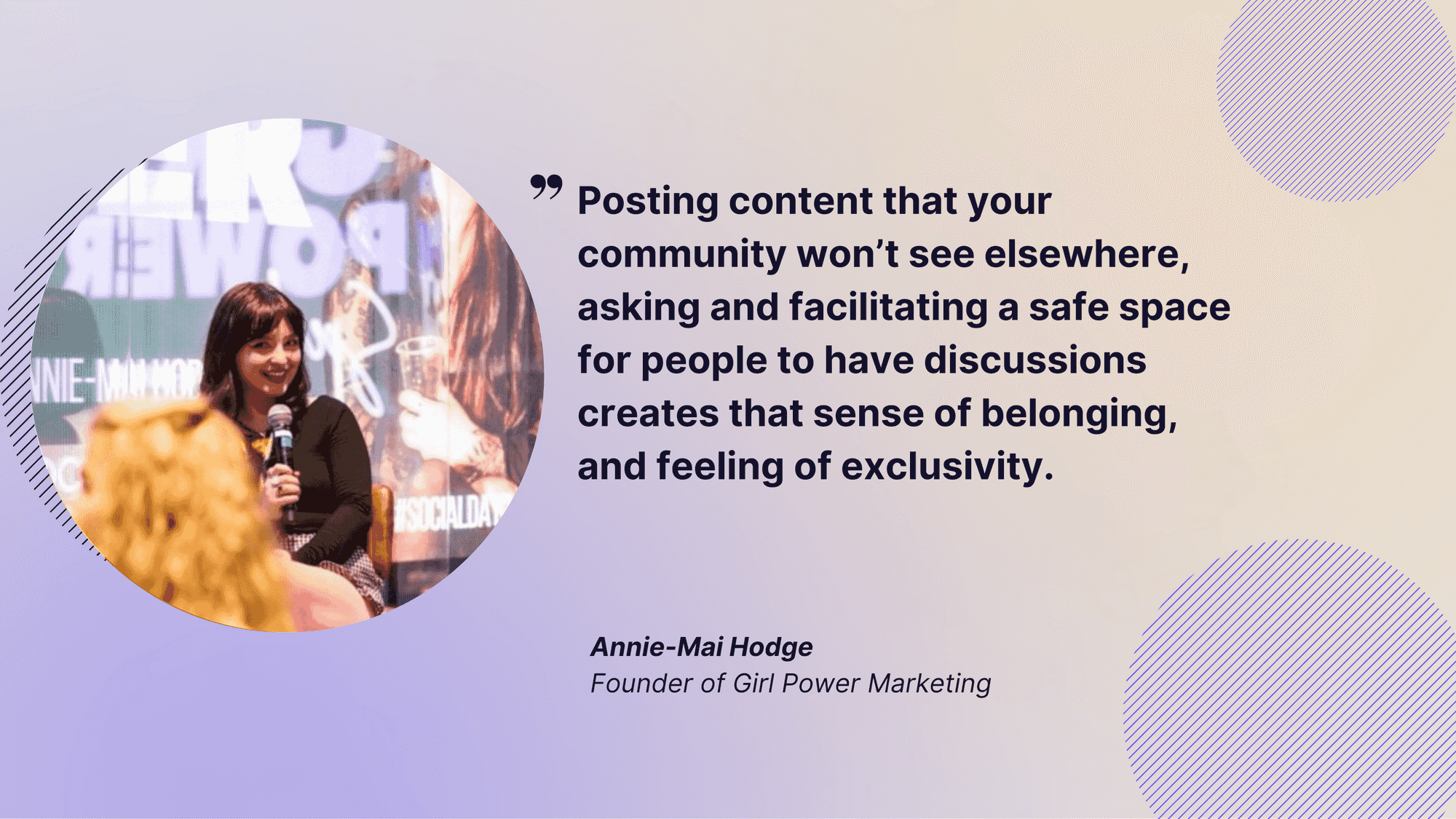
Avoid content that explicitly asks for likes, shares, comments, or follows
LinkedIn thrives on authentic, meaningful professional interactions. Asking outright for likes, shares, comments, or follows—commonly known as “engagement bait”—works against that mission.
Posts like “Like if you agree” or “Comment to show support” come off as transactional, not genuine. They might give you a quick visibility bump, but they don’t spark the kind of thoughtful conversations LinkedIn users actually care about.
Moreover, this kind of engagement rarely adds value and can even hurt your reach and reputation in the long run. Especially since professionals value content that informs, inspires, or encourages meaningful dialogue—not fluff.
Plus, LinkedIn’s algorithm is onto it. Engagement bait gets flagged and pushed down the feed. If your posts focus on shallow asks instead of offering real value, you’ll likely see your reach and engagement drop over time as your audience tunes out. Focus on creating content that resonates instead—it’ll pay off.
How to discover what works for your brand?
Let’s be honest: guessing what works on LinkedIn can be frustrating. The truth is, the winning formula isn’t one-size-fits-all—and what’s viral for someone in marketing could totally flop in legal or tech. That’s why taking the time to analyze your own data is the single best investment you can make for sustainable LinkedIn success.
Step 1: Track the Essentials
First things first, keep tabs on the ground-level metrics. Without this, it’s like driving with your eyes closed.
- Impressions: How many people saw your post? Compare organic (free, natural reach) impressions versus total (including paid, if you run ads). This tells you if you’re getting in front of new faces or just familiar connections.
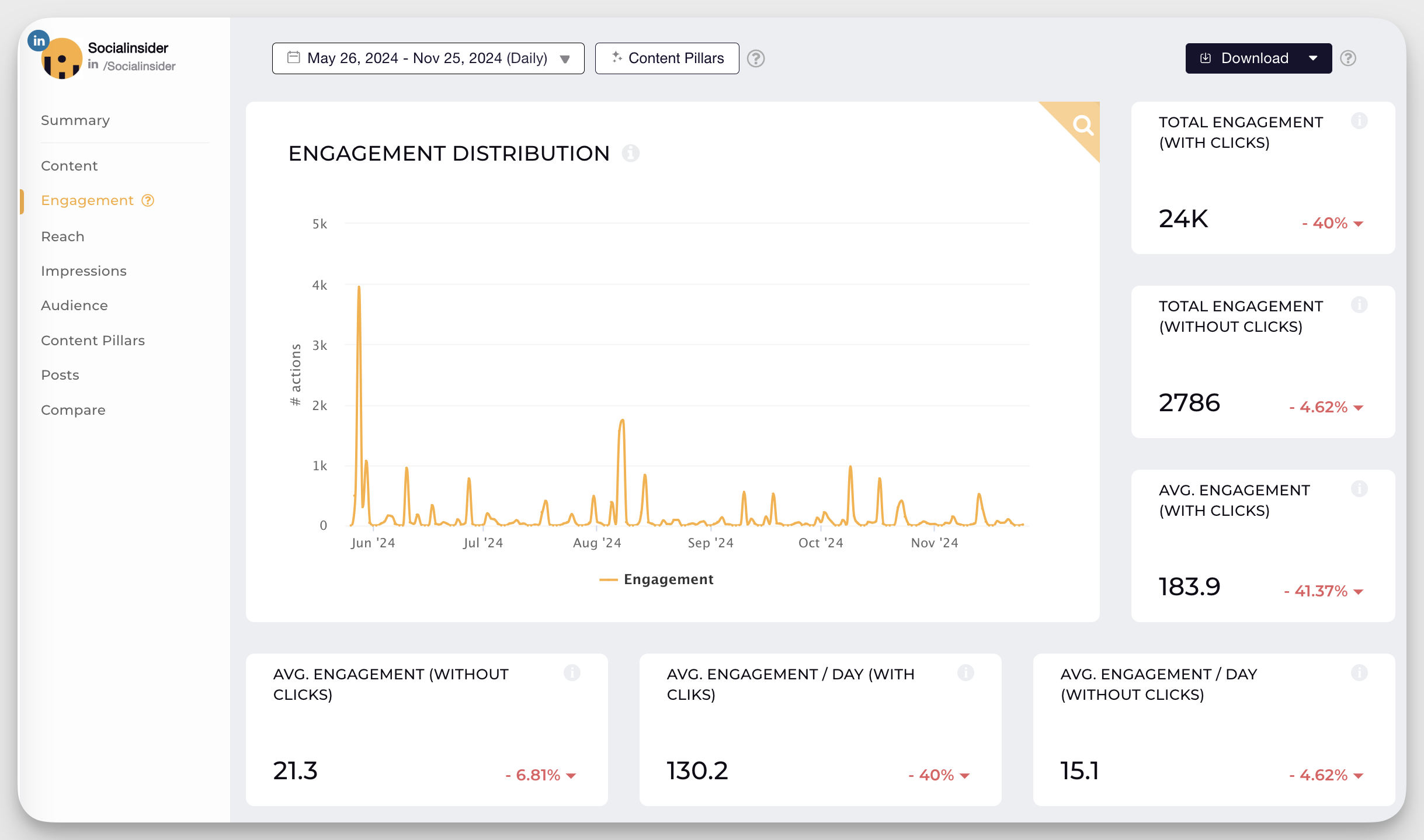
- Engagement Rate: Are people stopping to interact, or just scrolling past? Calculate this by dividing the sum of likes, comments, and shares by your total impressions. A high engagement rate means your content resonates—even if you’re not reaching millions (yet).
- Follower Growth Rate: Are you attracting new people into your network? If your follower count barely moves, it might be time to shake up your content.
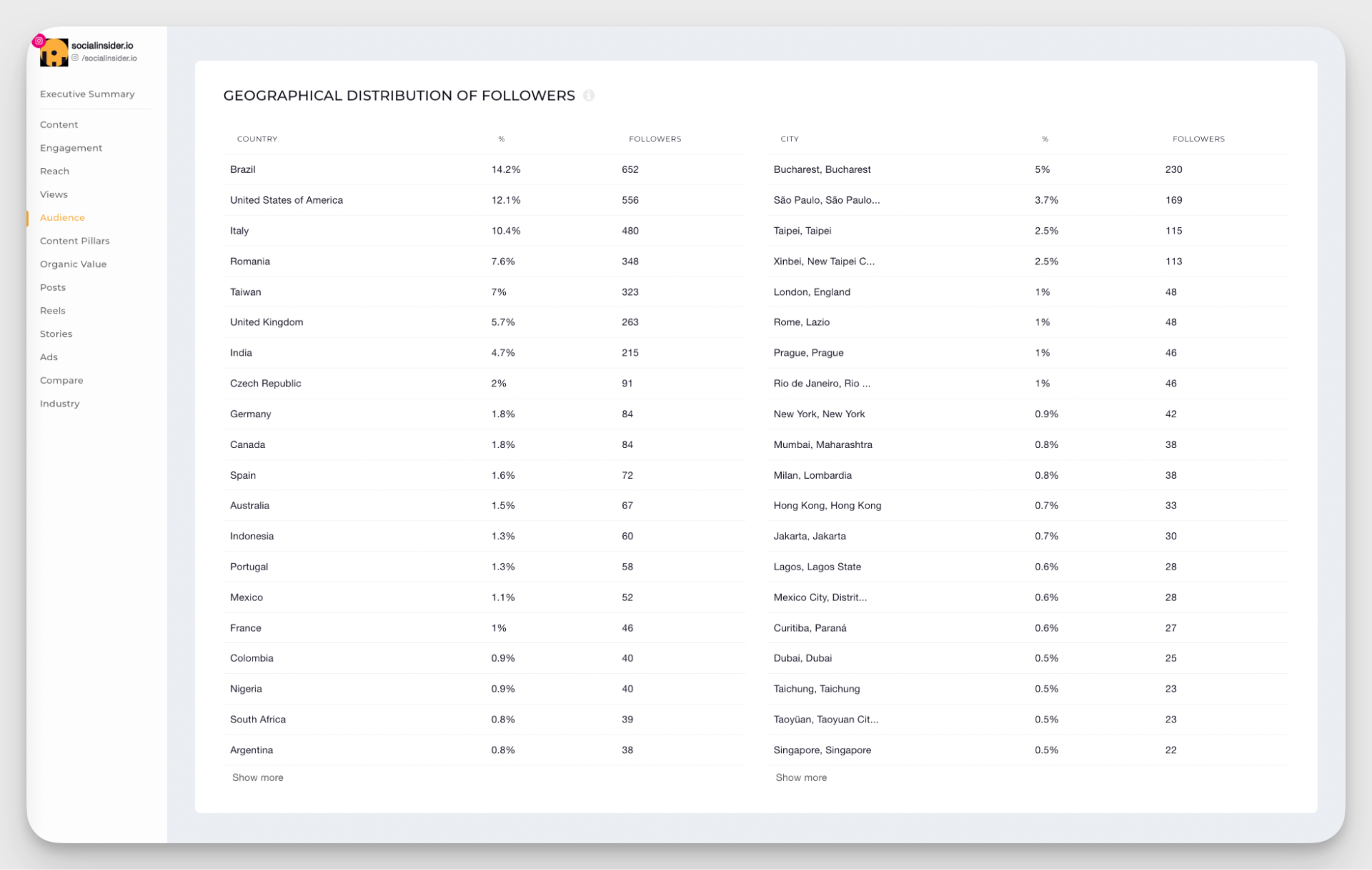
- Audience Demographics: LinkedIn shows you details on who’s liking, commenting, and sharing your posts. Are these the professionals you want to connect with—recruiters, decision-makers, peers in your sector? Adjust your content based on their roles, industries, and geographies.
Step 2: Look for patterns
Take a step back every couple of weeks. What types of posts got your best responses? Maybe your tip-packed PDFs get more shares, while your personal stories spark conversations. Look for:
- Topics that reliably get traction—do certain industries or themes light up your notifications?

- Formats that connect—are native videos crushing it, or do your audience prefer straightforward text posts?
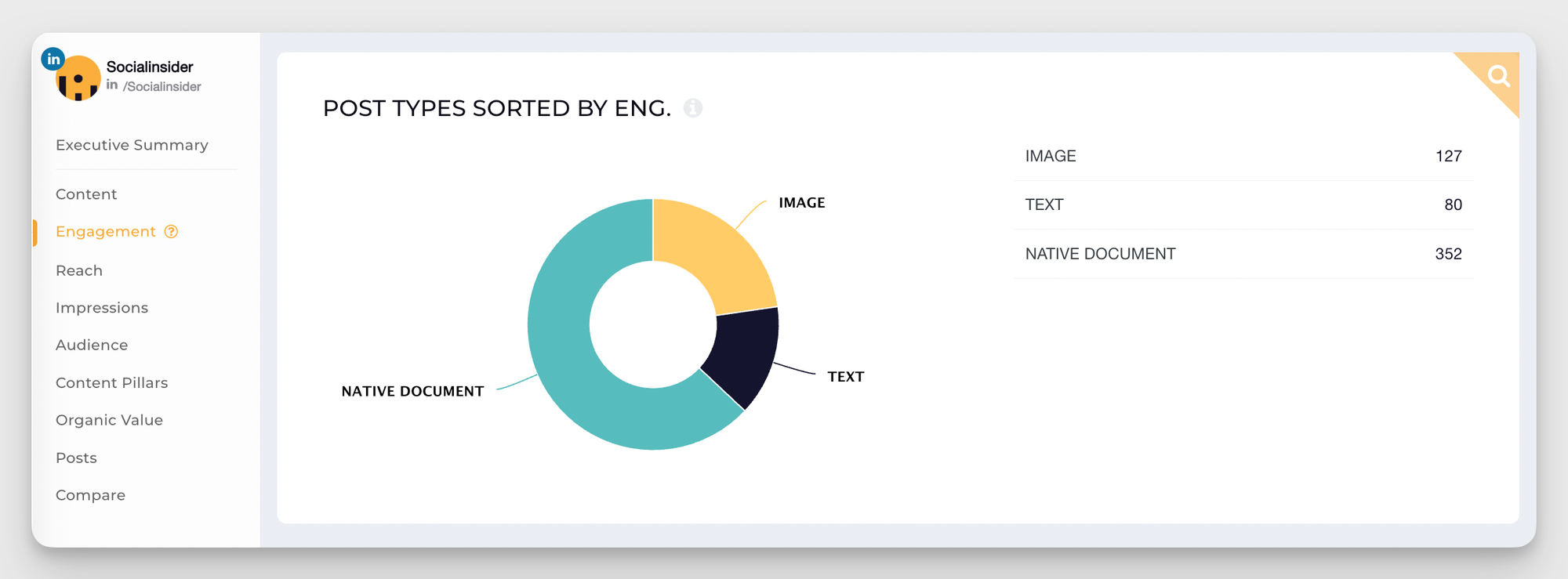
- Posting times and days—do your Monday morning thoughts bomb, but Thursday afternoon updates soar?
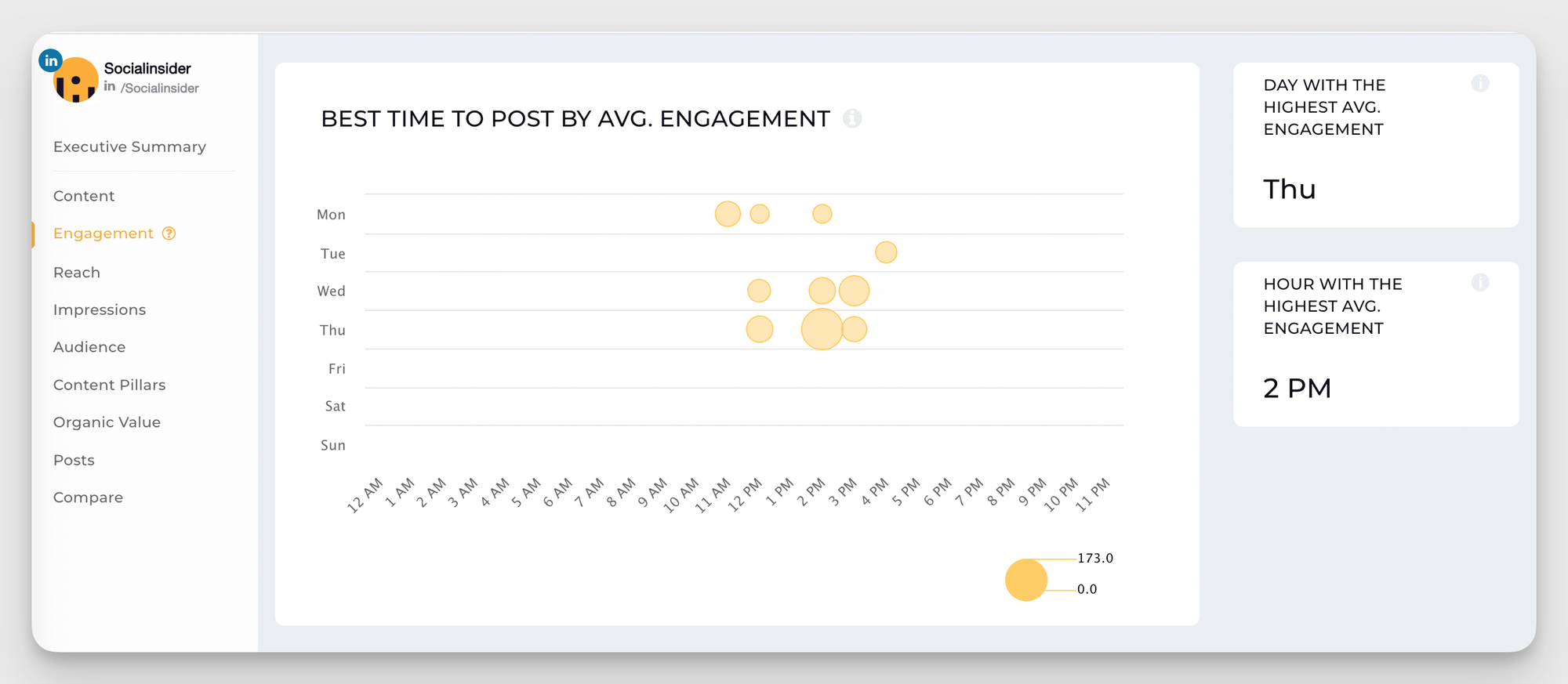
Even negative results are golden. If something flopped, try to identify why: was the timing off, was it too salesy, or did it lack a clear call to action?
Step 3: Experiment and adjust
If you'd ask me what's an important aspect for getting high performance on LinkedIn I'd say experimentation and optimization.
Here are my top 3 pieces of advice for you for this part:
- Don’t be afraid to shake things up. Try posting at different times, testing new content formats, or diving into new topics.
- Double down on what works. If your audience eats up short, actionable tips, give them more. If you notice carousels drive new followers, schedule them regularly.
- Watch your metrics after each experiment, and pivot accordingly.
Analysis means little if you don’t put it into motion!
7 LinkedIn algorithm tips to maximize performance
Below are some Linkedin posting best practices you can use to maximize your reach and build an engaged audience.
#1. Create relevant, engaging content that speaks to what people want to see
The LinkedIn algorithm loves engagement (likes, comments, shares), especially in those golden first few hours after posting. Translation? If your content sparks interest, you’ll get noticed. Here’s how to make that happen.
Know what your audience cares about (and deliver it)
Use LinkedIn’s analytics to see which past posts struck a chord. Check out demographic insights—job titles, industries, etc.—to fine-tune your message. For instance, if your network is full of marketers, don’t just post generic advice; something like “X Free Tools for Marketers in 2025” would work better.
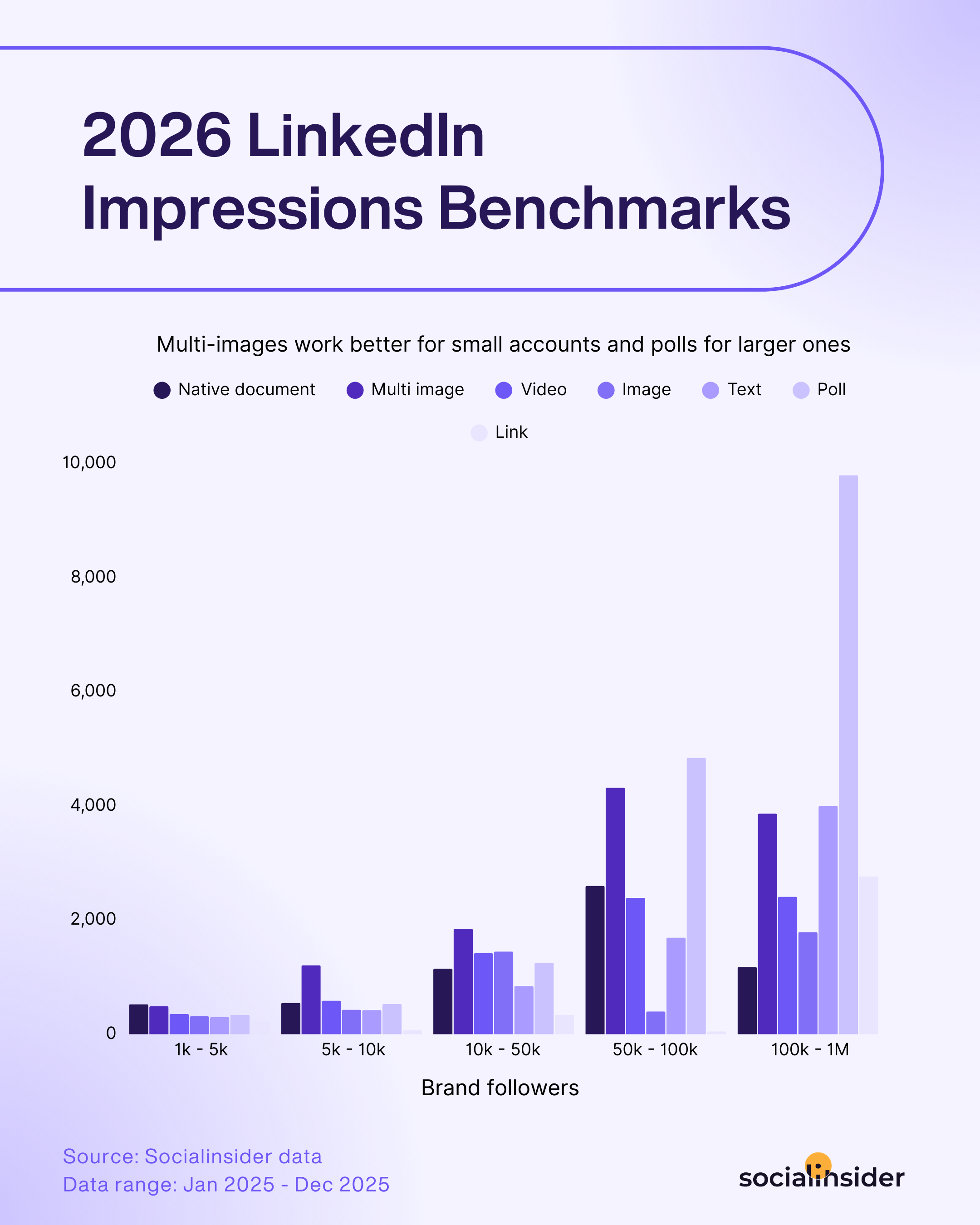
Mix up your formats
Experiment with the following post formats to keep your feed fresh and engaging:
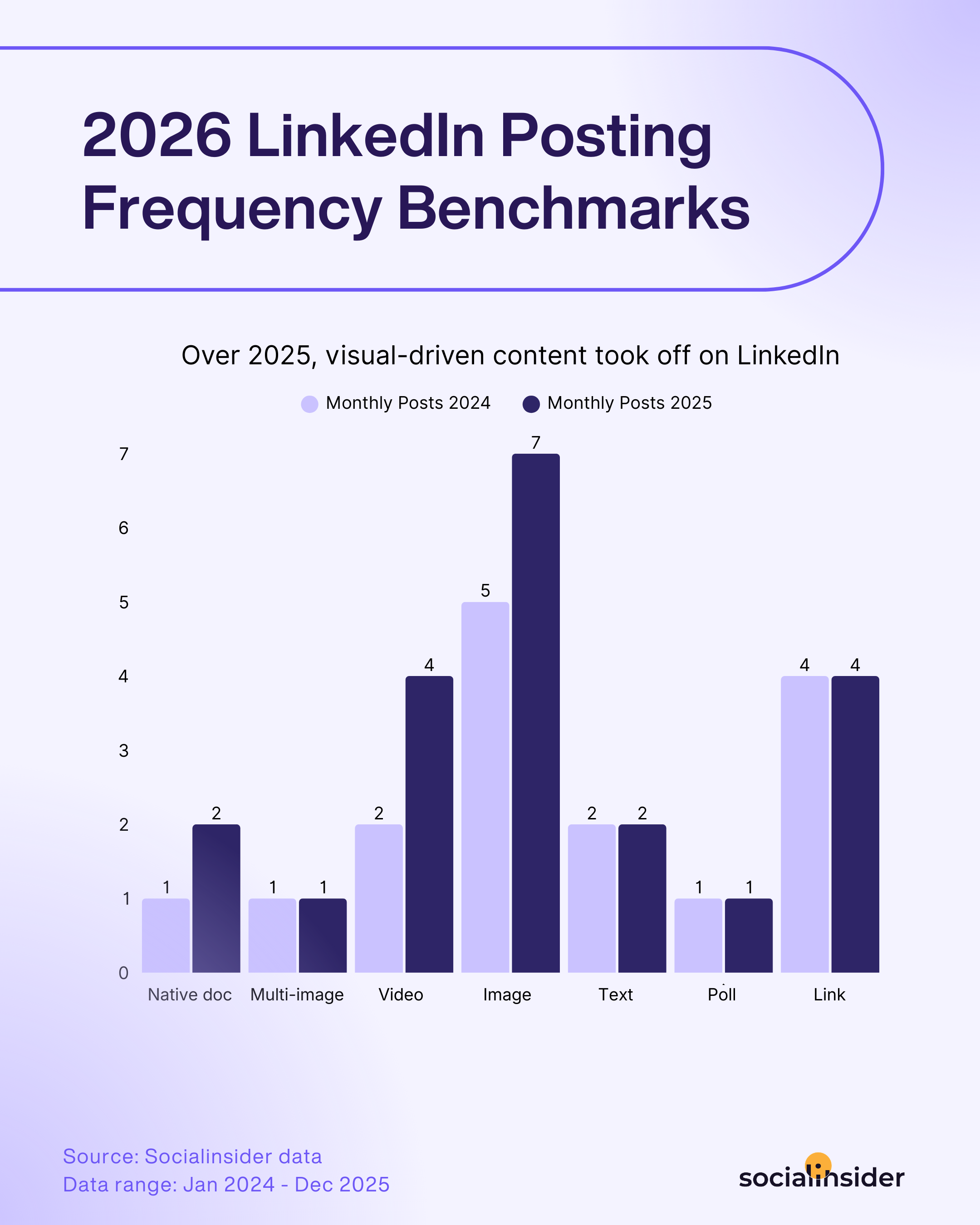
- Videos: This content format has seen an engagement increase year over year, adapting to the video is king social media reality.
- Carousels: Step-by-step guides? Chef’s kiss.
- Polls: Quick insights, big interaction. And great for generating impressions.
2. Prioritize zero-click content
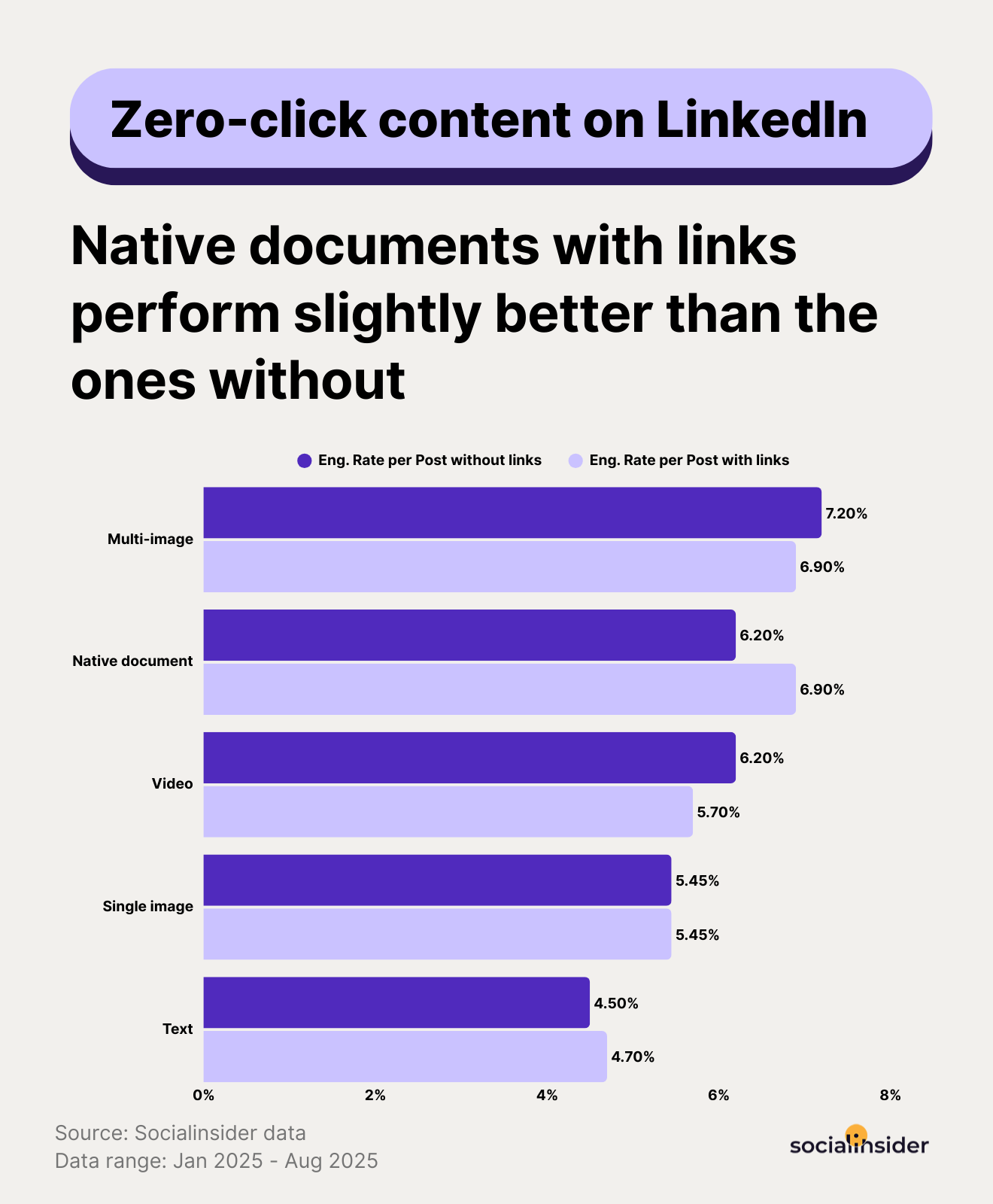
It’s time to embrace zero-click content. This content type is all about delivering value upfront, right in the LinkedIn feed—no clicking away to external links.
Why does it work? Simple: users love quick, actionable insights that save them time, and LinkedIn loves keeping its audience on the platform. Win-win.
Think about it: instead of sharing a link to your blog on “Top Marketing Strategies for 2025,” why not break it down into bite-sized nuggets of wisdom?
Create a carousel post that walks through the main points or a sleek infographic that catches the eye and explains the essentials.
Not only does this make your content more digestible, but it also shows off your expertise where it matters—directly in the feed.
To get started, focus on crafting visually appealing carousels or documents packed with value, condensing complex ideas into snappy posts, or designing engaging infographics.
Even LinkedIn-native features like polls or image-rich posts can boost interaction without pushing users off-site.
What’s more, the algorithm rewards you for keeping the party on LinkedIn, amplifying your reach and engagement.
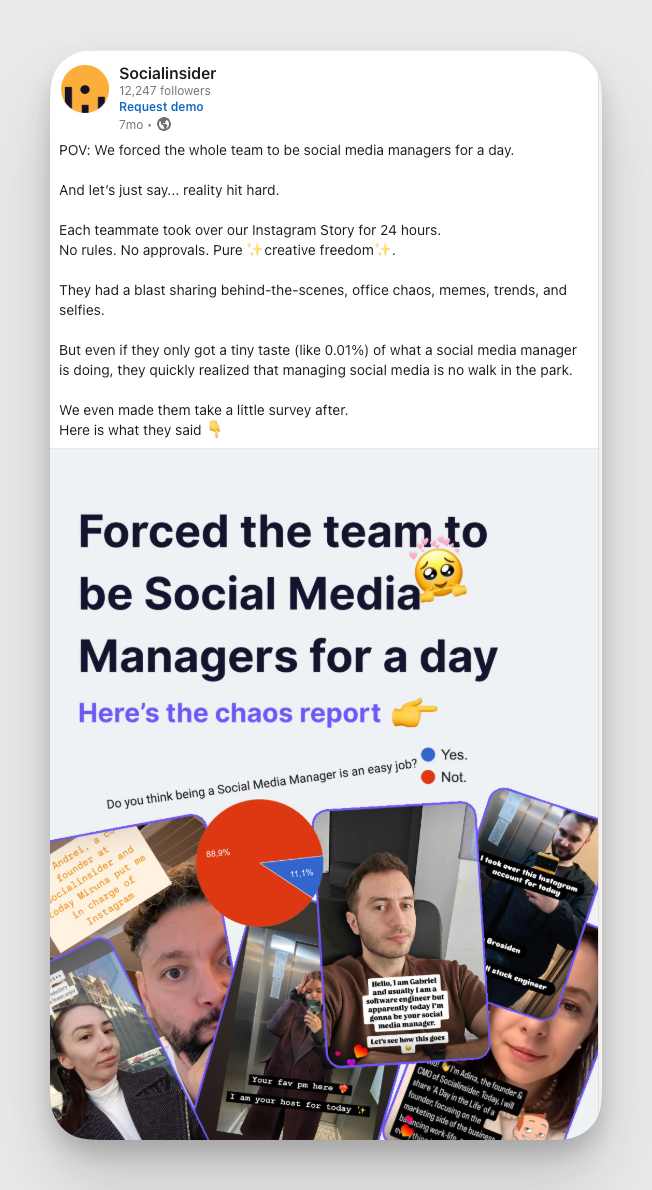
#3. Bring in employee-centric content
Sharing content that highlights your employees’ achievements, experiences, and insights is another effective engagement tactic.
Employee-centric posts humanize your brand, showcasing the people behind the company and fostering a sense of community. This approach enhances internal morale and attracts potential talent and clients who value a company’s commitment to its workforce.
To get started, you can:
- Provide glimpses into daily operations, team events, or company traditions—basically, behind-the-scenes stuff. Such transparency builds trust and showcases a vibrant workplace culture.
- Encourage your employees on LinkedIn to share their experiences and insights. This not only amplifies your brand’s reach but also empowers employees as brand advocates.
- Feature interviews or articles about employees’ career journeys, projects, or personal milestones. This personal touch resonates with audiences and builds a relatable brand image.
Want an example? Here's one, form your truly:
#4. Tag and mention people (use sparingly)
Tagging people on LinkedIn can work wonders for boosting engagement and visibility—if you do it right. It’s like seasoning a dish: too much, and it leaves a bad taste.
When done thoughtfully, tagging notifies the right people, bringing attention to your post and sparking meaningful conversations. Overdo it, though, and it screams “spam” louder than a Monday morning inbox.
Start with relevance. Tag people who are genuinely connected to your content. Did a team member crush it on a project? Tag them to spotlight their hard work and keep the professional karma flowing. Sharing an insightful industry take? Tag an expert whose perspective could add value. This kind of tagging shows thoughtfulness, builds goodwill, and encourages interaction.
Don’t overdo it, though. Tagging everyone under the sun (especially if they have no clear connection to your post) risks annoying your network and making your post feel insincere.
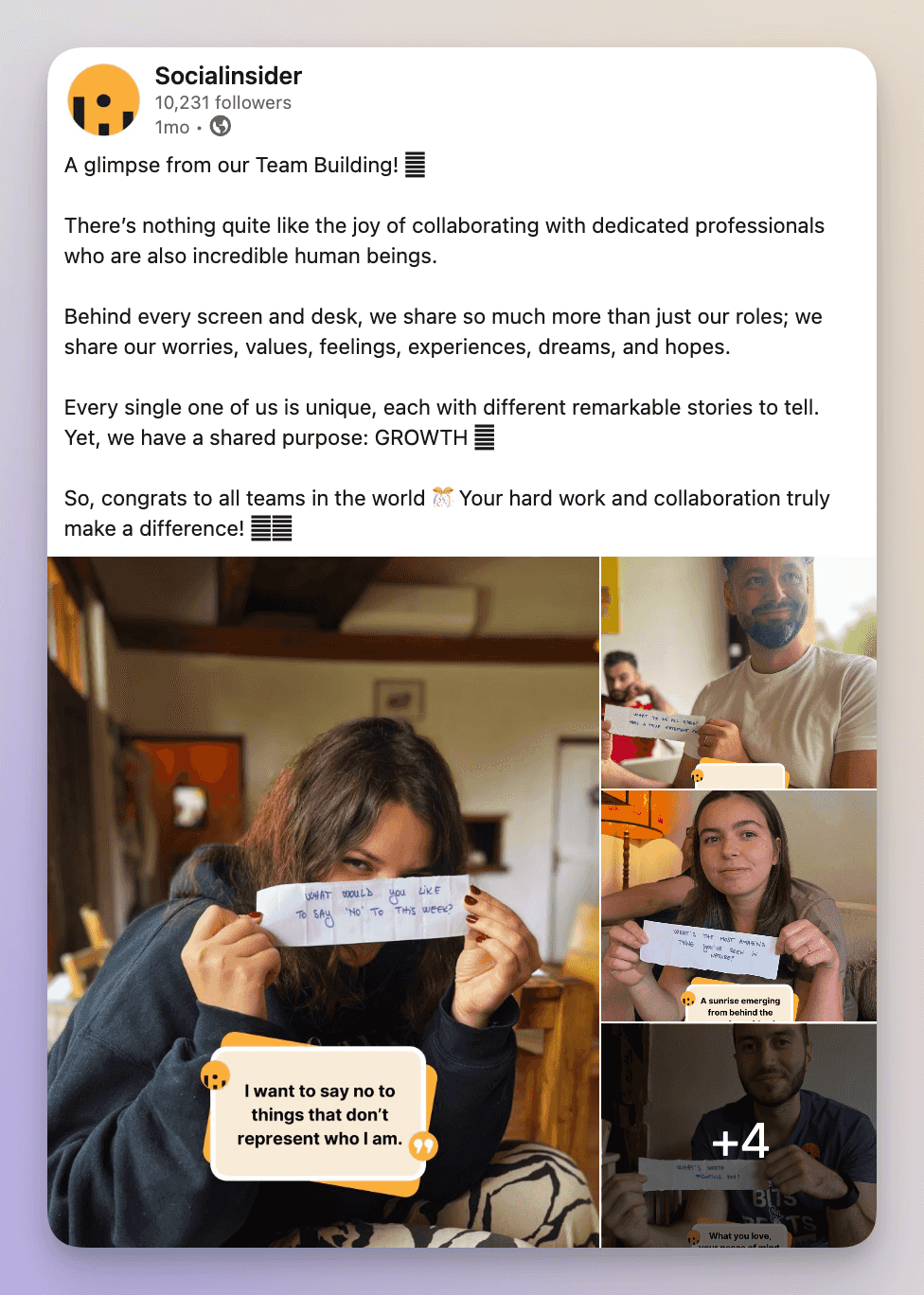
#5. Bring in-person events to LinkedIn
Sharing highlights from conferences, workshops, or company gatherings lets your network feel like part of the action. This then builds community and sparks engagement beyond the event itself.
Here’s how to make it happen:
- Post-event recaps: Share the good stuff—quick summaries, big takeaways, and a sprinkle of photos or videos. It’s a simple way to keep your audience informed and show off your industry cred.
- Live updates: Capture the excitement in real-time with updates or live streams. Your audience gets to ride the moment with you, and the buzz can send engagement soaring
- Tag participants: Give a shout out to attendees, speakers, and partners. It’s a thoughtful nod to their involvement, plus it amplifies your post’s reach through their networks.
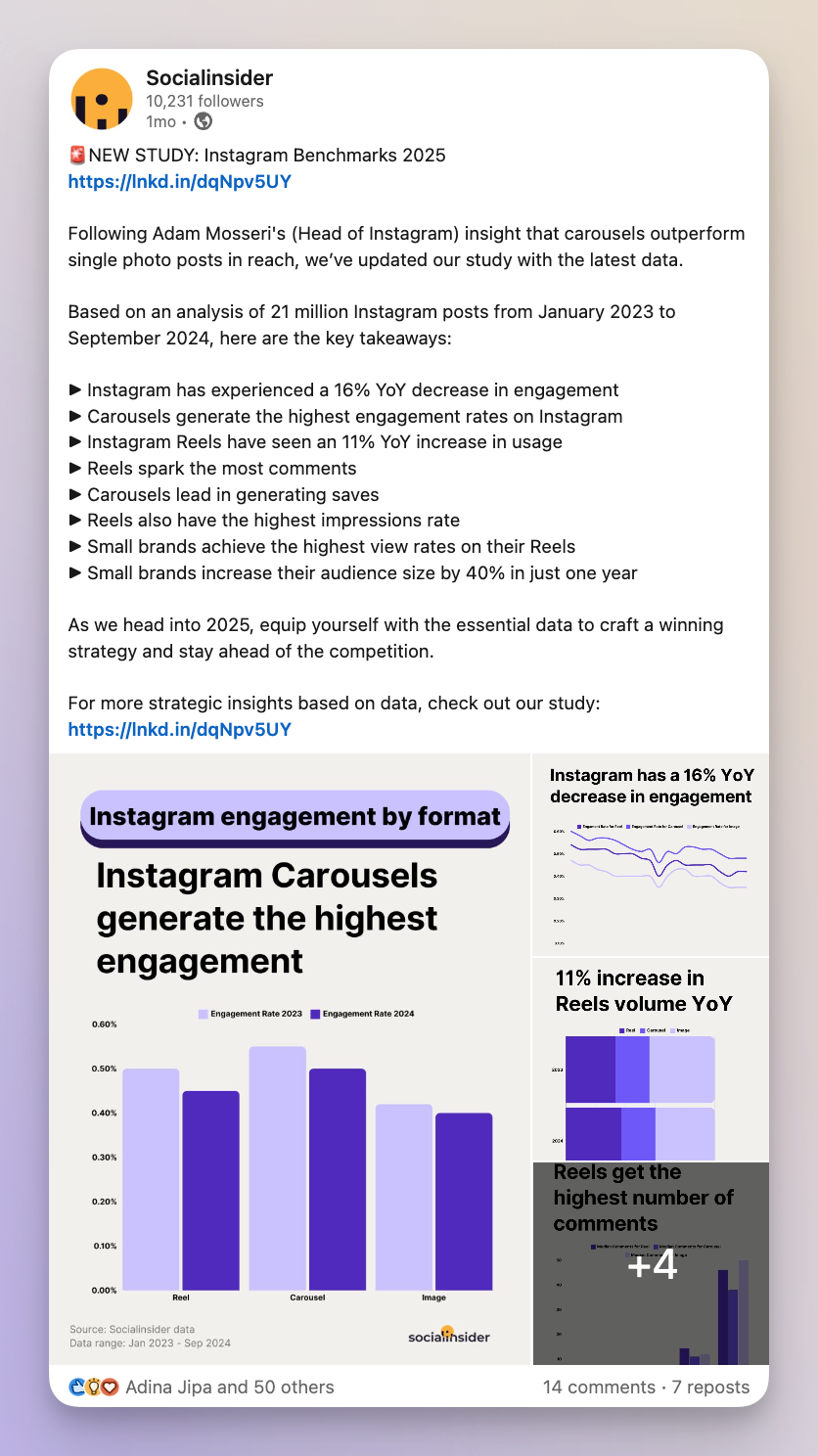
#6. Share reports and original research to build trust
LinkedIn’s audience thrives on content that feeds their professional curiosity, and the stats back it up: a 2024 study found that 71% of comments on research-related posts come from industry pros. You can understand just how hungry they are for fresh, thought-provoking content.
But it’s not just about filling your content calendar with numbers and charts. Regularly posting original research positions you as an authority in your field, earning you your network’s trust and respect. These posts can do wonders for engagement, drawing in shares, comments, and likes that boost your reach.
Plus, your expertise might just catch the eye of potential collaborators, event organizers, or other opportunities that could elevate your business.
To truly make your research shine on LinkedIn, ditch the fluff and keep it smart, engaging, and accessible.
Kick off with a punchy summary that highlights your key takeaways—because nobody has time for fluff. Then add some visuals like infographics or videos to simplify complex data.
Most importantly, don’t just hit “post” and ghost. Ask questions, invite opinions, and get the conversation rolling. The more interaction your post inspires, the more LinkedIn’s algorithm will love you.
#7. Use analytics to discover what’s working and what’s not
Data is your best friend when optimizing your LinkedIn strategy. Luckily, there are tons of top-notch social media analytics tools that you can pair with your existing tool stack to close gaps. Use them to optimize your approach for better LinkedIn engagement and reach.
For example, here’s how you can use Socialinsider to analyze your LinkedIn performance effectively.
Step 1: Access and set up your Socialinsider dashboard
Log into your Socialinsider dashboard and link your LinkedIn business profile to access detailed analytics. Once connected, navigate to the “Engagement,” “Impressions,” or “Content” tabs to explore detailed social media metrics.
Step 2: Analyze your best performing posts
In the “Posts” tab, you’ll see all your posts within a specific (and customizable) timeframe ranked by engagement (this is the default metric).
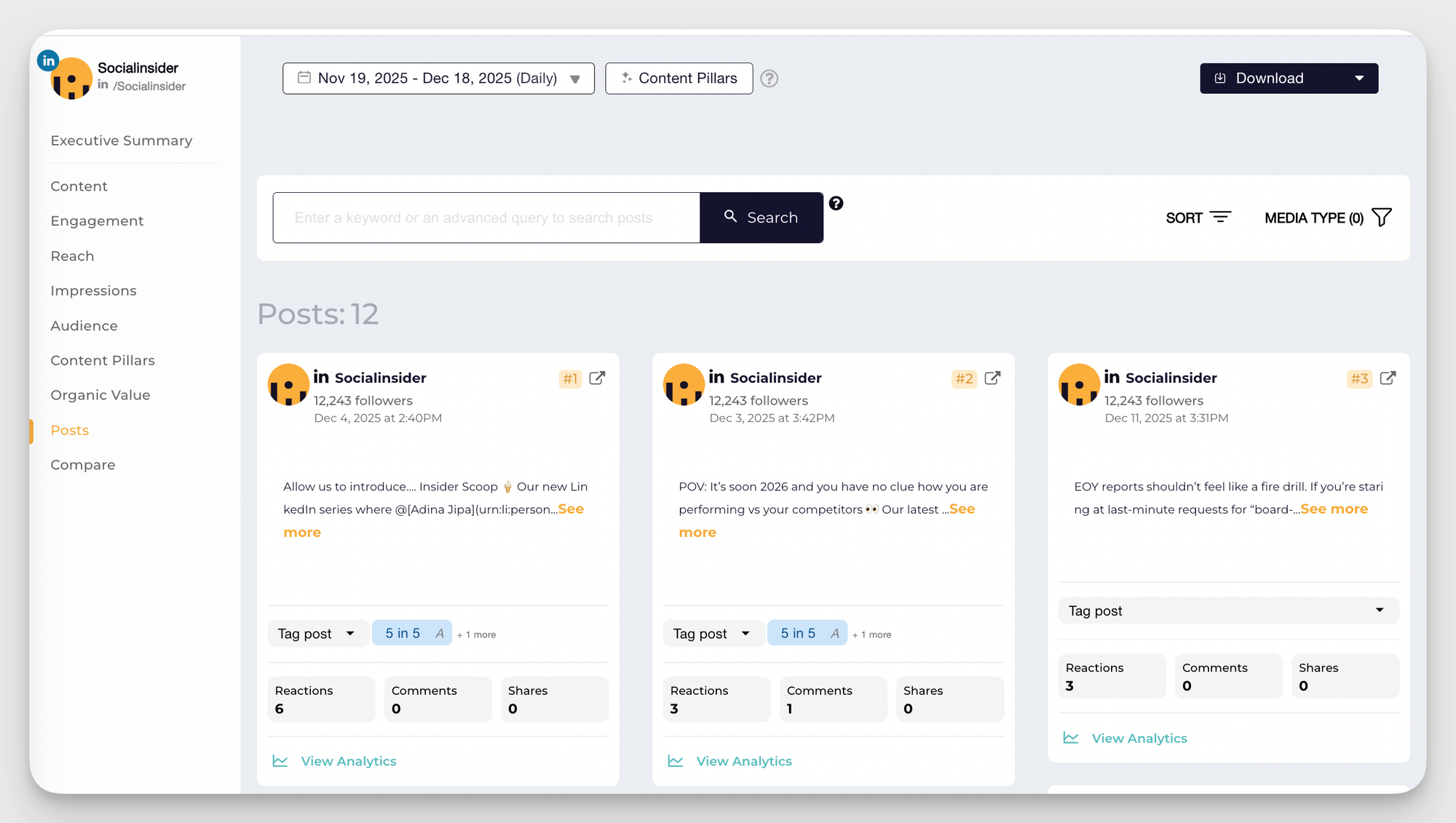
Now, you'll have to look at what your best-performing posts have in common! Is the format? The theme? The people featured? What you need to know is that right there is your secret recipe.
And by the way, in case you're a data geek like me and what to analyze the performance of specific content formats, I have some good news for you - Socialinsider allows different layes of filtering - from content type to metrics selection.
Final thoughts
Building a brand presence on LinkedIn is a balancing act—between following the latest data and keeping the human element front and center.
What’s worked best for us is staying flexible, listening closely to our audience, and not being afraid to try new approaches based on what the numbers say and what feels authentic.
The road to better engagement and growth on LinkedIn isn’t always straightforward, but with a thoughtful strategy and a bit of experimentation, building real connections and seeing strong results is absolutely possible.
FAQs on the LinkedIn algorithm
What is the best time to post on LinkedIn?
According to a recent study, the best times to post on LinkedIn are:
- Wednesday between 8–10 AM
- Thursday at 9 AM and 1–2 PM
- Friday at 9 AM
However, it’s worth doing your own research to see when your competitors are most active on this platform and how well that’s working for them.
Will LinkedIn penalize your post if you edit it after publishing?
No, LinkedIn will not penalize your post if you edit it after publishing, as long as the edits remain within reasonable limits. Specifically, modifications should not exceed 15% of the initial content to ensure the post retains its original intent and value. Excessive edits may disrupt the algorithm’s analysis of the post and could reduce its reach, so make updates carefully.
Rana Bano
Rana is a B2B writer specializing in sales, marketing and customer success. She aims to help brands achieve their desired goals by providing them with strategic advice.

Know what your competitors do — before your manager asks
Get instant social benchmarks & reports without manual work.