Facebook Audit: Step-by-Step Guide, Checklist & Tools
Run a LinkedIn audit step by step — from profile and content analysis to competitor benchmarking and ROI measurement. Free checklist inside."

Social media platforms are constantly evolving — algorithms shift, new formats emerge, and audience behaviors change in ways that aren't always obvious until you look at the data. Keeping up means regularly stepping back to assess what's actually working, and a Facebook performance check is one of the most effective ways to do that.
In this guide, I'll walk you through how to audit a Facebook page from start to finish — covering everything from profile basics and content performance to audience analysis, ads, and competitive benchmarking. There's also a complete Facebook page audit checklist at the end, so you can move through the whole process in one sitting. Without further ado, let's dive in!
Key takeaways
- How often should you run a Facebook audit? A quarterly full audit paired with monthly content check-ins is the right cadence for most marketing teams.
- How to conduct an effective Facebook audit? A well-structured audit moves sequentially from goals and profile basics through content, audience, performance metrics, organic vs. paid, ads, and competitive benchmarking.
- How to structure your Facebook audit report? Organize your findings around three core questions: what's working, what's underperforming, and what opportunities are you missing.
What is a Facebook audit?
A Facebook audit is a thorough review of your Facebook business page — covering everything from profile completeness and visual branding to content performance, audience fit, ad effectiveness, and competitive positioning.
It's part of your broader social media audit practice, but it goes much deeper than a quick metrics check. A proper Facebook page audit gives you a clear, honest picture of where your presence stands today — and a roadmap for where to take it next.
The scope can vary. A high-level audit can take 30 minutes. A comprehensive one — the kind I'll walk you through here — takes longer, but it's the kind that produces insights you can actually act on.
Why run regular Facebook performance audits?
Facebook is not a static platform. The algorithm evolves, audience behavior shifts, and content formats that drove strong results last year can quietly underperform today. Without a regular audit process, you're operating on assumptions — and in my experience, assumptions are where most Facebook strategies quietly fall apart.
Here's what consistent auditing gives you:
- Early warning on performance drops. Rather than noticing a problem months after it started, regular audits surface declining trends in reach, engagement, or follower growth while there's still time to correct course.
- Alignment between content and audience. Your followers' demographics and interests change over time. A Facebook page audit confirms you're still reaching the people you're trying to reach — and flags misalignment before it becomes a strategy-level problem.
- Competitive awareness. Benchmarking your performance against competitors as part of each audit helps you spot industry shifts and content opportunities before they become crowded.
- ROI clarity. Understanding the balance between your organic and paid efforts — and what your unpaid content is actually worth in dollar terms — helps you allocate budget and creative resources more effectively.
- Compound improvement. Each audit builds on the last. Over time, you're not just fixing problems — you're building a clear picture of what consistently works for your specific audience.
How often should you run a Facebook audit?
The right cadence depends on how actively you're using Facebook and what you're trying to improve. Here's the framework I use:
- Weekly micro-reviews: A quick scan of engagement metrics, reach, and top/bottom posts — 15 to 20 minutes. Good for active pages posting daily or several times per week.
- Monthly content audits: A deeper look at format performance, posting frequency, and audience growth trends. Useful for tracking whether strategic changes are actually working.
- Quarterly full audits: Complete review covering profile, content, audience, organic vs. paid performance, ads, and competitive benchmarking. This is when you update your strategy.
- Annual deep audit: Year-over-year comparisons, long-term goal-setting, and a full reset of your Facebook marketing strategy for the period ahead.
For most marketing teams, a quarterly full audit paired with monthly content check-ins is the right balance. If you're running significant ad spend, I'd add a monthly ads-specific review on top of that.
How to conduct an effective Facebook audit?
Step 1: Define your goals and KPIs
Before you touch any data, clarify what you're actually trying to achieve on Facebook. Auditing without defined goals means you're looking for problems without knowing what "good" even looks like.
Your Facebook goals should connect directly to broader business objectives. Common examples:
- Brand awareness → reach, views, follower growth
For Kassandra Quinn, Social Media Strategist at ModSquad, the most important metrics are:
The most important metrics really depend on your goals, but I focus on two. I want to know not just how far the content went, but who it reached and what impact it had. I specifically pay attention to:
Engagement rate: This tells me how relevant the content is to the audience. A high engagement rate means people aren’t just seeing it but they’re responding to it.
Reach and impressions: Are we getting in front of the right people? Is our content being surfaced consistently?
- Community engagement → engagement rate, comments, shares
- Website traffic → link clicks, CTR
- Lead generation → form completions, conversion rates
- Customer service → response rate, response time
Step 2: Check that your Facebook page basics are up to date
I always start every Facebook page audit here, because profile gaps compound quietly over time — and they're easy to miss when you're close to the page. My recommendation: view your page the way a new visitor would, from a logged-out browser window and from a mobile device. You'll often see things you'd never notice from your usual admin view.
Here's what to check:
- Username and URL: Consistent with your brand name across other social channels, and easy to find in Facebook search.
- Profile photo: Clear, recognizable at small sizes (typically your logo), and displaying well on both desktop and mobile.
- Cover photo: Current, on-brand, and actively communicating something — a campaign, a value proposition, or a seasonal moment. Not a placeholder that's been sitting untouched for two years.
- About section: Complete with accurate contact details, business hours, website URL, and a description that clearly explains what you do. This section also matters for Facebook's own internal search algorithm.
- CTA button: Aligned with your current primary goal, and linked to something that actually works. It sounds obvious, but I've audited pages where the CTA button linked to a 404 page that had been broken for months.
- Page category: The correct category improves discoverability in Facebook search.
- Pinned post: Is there one? Is it current? A pinned post is valuable real estate that too many brands leave empty or outdated.
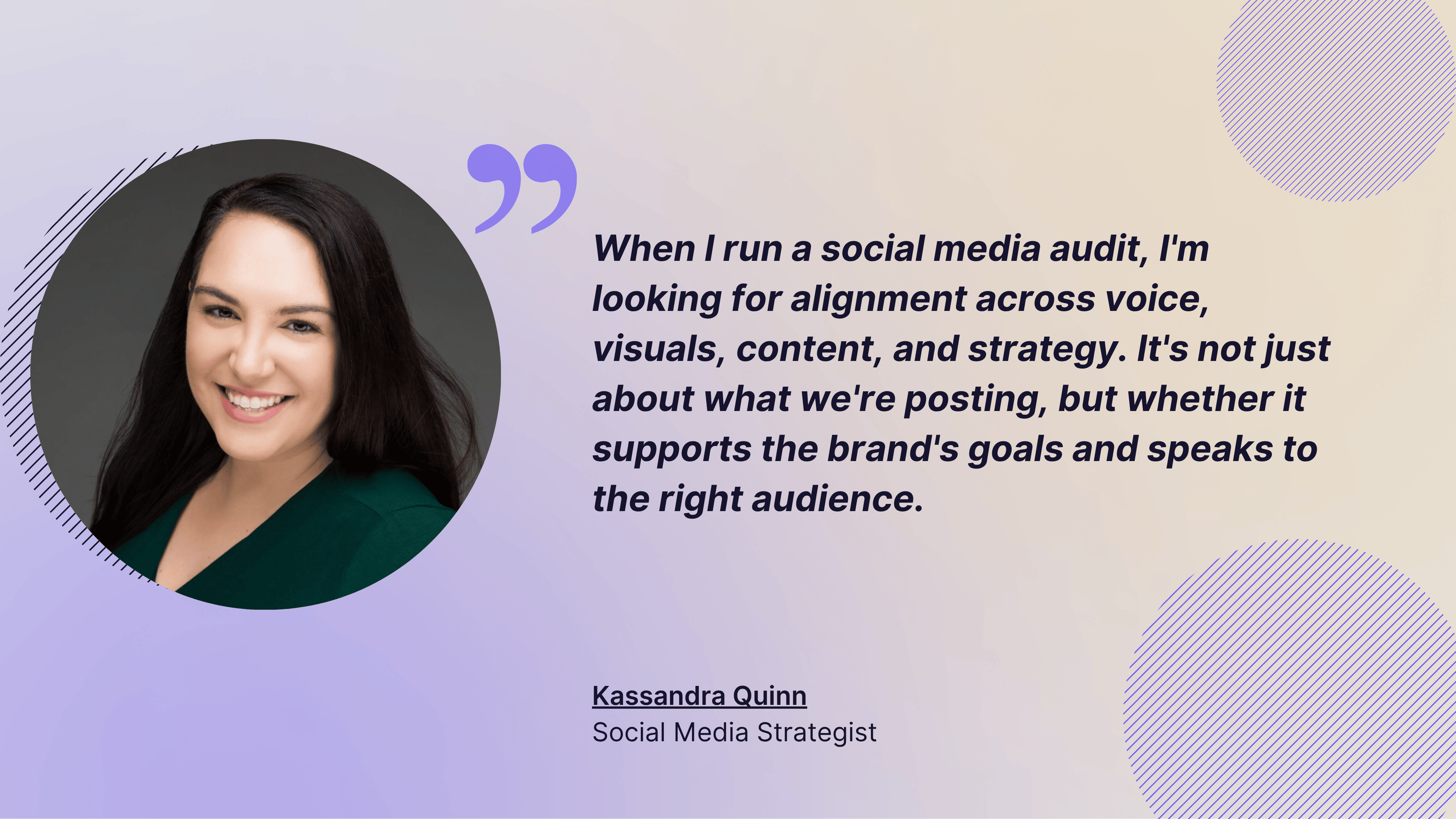
When I spoke with Kassandra about her audit process, her answer reminded me how much this first step sets the tone for everything else:
When I run a social media audit, I'm looking for alignment across voice, visuals, content, and strategy. It's not just about what we're posting, but whether it supports the brand's goals and speaks to the right audience.
Step 3: Run a Facebook content audit
Content is where most Facebook audits uncover the biggest opportunities — and the most surprising blind spots. The goal here is to identify which formats, topics, and posting patterns are driving results, and which are quietly consuming effort without returning anything meaningful.
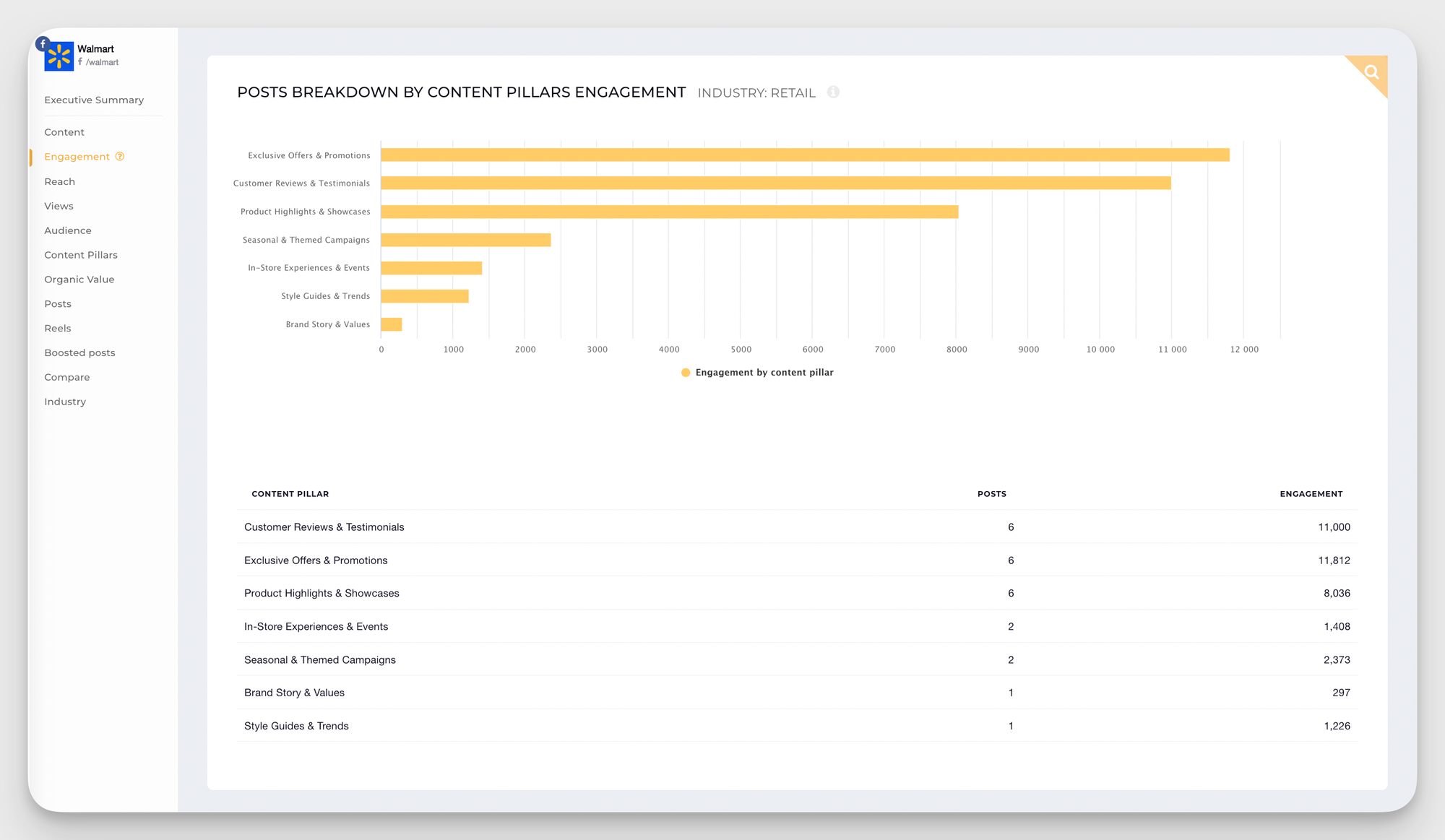
- Audit your content pillars: I always start here, because content pillars give you the strategic view before you zoom into individual posts. If you've been tagging or categorizing your content by topic, this is where the analysis gets really interesting. You'll quickly see which themes your audience gravitates toward — and which ones are quietly underperforming despite the effort going into them.
PS: This is something Socialinsider makes significantly easier through its AI Content Pillar Analysis feature. Rather than manually categorizing months of posts, it automatically groups your content into themes and ranks them by performance — so you can see at a glance which pillars are driving engagement and which ones are falling flat. It's one of those features that turns what used to be a multi-hour manual exercise into something you can act on in minutes.
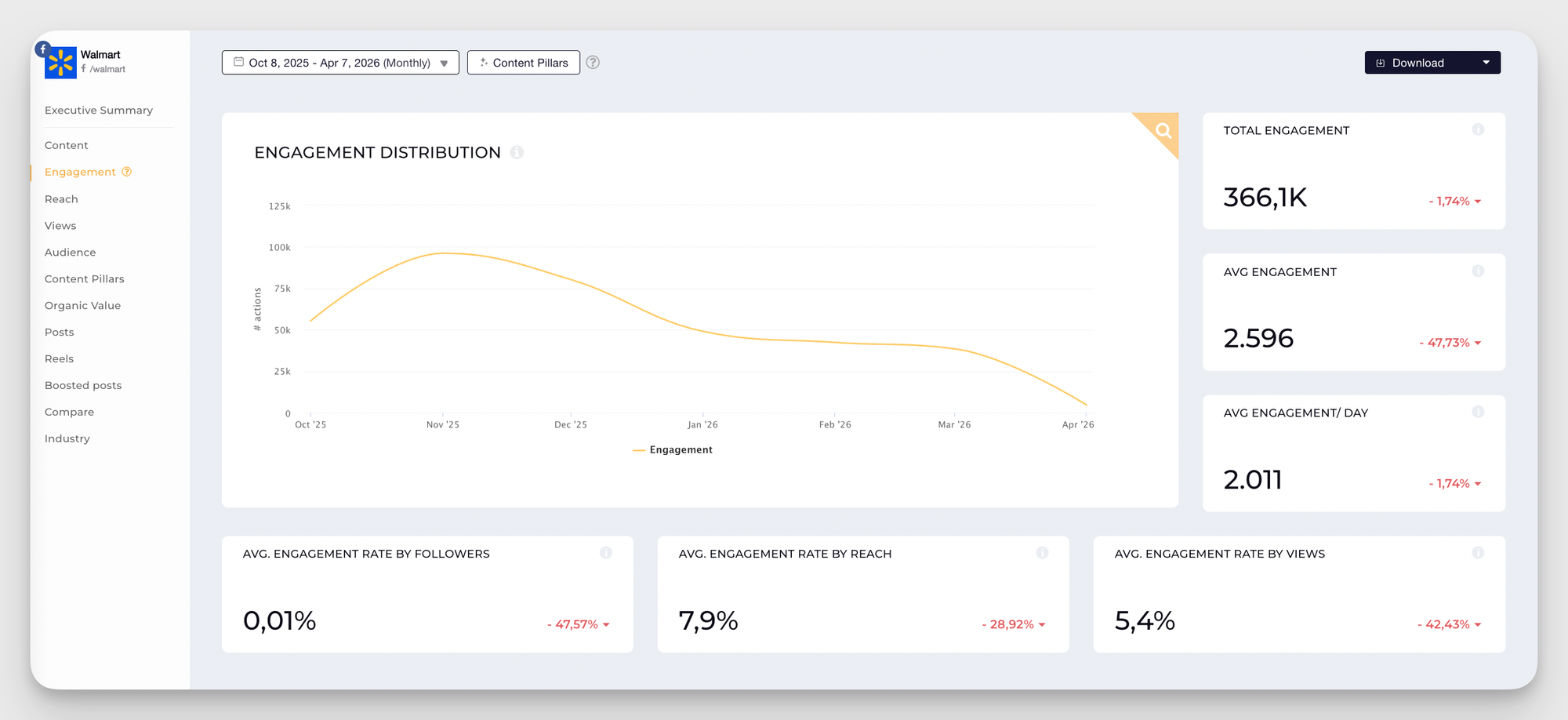
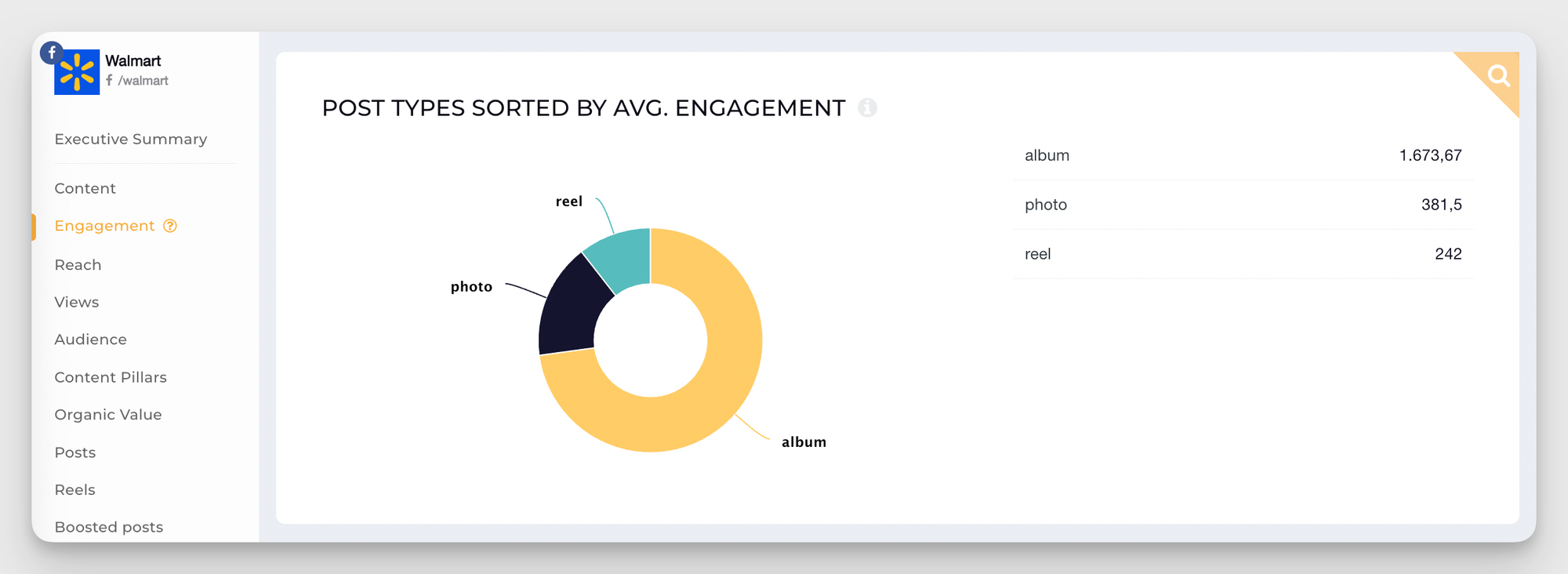
- Analyze by content format. Different post types perform very differently depending on your audience and Facebook's current algorithm priorities. When I ran a content analysis of Walmart's Facebook page using Socialinsider, for example, I could see that albums consistently generated the highest engagement, which is actually aligned with the latest performance trends uncovered by Socialinsider's Facebook benchmarks report.
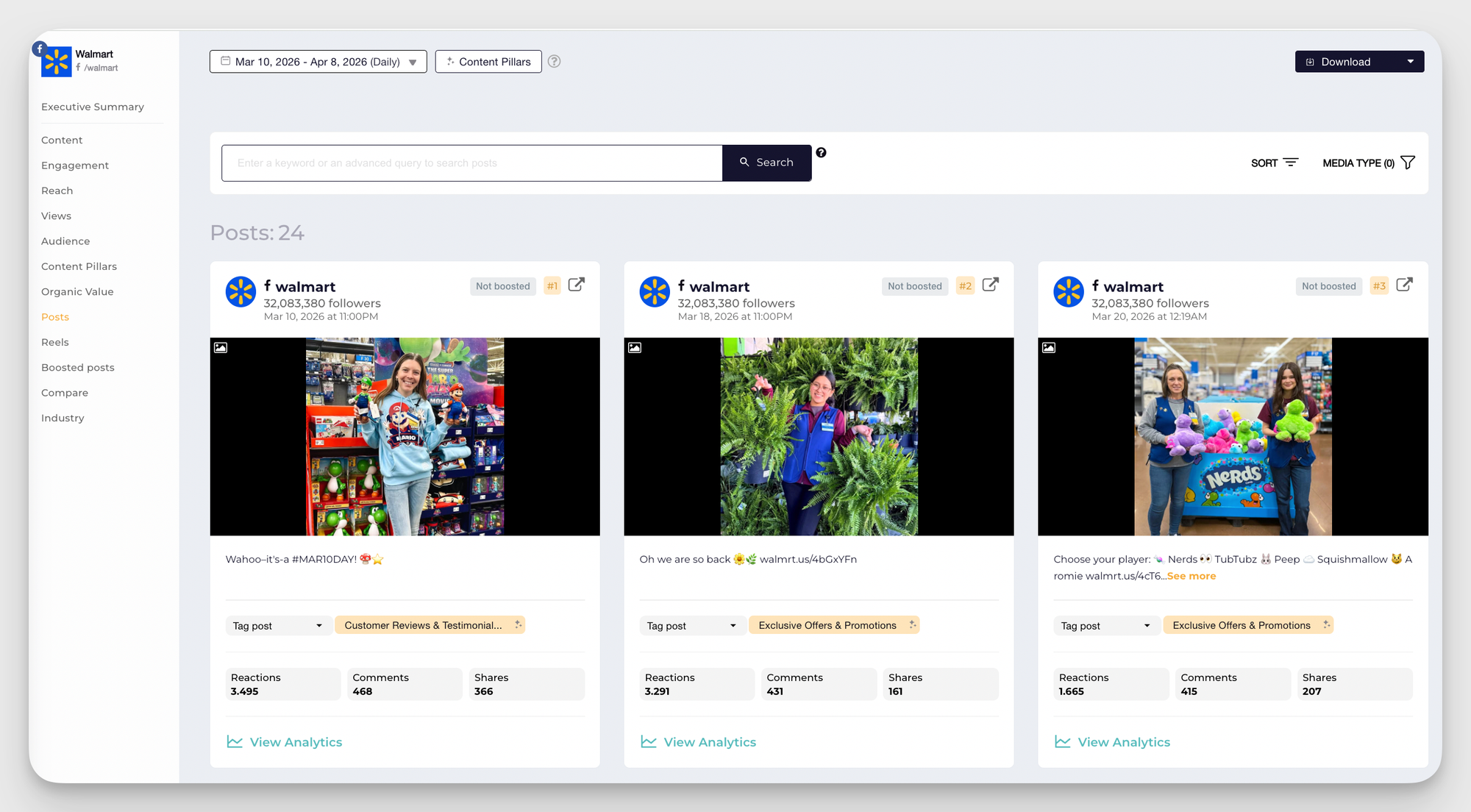
- Identify your top and bottom performers. Pull your best and worst-performing posts from the last quarter. Your top posts reveal themes, formats, and creative approaches worth replicating. Your bottom performers are equally valuable — they show you where you're investing effort that isn't connecting.
- Review your posting cadence. Frequency matters — but consistency matters more. Gaps in your posting schedule, or sudden bursts after a quiet period, can affect your organic reach. Look at whether your posting rhythm is sustainable and whether it's aligned with when your audience is most active.
Step 4: Do a Facebook audience analysis
Your content might be genuinely good, but if it's not reaching your intended demographic, your audit will reveal a misalignment between your target audience and who's actually following you — and that's a different problem with a different solution.
I recommend reviewing age demographics, gender splits, and location data together, not in isolation. The question you're trying to answer is: does my current audience match the audience my content and messaging are designed for?
Step 5: Analyze organic vs. paid efforts
Separating your organic vs. paid social media performance is one of the most clarifying things you can do in an audit, because it tells you which content succeeds naturally versus what requires budget to move.
One of my favorite ways to do this is through Socialinsider's Organic Value feature, which assigns a dollar amount to the engagement, awareness, and audience growth your unpaid content generates.
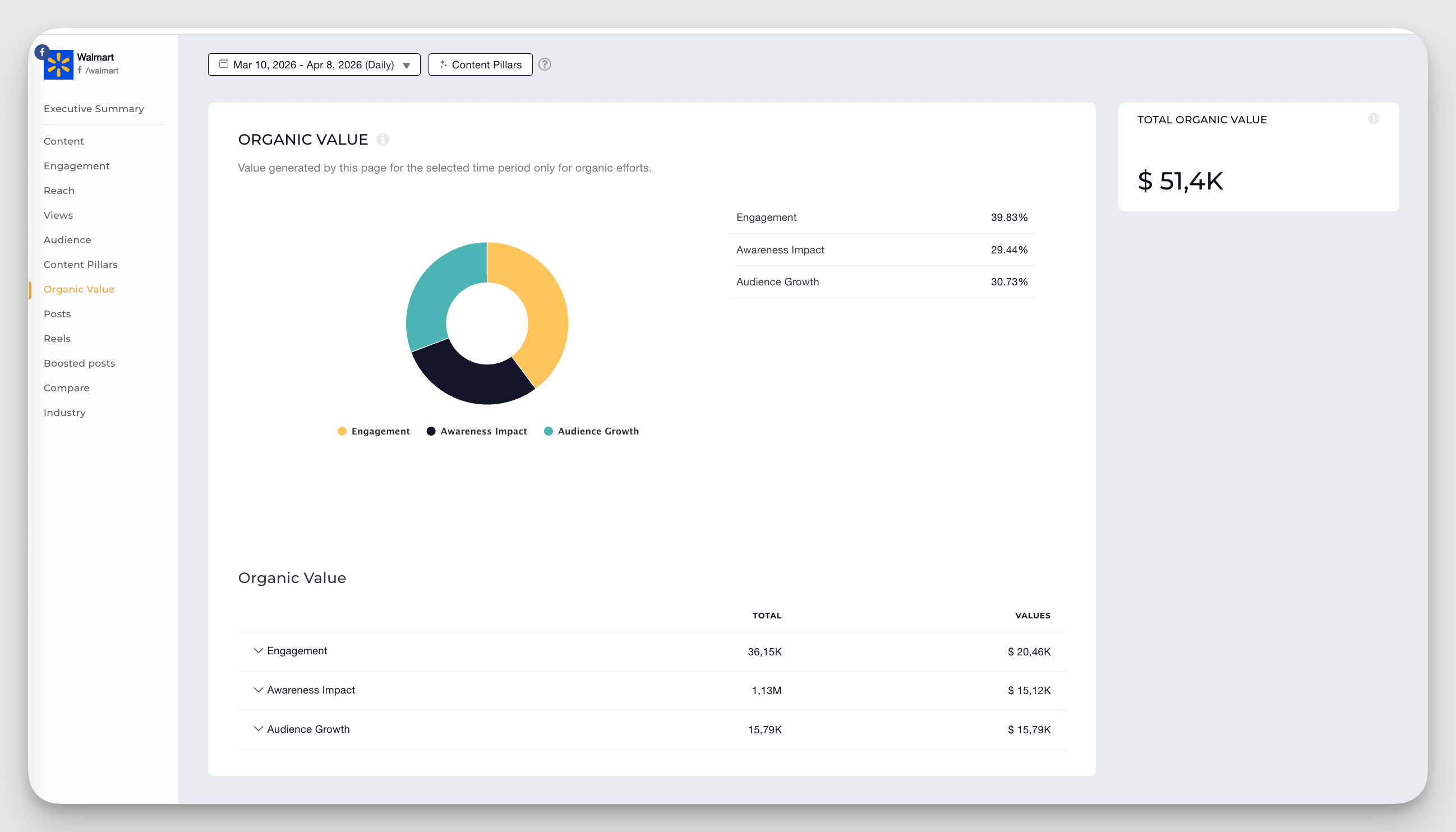
This metric is especially useful when you need to justify your social media investment internally. Rather than saying "our organic content is performing well," you can say "our organic content generated the equivalent of $X in advertising value this quarter." That's a much stronger argument for the marketing budget conversation.
You can also customize how different engagement types are weighted — reactions, comments, shares — to reflect what actually matters most to your business goals.
Step 6: Run a Facebook ads audit
This is the section most Facebook page audits skip — and it's often where the biggest budget inefficiencies are hiding. Even if your organic performance looks healthy, your ad account deserves its own structured review.
Here's what a solid Facebook ads audit should cover:
- Account structure. Are your campaigns organized around clear objectives — awareness, consideration, conversion? Is your ad set structure logical, with similar audiences grouped under relevant campaigns? Disorganized ad accounts make optimization very difficult.
- Conversion tracking. Verify that your Meta Pixel is firing correctly and that your Conversions API (CAPI) is set up and functioning. This is the foundation of everything else. Broken tracking means Facebook is optimizing toward the wrong signals — and you're likely paying more than you need to for worse results.
- Audience targeting. Review your saved audiences, custom audiences, and lookalike audiences. Are they still relevant? Have your custom audiences grown stale? Audience overlap between ad sets can cause your campaigns to compete against each other, inflating costs and reducing efficiency.
- Creative performance. Look at your ad creative across formats — static images, carousels, video, Reels. Which formats are driving the lowest cost per result? Where is creative fatigue showing up — declining CTR, rising frequency, stagnant engagement? These signals tell you when it's time to refresh.
- Budget allocation. Compare spend vs. results across campaigns and ad sets. Are you allocating budget toward what's actually converting, or is budget sitting on campaigns that haven't proven themselves?
- Ad placement. Facebook's automatic placements tend to outperform manually restricted placements for most goals — but that's worth validating with your own data, not assumed.
Step 8: Benchmark against competitors
Your Facebook audit report becomes genuinely actionable when you can compare your performance against similar brands — not just against your own historical data. This is the step that tells you whether your results are actually good, or just better than they used to be.
PS: I find Socialinsider's Key Insights Summary feature particularly useful here — it distills the most important competitive signals across your benchmarked profiles so you don't have to dig through every metric manually.
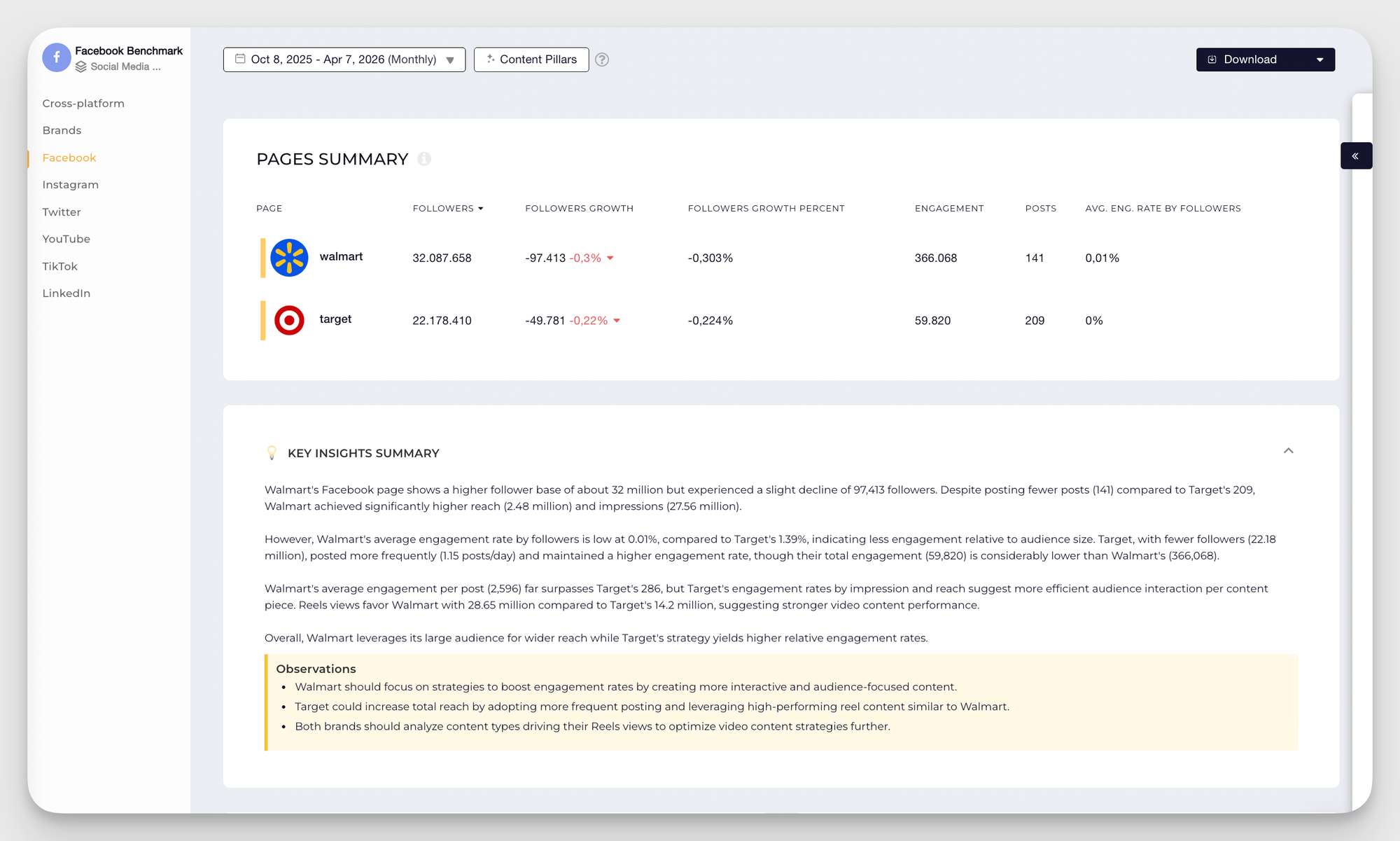
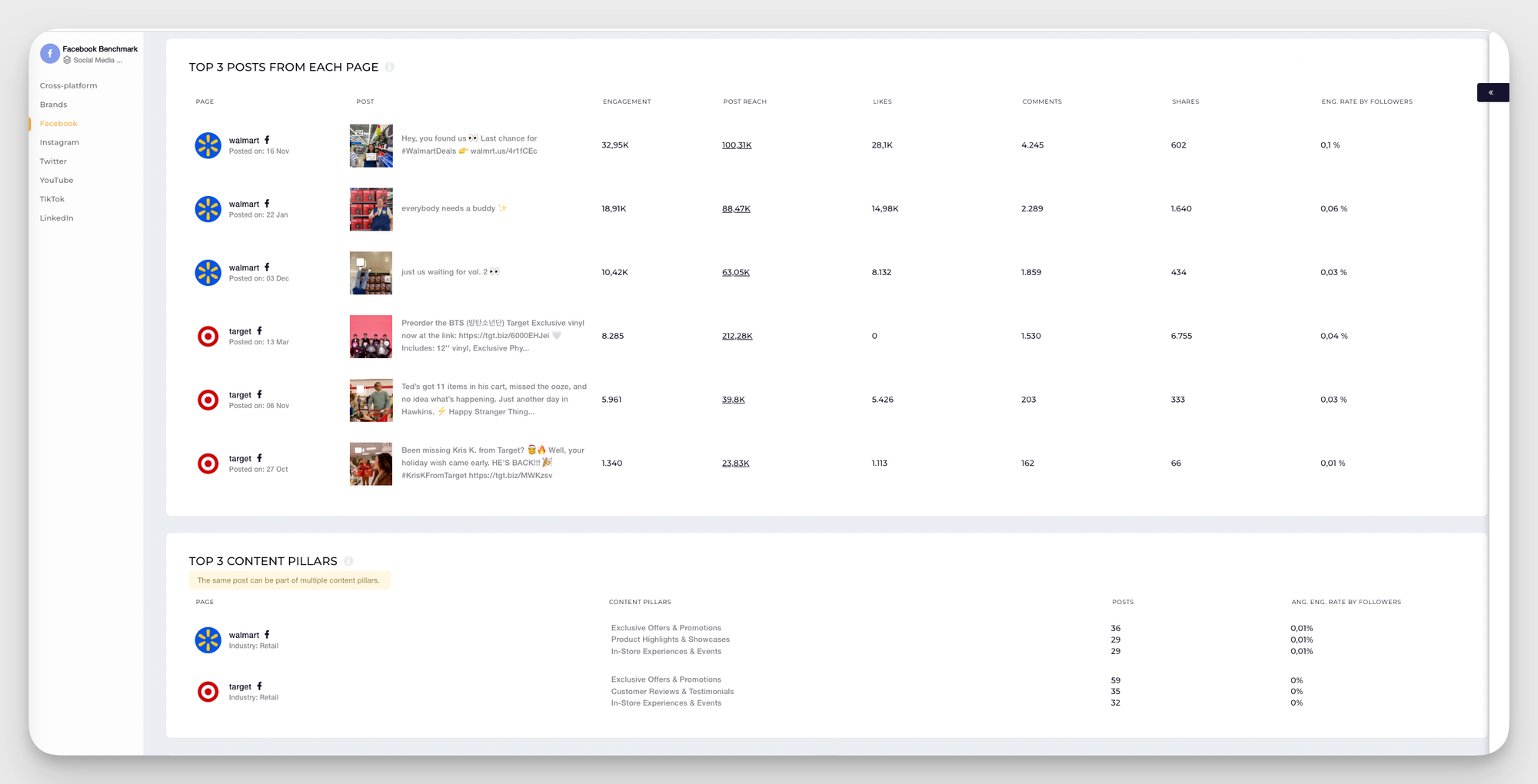
Content pillar comparisons and best-performing posts are also other data layers that I approach. Seeing which themes perform strongly across your competitive set — and which ones no one in your space is owning — is often where the most interesting strategic opportunities surface.
Understanding competitive insights helps you identify content gaps that competitors haven't addressed — which is where your real differentiation opportunities often live.
Facebook audit tools: what to use?
The right Facebook audit software makes all the difference between an audit that surfaces real insights and one that leaves you drowning in raw numbers. Here are the tools I recommend:
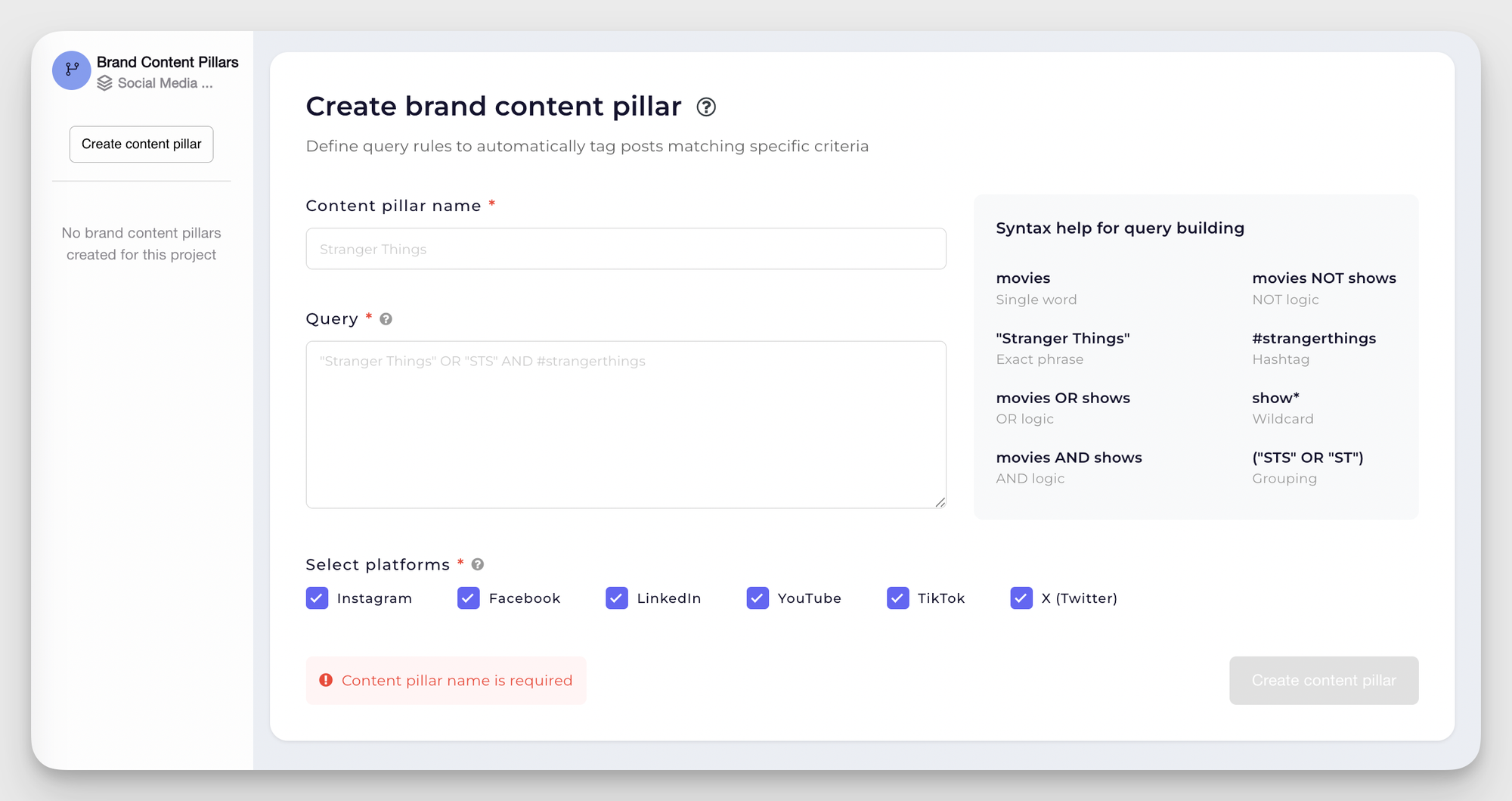
- Socialinsider is my go-to Facebook audit tool for everything related to competitive benchmarking, content pillar analysis, and organic value measurement. It pulls together data from Facebook, Instagram, TikTok, LinkedIn, and more, so you're not jumping between platforms to build a complete picture. For the content audit step, you have two powerful options: the AI Content Pillar Analysis, which automatically categorizes your posts into themes and ranks them by performance, or the Quenry Builder, which lets you create and track your own branded content pillars if you prefer a more customized framework.
- Meta Ads Manager is the primary Facebook audit tool for anything related to your paid campaigns — campaign structure, audience performance, creative analytics, and conversion tracking. My recommendation is to use it alongside Socialinsider for a complete view of organic and paid performance.
How to structure your Facebook audit report?
Once you've worked through all the steps above, the final piece is turning your findings into a clear, shareable Facebook audit report.
I structure mine around three core questions:
- What's working? Highlight the content formats, audience segments, and campaigns that are delivering above-average results. These are the things to double down on.
- What's underperforming? Identify the specific areas — whether that's a content pillar, an audience segment, or a campaign objective — where results consistently fall below expectations. Be specific about why, where the data allows.
- What opportunities are you missing? This is the forward-looking piece: content gaps competitors haven't addressed, formats your audience engages with elsewhere but you're not yet using, or untapped audience segments your current strategy isn't reaching.
A good Facebook audit report doesn't just document the past — it sets the agenda for the next quarter days.
To this, Kassandra also added:
The goal is to get a clear, data-informed picture of what’s working, what feels off, and how to refine the strategy moving forward.
Facebook page audit checklist
Use this facebook audit checklist to move through the full process systematically. Check off each item as you go.
Profile audit
- Username is consistent with other social profiles
- Profile photo is current, clear, and displays well on mobile
- Cover photo is on-brand and up to date
- About section is complete — contact details, hours, website, description
- CTA button is aligned with current goal and links to a working page
- Page category is correct
- Pinned post exists and is relevant
Content audit
- Engagement rate analyzed by content format (photo, video, Reel, album, link)
- Top 10 and bottom 10 posts identified for the review period
- Content pillars mapped and ranked by performance
- Posting frequency reviewed against audience activity windows
- Visual brand consistency checked across recent posts
Audience audit
- Age and gender demographics reviewed
- Geographic distribution analyzed
- Audience profile compared against target ICP
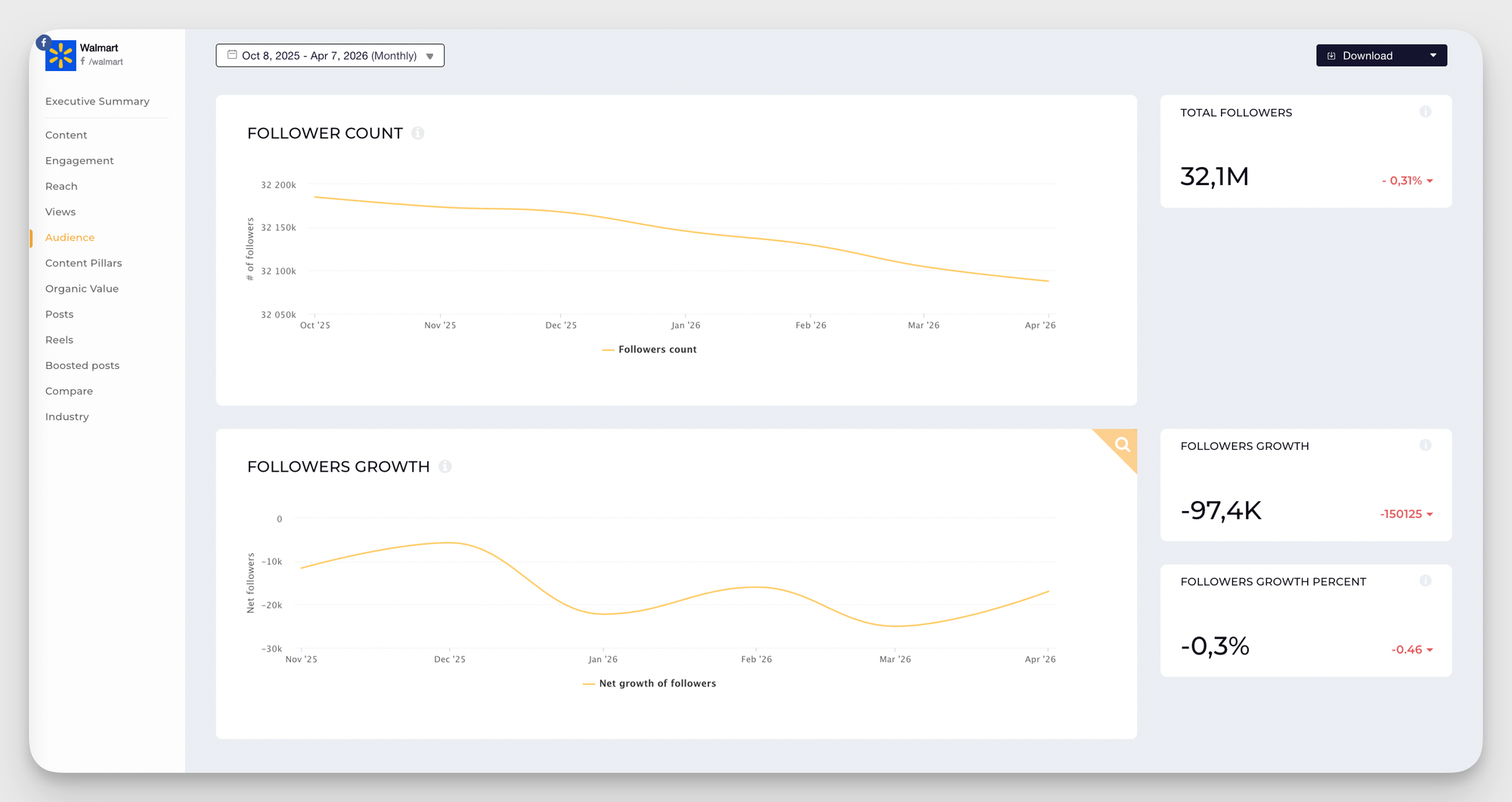
- Audience growth or decline trend identified and explained
Performance metrics audit
- Follower growth trend (last 3–6 months)
- Engagement rate trend (by month)
- Reach and views trend
- Average reach per post calculated
- Engagement distribution by post type reviewed
Organic vs. paid audit
- Organic reach vs. paid reach compared
- Organic value calculated for the review period
- Top-performing organic content identified
- Budget allocation vs. results reviewed
Facebook ads audit
- Campaign structure is organized around clear objectives
- Meta Pixel verified as firing correctly
- Conversions API (CAPI) verified as active
- Audience targeting reviewed — saved, custom, and lookalike
- Ad creative performance analyzed by format
- Creative fatigue checked (CTR trend, frequency)
- Budget allocation reviewed vs. conversion results
Competitive benchmarking
- 2–3 key competitors identified for benchmarking
- Follower count and engagement rate compared
- Top content pillars compared across competitive set
- Gaps in competitor content strategy identified
- Your brand's relative strengths and weaknesses documented
Final thoughts
The data you uncover through a Facebook audit only becomes valuable when you use it. Start with your biggest opportunities first, whether that's refining your content strategy to match your audience, or reallocating budget between organic and paid efforts. Then, gradually add in more optimizations.
And note that a Facebook audit shouldn't be a one-time exercise. Now that you know what to track, schedule regular monthly reviews. Focus on drawing actionable insights and improving things consistently.
Sabina Varga
Content marketing expert with 15 years of experience in digital marketing. I dream of beach life but love the city as a multitasking mom juggling playgrounds, books, brunches, and travels.

Know what your competitors do — before your manager asks
Get instant social benchmarks & reports without manual work.
You might also like




Improve your social media strategy with Socialinsider!
Use in-depth data to measure your social accounts’ performance, analyze competitors, and gain insights to improve your strategy.