14 Best Social Media Analytics Tools in 2026: Compared & Tested
Discover the best social media analytics tools compared by use cases, features, pricing, and platforms supported.


Native analytics are great at telling you how one post did on one platform. Ask them how you stack up against competitors, or how all your channels performed last quarter, and you're suddenly exporting CSVs from five dashboards and praying the date ranges match.
A dedicated social media analytics tool saves you from that spreadsheet marathon. It can even tell you whether a 2% engagement rate is worth celebrating, by comparing your numbers against industry benchmarks instead of your gut feeling.
The hard part is choosing, because "analytics tool" covers very different products: some are built for competitor benchmarking, some are scheduling tools with analytics attached, and others focus on social listening or reporting dashboards.
So I tested 14 of the most popular options and grouped them by what they do best so you can jump directly to what fits your needs.
Key takeaways
-
The best social media analytics tool depends on your goals. Some platforms excel at competitor benchmarking like Socialinsider, while others focus on social listening like Mentionlytics.
-
Look beyond native analytics. Dedicated tools offer cross-platform reporting, competitor insights, AI-powered analysis, and automated reports that native social media analytics can't match.
-
Choose a tool that fits your workflow. Whether you need campaign reporting, audience insights, scheduling, or social listening, prioritize the features you'll use every day over the longest feature list.
-
AI is becoming a must-have feature. Many of today's leading social media analytics tools use AI to summarize performance, identify trends, surface anomalies, and recommend next steps, saving hours of manual analysis.
How I tested and compared these social media analytics tools
In the first quarter of 2026, we conducted an extensive survey with social media professionals and marketers to uncover the key factors they consider when selecting an analytics tool.
Here are the results.
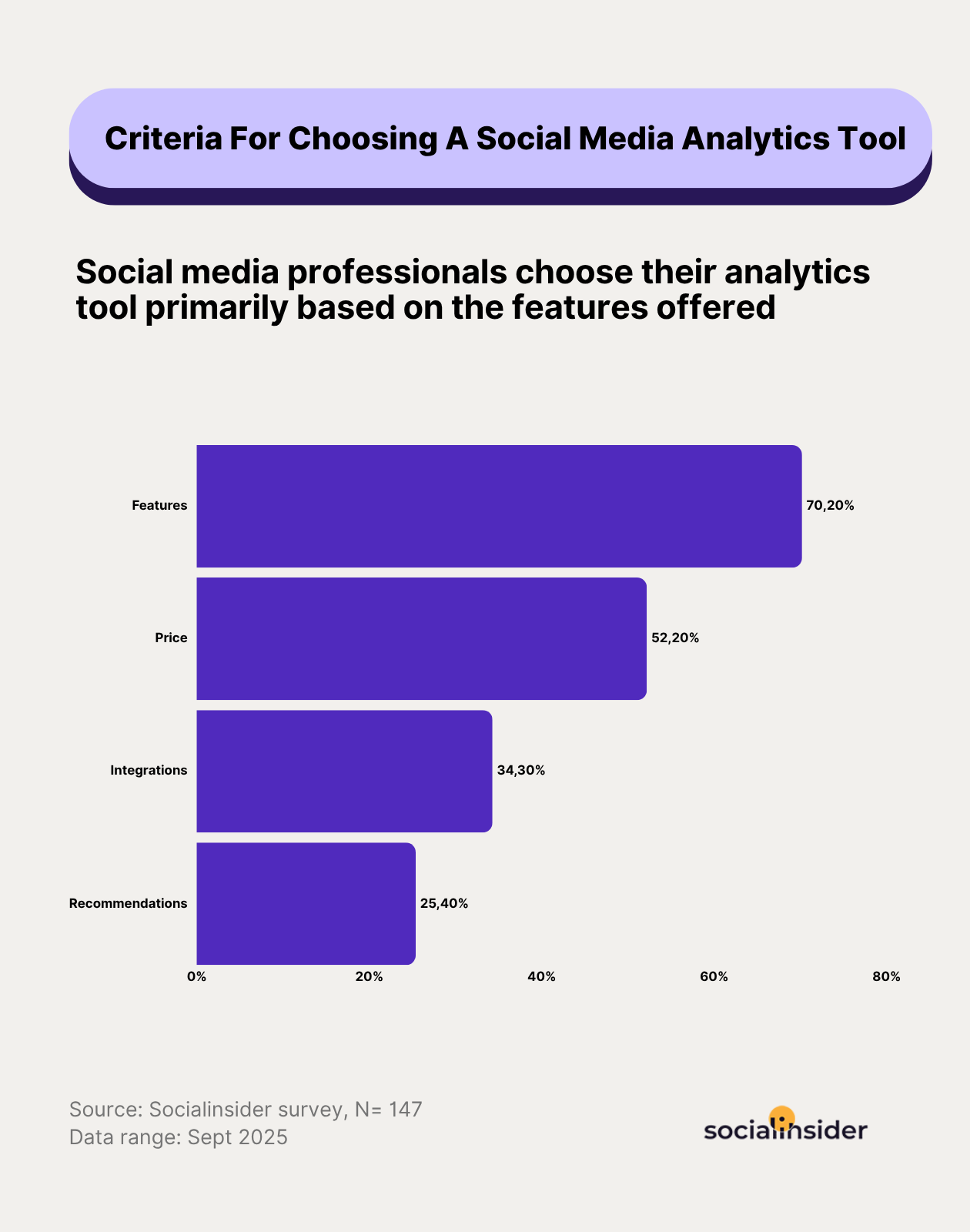
Based on these results, I shortlisted and tested over a dozen social analytics tools. Here’s the factors I looked for while selecting the best social media analytics tools.
- Support for multiple social platforms: If you work with multiple social platforms, you need a tool that helps you draw data from each one. While there are tools on this list that cater to one or two platforms really well, most work for all the major social platforms.
- Advanced analytics features: Paying for a tool that shows the same numbers as native analytics is like buying bottled tap water. I only picked tools that go deeper into metrics the platforms themselves don't provide.
- AI features: AI in social media analytics tools is now no longer about finding data. It should help marketers understand what the data means. This makes your work easier and quicker.
- Ease of use and intuitiveness: If a dashboard needs a two-hour onboarding call before you can find engagement rate, it's already failed. I prioritized clean dashboards, quick setup, and visual reports anyone on your team can understand at a glance.
- Pricing: Social analytics tools can range from budget-friendly to enterprise-level. I’ve included options for every stage (even free ones), whether you’re a solo marketer, a growing startup, or a large team looking for deeper customization.
- User reviews: I looked for customer reviews on platforms like G2 and Reddit to understand what long-term customers have to say about it.
What are social media analytics tools
Social media analytics tools collect data from your social accounts and turn it into insights you can act on. They pull metrics like reach, engagement, follower growth, and clicks from every platform into one dashboard, so you can spot what's working without playing tab roulette across five apps.
The better ones go further. They benchmark you against competitors, flag trends early, track campaigns across channels, and generate reports automatically. Think of them as the translator between "this post got 400 likes" and "here's what we should post next week."
Top 14 social media analytics tools
Before we understand each tool in depth, here’s a sneak peek of what each tool offers.
Best social media analytics tools for performance and competitor analysis
1. Socialinsider — best for multi-platform analytics and competitor benchmarking
Platforms supported: Instagram, Facebook, X, TikTok, YouTube, LinkedIn
Getting started with Socialinsider is as easy as adding your profile to the dashboard and getting key metrics.
These profile metrics include reach, views, follower growth rate, engagement rate by followers/views/impressions, social media engagement actions like likes and shares, and best times to post by engagement.
What I like is how Socialinsider goes beyond post-level data. Instead of just showing static metrics, it visualizes how different metrics like reach and engagement evolve over time, so you can actually see your progress.

And if you spot sudden upturns or downturns, just click on them and you’ll see the posts that resulted in them.
If you want a quick social media account analysis, Socialinsider also has an AI-generated ‘Key Insights Summary’ that tells you what transpired in the selected time period and what you need to work upon.

Let’s look at what the platform does best.
Key features:
- Cross-channel analysis with Brands feature: Socialinsider helps you organize all your profiles in one place and see overall social media performance, such as brand engagement, brand followers, and brand comments.

I even compare these metrics with earlier periods to see the overall growth on social media.
- Content pillar analysis: Which content pillars are getting the highest engagement? Are you covering all pillars in a balanced way? Socialinsider uses AI-generated feature to give you a snapshot of content pillar performance for a specific period.

You can even manually tag posts and create pillars to track campaign-specific performance.

- Competitor analysis: Take a sneak peek at how your competitors are performing by studying their metrics like engagement rates, when they post, what are their top-performing content pillars, post type distribution, etc.
Not only that, you can benchmark performance against all your competitors through the Benchmarks feature and study metrics side-by-side.

- Industry comparison analysis: See how you compare against the overall industry. In this analysis, you can select the country and follower number for competitor accounts you want to compare with.

- Earned media value calculation: See how much monetary value your organic social media generated during the selected period. You can customize this calculation based on monetary values you assign to individual engagement actions.

- Autoreporting: Socialinsider also works great as a social media reporting tool and generates autoreports for clients and top management, so you don’t waste time creating reports from scratch.

- AI-enabled analysis: Socialinsider AI assistant and Socialinsider MCP help you draw insights from the data already there in the tool. You can ask questions in natural language and have AI give you relevant answers.

Pricing: Socialinsider offers a free trial of 14 days and the monthly plans start from $99.
What users say: “I like the competition analysis summary and suggestions that Socialinsider provides. The accuracy of the numbers is wonderful, and it gives me a great support to plan my social media strategy and outperform the competition. I find it really helpful to understand the content bucket and approach each of my competitors is taking. Also, knowing what's performing better helps me rework my approach. It's one of the best for competitive analysis, and the initial setup was pretty easy.” - G2 Reviewer
2. Brand24 — Best for tracking competitor share of voice and visibility
Platforms supported: Instagram, Facebook, X, TikTok, YouTube, LinkedIn, Reddit, Quora, Telegram, Twitch, plus news sites, blogs, forums, podcasts, and review sites
If you've ever found out about a competitor's viral moment three days late (usually from your boss), Brand24 is the fix. You add your brand and your competitors as keywords, and the tool tracks how much of the online conversation each one owns.
The comparison view is where it earns its spot on this list. You can put rival brands side by side and compare mention volume, reach, sentiment, and Share of Voice, so you know who's winning the conversation and whether people are saying nice things. The Presence Score adds a quick read on how each brand's online visibility changes over time, which is handy when you need to prove a campaign moved the needle.

Brand24 also tracks a conversation most tools ignore: the one happening inside AI chatbots. In July 2025, it added Chatbeat, which shows how ChatGPT, Gemini, Claude, and Perplexity mention and recommend your brand compared to competitors. A July 2026 update went further, revealing the behind-the-scenes queries AI models run while building an answer, product carousels inside AI responses, and whether a ChatGPT ad appeared next to an organic answer.The caveat, it's sold as a paid add-on.
Key features:
- Competitor comparison: Track mentions, reach, and sentiment for rival brands alongside your own in one dashboard.
- Share of Voice: See how much of the online conversation your brand owns compared to competitors.
- Presence Score: Monitor how your brand's online visibility rises or falls over time.
- AI visibility tracking (Chatbeat): See how often AI chatbots mention and recommend your brand, and which sources shape their answers.
- AI Brand Assistant: Ask questions about your competitive data in plain English and get a summary back.
Pricing: Offers a 14-day free trial. Paid plans start at $249.
What users say: "I find Brand24's reporting extremely useful and user-friendly, with multiple reporting formats and ways to export and view data. I also appreciate the AI summaries and tips for being extremely on point, relevant, and revelatory. Additionally, the initial setup was very easy" - G2 Reviewer
3. Social Status — Best for paid social and influencer campaign analytics
Platforms supported: Instagram, Facebook, X, TikTok, YouTube, LinkedIn
When I first opened Social Status, I felt like I’d unlocked a secret level of Ads Manager.
The Ads Feed instantly became my favorite corner. Every ad, ad set, and campaign sits neatly in one place, sorted by the metrics I care about. No endless scrolling. Just clean data, perfectly filtered by naming separators like ‘|’ or ‘–’ so I can find what I need fast.

If you run a lot of influencer campaigns, Social Status can come in handy there too. You can see paid and influencer performance in one dashboard.
I could pull paid campaign data and influencer performance into the same dashboard, making it much easier to evaluate an entire campaign instead of looking at each creator individually. Beyond engagement, it also tracks metrics like impressions, clicks, video views, and Instagram Stories performance, eliminating the need to chase screenshots or manually compile reports from creators.

Key features:
- Paid and organic breakdown: See how your paid campaigns perform compared to organic posts, helping you understand which drives more engagement and reach.
- Full-funnel Meta Ads analytics: Track campaign, ad set, creative, impressions, clicks, conversions, and placement performance from a single dashboard.
- Influencer campaign tracking: Track influencer collaborations in one place, measuring post performance, reach, and ROI across campaigns.
- Influencer performance audit: Analyze each influencer’s performance over time to identify who delivers the best results and engagement quality.
- Influencer demographics: Access audience insights like age, gender, and location to ensure your influencers align with your target audience.
- White label reporting: Generate branded, customizable reports that you can share with clients or stakeholders without showing Social Status branding.
Pricing: Offers a 7-day free trial, post which their plans start from $99 per month.
What users say: “It's very easy to navigate the platform, self-explained and user friendly. The onboarding is very smooth and the platform is being demonstrated very well. The function is exactly what our team needs - from social profile tracking to competitor analysis. The metrics are holistic and the charts are easy to read and able to be toggled. The data are accurate so far and the customer support is timely.” - G2 Reviewer
Best social media analytics tools paired with social media management features
4. Sprout Social — Best for social media analytics with scheduling
Platforms supported: Instagram, Facebook, X, TikTok, LinkedIn, Bluesky, Pinterest, Threads, YouTube
Sprout Social is one of the few platforms where I can schedule content, monitor audience conversations, and measure performance without constantly switching between different dashboards.
I love the Smart Inbox. It pulls every message, comment, and mention from all channels into one view, so I never miss a beat.
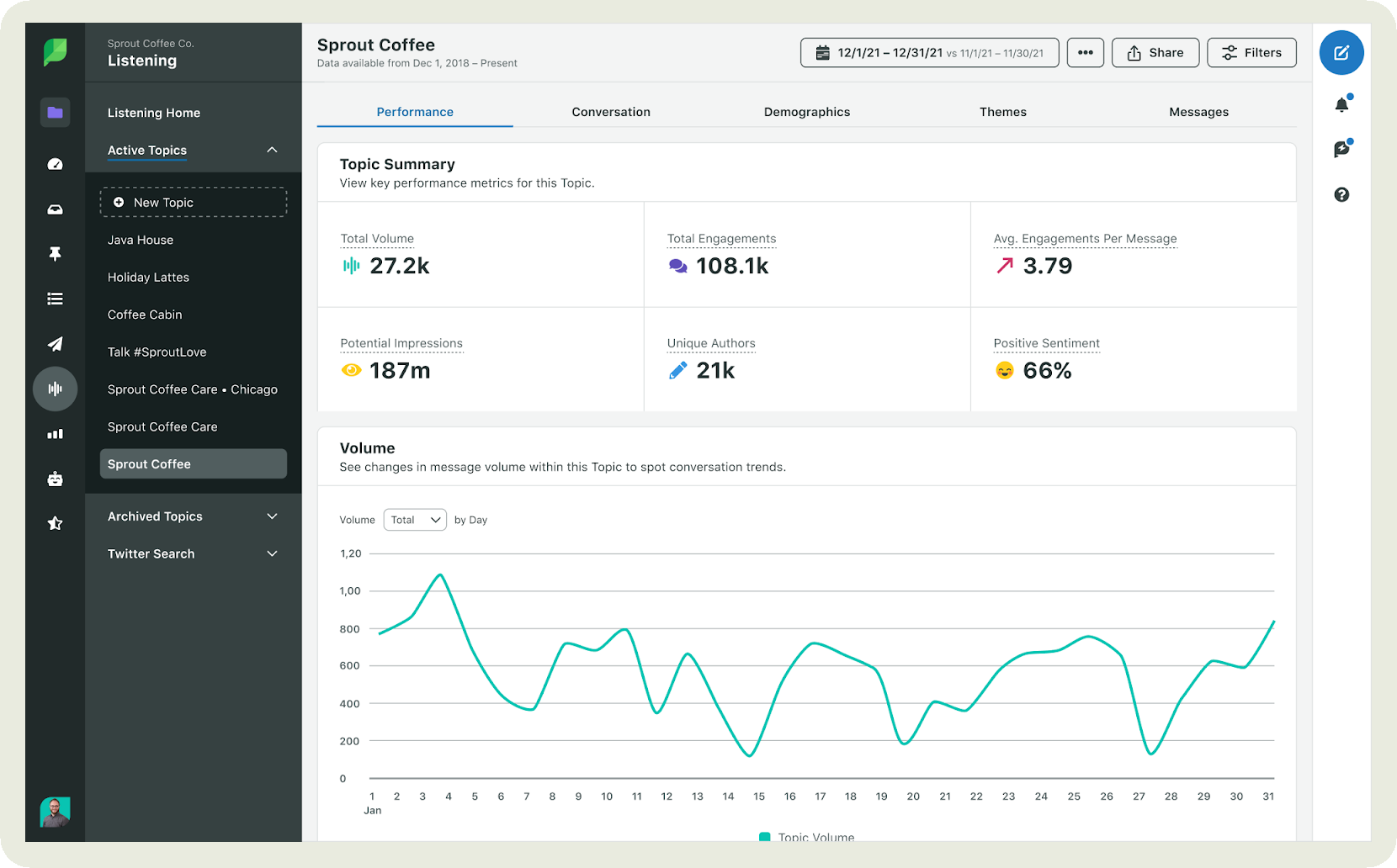
Sprout's AI assistant, Trellis, got a big upgrade in July 2026. It's now available to every customer on every plan across publishing, listening, the Smart Inbox, and reporting. Rather than digging through reports myself, I could ask questions like "Why did engagement drop on LinkedIn?" or "Which posts performed best last month?" and get an instant summary backed by my social data.
Sprout also added Trellis Studio, where teams can turn recurring requests into reusable AI workflows.
On the analytics side, Profile, Post, and Tag Reports show exactly which content drives reach and engagement, while Competitor and Paid Performance Reports help me see where I actually stand.
Key features:
- Multi-profile publishing and unified Composer: Create, schedule, and publish posts across multiple social profiles and platforms from a single, streamlined interface.
- Custom metrics: Let you build KPIs around your own business goals instead of relying only on the default platform metrics.
- Approval workflows & roles/collaboration features: Set up content approval processes and assign roles to team members, ensuring smooth collaboration and consistent brand messaging.
- URL tracking/UTM support: Add and manage UTM parameters directly within Sprout to track campaign performance and traffic sources in Google Analytics.
- Tagging: Organize posts, campaigns, and messages with custom tags to analyze performance by theme, content type, or objective.
- Cross-network analytics and unified dashboards: View and compare metrics from all your social networks in one place through customizable, unified reporting dashboards.
Pricing: Offers a free trial of 30 days post which their paid plans start from $199 per month.
What users say: “Sprout Social is incredibly user-friendly and provides a seamless way to manage all my social media accounts in one place. The analytics tools are top-notch, offering detailed insights that help refine our strategy and measure success. I also love the scheduling feature, which saves so much time and ensures consistent posting across platforms. The customer support team is responsive and helpful whenever I have questions. Overall, it’s a powerful tool for any social media manager.” - G2 Reviewer social listening and customizable reporting
5. Buffer — best for getting clear analytics without a learning curve
Platforms supported: Instagram, Facebook, LinkedIn, TikTok, YouTube, X, Threads, Bluesky, Pinterest, Mastodon, and Google Business Profile
Buffer is the tool I'd hand to someone who wants answers from their data in five minutes and zero spreadsheets. Its analytics live right next to its scheduler, so you can publish a post, check how it did, and plan the next one without switching tabs or logging into anything new.
The Insights dashboard shows followers, impressions, and engagement rate for each profile, and you can sort posts by engagement rate to quickly find your top performers.

The Answers tab goes one step further and recommends the best time, content type, and posting frequency based on your own audience's activity.
What users find best is Buffer has one of the most generous free plans in the category. You can connect three channels and get analytics, the AI Assistant, and the community inbox without entering a credit card.
Key features:
- Post and channel performance: Track followers, impressions, reach, engagement rate, and clicks for each connected profile.
- Best time to post: Get recommendations on the best time, content type, and frequency to post, based on your audience's behavior.
- Audience demographics: See who your followers are on Instagram and Facebook.
- Hashtag and tag tracking: Find out which hashtags and campaign tags drive the most engagement.
- AI Assistant: Draft and rewrite posts, included on every plan.
Pricing: Free plan for up to 3 channels. Essentials costs $6 per channel per month , and Team costs $12 per channel per month . Both paid plans come with a 14-day free trial.
What users say: "Its easy to connect with the most of the social media channels including Facebook, X, LinkedIn, Instagram, BlueSky. Also the free plan provides access to connect 3 channels. The best part is its simple dahsboard. We dont need to contact the support team for onboarding or no need to watch the videos for integrations." G2 Reviewer
6. Hootsuite — best for enterprise-grade monitoring and trend analysis
Platforms supported: Instagram, Facebook, X, TikTok, YouTube, LinkedIn, Threads, Bluesky
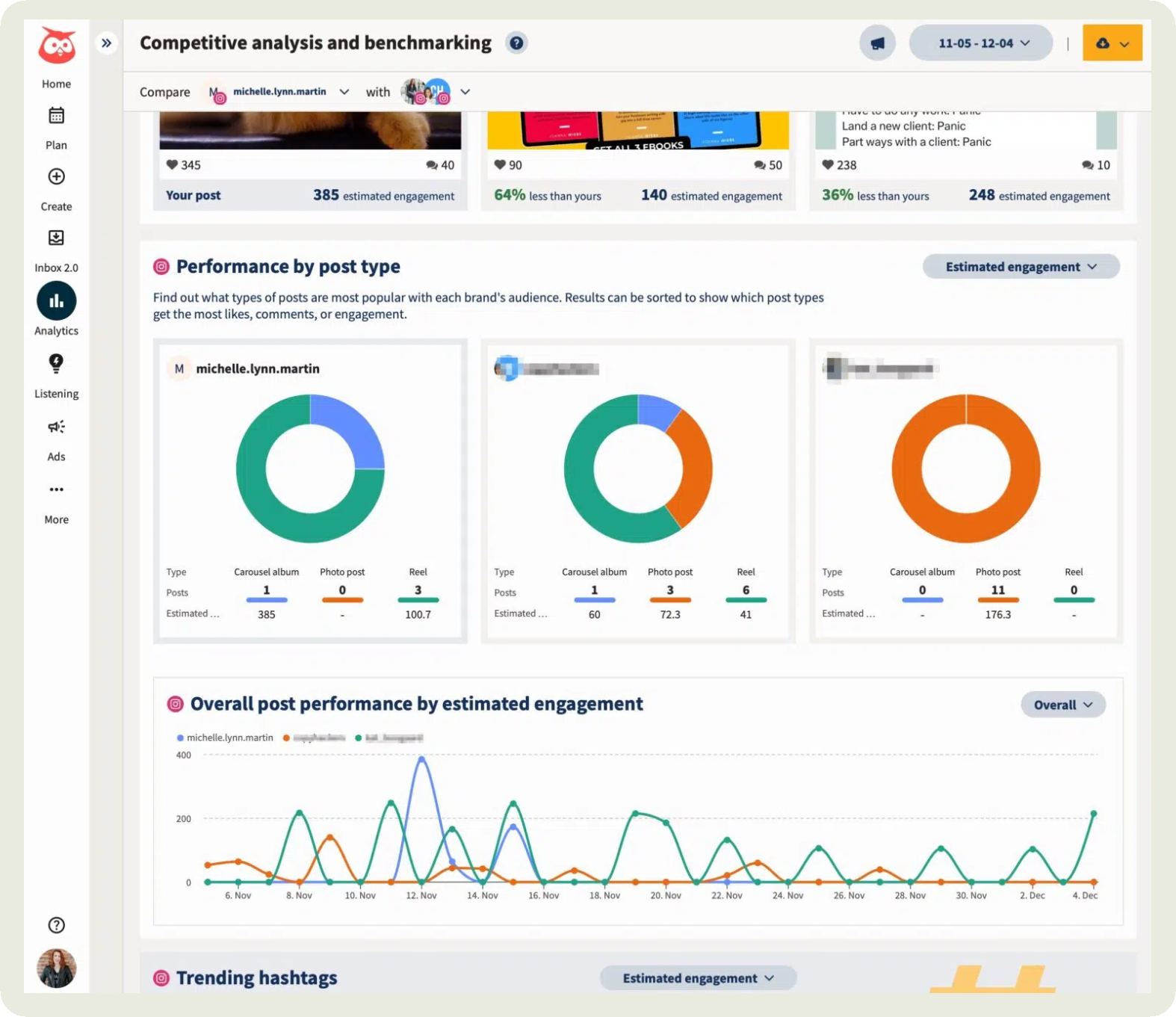
If your work revolves around chasing and capitalizing on trends, Hootsuite is a great social media analytics platform.
The platform lets you visualize topics, themes, and media types that are getting attention in real time. So you are never late to the party. One feature I love? You can analyze sentiment over time by tracking keywords around a trend, making it easier to decide whether it's worth jumping on.

Their analytics covers metrics like engagement, follower growth, traffic, audience activity, content, and ad performance. Hootsuite has also expanded its analytics with Instagram Collaboration reporting, allowing teams to measure the performance of creator partnerships directly within Analytics instead of relying on Instagram's native insights.
While I didn’t find the competitor analysis to be that in-depth, but it does give quick insights into posting frequency, engagement averages, and follower growth.
Key features:
- Social listening: Monitor conversations across platforms to see what people are saying about your brand, competitors, or industry in real time.
- Historical data: Access past social data to analyze long-term trends, benchmark performance, and measure the impact of past campaigns.
- Trend tracking: Identify emerging topics, hashtags, and content themes gaining momentum so you can join the conversation early.
- Spike alerts: Get notified when there’s a sudden surge in mentions, engagement, or activity so you can react fast to potential crises or viral moments.
- Measure organic and paid: Track social media metrics for both paid and organic content in one place.
- LLM insights: Help brands understand how they're being referenced across AI-powered discovery platforms, adding another layer to its monitoring capabilities.
Pricing: Offers a 30-day free trial, post which their paid plans start from $99 per month.
What users say: “I manage a lot of social content across multiple platforms, so having everything in one place makes my life so much easier. I can plan out campaigns, schedule posts, make quick edits, and see what's coming up without bouncing between a bunch of different apps. I also like being able to check performance in one dashboard so I can see what's working and adjust our strategy without digging through each platform individually.” - G2 Reviewer
7. Dash Social — Best for creative intelligence and connected social workflows
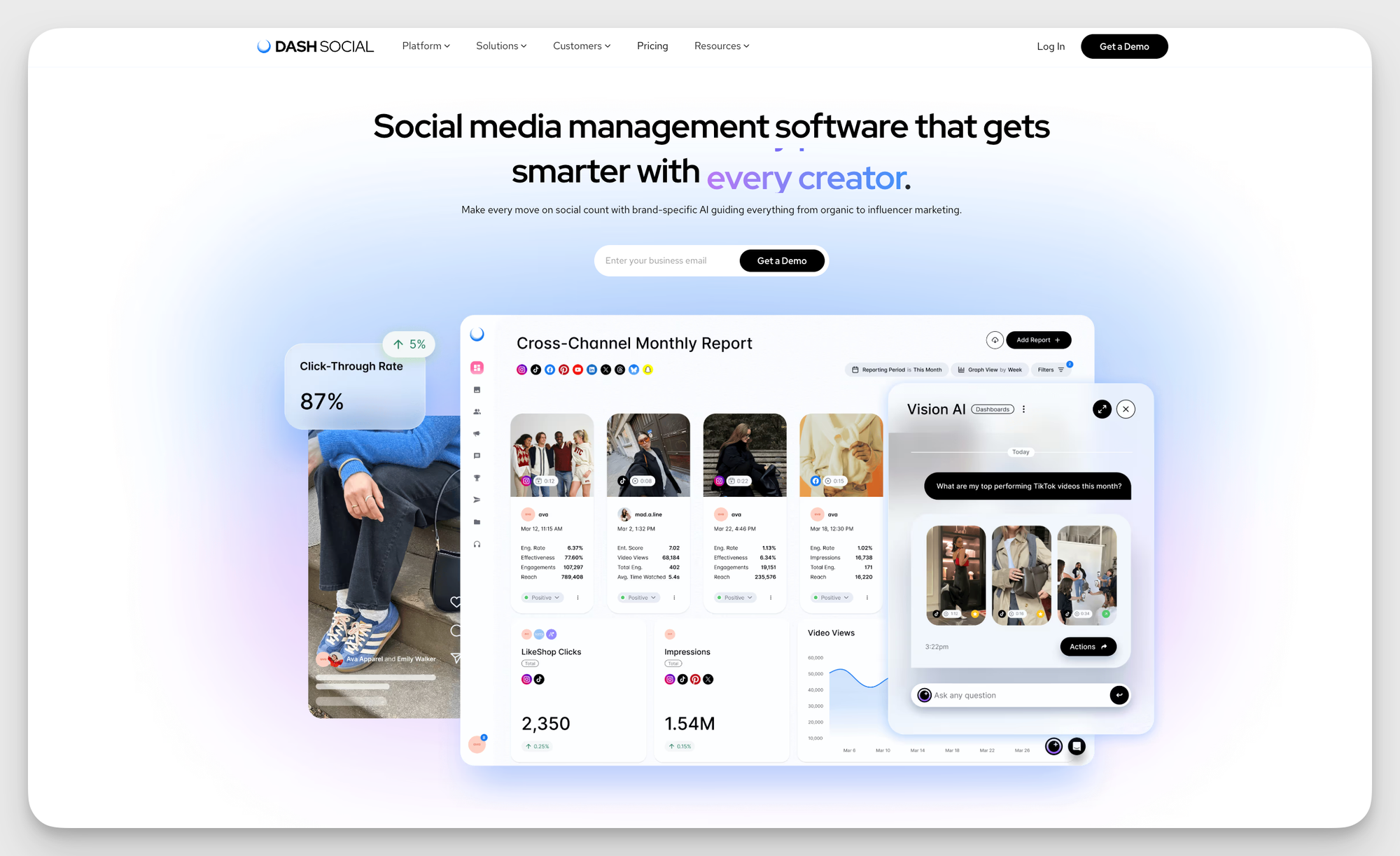
If your team needs more than surface-level reporting, Dash Social is a strong choice. It gives social marketers a clear view of what’s working across owned, creator, and paid, so they can make smarter decisions faster.
What stood out to me is how actionable the platform feels. Instead of overwhelming you with raw data, Dash helps you understand why content is performing, what trends are worth paying attention to, and where to focus next. That’s especially useful for teams that need to move quickly, prove impact, and keep multiple stakeholders aligned.
Dash Social’s analytics cover engagement, content performance, audience behavior, competitive insights, campaign reporting, creator performance, and social listening. It also brings planning, reporting, and collaboration into one place, which makes it easier to keep teams connected and reduce manual work.
Key features:
- Brand-specific AI insights: Understand what creative is most likely to perform based on your brand’s historical performance, audience behavior, and social footprint.
- Unified reporting across owned, creator, and paid: Measure performance in one place instead of stitching together reports from multiple tools.
- Competitive intelligence: Track benchmarks, creative trends, and category movement so you can spot opportunities faster.
- Social listening and sentiment analysis: Monitor conversations around your brand, competitors, and industry trends in real time.
- Campaign reporting: Group content and measure performance across campaigns for a clearer view of what is driving results.
- Planning and workflow tools: Bring publishing, reporting, and team collaboration together in one platform to reduce manual work and improve speed.
Pricing: Offers a 14-day free trial, and plans start at $999 a month.
What users say: “Having used Dash for over 5 years, it is a vital part of my daily toolkit. I couldn't schedule posts, maintain an asset library or pull data from socials without it. I love the AI vision prediction - helping me select assets to post. I love the app, the customer service is fantastic and it's simply SO worth it - especially for a one-woman social team in a large global brand!” - G2 Reviewer
Best social media analytics tools for social listening and sentiment analysis
8. Brandwatch — Best for social listening and audience sentiment analysis
Platforms supported: Instagram, Facebook, X, TikTok, LinkedIn, Bluesky, Pinterest, Threads, YouTube
Ever wondered what it would feel like to actually hear what your audience is saying in real time? That’s exactly where Brandwatch steps in.
One of Brandwatch's newer additions is Ask Iris, an AI chat assistant launched in November 2025. Instead of manually filtering thousands of mentions, it automatically surfaced unusual spikes in conversations, explained what caused them, and highlighted the topics driving the change. Whether it was a sudden increase in negative sentiment or an emerging discussion around a competitor, I could understand what was happening within minutes instead of spending hours digging through raw data.
You can even run a detailed content analysis on your and your competitors’ content.

If you are looking for strong customer intelligence, the tool classifies mentions as positive, negative, or neutral and can even detect emotional tone to understand how people feel about your brand, product, or topic.

Key features:
- Real-time monitoring: Brandwatch listens to social, blogs, news, forums, and review sites, giving you live access to conversations as they happen.
- AI-powered alerts and spike detection: With built-in AI, the system flags sudden changes in volume or sentiment (a spike in negative mentions) so you can respond quickly.
- Custom classifiers & training: You can teach Brandwatch to recognize specific themes or meaning (for example, ‘product criticism’ vs ‘feature request’) using custom machine learning classifiers.
- Brand health & benchmarking metrics: Help track your brand’s performance over time and compare sentiment, share of voice, and topics against competitors or industry standards.
- Audience segmentation: Analyze conversations by demographics, interests, geography, and online communities to better understand different audience groups.
Pricing: Not available on the website. Contact Brandwatch to get these details.
What users say: “What I appreciate most about Brandwatch Consumer Intelligence is how it transforms vast amounts of unstructured data into clear, actionable insights. The platform’s comprehensive social listening, along with its robust segmentation and sentiment analysis features, makes it significantly easier to gain a genuine understanding of consumer behavior and market trends. One drawback is that, because the platform is so powerful and comprehensive, there can be a learning curve at first—particularly when it comes to creating advanced queries or fully customizing dashboards.” – G2 Reviewer
9. Mentionlytics — Best for AI-powered social listening and customizable reporting
Platforms supported: X, Facebook, Instagram, TikTok, LinkedIn, YouTube, Reddit, Threads, Bluesky, and Telegram, plus news sites, blogs, forums, review sites, podcasts, and RSS feeds
If your social media analytics workflow goes beyond tracking engagement and follower growth, Mentionlytics is one of the more interesting tools on the market right now.

What stood out to me immediately was how much emphasis the platform puts on actionable insights instead of just throwing graphs at you and wishing you good luck. The Social Intelligence Advisor (SIA), their AI assistant, analyzes conversations, sentiment shifts, anomalies, and trends to surface insights you’d probably miss manually.
The analytics cover engagement, sentiment, Share of Voice (SOV), competitor monitoring, audience insights, top mentioners, campaign tracking, and reputation monitoring across both social media and the wider web. They also have an Earned Media Value (mEMV) estimation, so you can put a value on earned media. I also liked the dashboards' and reports' flexibility, especially for agencies or teams that regularly present data to clients or stakeholders.
One thing worth mentioning: while the listening capabilities are impressive for the price point, historical data access isn’t as extensive as some enterprise-only tools.
Key features:
- AI-powered social listening: Monitor conversations, sentiment, emotions, and brand mentions across social media and the web in real time.
- Social Intelligence Advisor (SIA): Turn raw monitoring data into actionable recommendations, trends, and insights.
- Share of Voice: Compare your brand visibility and online presence against competitors.
- AI Anomaly Detection Alerts: Get alerts when something out of the ordinary (outside your usual patterns) happens in terms of mentions or sentiment.
- White-label reports: Create customizable and shareable reports for clients, teams, or stakeholders.
Pricing: The price starts at $69 per month, but you can catch a time-limited offer for a discount, and they offer a 14-day free trial.
What users say: “What I like best about Mentionlytics is how easy it makes monitoring and understanding online conversations. The interface is intuitive, the insights are clear and actionable, and it helps quickly identify trends, sentiment, and key mentions without requiring complex setup or deep technical knowledge.” - G2 Reviewer
10. Keyhole — Best for keyword and AI-powered sentiment analysis
Platforms supported: Instagram, Facebook, X, TikTok, LinkedIn
Whenever I want to understand how a campaign or trending topic is unfolding in real time, Keyhole is one of the first tools I reach for. It goes beyond simply tracking a hashtag by giving me a live view of conversations around keywords, mentions, and campaigns as they happen.
For example, you can see real-time analytics like volume of posts, number of users, reach, and impressions for a particular keyword. What I like best is that I can see via the graph how the keyword has evolved over time.

To dig deeper, you can layer multiple keywords or add second-level search terms for context. Need to filter out noise? Keyhole lets you exclude specific usernames or phrases for cleaner insights.

Alongside hashtag tracking, it offers Share of Voice reporting, AI-powered sentiment analysis, influencer tracking, and brand mention monitoring, making it easier to understand how my campaign compared with competitors and which creators were driving the most conversations.
Key features:
- Historical insights: Access past social data to track how keywords, hashtags, or campaigns have performed over time.
- Trend discovery: Identify emerging topics, conversations, and content themes gaining traction in your industry.
- Competitor benchmarking: Compare your brand’s performance, engagement, and reach against competitors to spot strengths and gaps.
- Audience insights: Understand who’s engaging with your content through demographic, location, and interest-based analytics.
- Sentiment analysis: Measure the tone of conversations: positive, negative, or neutral, to gauge audience perception.
- Reporting: Generate visual, customizable reports with shareable dashboards and export options for easy presentation.
Pricing: Pricing is not available on the website. Contact Keyhole’s team to know more.
What users say: “I've been using Keyhole almost since the beginning and what I love best is the flexibility in the data that can be tracked and captured. It has made evaluating ROI of different campaigns and tactics much easier. In the early days you had unlimited tracking now it can quickly gobble up the data and either stop tracking or rack up the cost in a prohibitive way. It's why I only use it for limited campaigns now instead of on an ongoing basis.” - G2 Reviewer
Best social media analytics tools for reporting and dashboard customization
11. DashThis — best for agencies that need automated, white-labeled client reports
Platforms supported: Facebook, Instagram, LinkedIn, and other social and ad platforms, plus Google Analytics, Google Ads, Mailchimp, Semrush, Ahrefs, and 30+ other native integrations
If your Monday mornings involve screenshotting dashboards and pasting them into a slide deck for every client, DashThis will give you those hours back. I connected my data sources, picked a social media template, and had an automatically updating report running in minutes, with social, paid, SEO, and web data all in one place.
What I liked most was how repeatable it is. Once I had a dashboard I was happy with, I could save it as a template or clone it for the next client, add branding, and schedule it to land in stakeholders' inboxes automatically. The comment boxes are a small feature I ended up using a lot, because explaining a dip in engagement right next to the chart saves a follow-up email.

One thing to keep in mind: DashThis switched to source-based pricing on March 30, 2026. Plans now depend on both the number of dashboards and the number of connected data sources, so I'd count both before picking a tier.
Key features:
- Custom dashboards: Build reports from scratch with full control over charts, layout, filters, and branding.
- Connectors: Free native Google connectors and 800+ partner connectors for social, ads, CRM, and databases.
- Data blending: Combine metrics from multiple sources, like social engagement and website conversions, in one chart.
- Conversational Analytics: Ask questions about your data in plain English and get answers backed by your reports.
- Sharing and scheduling: Share interactive reports by link or schedule them to be emailed automatically.
Pricing: Offers a 15-day free trial. Paid plans start at $49 per month.
What users say: "What I like best about DashThis is how simple and intuitive the platform is. It takes complex analytics data from multiple integrations and organizes it into clear, easy-to-read dashboards that make reporting much more efficient. This has saved our team significant time and improved performance by eliminating the need to manually compile reports. The dashboards are easy for leadership teams and board members to understand, allowing them to track key metrics and monitor results in real time." - G2 Reviewer
Best free social media analytics tools
12. Native tools — best for quick check on a single platform
Platforms supported: Every major network has its own. The main ones are Meta Business Suite (Facebook and Instagram), LinkedIn Page analytics, TikTok Studio, YouTube Studio, and X Analytics.
Native analytics are the first stop for most social media managers, and for good reason. They're free, built into the platforms you already use, and pull data straight from the source.
They're also great for platform-specific details, like YouTube's audience retention graphs or TikTok's traffic source breakdown, that third-party tools can't always access.

Truth be told, I still open YouTube Studio almost every day. The trouble starts when I need the bigger picture. Each platform defines metrics its own way, stores history for different lengths of time, and lives in a separate dashboard. Comparing Instagram and LinkedIn performance means lining up two exports in a spreadsheet and hoping the date ranges match. Plus, native tools also can't show you how your competitors are doing.
Key features:
- Post-level performance: See reach, impressions, likes, comments, shares, saves, and video views for every post.
- Audience demographics: Break down your followers by age, gender, location, and active hours.
- Follower growth tracking: Monitor follower gains and losses over time.
- Video and content insights: Dig into platform-specific data like YouTube's audience retention and TikTok's traffic sources.
- Data exports: Download performance data as CSV files on most platforms.
13. Socialinsider free tools — best for quick competitor comparisons and engagement checks
If you want a taste of competitor analysis before committing to a paid tool, Socialinsider's free social media analysis tools are a good place to start. They don't need a login or credit card.
The head-to-head comparisons are the ones I use most. You enter two profiles on Facebook, Instagram, TikTok, or YouTube and get a side-by-side view of their performance, which is handy when your boss asks why a competitor seems to be everywhere.

The engagement rate calculators tell you whether your engagement is actually good, and the free audit tools for Facebook, Instagram, and YouTube give you a quick performance snapshot of any public profile.
Key features:
- Head-to-head comparisons: Compare two profiles side by side on Facebook, Instagram, TikTok, or YouTube.
- Engagement rate calculators: Calculate the engagement rate of any public profile on Facebook, Instagram, TikTok, or YouTube.
- Free profile analytics: Get a quick performance snapshot of any public Facebook, Instagram, or YouTube profile.
14. Data Studio (previously Looker Studio) — best for fully custom, cross-channel dashboards
In April 2026, Google renamed Looker Studio back to its original name, Data Studio. It is the tool for people who look at a dashboard template and think "I'd move that chart." I'm one of those people. It's Google's free reporting tool, and it gives you a blank canvas: pick your data sources, choose your charts, and build a report that looks exactly how you want it.
The first thing I ran into is that Google's native connectors don't cover social platforms. To bring in social data, you'll need a partner connector, and most of them are paid. I used the Socialinsider connector, which let me pull cross-platform social metrics and competitor data into the same report as my GA4 and ad data.

Google has been adding AI to the product too. I found Conversational Analytics handy for quick questions, since you can ask about your data in plain English. The Pro version adds Gemini features like building calculated fields from a simple description.
Key features:
- Custom dashboards: Build reports from scratch with full control over charts, layout, filters, and branding.
- Connectors: Free native Google connectors and 800+ partner connectors for social, ads, CRM, and databases.
- Data blending: Combine metrics from multiple sources, like social engagement and website conversions, in one chart.
- Conversational Analytics: Ask questions about your data in plain English and get answers backed by your reports.
- Sharing and scheduling: Share interactive reports by link or schedule them to be emailed automatically.
Which social media analytics tool is best for your needs?
The best social media analytics tool isn't necessarily the one with the longest feature list. It's the one that helps you answer the questions you ask every day without making reporting feel like a second job.
Here's how I'd narrow down your options:
- If competitor benchmarking is your top priority, look for tools that compare engagement, content pillars, posting frequency, and industry benchmarks side by side. Socialinsider is built for this. If you want to know who's winning the wider online conversation, Brand24 covers share of voice and AI visibility.
- If you run paid social or influencer campaigns, you'll need analytics that go beyond organic posts. Social Status stands out with its Meta Ads reporting and influencer campaign tracking.
- If you want scheduling and analytics in one place, Sprout Social is the most complete all-in-one option, especially now that its Trellis AI assistant is on every plan. Enterprise teams that live on trends and real-time monitoring should look at Hootsuite. Dash Social suits large brands that want to connect owned, creator, and paid performance.
- If social listening is part of your strategy, prioritize tools that monitor brand mentions, keywords, competitors, and sentiment across social and the wider web. Brandwatch is the enterprise heavyweight, and Mentionlytics offers AI-powered listening at a friendlier price.
- If reporting eats up most of your week, automate it. Socialinsider's autoreports handle recurring social reports. DashThis is ideal for agencies sending white-labeled reports to many clients. Data Studio gives you a free, fully custom canvas if you're happy to spend time on setup.
- If you're just getting started or working with a tight budget, Buffer's free plan gives you clear analytics for up to three channels. Pair native analytics with Socialinsider's free tools for quick competitor comparisons and engagement checks, and you'll cover a lot of ground without spending anything.
If you’re leaning towards Socialinsider, take the tool for a free spin and see all the different features you can utilize. Activate your free trial of 14 days.
FAQs about social media analytics tools
1. What are the benefits of using social media analytics tools?
Social media analytics tools save time by automating data collection and reporting. They also help you prove social media ROI, better understand your audience, improve your content strategy by identifying what works, and benchmark your performance against competitors to uncover new growth opportunities.
2. Are native social media analytics enough?
Native analytics are great for checking the performance of your own social profiles, but they often lack advanced features like competitor benchmarking, cross-platform reporting, AI-powered insights, automated reports, and long-term historical data. If you manage multiple social channels or need to prove ROI, a dedicated social media analytics tool is usually a better investment.
3. Which social media analytics tool is best for beginners?
If you're just getting started, look for a tool that's easy to navigate and doesn't overwhelm you with data. Buffer Analyze is a great option for simple performance tracking, while Socialinsider offers an intuitive interface with more advanced analytics like competitor benchmarking and content pillar analysis as your needs grow.
4. What is the difference between social media analytics and social media management tools?
Social media analytics tools focus on measuring and understanding performance, including engagement, reach, audience behavior, and competitor benchmarks. Social media management tools focus on publishing, scheduling, and engaging with your audience, usually with basic analytics built in.
5. How much do social media analytics tools cost?
Prices vary widely. Free options include native analytics and tools like Data Studio. Paid tools for small teams typically start between $6 and $100 per month, and mid-market tools range from $100 to $300 per month. Enterprise platforms like typically start at around $999 per month, and some only offer custom pricing.
6. What are the best free social media analytics tools?
The best free options are native platform analytics (like Meta Business Suite, YouTube Studio, and TikTok Studio), Buffer's free plan for up to three channels, and Data Studio (formerly Looker Studio) for custom reports. For free competitor comparisons and engagement rate checks, try Socialinsider's free social media analysis tools.
7. Can AI analyze social media data?
Yes, and it's one of the fastest-growing features in the category. Tools like Socialinsider, Sprout Social, Brandwatch, and Mentionlytics now include AI assistants that summarize performance, explain spikes or drops, and answer questions about your data in plain English. Socialinsider's MCP also lets you connect your social data to AI assistants like Claude and ChatGPT, so you can ask questions about your performance without opening a dashboard.
Nidhi Parikh
Having worked with several brands in the social media space, Nidhi writes about all things social. With 13K followers on LinkedIn, she's always up for a chat about books or her next travel plan

Know what your competitors do — before your manager asks
Get instant social benchmarks & reports without manual work.