How to Check Your TikTok Follower Count History: Insights and Tips
Research TikTok follower count history and analyze growth trends over time. Gain valuable insights into what influences follower changes.

Your TikToks are going viral. You’re seeing people comment on your videos. And that follower graph is steadily increasing.
But is this because of a new content strategy you have adopted? Or did you also see such follower growth changes a few months back?
The only way to find these answers is by checking your TikTok follower count history. You can use TikTok analytics insights or tools like Socialinsider to track this metric.
In this guide, we’ll see how to track TikTok follower count, which tools to use, and how you can tie this metric to other metrics to see the bigger picture. Let’s get started.
Key takeaways
-
TikTok native analytics limitations: TikTok’s native analytics lack historical follower data for large timeframes making it hard to track long-term growth trends.
-
How external tools like Socialinsider help: Socialinsider has created estimates for follower count history, bridging gaps left by TikTok’s native tools.
-
Why correlations with other metrics matter: correlating follower growth with metrics like engagement helps uncover what truly drives audience expansion.
How to track your TikTok follower history
Want a high-level picture of what your TikTok follower data suggests? TikTok has built-in analytics that can give you a head start on how to view TikTok followers evolution over time. It does come with a limited view though. That’s where third-party social media analytics tools can help.
Using native TikTok analytics: what it shows and what it misses out on
If you haven't already, you need to switch to a Creator or Business account to check native TikTok follower analytics.
Once that's done, open the TikTok app and go to your profile. Tap the three lines (≡) in the top right corner to access the menu, then select Creator Tools and choose Analytics.
From there, navigate to the Followers tab for detailed information about your audience. If you’re using a desktop, you can directly go to this link.
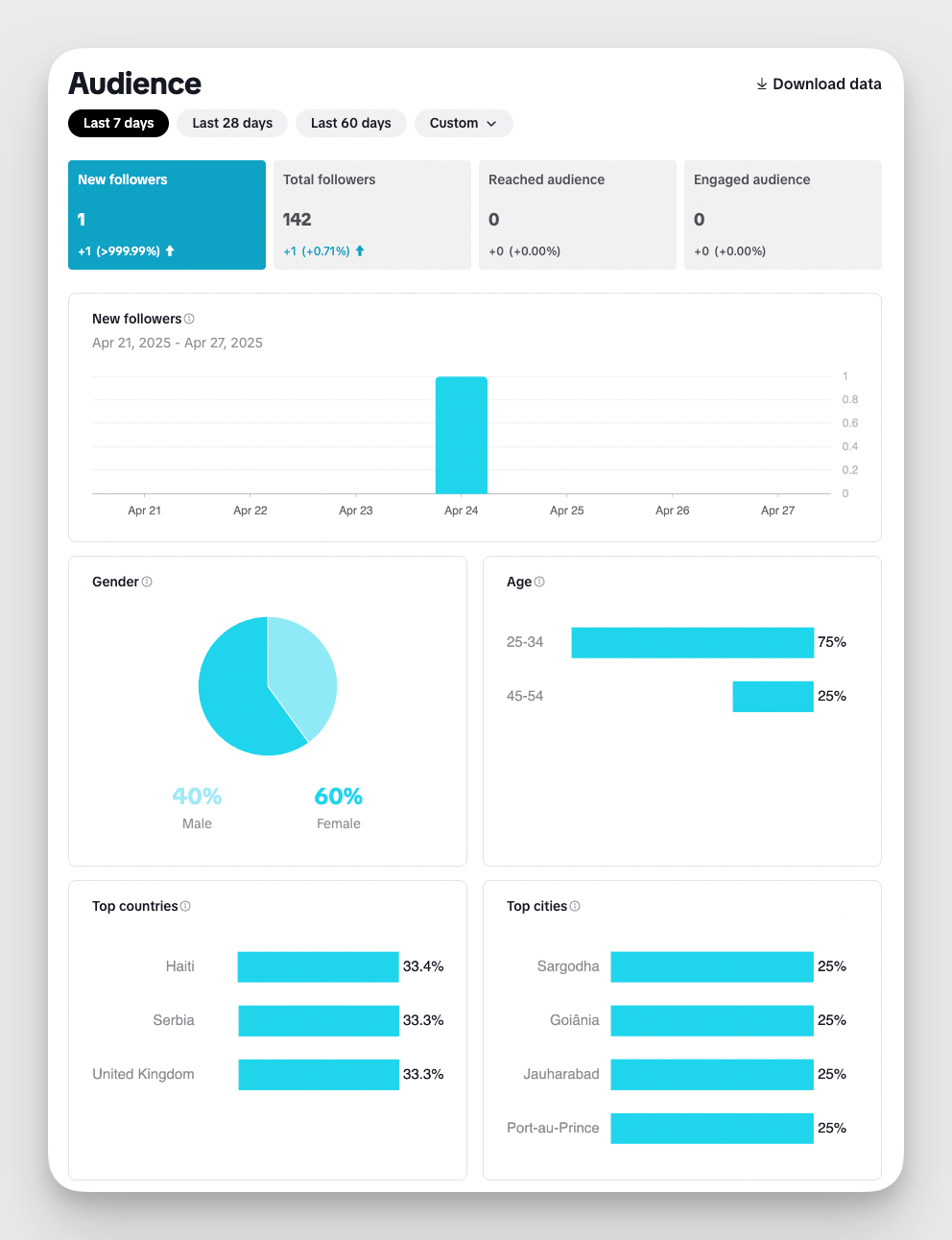
The main info that you will get from this screen:
- TikTok following count: Shows the total number of people who follow your account.
- Age range: Displays the percentage breakdown of your followers by age group.
- Gender: Indicates the gender distribution of your audience.
- Top locations (cities and countries): Reveals where most of your followers are located geographically.
- Most active times: Highlights the hours and days when your followers are most active on TikTok.
You can even download this data from TikTok Studio in an XLSX or CSV format.
Limitations of native TikTok analytics
One major limitation of TikTok’s native analytics is the lack of detailed, long-term follower history. While the platform now supports custom date ranges, you still can’t access follower data beyond one year.
This creates a few key limitations:
- No follower history beyond one year: You can’t analyze long-term TikTok follower growth using native analytics.
- Limited comparisons: Comparing a campaign from over a year ago with a recent one becomes difficult.
- No way to recover expired data: Once historical data is no longer available, you can’t retrieve it unless you saved it manually.
So, if you want to track TikTok follower count over longer periods, you need to proactively record your stats. Or, you can use a better alternative. Let’s look at how.
Using third-party tools like Socialinsider for TikTok follower growth tracking
TikTok native analytics are great for giving you a sneak peek. But they fall short when it comes to helping you dig deep into why a follower spike happened, or if different campaigns have had different impacts on TikTok follower growth over the years.
Here’s how third-party social media analytics tools like Socialinsider are better at follower count history and more.
Extended custom timeframes and analysis
Unlike TikTok’s native analytics, which only shows follower data for a limited time period, Socialinsider offers extended timeframes for in-depth analysis.
One of our standout features is access to estimated historical followers data, even for dates before you connected your TikTok account to the tool. This means you can track TikTok follower count from when the account was created, giving you a complete long-term view of your performance.
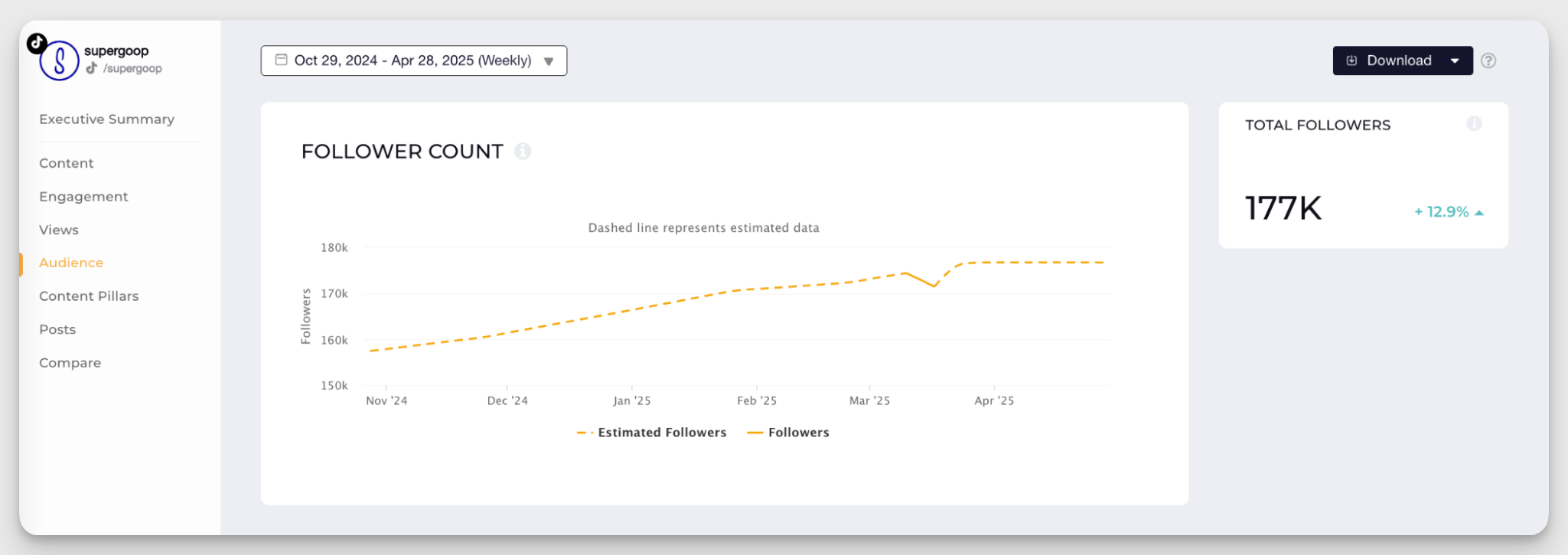
For example, if you want to see how your content strategy attracted followers a year ago, TikTok won’t help. But Socialinsider fills in the gaps with reliable estimates. This extended view is perfect for brands or creators who need to analyze growth trends over quarters or years, not just weeks.
It’s like having a time machine for your profile, making social media strategy planning, reporting, and performance reviews much easier and more data-driven.
Extended metrics for effective progress tracking and benchmarking
Socialinsider goes beyond TikTok’s basic analytics by offering extended social media metrics that help you track progress more effectively and benchmark your performance.
Instead of just looking at TikTok followers history data, you can connect that number with other key insights, like engagement rate, video views, or posting frequency, to understand what drives growth.
For example, if you see a big jump in followers, you can check which videos caused the spike, what times they were posted, etc. This lets you spot patterns and adjust your strategy based on real data.
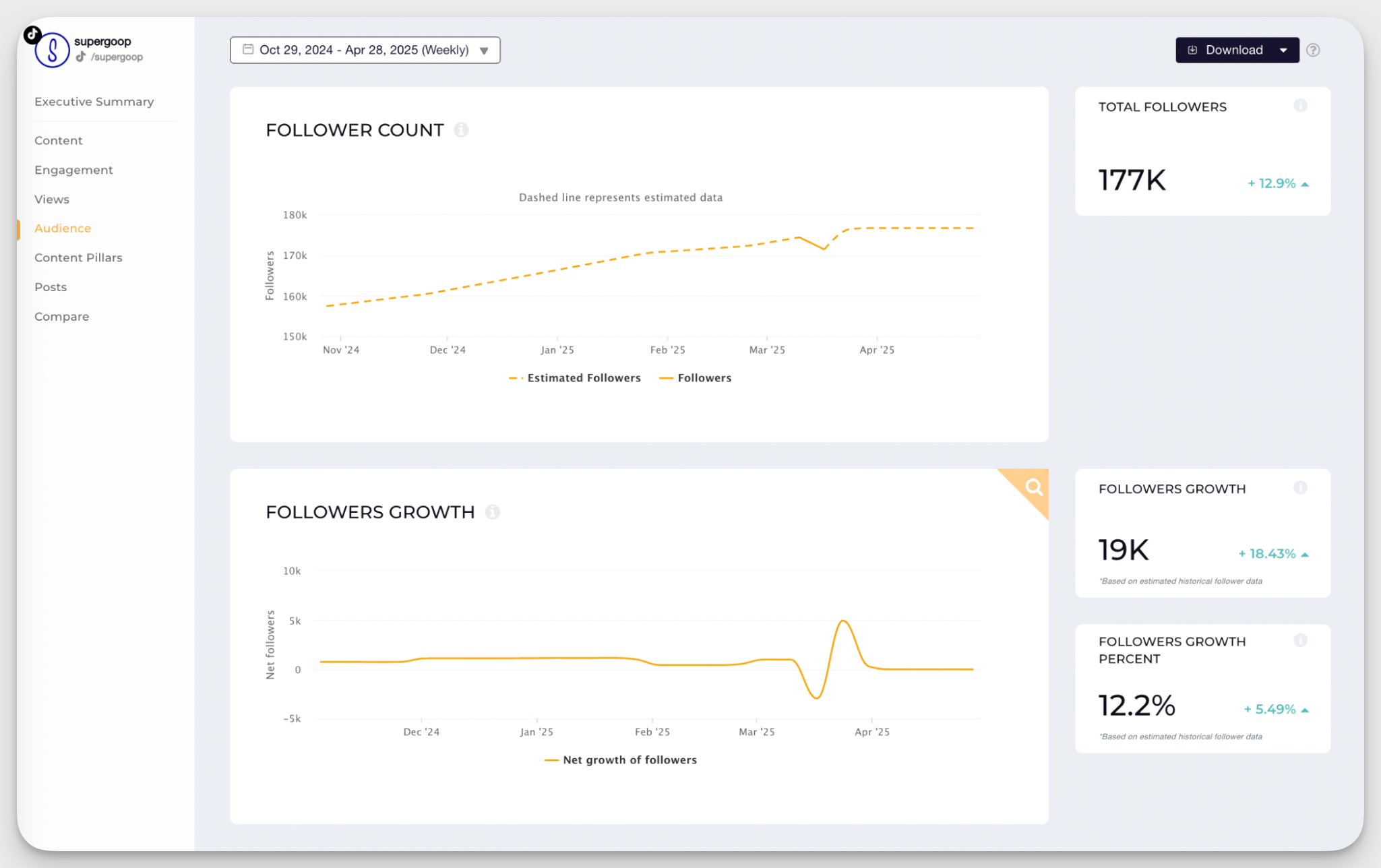
Socialinsider also helps you compare your account to competitors or industry benchmarks, so you can see if your growth is above or below average. This makes follower tracking more intelligent and actionable.
Correlation between content strategy and follower growth
Ever heard the saying, “No man is an island?” The same applies to social media metrics as well.
By basing your analysis on just one metric, you can only go so far. But when you consider it along with other metrics, you understand the deeper relations and impacts.
That’s where tools like Socialinsider help. You can track which videos sparked the most growth by analyzing views, likes, comments, and engagement rates side by side with follower data.
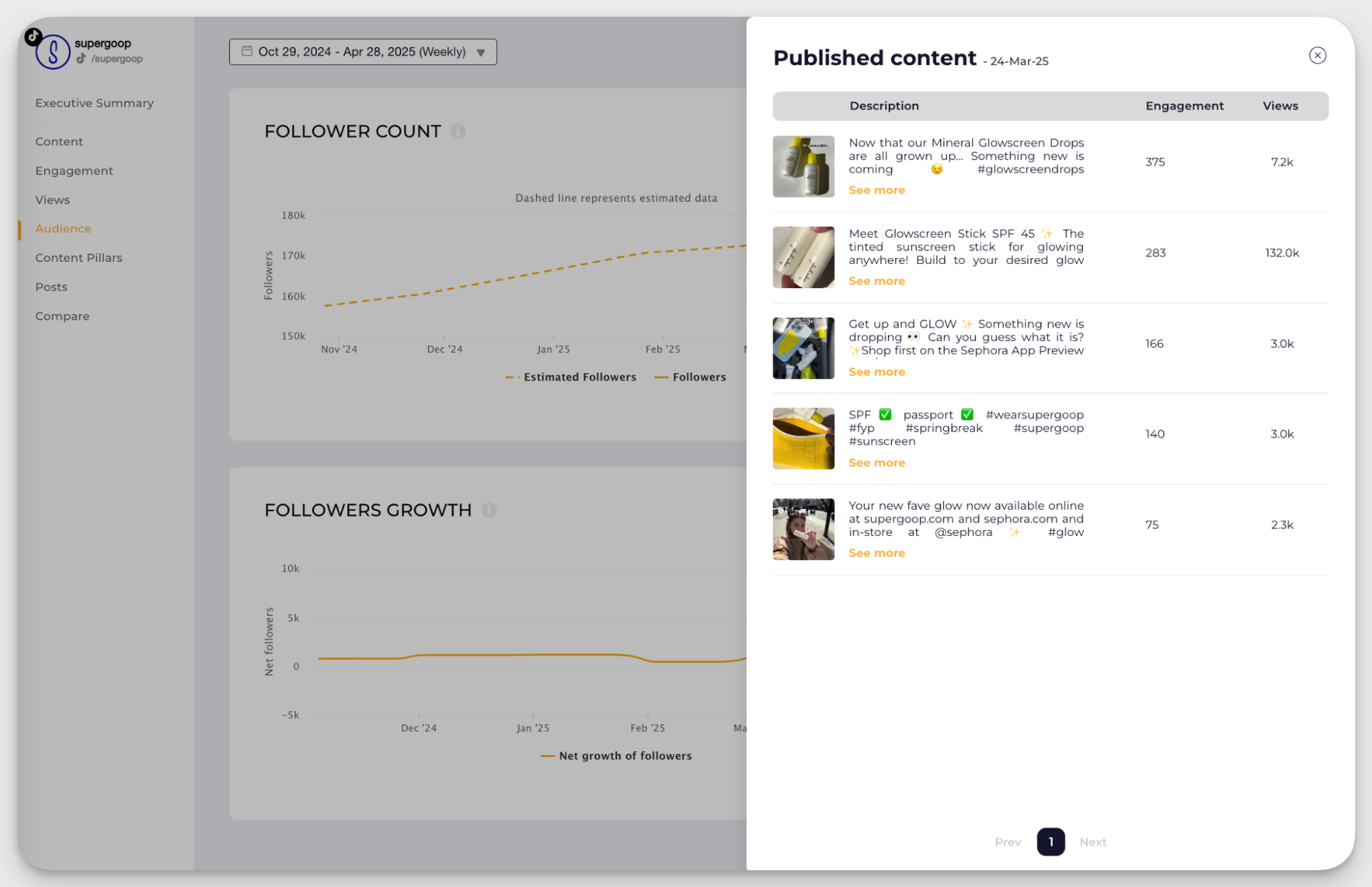
For example, imagine you posted a "Behind-the-Scenes" video, and your account gained 2K new followers over the next days.
With Socialinsider, you can zoom in on that timeframe, spot the spike in engagement for that post, and directly connect it to your follower surge. Maybe that video had a 15% engagement rate increase, or double that of your average. That’s a clear sign this type of content resonates with your audience.
Methods to track TikTok follower count history
Want to see TikTok followers' evolution over time? Here are two methods businesses or creators often use to track TikTok followers over time.
Excel/Google Sheets for manual reporting
Since TikTok’s native analytics show only short-term data, you can use Excel/Google Sheets to monitor follower growth over time. To get started, create a spreadsheet with columns such as date, total followers, change in followers, and notes.
Each day, or at regular intervals (weekly, bi-weekly), record your total follower count from TikTok Analytics. You can calculate the daily or weekly TikTok followers change by subtracting the previous entry’s follower count from the current one.
You can also use charts or graphs in Sheets or Excel to visualize your follower progress, making it easier to analyze performance at a glance.
When to use this method?
- You want a budget-friendly option. This is ideal if you don’t want to pay for third-party analytics tools. Sheets and Excel are freely available.
- You want custom tracking. You can tailor your sheet to include any data you want, like campaign notes, post types, or goals, not just what tools provide.
- You have basic requirements. It’s the best method if you’re a small creator or brand with basic tracking needs.
When not to use this method?
- You need advanced analytics. You won’t get deeper social media insights like estimated historical data for TikTok follower count, content benchmarking, or competitor analysis.
- You have time constraints. If you don't have time to log data consistently, your sheets will be incomplete and less useful for long-term analysis.
- You need reports and visuals fast. If you manage social media for clients, third-party tools help generate polished reports and charts instantly.
Socialinsider for automated reporting
If manually updating a spreadsheet feels overwhelming, Socialinsider provides an automated and efficient solution for tracking TikTok follower growth.
Our social media analytics platform helps you monitor followers over time without any manual input.
You can view follower trends on a clean timeline and even set custom date ranges to analyze how specific content or campaigns impacted your audience growth.
One of the challenges with TikTok is that it offers very limited access to historical follower data through its API. This means that when you connect a TikTok profile to Socialinsider (or any analytics tool), you won’t be able to retrieve the exact follower counts from before the connection date.
To bridge this gap, Socialinsider uses intelligent estimations to help you understand past follower trends, even for periods when the account wasn’t actively tracked. You can get estimated historical followers data for any business account you add to the Socialinsider dashboard.
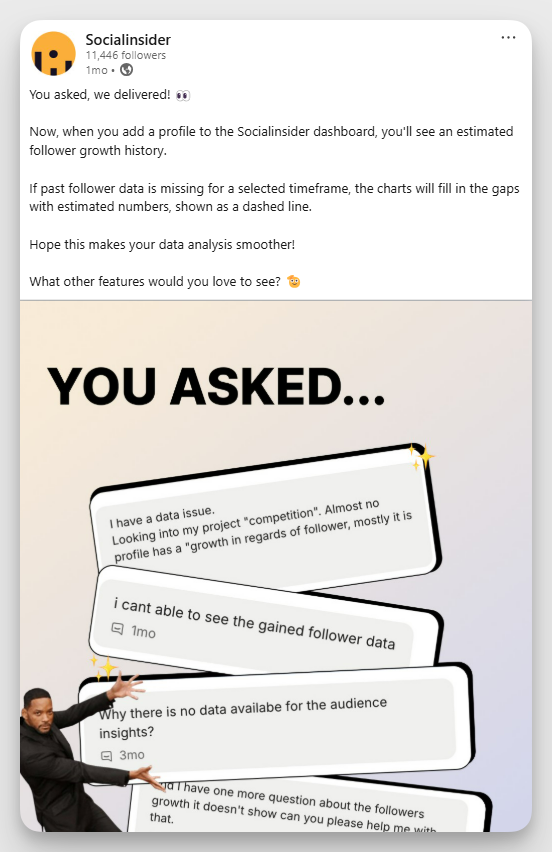
Historical follower data helps you:
- Understand long-term growth patterns even if you just started using our tool.
- Correlate past marketing campaigns or events with follower changes.
- Create more comprehensive reports with complete timelines.
- Benchmark performance against competitors with a fuller dataset.
If you’re looking to switch tools, we can import your historical posts into the Socialinsider dashboard to provide accurate data reporting.
What’s more? You can now use Socialinsider MCP to connect your AI tool of choice to ask questions about follower growth. Here’s an output from Claude.

How to interpret follower spikes, drops, and plateaus on TikTok
Ups and downs are normal. However, if you see a significant spike/drop in your follower count over a certain (usually short) period of time, you should look into it to see what triggered that spike/drop.
For example, here’s Rhode’s follower growth graph for a specific custom date range.
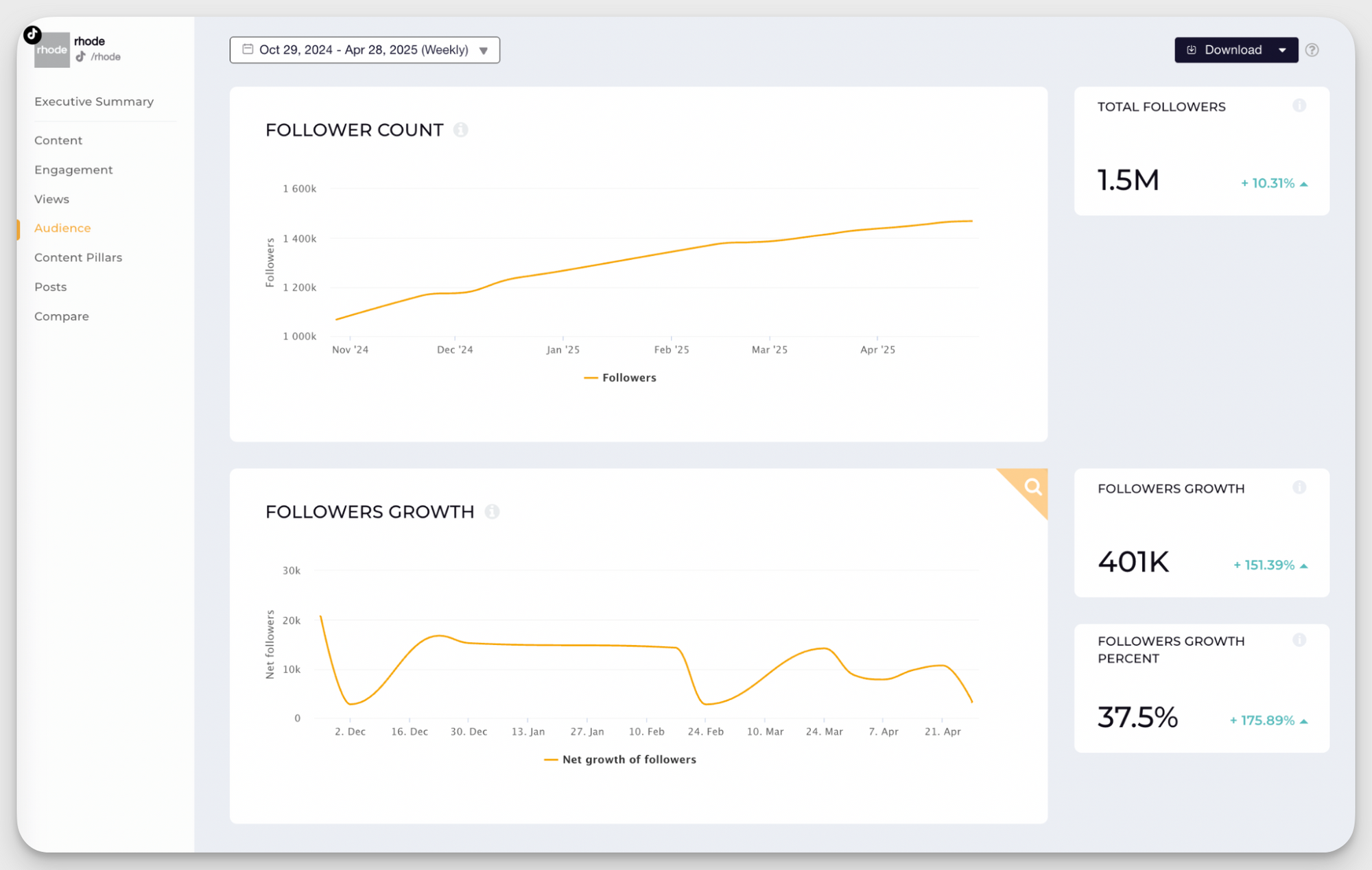
You can see a drop in its growth rate over the first two weeks of December. This may be due to the holiday season. Or it could be an indication that the content leveraged wasn’t the most successful in gaining new followers.
Using Socialinsider, you can quickly check the content posted during this period and see the TikTok metrics they generated.
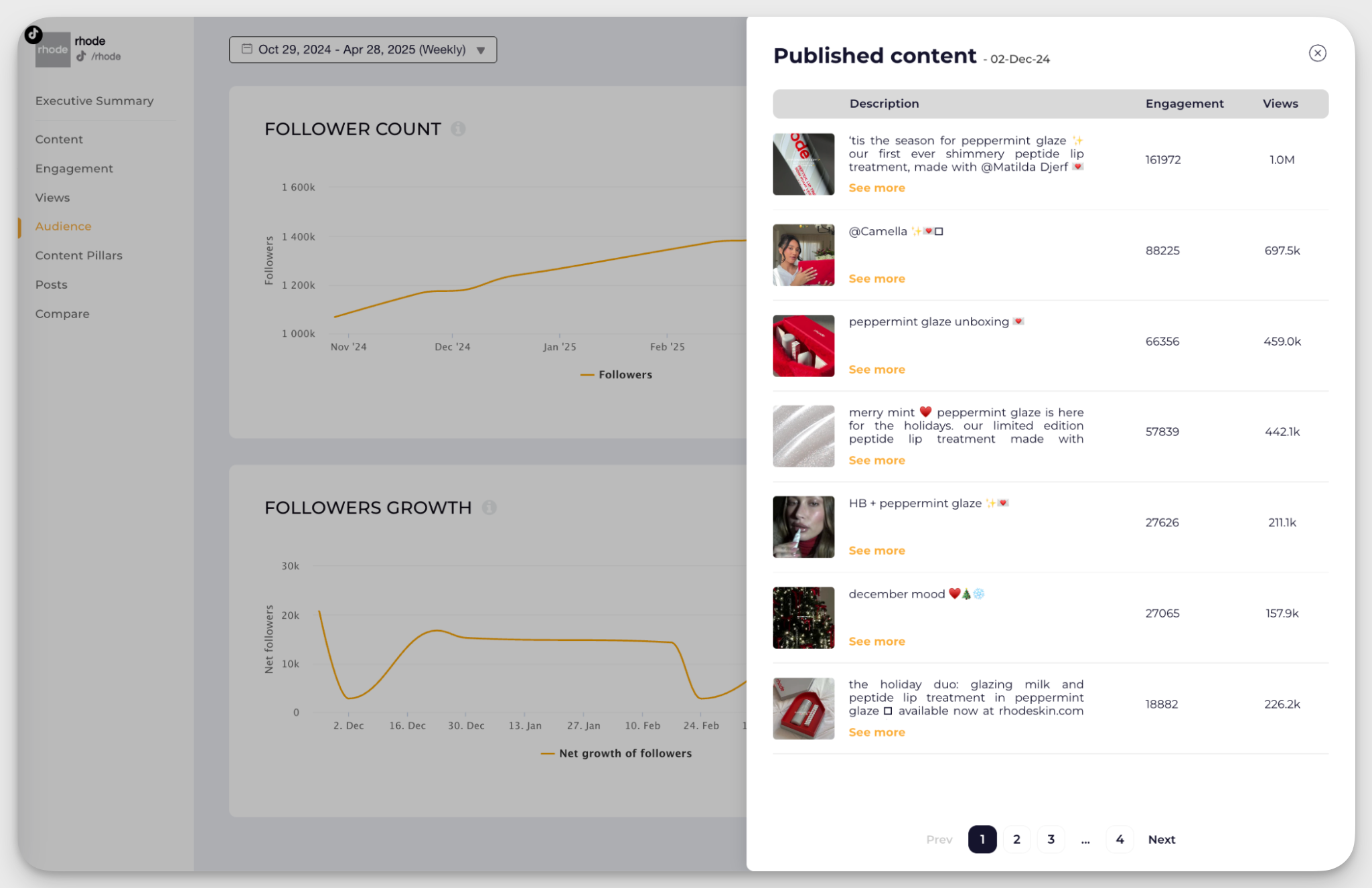
You can even go one step further and see last year’s metrics for the holiday season. Does a similar pattern show up? If yes, that points to a seasonal trend, meaning follower activity naturally dips during this time each year. But if last year’s growth remained steady, then the drop may be more content-related.
Plateaus deserve attention, too. If follower growth stays flat for an extended period, check whether posting frequency changed, engagement declined, or recent content failed to reach new audiences.
With Socialinsider’s custom date range and historical data capabilities, you can dig into both recent performance and year-over-year comparisons. This helps you distinguish between a normal fluctuation and a meaningful trend that may need action.
I also use Socialinsider AI assistant to get the reasoning behind why a follower drop or spike may have happened. Here’s an example.

How to benchmark follower growth performance
Ever wondered if your TikTok follower growth is actually good or just average?
One way to do that is by using benchmarks. What does an average follower growth look like on TikTok? For example, you can check out Socialinsider TikTok benchmarks 2026 to find out that follower growth slowed more for smaller accounts as compared to the previous year.

Another way to find out is by benchmarking your performance against competitors. This means comparing your follower growth to similar accounts in your niche to see how you stack up.
Tools like Socialinsider make this easy by letting you track competitor profiles and compare follower trends, social media engagement, and content performance side by side.
Going back to Rhode’s example from December, one way to understand whether the drop in followers’ growth was caused by seasonality is to benchmark performance against a competitor. So we took a competitor profile and added it to Socialinsider.
We saw the following graph for the same period.
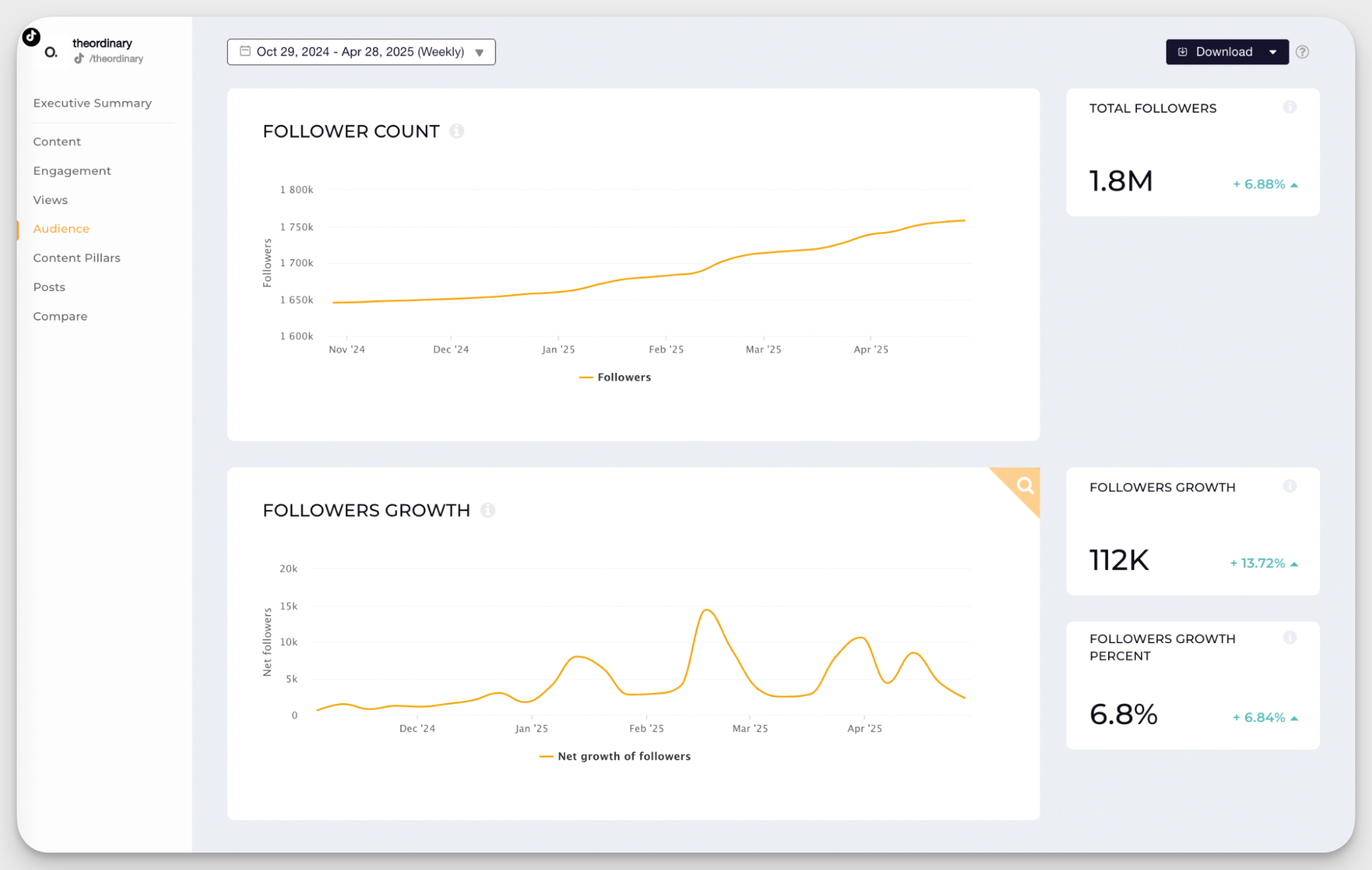
Judging by the numbers, given that one of Rhode’s competitors had an increase in its follower growth trends, we can assume that the content strategy caused the drop in Rhode’s case.
Based on this competitive comparison, you can also:
- See industry patterns: Identify common growth trends across similar accounts, like when follower spikes typically happen or which content formats consistently perform well.
- Find opportunities: Spot gaps in your competitors’ strategies, such as content types they aren’t using effectively, and use those openings to stand out. You can even discover your gaps and make strategies to deal with them.
- Set realistic goals: Use competitor data to define achievable follower growth targets based on what's typical in your niche.
How to correlate TikTok follower growth with engagement metrics
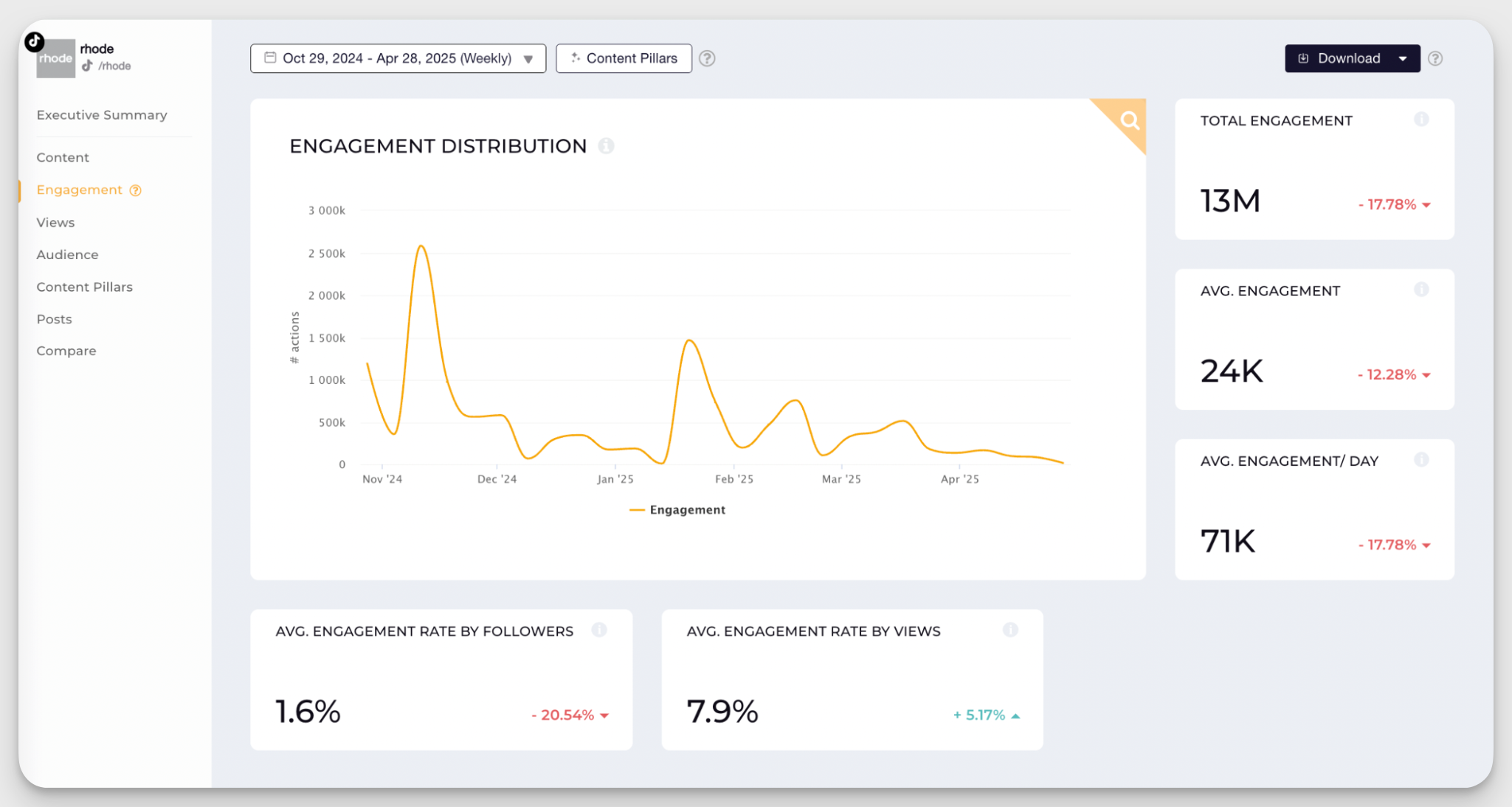
To understand your TikTok growth, it’s important to connect follower increases with social media engagement metrics such as comments or shares. These numbers show not just how many people follow you, but why they chose to.
For example, say you gained 2K new followers in one week. Instead of just celebrating, look back at your posts during that period. Did a specific video get more comments or shares than usual? That’s likely the trigger. High engagement means your content resonated, often leading to more followers.
Take, for instance, Rhodes’ example. We can see that during the same timeframe that the follower growth dipped, the account’s engagement also dropped.
Final thoughts
Tracking your TikTok follower count over time helps you understand what’s working, what’s not, and where to focus your efforts. Instead of just watching numbers go up or down, look at the bigger picture. Connect your content, engagement, and growth trends.
Whether you’re a creator or brand, this insight can guide smarter content decisions and help you grow faster. Manual tracking is a good start, but if you want deeper insights without the extra work, try Socialinsider for free. Click here to activate your free trial.
FAQs about TikTok follower count history
Why should you track TikTok follower history?
Tracking TikTok follower history helps you understand what drives audience growth. By monitoring changes over time, you can identify which content, campaigns, collaborations, or posting patterns lead to follower spikes or slowdowns. It also helps you spot long-term growth trends, set realistic KPIs, and make more accurate growth predictions.
How far back can you see TikTok follower history?
TikTok Analytics lets you analyze follower data using custom date ranges, but historical data is limited to one year. If you want to track follower growth beyond that period, you’ll need previously saved data or a third-party analytics platform with historical tracking capabilities.
Can you recover old TikTok follower data?
Generally, you can’t recover TikTok follower data once it falls outside the platform’s available historical range. Unless you manually saved the data or used a third-party analytics tool to track it, older follower counts may no longer be accessible.
Why did my TikTok follower count suddenly drop?
A sudden TikTok follower drop can happen for several reasons, including audience churn, changes in content performance, reduced posting activity, seasonal behavior, or TikTok removing spam and fake accounts. Compare the drop with your views, reach, engagement, and posting activity to identify the likely cause.
Can you track a competitor’s TikTok follower history?
Yes, you can track a competitor’s TikTok follower growth using a third-party social media analytics tool. This allows you to monitor changes over time, compare growth trends, and benchmark your TikTok performance against competing brands or accounts.

Nidhi Parikh
Having worked with several brands in the social media space, Nidhi writes about all things social. With 13K followers on LinkedIn, she's always up for a chat about books or her next travel plan

Know what your competitors do — before your manager asks
Get instant social benchmarks & reports without manual work.