Meistere die social media Content-Analyse, um verborgene Muster aufzudecken
Nutze fortschrittliche social media Content-Analyse, um die Performance verschiedener content pillars zu vergleichen und Strategien zur Content-Optimierung zu entdecken.
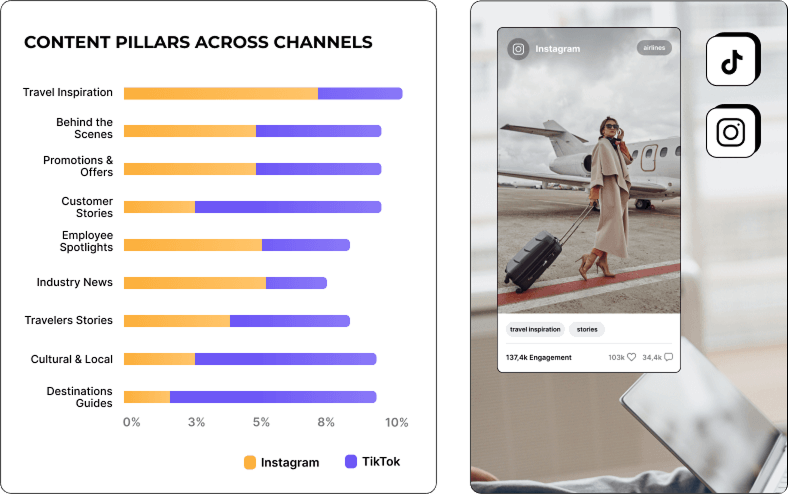






Verbessere deine social media strategy mit AI content pillars
Finde heraus, was bei deiner Zielgruppe ankommt, indem du insights zu verschiedenen AI-Content-Themen erkundest. Optimiere deine Posts, um eine social media strategy zu entwickeln, die wirklich ankommt.
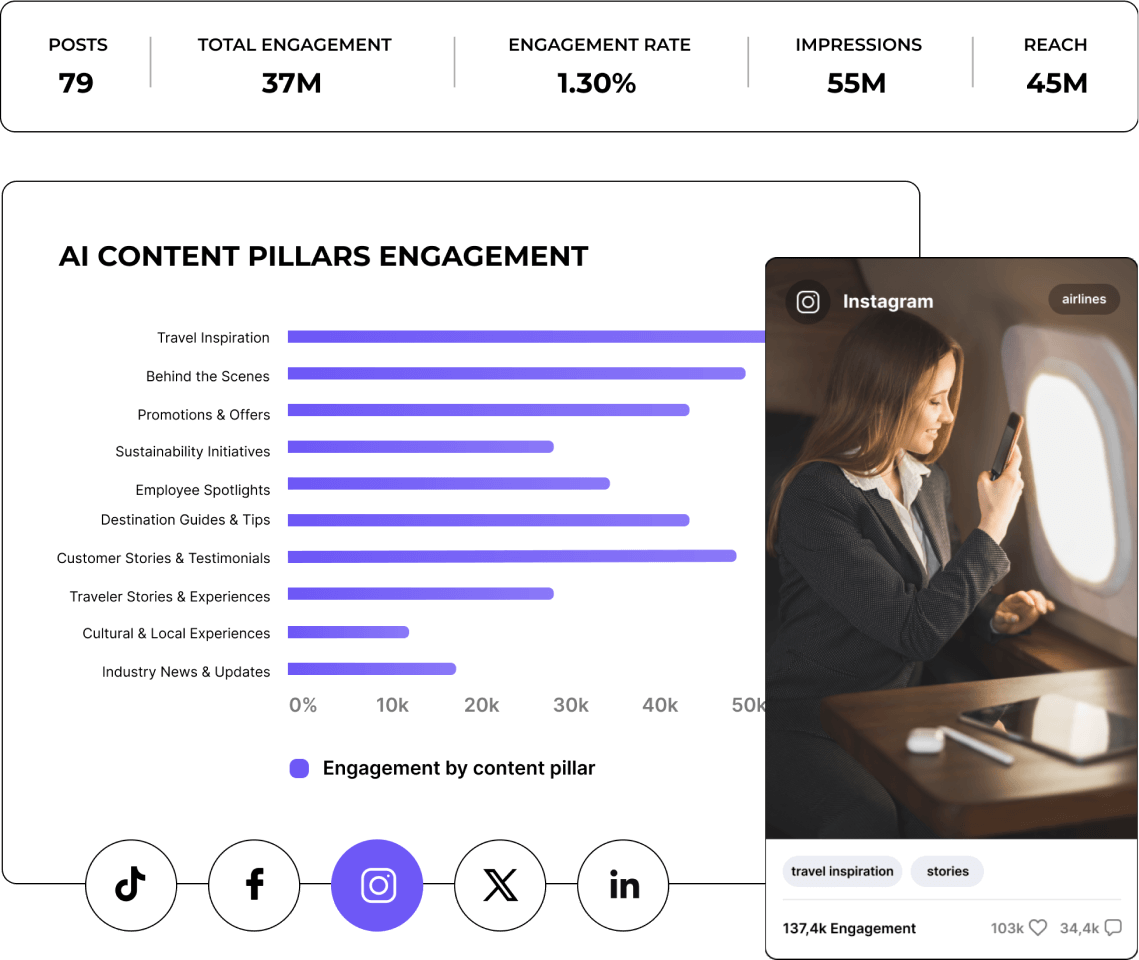
Erhalte KI-gestützte Content-Segmentierung deiner Wettbewerber
Bleib voraus, indem du siehst, was für andere in deiner Branche funktioniert. Vergleiche deinen Content mit Top-Wettbewerbern, um aus ihren Erfolgen zu lernen und deinen eigenen Ansatz zu schärfen.
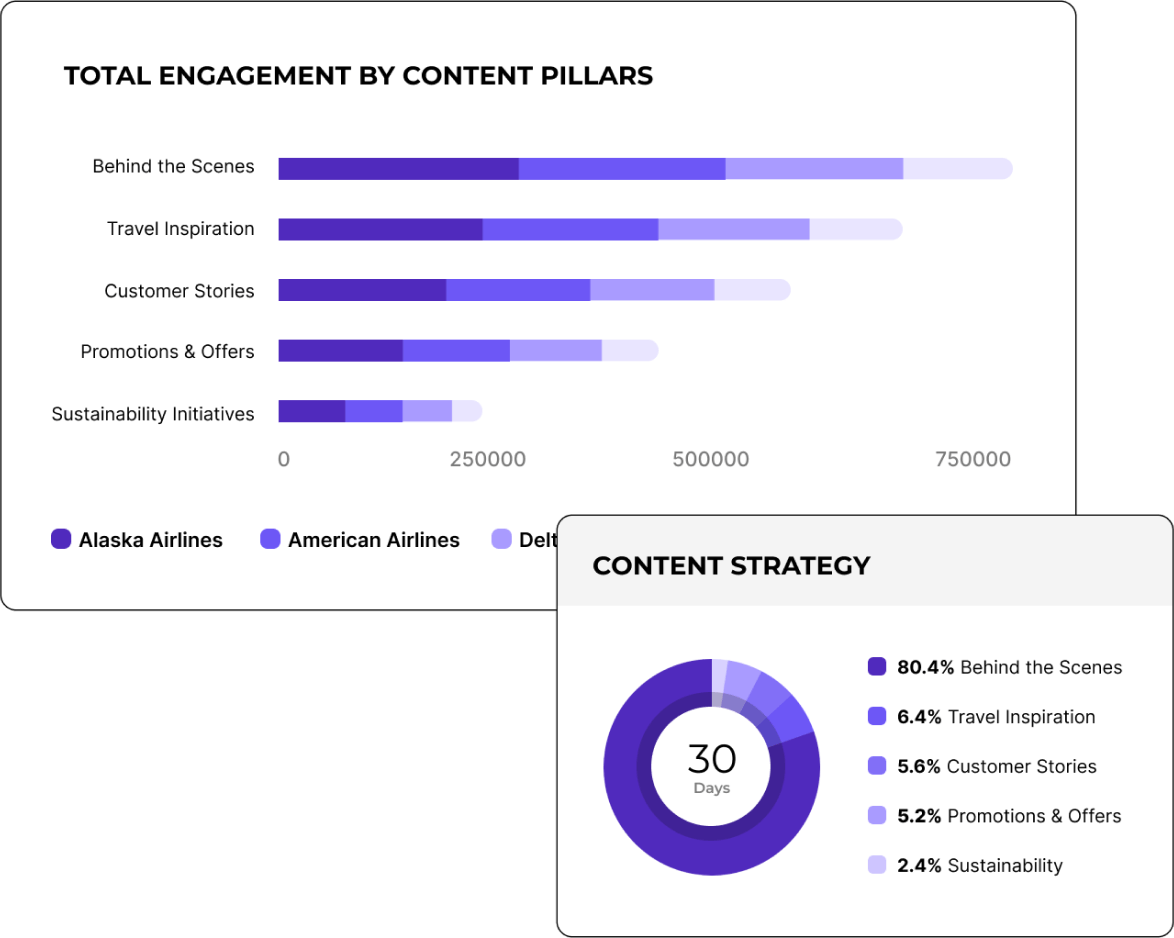

"Mit der Funktion zum Taggen von Kampagnen-Posts konnten wir unsere content strategies sehr effizient analysieren."

Tagge und gruppiere social media posts nach Event oder Kampagne
Konzentriere dich auf das Wesentliche, indem du Posts durchsuchst und sie bestimmten Events oder Kampagnen zuordnest. Erhalte klare insights darüber, was funktioniert, und mache jede Kampagne besser als die vorherige.
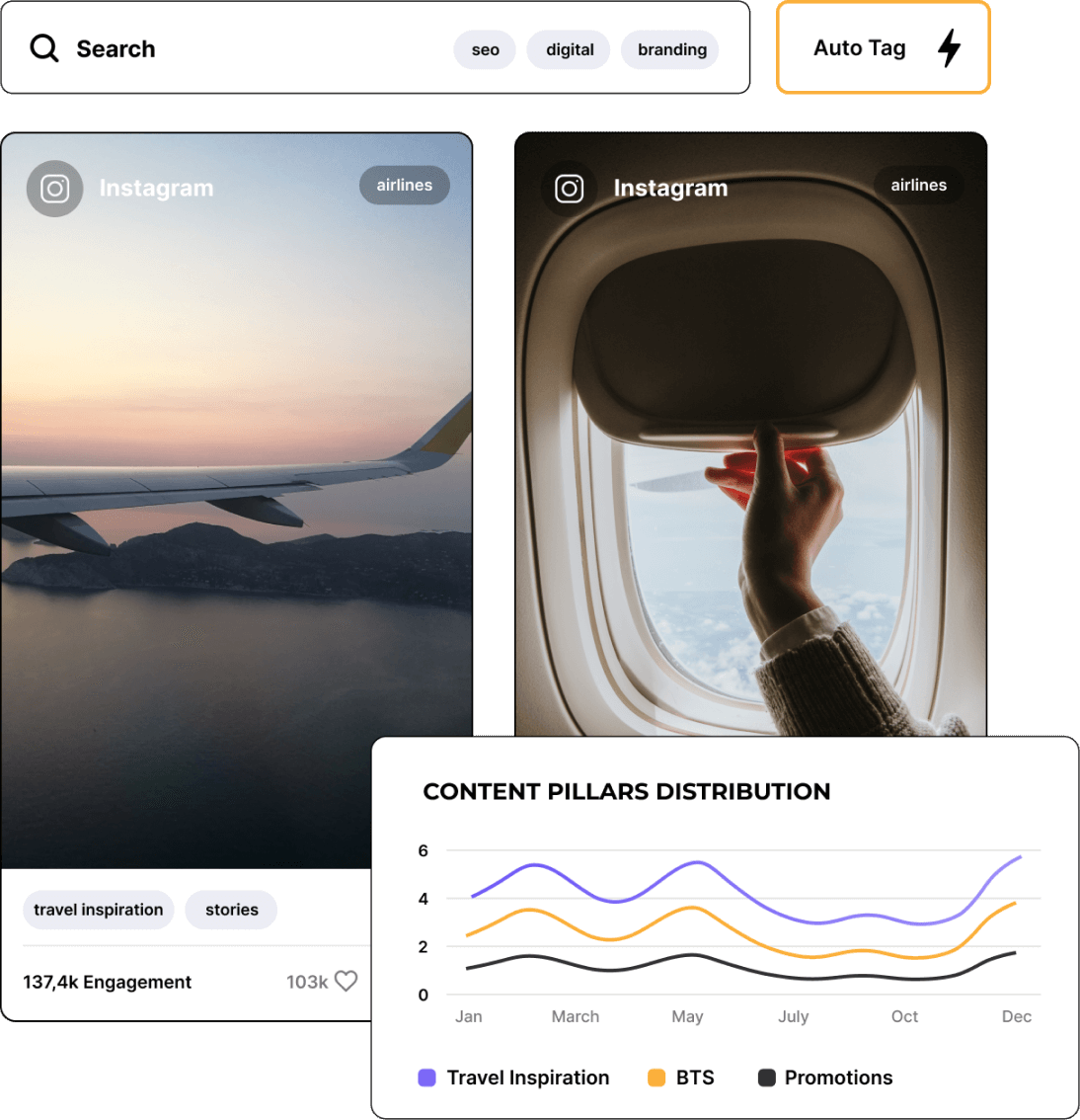
Baue mit historischen Content-insights auf vergangenen Erfolgen auf
Verschaffe dir mit einem Rückblick auf Content-Trends im Zeitverlauf das große Ganze. Baue auf dem auf, was in der Vergangenheit funktioniert hat, und entwickle eine Strategie, die für morgen bereit ist.

So verfolgst du die Engagement Rate in Socialinsider
Die social media analytics- und Wettbewerbsanalyse-Tools von Socialinsider ermöglichen dir, die social media-Performance zu messen, Audits durchzuführen und die Performance zu vergleichen.
Erstelle zunächst ein Testkonto bei Socialinsider
Füge deine Wettbewerber hinzu und verbinde die Profile, die du verwaltest
Erhalte alle Engagement-Metriken für jedes Unternehmenskonto
Vergleiche deine Performance mit der deiner wichtigsten Wettbewerber
Führe eine kanalübergreifende Analyse durch, um deine Performance zu bewerten.
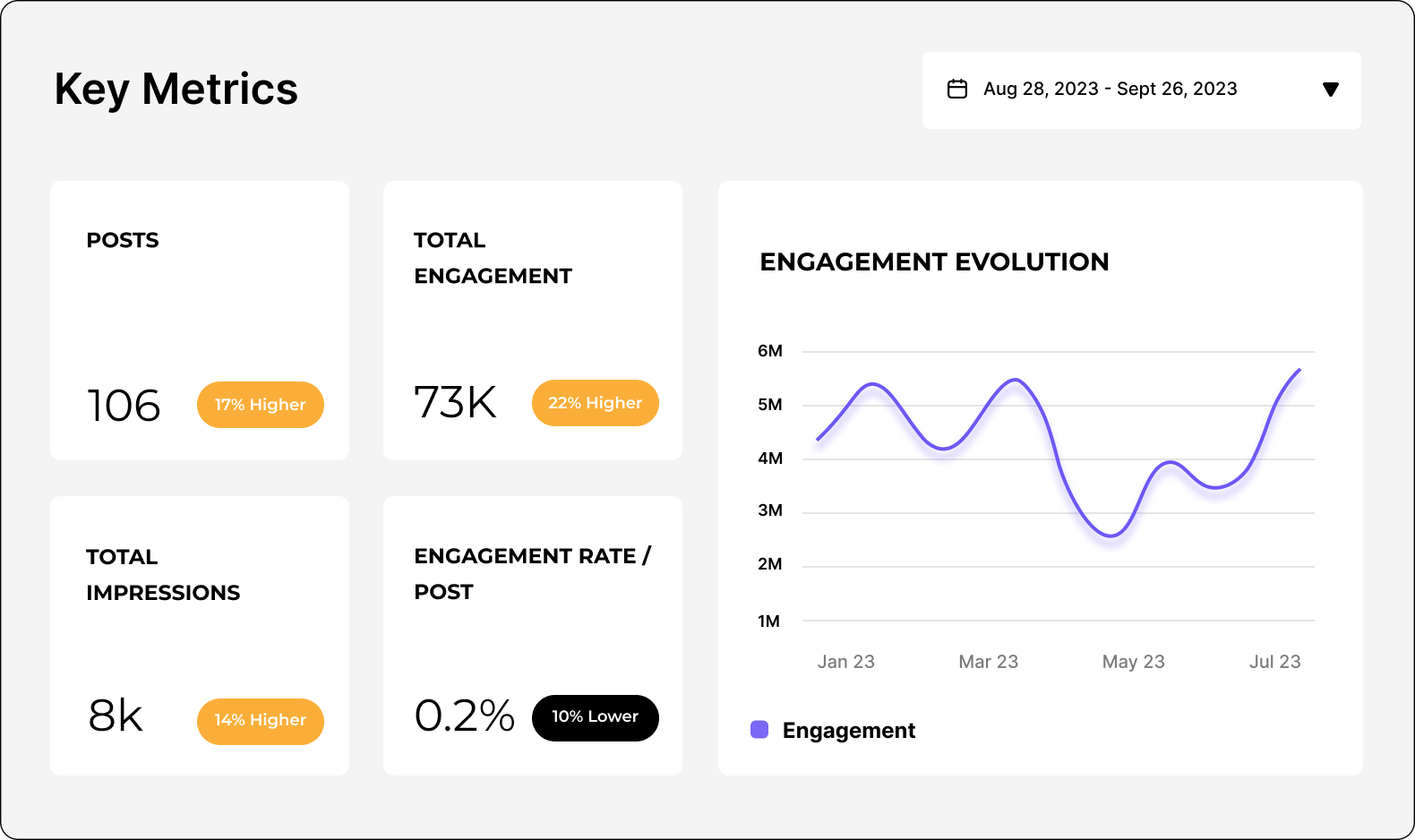
Erhalte Wettbewerbs-Insights und erkunde
social media analytics metrics
Das sagen sie über uns
"Der Kundenservice gehört ebenfalls zu meinen Lieblingsfunktionen. Du bist einfach phänomenal. Dein Team reagiert so schnell und ist sehr freundlich und hilfsbereit. Das ist nicht selbstverständlich."

"Socialinsider hat uns geholfen zu verstehen, ob wir uns verbessern oder nachlassen – besonders im Vergleich zu den anderen Accounts, denen wir folgen."

"Socialinsider ermöglicht eine Wettbewerbsanalyse, die Einblicke in die Performance im Vergleich zum Markt gibt."

"Die Sentimentanalyse für Instagram-Hashtags ist beeindruckend. Dieses neue Dashboard für social media listening hat mir bei der langfristigen Planung geholfen."

"Wir nutzen dieses social media analytics dashboard für alle unsere 40 social media-Kunden. So haben wir alle Performance-Daten an einem einzigen Ort."

"Mit Socialinsider wurde unser Team effizienter. Wir müssen keine Zeit mit dem Sammeln von social media-Daten verbringen. Stattdessen können wir uns auf Insights und Analysen konzentrieren."

"Wir nutzen Socialinsider für tägliche social media insights, wenn wir einfache strategische Änderungen skizzieren oder die Performance bestimmter social media Posts überprüfen möchten."

"Im Durchschnitt erfordert ein social media Bericht für eine Marke mit Socialinsider 1 bis 2 Stunden Arbeit, während die Datenerfassung zuvor einen ganzen Tag dauerte."

"Socialinsider hat uns jährlich mehr als 16.000 $ eingespart. Dadurch sparen wir Zeit bei monatlichen Berichten und komplexen langfristigen Analysen."

Häufig gestellte Fragen
Eine Frage? Wir haben die Antworten.
Was ist die Analyse von social media content?
- Welche Content-Arten gut performen
- Welche Themen bei deiner Zielgruppe am besten ankommen
- Dein Content mit dem höchsten Engagement + deine Engagement-Rate
- Deine besten Posts auf Basis von Reach und Engagement
- Wie deine Zielgruppe deine Marke und ihren Content wahrnimmt
Als Marketer musst du die gesamte Performance deines social media content im Blick behalten. So kannst du deine social media strategy kontinuierlich anpassen und optimieren, um Performance, Reach und Wachstum zu maximieren.
Warum ist die Analyse von social media content wichtig?
Hier sind einige Vorteile einer gründlichen Analyse von social media content.
Verstehe deine Zielgruppe besser
Wenn du deinen Content, seine Engagement-Raten und die Reaktionen deiner Zielgruppe analysierst, erhältst du ein klareres Verständnis dafür, wofür sich deine Zielgruppe interessiert und wie du ihr das bieten kannst.
Sehen wir uns ein Beispiel an. Nehmen wir an, du betreibst ein Unternehmen, das isolierte Wasserflaschen verkauft. Du hast eine social media content-Kampagne getestet, in der du deine Produkte in verschiedenen Outdoor-Umgebungen präsentierst und alle Einsatzmöglichkeiten zeigst. Du stellst jedoch fest, dass deine kreativeren und bearbeiteten Grafiken, die für die verschiedenen Farben deiner Produkte werben, bei deiner Zielgruppe besser performen.
Das zeigt dir, dass deine spezifische Zielgruppe nicht ganz die Outdoor-Gruppe ist, für die du sie vielleicht gehalten hast. Stattdessen bevorzugt sie die Ästhetik deiner Produkte und weniger die Orte, an die sie sie mitnehmen kann.
Achte genau auf deinen beliebtesten Content. So erkennst du, was bei deiner Zielgruppe am besten ankommt. Das hilft dir zu verstehen, wer sie ist, warum sie dein Produkt kauft und was sie von dir sehen möchte.
Bewerte die Effektivität deiner social media strategy
Die Analyse von social media content hilft dir, wichtige Metriken wie Reactions, Comments und Shares zu verfolgen. So erhältst du ein klares Bild davon, wie effektiv deine social media strategy ist.
Beobachte deinen Content mit dem höchsten Engagement, um deine besten Posts zu ermitteln. Vergleiche sie außerdem mit denen deiner Wettbewerber, um zu sehen, wie effektiv deine Strategie im Vergleich zu deren Strategie ist.
Erkenne Trends und Muster
Die Analyse deines social media content hilft dir, Trends bei beliebten Content-Themen zu erkennen. Als Teil deiner Strategie hast du wahrscheinlich verschiedene content pillars oder Themen beziehungsweise Post-Typen, die du mit deiner Zielgruppe teilst.
Zum Beispiel könnte eine Online-Pflanzenboutique zwischen folgenden Posts wechseln:
- Pflanzenfotos
- Werbe-Posts, die verfügbare Produkte präsentieren
- Tipps zur Pflanzenpflege
Durch eine Analyse von social media content kann die Boutique anschließend ermitteln, welcher Post-Typ am beliebtesten ist.
Darüber hinaus kann die Pflanzenboutique weitere Trends und Muster erkennen, zum Beispiel:
- Posts am Wochenende performen besser
- Bestimmte Pflanzenarten scheinen beliebter zu sein als andere
- Bestimmte Produkte erzeugen mehr Interesse als andere
Die Analyse von social media content kann auch genutzt werden, um deine Wettbewerber und deren social media posts zu überprüfen. Nutze das zu deinem Vorteil und achte ebenfalls auf Trends bei ihren beliebtesten Posts.
Optimiere deine content strategy
Deine Content-Analyse sollte dir auch zeigen, welche Post-Typen am beliebtesten sind (z. B. Text-Posts, Bilder, Grafiken und Videos). So kannst du deine social media content strategy optimieren und mehr von dem erstellen, was deiner Zielgruppe gefällt.
Du solltest immer eine Kombination verschiedener Post-Typen verwenden. Trotzdem kannst du Content-Typen, die einfach nicht performen, problemlos entfernen.
Verbessere deinen social media ROI
Wenn du besser verstehst, welcher Content am besten performt, kannst du mehr davon teilen. Je mehr hochwertigen und gut performenden Content du teilst, desto bessere Ergebnisse solltest du erzielen.
Mehr Reactions, Comments und Shares sollten hoffentlich zu mehr Followers, Clicks und Verkäufen führen. Sobald du durch deine Marketingaktivitäten mehr Umsatz generierst, steigt dein social media ROI (Return on Investment).
Du solltest deinen ROI kontinuierlich verbessern. So steht dir ein größeres Marketingbudget zur Verfügung und du kannst gleichzeitig dein Unternehmen weiterentwickeln.
Bleibe wettbewerbsfähig
Eine kontinuierliche Analyse von social media content hilft dir schließlich, mit deiner Strategie wettbewerbsfähig zu bleiben. Analysiere deine eigene Performance im Vergleich zu deinen Wettbewerbern. Wächst du ähnlich schnell? Erzielst du ein ähnliches Engagement?
Wenn du deine social media-Daten im Blick behältst, kannst du sicherstellen, dass du mit deinen Aktivitäten wettbewerbsfähig bleibst und nicht von anderen in deiner Branche abgehängt wirst.
Wie führst du eine Content-Analyse in social media durch?
Schritt 1: Definiere deine Ziele
Wie bei jeder Marketinganalyse musst du deine Ziele festlegen. Was möchtest du mit deinem Content in social media erreichen? Bevor du mit deiner Analyse beginnst, solltest du wissen, was du erreichen möchtest. So kannst du feststellen, ob du auf dem richtigen Weg bist.
Zu den häufigsten Zielen von Content in social media gehören:
- Markenbekanntheit steigern
- Deine Online-Präsenz ausbauen
- Deine Zielgruppe einbinden
- Traffic auf deine Website leiten
- Verkäufe generieren
Deine Ziele für die Marketingstrategie stehen in direktem Zusammenhang mit den Metriken, die du misst. Damit kommen wir zum nächsten Schritt.
Schritt 2: Wähle deine Metriken für deine Content Pillars in social media
Du solltest bei deiner Content-Analyse nicht jede einzelne Metrik zu deiner Präsenz in social media untersuchen. Das würde zu viel Zeit kosten und dir keine relevanten Erkenntnisse zu deinen Zielen liefern.
Wähle stattdessen einige wenige Metriken aus, die tatsächlich zu deinen Zielen in social media passen. So kannst du erkennen, ob dein Content seinen Zweck erfüllt oder ob du deine Strategie anpassen musst.
Einige mögliche Metriken und die zugehörigen Ziele sind:
- Markenbekanntheit steigern: Impressions, Reach, Video Views, Followers
- Online-Präsenz ausbauen: Reach, Followers
- Zielgruppe einbinden: Engagement Rate, Likes, Comments, Shares
- Traffic auf deine Website leiten: Clicks
- Verkäufe generieren: Conversions
Schritt 3: Sammle Daten für eine bessere Analyse
Als Nächstes musst du deine Daten sammeln. Dafür gibt es verschiedene Möglichkeiten:
- Integrierte Analytics-Tools der einzelnen social media Plattformen, auf die du zugreifen kannst, sobald du auf den jeweiligen Plattformen Business-Konten einrichtest. Dazu gehören Instagram Insights und TikTok Analytics. Über die jeweilige App kannst du ganz einfach Daten zu deiner Zielgruppe, zur Content-Performance und mehr abrufen.
- Drittanbieter-Tools für social media analytics, mit denen du deine gesamten social media analytics auf einen Blick in einem einzigen dashboard siehst. Außerdem erhältst du Tools für detaillierte Daten und insights.
Die erste Option ist kostenlos, da sie in der jeweiligen social media App enthalten ist. Einige Analytics-Tools bieten kostenlose Tarife mit Einschränkungen. Für detailliertere social media content analytics musst du jedoch wahrscheinlich einen Teil deines Marketingbudgets einplanen.
Socialinsider bietet beispielsweise eine 14-tägige kostenlose Testversion. Danach starten unsere kostenpflichtigen Tarife bei 99 $ pro Monat. Wir bieten eine große Bandbreite an social media insights, die deiner Marke helfen, bessere Entscheidungen zu treffen.
Schritt 4: Kategorisiere deinen Content
Nachdem du deine Methode zur Datensammlung ausgewählt hast – wir empfehlen ein Drittanbieter-Tool, damit du alle Plattformen gleichzeitig leichter vergleichen kannst –, musst du deinen Content kategorisieren. So kannst du deine social media content analysis wirklich detailliert untersuchen.
Mit Socialinsider stehen dir drei Möglichkeiten zur Verfügung, um deinen Content zu kategorisieren.
Erstens kannst du unser KI-Tool automatisch Content Pillars auf Basis des Contents erstellen lassen, den du normalerweise veröffentlichst. Das ist eine schnelle und einfache Möglichkeit, deinen Content zu kategorisieren, wenn du möglichst wenig manuellen Aufwand möchtest.
Alternativ kannst du zu deinen Posts gehen und manuell nach einem Keyword oder Hashtag suchen. So siehst du, wie oft du über ein bestimmtes Thema, Event oder eine Kampagne gepostet hast.
Du kannst auch basierend auf deiner Keyword- oder Hashtag-Suche ein Auto Tag erstellen. Damit kannst du Content schnell nach Themen filtern, über die du häufig postest – besonders dann, wenn du einen bestimmten Content-Typ oder ein bestimmtes Thema regelmäßig analysieren möchtest.
Sobald du dein Auto Tag eingerichtet hast, werden alle vergangenen und zukünftigen Posts mit dem Keyword oder Hashtag diesem Tag zugeordnet.
Gib deinem Auto Tag einen Namen, damit du ihn bei der Analyse deines Contents leicht findest. Da sich deine social media content analysis um verschiedene Content-Typen und Themen dreht, ist die Einrichtung dieser Kategorien ein wichtiger Schritt, den du nicht überspringen solltest.
Schritt 5: Analysiere deinen Content in social media plattformübergreifend
Jetzt geht es an die Content-Analyse. In Socialinsider gehst du dazu zu deinem dashboard und klickst in der linken Seitenleiste auf Content Pillars. Wähle anschließend dein Thema aus deinen eigenen Content Pillars oder aus den von der KI erstellten Optionen aus.
Nachdem du deinen Content Pillar ausgewählt hast, kannst du deine social media Plattformen auswählen.
Wähle über das Dropdown-Menü oben auf dem Bildschirm den Datumsbereich aus. Du kannst eine monatliche oder vierteljährliche Analyse durchführen, um deine Performance zu überprüfen. Scrolle anschließend nach unten, um die Performance zu untersuchen.
Schritt 6: Analysiere Engagement-Muster
Achte bei der Analyse deiner Performance auf den verschiedenen Plattformen auf mögliche Engagement-Muster.
Socialinsider liefert dir beispielsweise Daten wie:
- Anzahl der Posts innerhalb des Pillars im ausgewählten Zeitraum
- Wachstum der Follower-Zahl
- Avg Engagement, also die Anzahl der Comments, Likes und Shares für deinen Content
- Engagement Rate by Followers, also der Prozentsatz deiner Followers, die mit deinem Content interagiert haben
- Deine Top 10 Posts
- Anzahl der Interaktionen pro Post
Mit solchen insights kannst du deine erfolgreichsten Content Pillars identifizieren. So kannst du mehr Content dieser Art erstellen und deine Performance bei deiner Zielgruppe steigern.
Schritt 7: Vergleiche dich anhand von Benchmarks mit Wettbewerbern
Mit Socialinsider kannst du die Content Pillars in social media jedes Profils identifizieren, nicht nur deine eigenen. Füge die social media Profile deiner Wettbewerber hinzu. So siehst du, welche Themen bei ihnen am beliebtesten sind und welche Posts zu diesen Themen gehören. Dadurch erhältst du weitere Ideen, wie du deine Zielgruppe einbinden kannst.
Was sind die wichtigsten Tipps für eine Content-Analyse in social media?
Konzentriere dich auf die richtigen Metriken
Überfordere dich nicht damit, jede einzelne Metrik zu überwachen. Priorisiere deine Ziele und konzentriere dich anschließend nur auf die Metriken oder KPIs, die zu diesen Zielen passen.
Hier sind noch einmal die Metriken, die du für einige der häufigsten Ziele von Content in social media verfolgen solltest:
- Markenbekanntheit: Impressions, Reach, Video Views, Followers
- Wachstum: Reach, Followers
- Engagement: Engagement Rate, Likes, Comments, Shares
- Website-Traffic: Clicks
- Verkäufe: Conversions
Wähle ein oder zwei Ziele aus, die du erreichen möchtest. So überlastest du dich nicht mit zu vielen Metriken. Wenn du dich auf zu viele KPIs konzentrierst, erhältst du kein vollständiges Bild – besonders dann nicht, wenn du Daten analysierst, die sich nicht auf dein Geschäftsergebnis auswirken.
Organisiere deine Daten
Halte deine Daten mit den richtigen Tools und Tabellen übersichtlich. Anstatt beispielsweise die Analytics jedes einzelnen social media Netzwerks zu untersuchen, kannst du ein Drittanbieter-Tool verwenden, das deinen gesamten Content an einem Ort bündelt.
Entscheide anschließend, welches Format für deine Daten am besten geeignet ist – PDF, CSV, Excel-Tabelle usw. Exportiere deine Berichte regelmäßig im gleichen Format, damit alles übersichtlich bleibt.
Erstelle deine Berichte jeden Monat oder jedes Quartal ungefähr zur gleichen Zeit. So kannst du alles leichter vergleichen. Speichere die Berichte im gleichen Ordner, damit du sie einfach findest und später darauf zurückgreifen kannst. Eine gute Organisation ist entscheidend für eine konsistente und hochwertige Analyse.
Nutze Tools für social media analytics
Tools für social media analytics wie Socialinsider machen den gesamten Analyseprozess deutlich einfacher. Erstens hast du deine gesamten Analytics in einem einzigen dashboard. So musst du während deiner Analyse nur eine Website statt fünf verschiedener dashboards aufrufen.
Viele Tools für social media analytics liefern außerdem detailliertere insights als dein integriertes Analytics-Tool. Sie greifen auf die APIs der einzelnen Netzwerke sowie auf andere Marketing-Tools zu, die du möglicherweise verwendest.
Deine Instagram Analytics können dir beispielsweise nicht sagen, wie viele Klicks auf deine Website Verkäufe generiert haben. Wenn du jedoch deine Instagram-Analytics und deine Website-Analytics über ein Drittanbieter-Tool für social media analytics verknüpfst, kannst du diese Information abrufen.
Suche nach Mustern und Trends
Ein wichtiger Teil deiner social media content analysis besteht darin, Gemeinsamkeiten, Muster oder Trends in deinem Content und dessen Ergebnissen zu erkennen.
Genau deshalb ist die Content-Pillars-Funktion von Socialinsider so wertvoll. Sie erstellt das ideale dashboard zur Analyse von Mustern in deinem Content. So findest du Themen, die für deine Zielgruppe ansprechender und relevanter sind als andere.
Durch das Benchmarking des Contents deiner Wettbewerber kannst du außerdem Trends in deiner Branche analysieren. Prüfe, ob die Content-Muster deiner Wettbewerber mit deinen übereinstimmen. Sind ähnliche Themen auch bei ihnen beliebt? Und warum scheint das so zu sein – oder warum nicht?
Behalte die Lebensdauer deines Contents im Blick
Die Lebensdauer von Content bezeichnet den Zeitraum, in dem ein Content-Element weiterhin Reach und Engagement erzielt. Wenn du deine Top Posts und deren Wachstum jeden Monat verfolgst, siehst du, wie lange dein Content neue Mitglieder deiner Zielgruppe erreicht.
Wenn du die Lebensdauer deines Contents kennst, kannst du besonders leistungsstarke Plattformen und Themen priorisieren. Wenn dein Content beispielsweise auf LinkedIn länger erfolgreich ist als auf X/Twitter, weißt du, dass es für dein Unternehmen sinnvoller ist, mehr LinkedIn-Content zu erstellen.
Führe regelmäßig Content-Audits durch
Ein Content-Audit ist eine detailliertere social media content analysis. Dabei wird die Content-Performance über einen längeren Zeitraum untersucht. Ziel ist es, Verbesserungsmöglichkeiten zu erkennen, statt Muster zwischen deinen Content-Themen zu finden.
Mit einem Content-Audit kannst du leistungsschwache Post-Typen entfernen, die Prozesse für Content-Erstellung und Veröffentlichung verbessern und auf eine bessere Marketingstrategie hinarbeiten.
Präsentiere deine Ergebnisse in einem visuellen Bericht
Wenn du die Ergebnisse deiner social media content analysis weitergeben musst, solltest du sie in einem visuellen Bericht aufbereiten. So können andere die Ergebnisse leichter ansehen und verstehen.
Charts und Grafiken vermitteln deine Ergebnisse deutlich verständlicher als eine Tabelle oder eine Liste mit Zahlen.
Mit Tabellen in Excel kannst du Datentabellen in Grafiken umwandeln. Auch Drittanbieter-Tools für Analytics wie Socialinsider ermöglichen es dir, deine Daten visuell zu präsentieren. Einige unserer Berichte werden beispielsweise als Liniendiagramme, Balkendiagramme und in weiteren Formaten dargestellt.
Wie kann ich mit Socialinsider eine Content-Analyse auf social media durchführen?
Schritt eins: Erstelle dein Socialinsider-Konto. Unser günstigster Tarif startet bei 99 $/Monat und bietet dir Zugriff auf mehrere unserer vorgefertigten Berichte.
Schritt zwei: Verbinde deine social media Konten. Socialinsider unterstützt die folgenden Plattformen:
- TikTok
- X/Twitter
- YouTube
Schritt drei: Greife auf unsere leicht verständlichen Berichte zu. Du findest mehrere dieser Berichte in der linken Seitenleiste deines Socialinsider-Dashboards.
Zu diesen Berichten gehören unter anderem:
- Content-Performance
- Engagement
- Impressions
- Followers Growth
- Content pillars
- Post-Übersicht
- Wettbewerbervergleiche
Die wichtigsten Berichte für deine social media Content-Analyse sind die Content-Übersicht, Content pillars und Post-Übersicht. Damit erfährst du, welche Posts am besten performt haben, welchen Themen sie zugeordnet waren und welche Posts möglicherweise hinter deinen Erwartungen zurückgeblieben sind.
Kann ich die AI content pillars für meine social media Konten ändern?
Du kannst jedoch eigene Content pillars erstellen und verwalten. Klicke in deinem Socialinsider-Dashboard auf dein social media Konto und öffne anschließend den Posts-Bericht.
Dort kannst du deine eigenen Hashtags, Keywords und Kategorien in die Suchleiste eingeben, um Posts zu finden, die diese enthalten. Anschließend kannst du den Hashtag, das Keyword oder die Kategorie als Auto-Tag hinzufügen. So kannst du alle bisherigen und zukünftigen Posts ganz einfach über diesen Tag aufrufen.
Kann ich die einem social media-Konto zugewiesene Branche ändern?
In den meisten Fällen sind diese Branchen äußerst präzise. Falls wir jedoch nicht ganz richtigliegen, du eine spezifischere Branche auswählen möchtest oder die Branche wechselst, arbeiten unsere Ingenieure noch daran, diese Einstellung änderbar zu machen.
Die einem social media-Konto zugewiesene Branche kann daher derzeit nicht geändert werden. Schau aber bald wieder vorbei, denn diese Funktion befindet sich noch in der Entwicklung.
Bereit, deine social media content strategy zu verbessern?
Analysiere detaillierte Daten zu deinem social media Content und erhalte strategische insights, die dir helfen, deine social media content strategy zu optimieren und einen Wettbewerbsvorteil zu gewinnen.