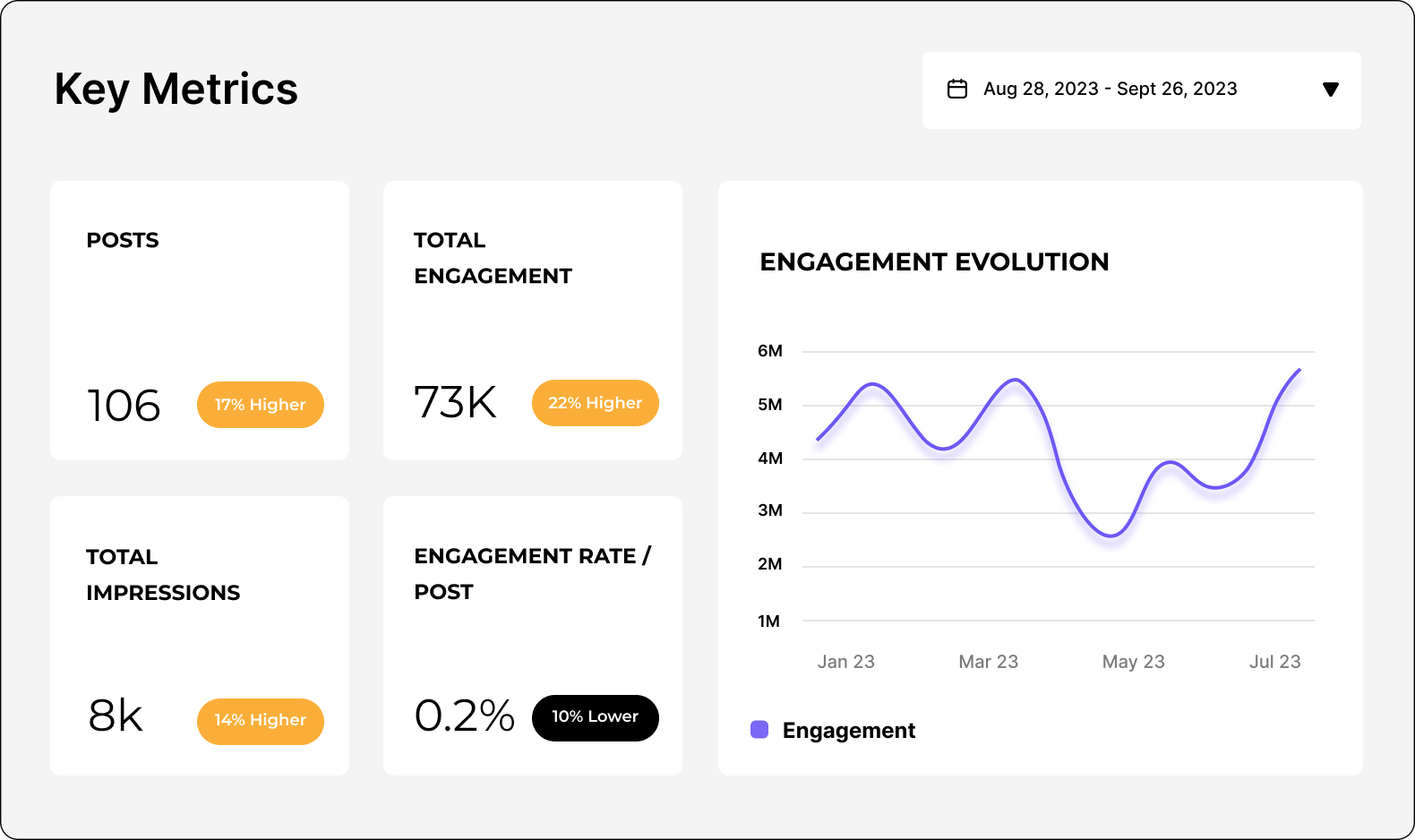
ソーシャルメディアコンテンツ分析を習得して、隠れたパターンを発見しましょう。

高度なソーシャルメディアコンテンツ分析を活用して、さまざまなコンテンツピラーのパフォーマンスを比較できます。コンテンツ最適化の戦略も発見しましょう。

ソーシャルメディア競合分析プラットフォーム

Leader in Social Media Analytics Category

High Performer social media analytics tool for brands and businesses.

High Performer Enterprise
High Performer Small Business
Momentum Leader Fall
High Performer Europe
  • Beko
  • Booking
  • TBWAI
  • Rolls Royce
  • Brother
  • Honda
  • Volvo

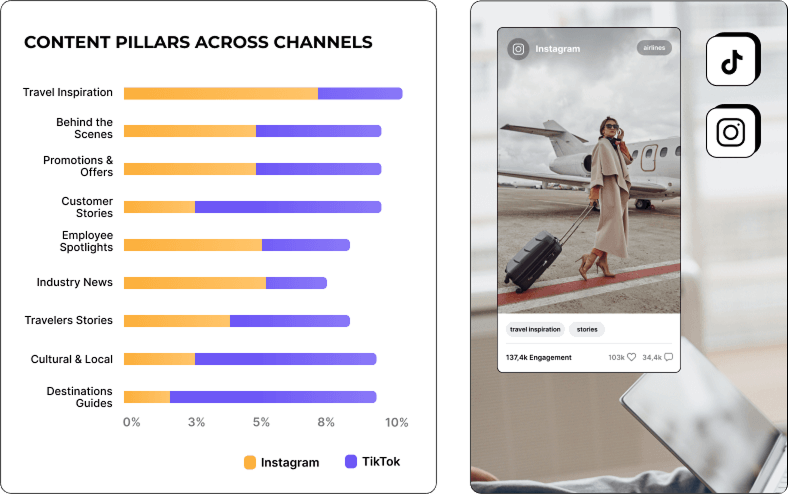
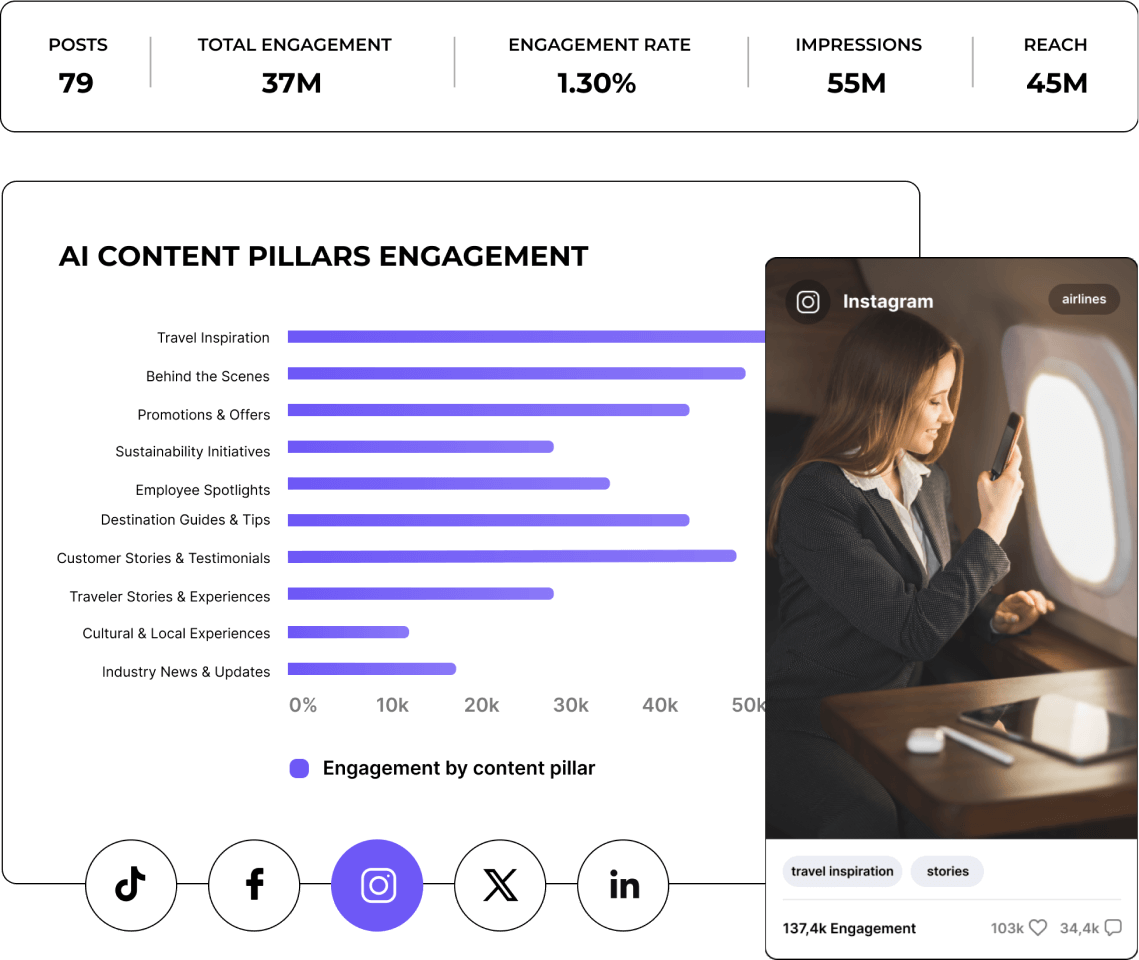
AIコンテンツピラーでソーシャルメディア戦略を強化しましょう

さまざまなAIコンテンツテーマのインサイトを分析し、オーディエンスに響くポイントを発見しましょう。投稿を最適化して、本当に心に届くソーシャルメディア戦略を構築できます。

ソーシャルメディアコンテンツ分析で、ソーシャルメディア戦略を強化

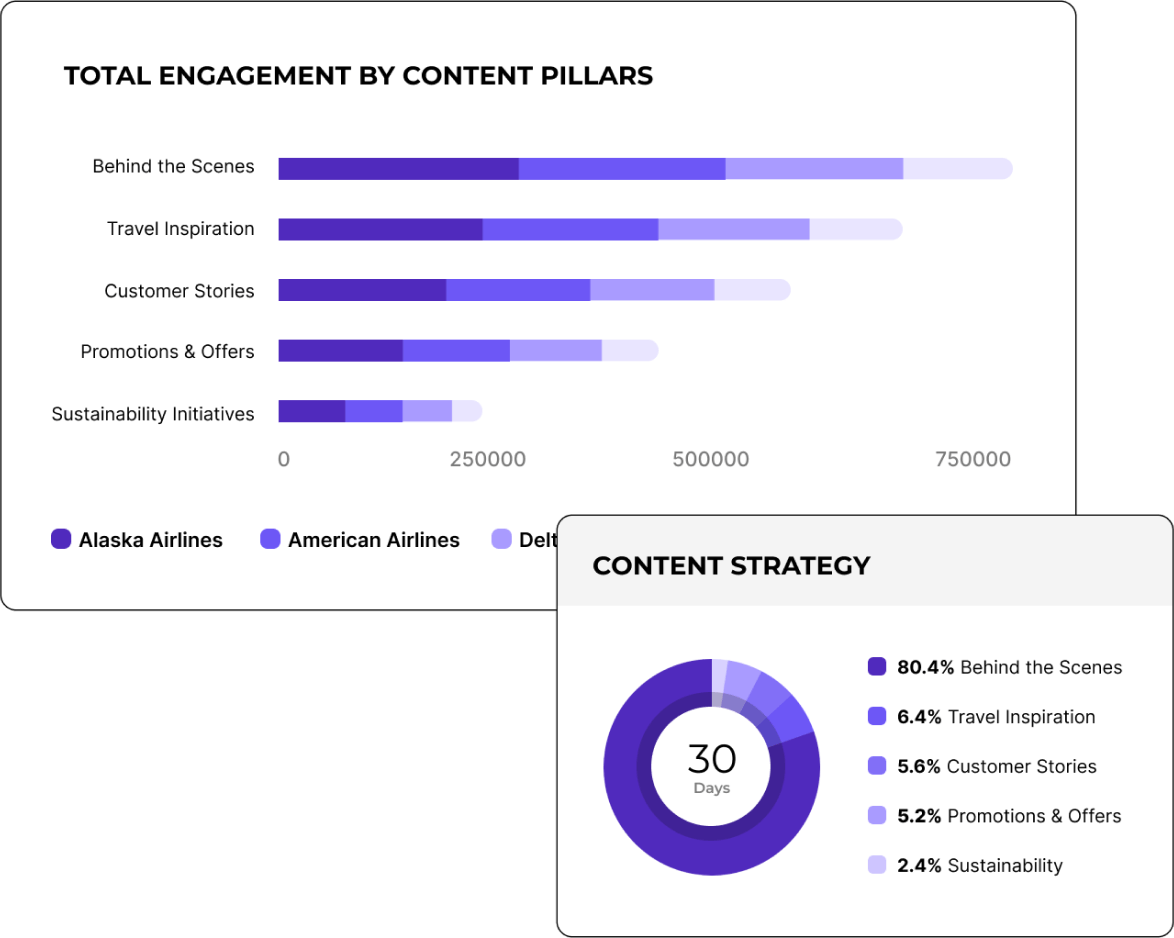
競合他社のAIコンテンツセグメンテーションを取得

業界内で効果的な事例を確認して、一歩先を行きましょう。自社のコンテンツを主要な競合他社と比較。成功事例から学び、自社の戦略を強化できます。

AIコンテンツセグメンテーション

" キャンペーン投稿タグ付け機能のおかげで、コンテンツ戦略を非常に効率的に分析できました。 "

Caitlin Duffy, Founder & Consultant at Roisin Consulting

お客様のストーリーズをご覧ください。

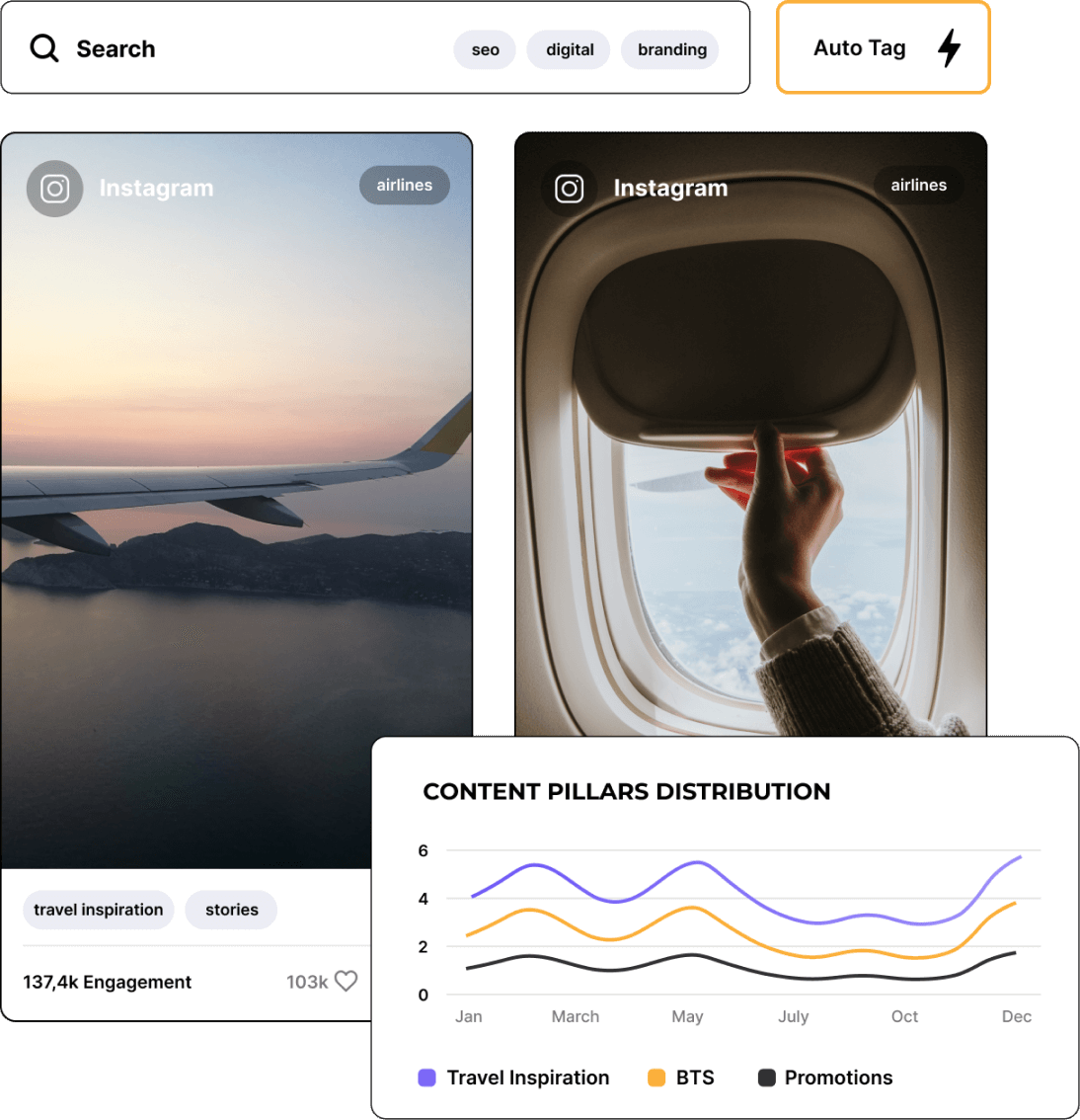
イベントやキャンペーンごとにソーシャルメディア投稿をタグ付け・グループ化できます。

投稿を検索し、特定のイベントやキャンペーン用にタグ付けすることで、重要なポイントに集中できます。何が効果的かをクリアなインサイトで把握し、毎回のキャンペーンを前回よりも改善しましょう。

ソーシャルメディアコンテンツ分析タグ

過去の成功をもとに、履歴コンテンツのインサイトを活用します。

コンテンツのトレンドを時系列で振り返り、全体像を把握できます。過去に効果的だった内容を活かし、明日に備えた戦略を構築しましょう。

ソーシャルメディアコンテンツ分析の構築

Socialinsiderでエンゲージメント率を追跡する方法

Socialinsiderのソーシャルメディアアナリティクスや競合分析ツールで、ソーシャルメディアのパフォーマンスを測定し、監査を実施して、成果を比較できます。

Step 1

まずはSocialinsiderでトライアルアカウントを作成してください。

Step 2

競合他社を追加し、管理しているプロフィールを連携してください。

Step 3

あらゆるビジネスアカウントのエンゲージメントメトリクスをすべて取得できます。

Step 4

主要な競合他社と成果を比較します。

Step 5

クロスチャネル分析でパフォーマンスを評価します。

ソーシャルメディア

お客様の声

  • カスタマーサービスは私のお気に入り機能の一つです。皆さん、本当に素晴らしいです。チームの対応が早く、とても親切で助かります。これは普通ではありません。

    Caitlin Duffy | Roisin Consulting

  • 「Socialinsiderは、私たちがフォローしている他のアカウントと比較して、改善しているのか、低下しているのかを把握するのに役立ちました。」

    Declan Seachoy | 労働組合会議

  • Socialinsiderは、競合分析により市場全体と比較したパフォーマンスのインサイトを提供します。

    Victor Mukubvu | Mitsubishi Electric

  • インスタグラムのハッシュタグに対するセンチメント分析が素晴らしいです。この新しいソーシャルメディアリスニングダッシュボードは、長期的なプランニングにとても役立ちました。

    Giuseppe Veturi | Havas Media Network

  • 私たちは、このソーシャルメディアアナリティクスダッシュボードを40社すべてのソーシャルメディアクライアントに活用しています。すべてのパフォーマンスデータを一か所で管理できます。

    Arnold Vieriu | Tribal Worldwide

  • Socialinsiderのおかげで、私たちのチームはさらに効率的になりました。ソーシャルメディアデータの収集に時間をかける必要がありません。その分、インサイトと分析に集中できます。

    Yana Bushmeleva | Fashionbi

  • 日々のソーシャルメディアインサイトにSocialinsiderを利用しています。シンプルな戦略変更の概要を作成したり、特定の投稿のパフォーマンスを確認したりする際に便利です。

    Nick Radclyffe | Hype Lab CEO

  • 平均して、ブランド向けのソーシャルメディアレポート作成は、Socialinsiderを使えば1~2時間で完了します。従来はデータ収集だけで丸一日かかっていました。

    Dorra Lunet | ハンギングガーデンズエージェンシー

  • Socialinsiderのおかげで、年間16,000ドル以上のコスト削減ができました。月次レポートや複雑な長期分析の作業時間も短縮できています。

    Mohamed El-Daly | メディアを作成

  • カスタマーサービスは私のお気に入り機能の一つです。皆さん、本当に素晴らしいです。チームの対応が早く、とても親切で助かります。これは普通ではありません。

    Caitlin Duffy | Roisin Consulting

  • 「Socialinsiderは、私たちがフォローしている他のアカウントと比較して、改善しているのか、低下しているのかを把握するのに役立ちました。」

    Declan Seachoy | 労働組合会議

  • Socialinsiderは、競合分析により市場全体と比較したパフォーマンスのインサイトを提供します。

    Victor Mukubvu | Mitsubishi Electric

  • インスタグラムのハッシュタグに対するセンチメント分析が素晴らしいです。この新しいソーシャルメディアリスニングダッシュボードは、長期的なプランニングにとても役立ちました。

    Giuseppe Veturi | Havas Media Network

  • 私たちは、このソーシャルメディアアナリティクスダッシュボードを40社すべてのソーシャルメディアクライアントに活用しています。すべてのパフォーマンスデータを一か所で管理できます。

    Arnold Vieriu | Tribal Worldwide

  • Socialinsiderのおかげで、私たちのチームはさらに効率的になりました。ソーシャルメディアデータの収集に時間をかける必要がありません。その分、インサイトと分析に集中できます。

    Yana Bushmeleva | Fashionbi

  • 日々のソーシャルメディアインサイトにSocialinsiderを利用しています。シンプルな戦略変更の概要を作成したり、特定の投稿のパフォーマンスを確認したりする際に便利です。

    Nick Radclyffe | Hype Lab CEO

  • 平均して、ブランド向けのソーシャルメディアレポート作成は、Socialinsiderを使えば1~2時間で完了します。従来はデータ収集だけで丸一日かかっていました。

    Dorra Lunet | ハンギングガーデンズエージェンシー

  • Socialinsiderのおかげで、年間16,000ドル以上のコスト削減ができました。月次レポートや複雑な長期分析の作業時間も短縮できています。

    Mohamed El-Daly | メディアを作成

よくあるご質問

ご質問がありますか?私たちがしっかりお答えします。

What is social media content analysis?

Social media content analysis is the process of analyzing the content your brand (and its competitors) posts on social media. This analysis can help your marketing team understand insights like:

- The types of content that are performing well
- Topics that most resonate with your audience
- Your most engaging content + your engagement rate
- Your top posts based on reach and engagement
- How your audience feels about your brand and its content

As a marketer, you need to have your thumb on your overall social media content performance so that you can continuously adjust and adapt your social media strategy to maximize performance, reach, and growth.

Why is social media content analysis important?

Social media content analysis is an essential part of any social media marketer’s job. You don’t want to simply throw content out into the internet void. You need to be strategic about it, and analyzing the content you’ve posted is an important part of that process.

Here are some of the benefits outlined by proper social media content analysis.

Get a better understanding of your audience

When you analyze your content, its engagement rates, and your audience reception, you can gain a clearer understanding of what your audience is interested in and how you can provide that.

Let’s look at an example. Say you’re running a business that sells insulated water bottles. You’ve tested out a social media content campaign where you share your products in different outdoorsy areas, showcasing all of the ways they can be used. However, you discover that your more artistic and edited graphics promoting the different colors of your products tend to perform better amongst your audience.

This shows you that your specific audience isn’t quite the outdoorsy group you may have thought. Instead, they prefer the aesthetics of your products, rather than where they can take them.

Pay close attention to your most popular content so that you know what resonates most with your audience, as this can help you understand who they are, why they’re buying your product, and what they want to see from you.

Evaluate the effectiveness of your social media strategy

Social media content analysis can help you track key metrics like reactions, comments, and shares so that you have a clear idea of how effective your social media strategy is.

Monitor your most engaging content to gauge your top posts, but also compare them to your competitors to see how your strategy’s effectiveness compares to theirs.

Identify trends and patterns

Analyzing your social media content helps you to identify trends amongst popular content topics. As a part of your strategy, you likely have different content pillars or topics/post types that you share with your audience.

For example, an online plant boutique might alternate between posts like:

- Plant photos
- Promotional posts showcasing available products
- Plant care tips

By conducting a social media content analysis, the boutique can then gauge which type of post is most popular.

More than that, the plant boutique can identify other trends and patterns, like:

- Posts on the weekend perform better
- Certain types of plants appear more popular than others
- Certain products generate more interest than others

Social media content analysis can also be used to check in on your competitors and their social media posts. You can use that to your advantage by looking at any trends amongst their most popular posts as well.

Optimize your content strategy

Your content analysis should also clue you into the most popular types of posts (i.e., text posts, images, graphics, videos) so that you can optimize your social media content strategy and create more of what your audience enjoys.

While you always want to use a combination of different post types, you should feel comfortable eliminating content types that simply don’t perform.

Improve your social media ROI

When you have a better understanding of what content performs best, you can share more of it. As you share more and more high-quality, high-performing content, you should see more results because of it.

More reactions, comments, and shares should hopefully lead to more followers, clicks, and sales. And as you start to generate more revenue from your marketing efforts, your social media ROI (or return on investment) increases.

You want to consistently improve your ROI because it gives you a bigger marketing budget to work with while also helping you grow your business.

Stay competitive

Finally, consistently conducting social media content analyses helps you to stay competitive with your strategy. Analyze your own performance against your competitors. Are you growing at similar rates? Are you seeing similar engagement?

Keeping an eye on your social media data is the only way to ensure you’re remaining competitive in your efforts and not getting left behind by others in your industry.

How do you conduct a content analysis on social media?

Conducting your own social media content analysis can help you gauge how your marketing strategy is doing. Let’s walk through a step-by-step guide on how you can make sure your content is performing well, and which types of posts your audience most wants to see.

Step 1: Define your objectives

As with any marketing analysis, you need to have your objectives laid out. What are your goals for your social media content? Knowing what you hope to achieve is important before you begin your analysis so that you know if you’re on the right track or not.

Common goals and objectives from social media content include:

- Increasing brand awareness
- Growing your online presence
- Engaging your audience
- Sending traffic to your website
- Generating sales

The objectives you have for your marketing strategy will directly correlate with the metrics you measure, which brings us to our next step.

Step 2: Choose your metrics for your social media content pillars

You don’t want to look into every single metric related to your social media presence as you do your content analysis. It will take too much time and won’t actually tell you anything related to your goals.

Instead, you need to choose a select few metrics that actually pertain to what you’re hoping to achieve through social media. This way, you’ll be able to understand if your content is doing its job or if you need to pivot.

Some of the metrics you might choose (and the objectives they relate to) are:

- Increasing brand awareness: Impressions, reach, video views, followers
- Growing your online presence: Reach, followers
- Engaging your audience: Engagement rate, likes, comments, shares
- Sending traffic to your website: Clicks
- Generating sales: Conversions

Step 3: Collect data for better analysis

Next, you need to collect your data. There are a couple of different ways to do this:

- Built-in analytics tools on each social media platform, which you get access to when you sign up for business accounts on each platform. Think Instagram Insights and TikTok Analytics. You can simply use your app to access data about your audience, content performance, and more.

- Third-party social media analytics tools that let you see all of your social media analytics at a glance from a single dashboard, while also providing you with the tools to get in-depth data and insights.

The former option is free as it comes with the social media app. Some analytics tools have free limited plans, but you’ll likely need to set aside some of your marketing budget to get access to more in-depth social media content analytics.

For example, Socialinsider offers a 14-day free trial, then our paid plans start at $99/month, as we offer a wide range of social media insights that help your brand make better decisions.

Step 4: Categorize your content

Once you’ve chosen your data collection method (we recommend a third-party tool to make it easier to compare all platforms at once), you’ll need to categorize your content so you can really dive into your social media content analysis.

There are three options available when using Socialinsider to categorize your content.

First, you can have our AI tool automatically generate content pillars for you based on the content you typically publish. This is a quick and easy way to categorize your content if you want a more hands-off approach.

Next, you can head to your posts and do a manual search by keyword or hashtag to see how often you’ve posted about a specific topic, event, or campaign.

Or, you can create an Auto Tag based on your keyword or hashtag search that gives you a quick way to filter content based on topics you know you post about often, especially if there’s a specific content type or topic you want to analyze consistently.

Once you set up your Auto Tag, all past and future posts using the keyword or hashtag will be categorized with that tag.

Give your Auto Tag a name so you can easily find it when you analyze your content. Because your social media content analysis centers around different content types and topics, having these categories set up is a key step you can’t miss.

Step 5: Analyze social media content across platforms

Next, it’s time to dive into your content analysis. Using Socialinsider, this means you’ll head to your dashboard, and click Content Pillars in the left sidebar before choosing your topic from either your own content pillars or the AI-generated options.

Once you’ve selected your content pillar, you can then choose your social media platforms.

Use the dropdown menu at the top of the screen to choose your date range. You might conduct a monthly or quarterly analysis to check in on your performance. Then, you can scroll down to start looking at performance.

Step 6: Analyze engagement patterns

As you look at your performance across platforms, start paying attention to any engagement patterns you might see.

For example, Socialinsider provides you with data like:

- Number of posts within the pillar during your selected time frame
- Growth in follower count
- Average engagement (i.e., the number of comments, likes, and shares your content saw)
- Average engagement rate by followers (i.e., the percent of your followers who engaged with your content)
- Your top 10 posts
- Number of engagements per post

With insights like this, you can pinpoint your most engaging content pillars so that you can prioritize creating more of that content and increasing performance with your audience.

Step 7: Benchmarks against competitors

Socialinsider also gives you the ability to identify the social media content pillars for any profile, not just yours. Add social media profiles from your competitors so that you can see what their most popular topics (and the posts within those topics) are, so you get other ideas for how to engage your audience.

What are the top tips for doing a social media content analysis?

To get the most out of your social media content analysis, keep these tips in mind.

Focus on the right metrics

Don’t overwhelm yourself by trying to monitor every single metric. Prioritize your goals, then focus only on the metrics or KPIs that pertain to those goals.

Again, here are the metrics you should track for some of the most common social media content goals:

- Brand awareness: Impressions, reach, video views, followers
- Growth: Reach, followers
- Engagement: Engagement rate, likes, comments, shares
- Website traffic: Clicks
- Sales: Conversions
Pick one or two goals that you hope to achieve so you’re not overloading yourself with too many metrics. Trying to focus on too many KPIs won’t give you the full picture, especially if you look at data that doesn’t impact your bottom line.

Organize your data

Keep your data organized by using the right tools and spreadsheets to house it. For example, instead of looking at each individual social network’s analytics, use a third-party tool that puts all your content analytics in one place.

From there, decide what format works best for your data—PDF, CSV, Excel spreadsheet, etc. Make sure to consistently export your reports in the same format so everything stays streamlined.

Pull your reports around the same time every month or quarter so you can line everything up easily. Save reports within the same folder so you can easily find and refer back to them. Staying organized is going to be a key part of maintaining consistent and quality analysis.

Use social media analytics tools

Enlisting the help of social media analytics tools like Socialinsider helps make the entire analysis process go much more smoothly. First of all, you have all of your analytics within a single dashboard. This means you get to look at one website rather than five different dashboards during your analysis.

In addition, many social media analytics tools give you even deeper insights than your built-in analytics tool can. This is because they’ve tapped into APIs of each network as well as other marketing tools you might be using.

For example, your Instagram analytics won’t be able to tell you how many clicks to your website generated sales, but if you have your Instagram and your website analytics connected via a third-party social media analytics tool, you can certainly find that information.

Look for patterns and trends

A big part of your social media content analysis will be pinpointing similarities, patterns, or trends amongst your content and its results.

This is why Socialinsider’s content pillars feature is so valuable. It creates the perfect dashboard for analyzing patterns amongst your content, helping you find topics that are more engaging and relevant to your audience than others.

By also enabling you to benchmark your competitors’ content, you can further analyze trends within your industry. Look to see if your competitors’ content patterns line up with yours. Are similar topics just as popular for them? And why does that seem to be the case, one way or the other?

Keep track of content lifespans
Content lifespans refer to the length of time that a piece of content continues to get reach and engagement. By tracking your top posts each month and their growth, you can see how long your content tends to continue reaching new audience members.

Knowing your content lifespans helps you to prioritize top-performing platforms and topics. For example, if your content tends to last longer on LinkedIn than on X/Twitter, you’ll know it’s more valuable for your company to create more LinkedIn content.

Conduct regular content audits

A content audit is a more in-depth social media content analysis. It looks at content performance over time, with the goal being to pinpoint areas of improvement rather than finding patterns amongst your content topics.

Conducting a content audit helps you to eliminate low-performing post types, improve content creation and publication processes, and work towards a better marketing strategy.

Present your findings in a visual report

If you need to relay your social media content analysis findings, it’s always a good idea to put them into a visual report that makes it easy for others to look at and understand what they’re seeing.

Using charts and graphs, rather than a spreadsheet or list of numbers, helps convey your results in a much more digestible way.

Spreadsheets like Excel allow you to turn tables of data into graphs, but third-party analytics tools like Socialinsider also give you the ability to present your data in visual ways, with some of our reports appearing in line graphs, bar charts, and more.

Socialinsiderでソーシャルメディアのコンテンツ分析を行うにはどうすればよいですか。

Socialinsiderをソーシャルメディアコンテンツの分析ツールとして使いたい場合、設定はとても簡単です。以下の3ステップでご案内します。

ステップ1:Socialinsiderのアカウントを作成します。最もお手頃なプランは月額$99からで、多数のレポートにアクセスできます。

ステップ2:ソーシャルメディアアカウントを接続します。Socialinsiderは以下のプラットフォームに対応しています。

- TikTok
- LinkedIn
- Instagram
- X/Twitter
- Facebook
- YouTube

ステップ3:読みやすいレポートにアクセスします。これらのレポートはSocialinsiderダッシュボードの左サイドバーからご覧いただけます。

主なレポート例:

- コンテンツパフォーマンス
- エンゲージメント
- インプレッション
- フォロワー成長
- コンテンツピラー
- 投稿概要
- 競合比較

ソーシャルメディアコンテンツ分析に特に重要なレポートは、コンテンツ概要、コンテンツピラー、投稿概要です。これらにより、どの投稿の成果が良かったか、どのテーマだったか、期待通りでなかった投稿も把握できます。

Can I change the AI content pillars for my social media accounts?

You cannot change the AI content pillars that have been set for your accounts. These have been determined by our AI analysis as pertinent categories for your business.

However, there are ways that you can create and manage your own content pillars. Click on your social media account within your Socialinsider dashboard, then head to the Posts report.

From here, you can type in your own hashtags, keywords, and categories into the search bar to find posts that include them. You can then add that hashtag, keyword, or category as an auto tag so that all previous (and future) posts are easily accessible by viewing that tag.

ソーシャルメディアアカウントに割り当てられた業界は変更できますか?

弊社のアナリティクスツールでは、追加した各プロフィールに業界が自動で割り当てられていることにお気づきかもしれません。これは、作成されたコンテンツとその内容に基づき、AI分析ツールが自動で判断しています。

多くの場合、この業界分類は非常に正確です。ただし、まだ最適でない場合や、よりニッチな業界に変更したい場合、あるいは業界を切り替える場合には、ご不便をおかけしますが、現在エンジニアが変更機能を開発中です。

現時点では、ソーシャルメディアアカウントに割り当てられた業界は変更できません。今後のアップデートにご期待ください。

Ready to improve your social media content strategy?

Look at in-depth social media content data and get strategic insights that will help you optimize your social media content strategy and gain a competitive advantage.