소셜 미디어 콘텐츠 분석을 통해 숨겨진 패턴을 발견하는 방법을 마스터하세요

고급 소셜 미디어 콘텐츠 분석을 활용해 다양한 콘텐츠 필러의 성과를 비교하세요. 콘텐츠 최적화를 위한 전략도 발견할 수 있습니다

소셜 미디어 경쟁 분석 플랫폼

소셜 미디어 분석 부문 리더

브랜드와 비즈니스를 위한 소셜 미디어 분석 우수 도구입니다.

High Performer Enterprise
High Performer Small Business
Momentum Leader Fall
High Performer Europe
  • Beko
  • Booking
  • TBWAI
  • Rolls Royce
  • Brother
  • Honda
  • Volvo

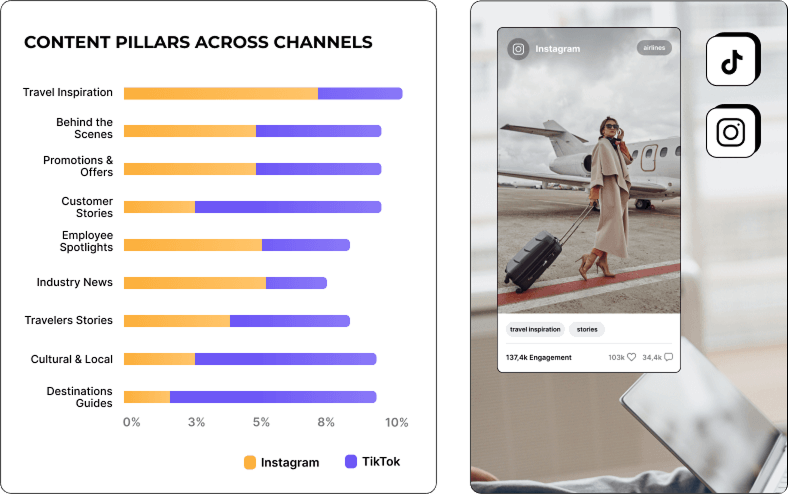
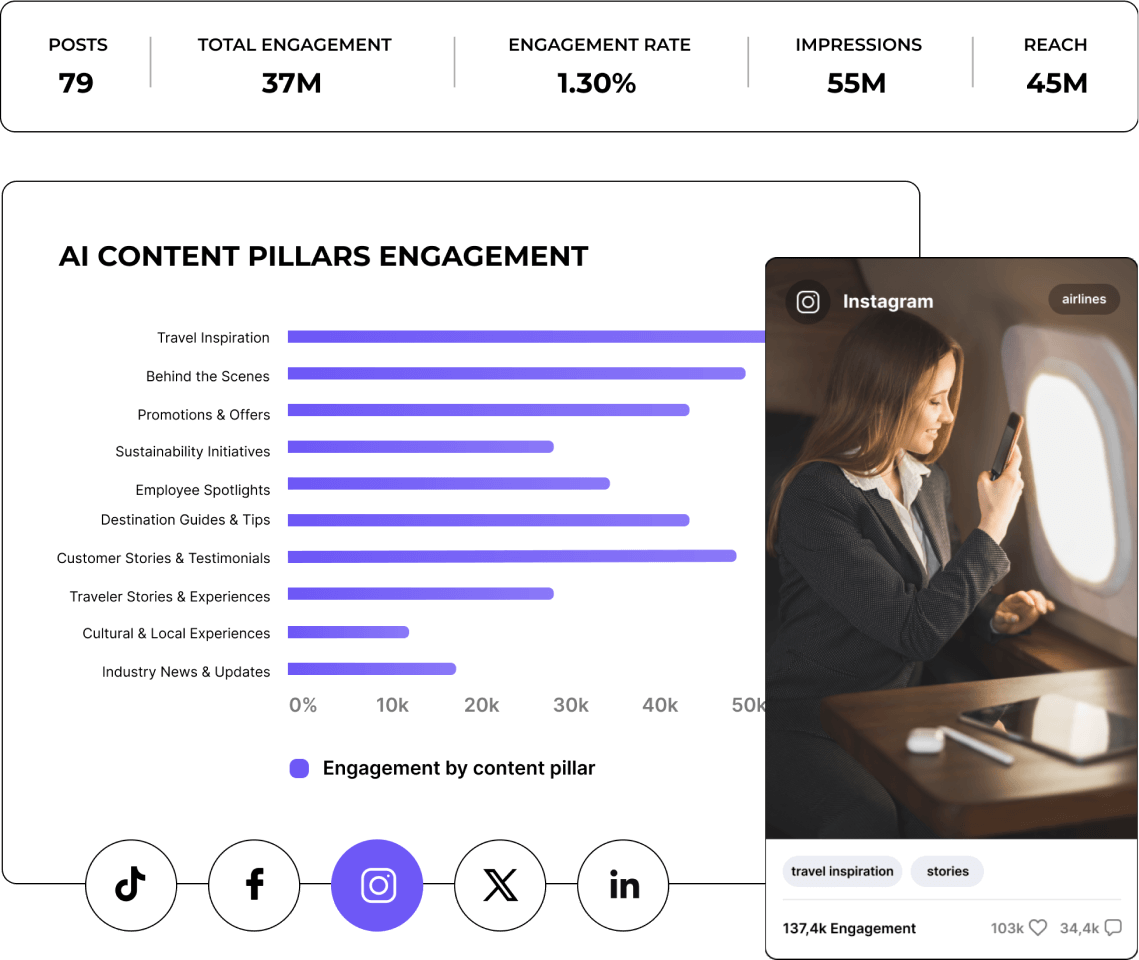
AI 콘텐츠 필러로 소셜 미디어 전략을 강화하세요

다양한 AI 콘텐츠 테마의 인사이트를 탐색하여 오디언스와 공감하는 요소를 발견하세요. 게시물을 정교하게 다듬어 소셜 미디어 전략을 효과적으로 구축합니다.

소셜 미디어 콘텐츠 분석으로 소셜 미디어 전략을 강화합니다

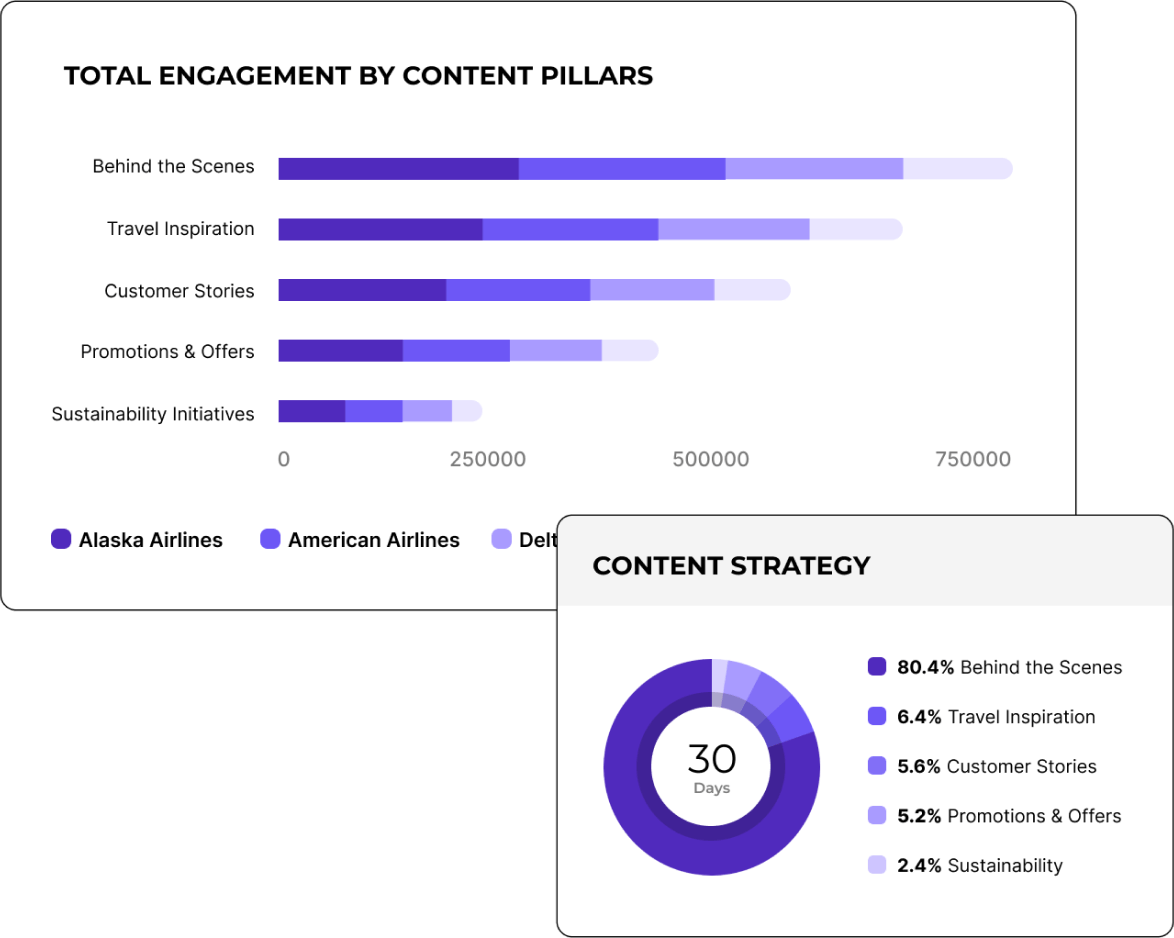
경쟁사로부터 AI 콘텐츠 세분화 분석을 받아보세요

업계 내 다른 기업의 성공 전략을 확인하고 앞서 나가세요. 상위 경쟁사와 콘텐츠를 비교해 성공 사례를 배우고 귀사의 전략을 강화하세요.

AI 콘텐츠 세분화

" 캠페인 게시물 태그 기능 덕분에 콘텐츠 전략을 매우 효율적으로 분석할 수 있었습니다. "

Caitlin Duffy, Founder & Consultant at Roisin Consulting

고객 스토리를 확인하세요

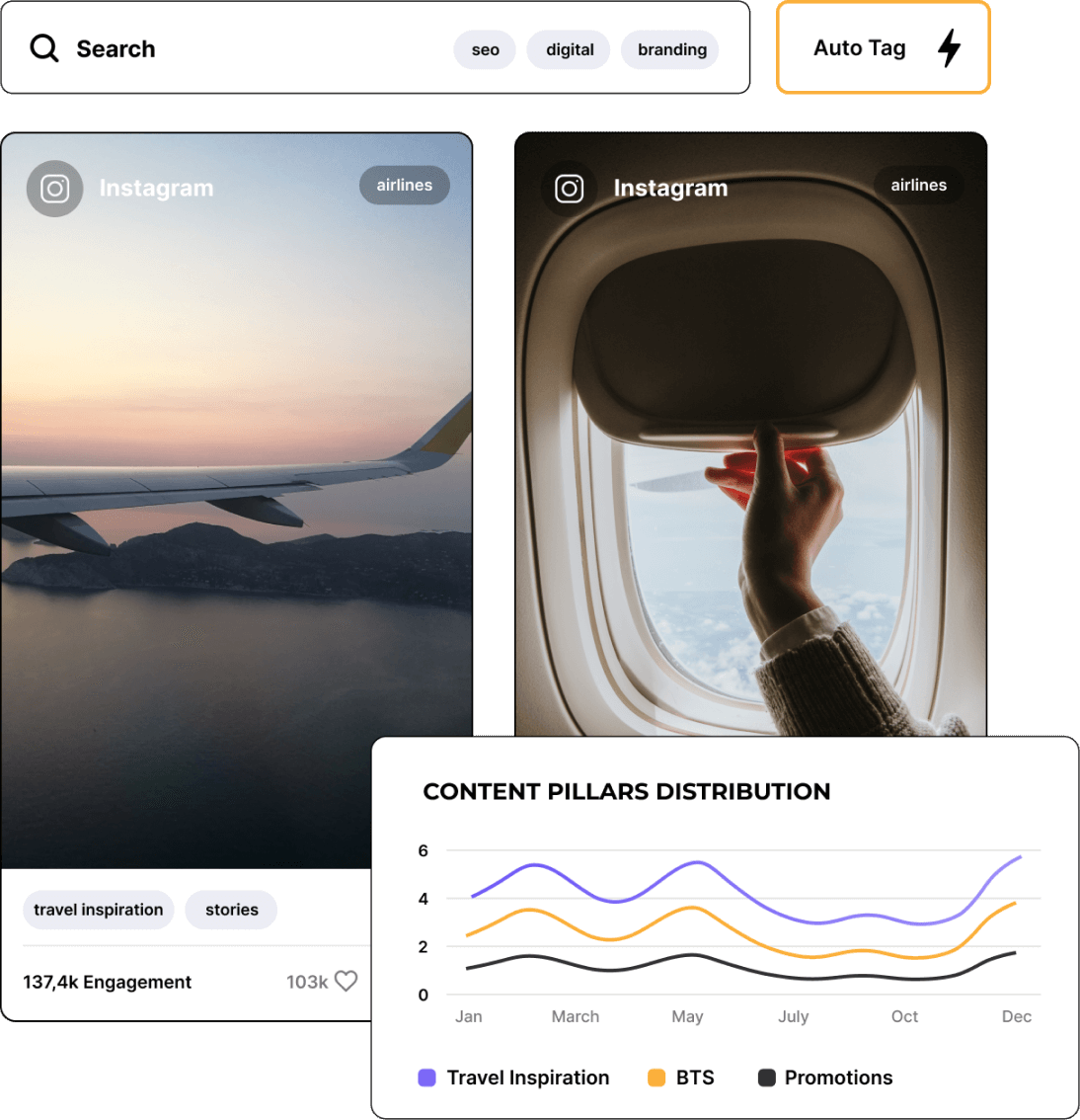
이벤트나 캠페인별로 소셜 미디어 게시물을 태그하고 그룹화합니다

게시물을 검색하고 특정 이벤트나 캠페인에 태그를 추가하여 중요한 포인트에 집중하세요. 무엇이 효과적인지 명확한 인사이트를 얻고, 캠페인마다 더 나은 결과를 만들어 보세요.

소셜 미디어 콘텐츠 분석 태그

과거 성공 사례와 히스토리컬 콘텐츠 인사이트로 더 성장하세요

시간에 따른 콘텐츠 트렌드를 되짚어 전체 흐름을 파악하세요. 검증된 과거 성과를 바탕으로 미래에 최적화된 전략을 만드세요.

소셜 미디어 콘텐츠 분석 빌드

Socialinsider에서 인게이지먼트 비율을 추적하는 방법

Socialinsider의 소셜 미디어 분석 및 경쟁사 분석 도구로 소셜 미디어 성과를 측정하고, 감사하며, 성과를 비교할 수 있습니다.

Step 1

Socialinsider에서 체험 계정을 생성하여 시작하세요.

Step 2

경쟁사를 추가하고 관리하는 프로필을 연결하세요.

Step 3

모든 비즈니스 계정의 인게이지먼트 지표를 확인하세요.

Step 4

상위 경쟁사와 성과를 비교하세요.

Step 5

성과 평가를 위해 채널 간 분석을 진행하세요.

소셜 미디어

고객이 전하는 이야기

  • 고객 서비스도 제가 가장 좋아하는 기능 중 하나였습니다. 여러분은 정말 대단합니다. 팀이 매우 빠르게 응답하고, 친절하며 도움이 많이 됩니다. 이런 서비스는 흔하지 않습니다.

    Caitlin Duffy | Roisin Consulting

  • Socialinsider 덕분에 우리가 팔로우하는 다른 계정과 비교하여 성과가 개선되고 있는지, 아니면 감소하는지 명확하게 알 수 있었습니다.

    Declan Seachoy | Trades Union Congress

  • Socialinsider에서는 경쟁사 분석을 통해 시장 내 성과를 인사이트로 제공합니다.

    Victor Mukubvu | Mitsubishi Electric

  • 인스타그램 해시태그에 대한 감성 분석이 놀랍습니다. 이 새로운 소셜 미디어 리스닝 대시보드는 장기적인 계획 수립에 큰 도움이 되었습니다.

    Giuseppe Veturi | Havas Media Network

  • 저희는 이 소셜 미디어 분석 대시보드를 40곳의 소셜 미디어 고객 모두에게 사용하고 있습니다. 모든 성과 데이터를 한 곳에서 확인할 수 있습니다.

    Arnold Vieriu | Tribal Worldwide

  • Socialinsider 덕분에 저희 팀의 효율성이 높아졌습니다. 소셜 미디어 데이터 수집에 시간을 들일 필요가 없습니다. 이제 인사이트와 분석에 집중할 수 있습니다.

    Yana Bushmeleva | Fashionbi

  • 간단한 전략 변경을 제시하거나 특정 소셜 게시물의 성과를 검토해야 할 때 Socialinsider를 이용해 일상적인 소셜 미디어 인사이트를 확인합니다.

    Nick Radclyffe | Hype Lab CEO

  • 평균적으로 브랜드의 소셜 미디어 보고서는 Socialinsider를 사용하면 1~2시간이면 완료합니다. 예전에는 데이터를 모으는 데 하루가 걸렸습니다.

    Dorra Lunet | Hanging Gardens Agency

  • Socialinsider 덕분에 연간 16,000달러 이상을 절감했습니다. 월간 보고서와 복잡한 장기 분석에 드는 시간을 아꼈습니다.

    Mohamed El-Daly | Create Media

  • 고객 서비스도 제가 가장 좋아하는 기능 중 하나였습니다. 여러분은 정말 대단합니다. 팀이 매우 빠르게 응답하고, 친절하며 도움이 많이 됩니다. 이런 서비스는 흔하지 않습니다.

    Caitlin Duffy | Roisin Consulting

  • Socialinsider 덕분에 우리가 팔로우하는 다른 계정과 비교하여 성과가 개선되고 있는지, 아니면 감소하는지 명확하게 알 수 있었습니다.

    Declan Seachoy | Trades Union Congress

  • Socialinsider에서는 경쟁사 분석을 통해 시장 내 성과를 인사이트로 제공합니다.

    Victor Mukubvu | Mitsubishi Electric

  • 인스타그램 해시태그에 대한 감성 분석이 놀랍습니다. 이 새로운 소셜 미디어 리스닝 대시보드는 장기적인 계획 수립에 큰 도움이 되었습니다.

    Giuseppe Veturi | Havas Media Network

  • 저희는 이 소셜 미디어 분석 대시보드를 40곳의 소셜 미디어 고객 모두에게 사용하고 있습니다. 모든 성과 데이터를 한 곳에서 확인할 수 있습니다.

    Arnold Vieriu | Tribal Worldwide

  • Socialinsider 덕분에 저희 팀의 효율성이 높아졌습니다. 소셜 미디어 데이터 수집에 시간을 들일 필요가 없습니다. 이제 인사이트와 분석에 집중할 수 있습니다.

    Yana Bushmeleva | Fashionbi

  • 간단한 전략 변경을 제시하거나 특정 소셜 게시물의 성과를 검토해야 할 때 Socialinsider를 이용해 일상적인 소셜 미디어 인사이트를 확인합니다.

    Nick Radclyffe | Hype Lab CEO

  • 평균적으로 브랜드의 소셜 미디어 보고서는 Socialinsider를 사용하면 1~2시간이면 완료합니다. 예전에는 데이터를 모으는 데 하루가 걸렸습니다.

    Dorra Lunet | Hanging Gardens Agency

  • Socialinsider 덕분에 연간 16,000달러 이상을 절감했습니다. 월간 보고서와 복잡한 장기 분석에 드는 시간을 아꼈습니다.

    Mohamed El-Daly | Create Media

자주 묻는 질문

문의사항이 있으신가요? 저희가 답변해드립니다.

What is social media content analysis?

Social media content analysis is the process of analyzing the content your brand (and its competitors) posts on social media. This analysis can help your marketing team understand insights like:

- The types of content that are performing well
- Topics that most resonate with your audience
- Your most engaging content + your engagement rate
- Your top posts based on reach and engagement
- How your audience feels about your brand and its content

As a marketer, you need to have your thumb on your overall social media content performance so that you can continuously adjust and adapt your social media strategy to maximize performance, reach, and growth.

Why is social media content analysis important?

Social media content analysis is an essential part of any social media marketer’s job. You don’t want to simply throw content out into the internet void. You need to be strategic about it, and analyzing the content you’ve posted is an important part of that process.

Here are some of the benefits outlined by proper social media content analysis.

Get a better understanding of your audience

When you analyze your content, its engagement rates, and your audience reception, you can gain a clearer understanding of what your audience is interested in and how you can provide that.

Let’s look at an example. Say you’re running a business that sells insulated water bottles. You’ve tested out a social media content campaign where you share your products in different outdoorsy areas, showcasing all of the ways they can be used. However, you discover that your more artistic and edited graphics promoting the different colors of your products tend to perform better amongst your audience.

This shows you that your specific audience isn’t quite the outdoorsy group you may have thought. Instead, they prefer the aesthetics of your products, rather than where they can take them.

Pay close attention to your most popular content so that you know what resonates most with your audience, as this can help you understand who they are, why they’re buying your product, and what they want to see from you.

Evaluate the effectiveness of your social media strategy

Social media content analysis can help you track key metrics like reactions, comments, and shares so that you have a clear idea of how effective your social media strategy is.

Monitor your most engaging content to gauge your top posts, but also compare them to your competitors to see how your strategy’s effectiveness compares to theirs.

Identify trends and patterns

Analyzing your social media content helps you to identify trends amongst popular content topics. As a part of your strategy, you likely have different content pillars or topics/post types that you share with your audience.

For example, an online plant boutique might alternate between posts like:

- Plant photos
- Promotional posts showcasing available products
- Plant care tips

By conducting a social media content analysis, the boutique can then gauge which type of post is most popular.

More than that, the plant boutique can identify other trends and patterns, like:

- Posts on the weekend perform better
- Certain types of plants appear more popular than others
- Certain products generate more interest than others

Social media content analysis can also be used to check in on your competitors and their social media posts. You can use that to your advantage by looking at any trends amongst their most popular posts as well.

Optimize your content strategy

Your content analysis should also clue you into the most popular types of posts (i.e., text posts, images, graphics, videos) so that you can optimize your social media content strategy and create more of what your audience enjoys.

While you always want to use a combination of different post types, you should feel comfortable eliminating content types that simply don’t perform.

Improve your social media ROI

When you have a better understanding of what content performs best, you can share more of it. As you share more and more high-quality, high-performing content, you should see more results because of it.

More reactions, comments, and shares should hopefully lead to more followers, clicks, and sales. And as you start to generate more revenue from your marketing efforts, your social media ROI (or return on investment) increases.

You want to consistently improve your ROI because it gives you a bigger marketing budget to work with while also helping you grow your business.

Stay competitive

Finally, consistently conducting social media content analyses helps you to stay competitive with your strategy. Analyze your own performance against your competitors. Are you growing at similar rates? Are you seeing similar engagement?

Keeping an eye on your social media data is the only way to ensure you’re remaining competitive in your efforts and not getting left behind by others in your industry.

How do you conduct a content analysis on social media?

Conducting your own social media content analysis can help you gauge how your marketing strategy is doing. Let’s walk through a step-by-step guide on how you can make sure your content is performing well, and which types of posts your audience most wants to see.

Step 1: Define your objectives

As with any marketing analysis, you need to have your objectives laid out. What are your goals for your social media content? Knowing what you hope to achieve is important before you begin your analysis so that you know if you’re on the right track or not.

Common goals and objectives from social media content include:

- Increasing brand awareness
- Growing your online presence
- Engaging your audience
- Sending traffic to your website
- Generating sales

The objectives you have for your marketing strategy will directly correlate with the metrics you measure, which brings us to our next step.

Step 2: Choose your metrics for your social media content pillars

You don’t want to look into every single metric related to your social media presence as you do your content analysis. It will take too much time and won’t actually tell you anything related to your goals.

Instead, you need to choose a select few metrics that actually pertain to what you’re hoping to achieve through social media. This way, you’ll be able to understand if your content is doing its job or if you need to pivot.

Some of the metrics you might choose (and the objectives they relate to) are:

- Increasing brand awareness: Impressions, reach, video views, followers
- Growing your online presence: Reach, followers
- Engaging your audience: Engagement rate, likes, comments, shares
- Sending traffic to your website: Clicks
- Generating sales: Conversions

Step 3: Collect data for better analysis

Next, you need to collect your data. There are a couple of different ways to do this:

- Built-in analytics tools on each social media platform, which you get access to when you sign up for business accounts on each platform. Think Instagram Insights and TikTok Analytics. You can simply use your app to access data about your audience, content performance, and more.

- Third-party social media analytics tools that let you see all of your social media analytics at a glance from a single dashboard, while also providing you with the tools to get in-depth data and insights.

The former option is free as it comes with the social media app. Some analytics tools have free limited plans, but you’ll likely need to set aside some of your marketing budget to get access to more in-depth social media content analytics.

For example, Socialinsider offers a 14-day free trial, then our paid plans start at $99/month, as we offer a wide range of social media insights that help your brand make better decisions.

Step 4: Categorize your content

Once you’ve chosen your data collection method (we recommend a third-party tool to make it easier to compare all platforms at once), you’ll need to categorize your content so you can really dive into your social media content analysis.

There are three options available when using Socialinsider to categorize your content.

First, you can have our AI tool automatically generate content pillars for you based on the content you typically publish. This is a quick and easy way to categorize your content if you want a more hands-off approach.

Next, you can head to your posts and do a manual search by keyword or hashtag to see how often you’ve posted about a specific topic, event, or campaign.

Or, you can create an Auto Tag based on your keyword or hashtag search that gives you a quick way to filter content based on topics you know you post about often, especially if there’s a specific content type or topic you want to analyze consistently.

Once you set up your Auto Tag, all past and future posts using the keyword or hashtag will be categorized with that tag.

Give your Auto Tag a name so you can easily find it when you analyze your content. Because your social media content analysis centers around different content types and topics, having these categories set up is a key step you can’t miss.

Step 5: Analyze social media content across platforms

Next, it’s time to dive into your content analysis. Using Socialinsider, this means you’ll head to your dashboard, and click Content Pillars in the left sidebar before choosing your topic from either your own content pillars or the AI-generated options.

Once you’ve selected your content pillar, you can then choose your social media platforms.

Use the dropdown menu at the top of the screen to choose your date range. You might conduct a monthly or quarterly analysis to check in on your performance. Then, you can scroll down to start looking at performance.

Step 6: Analyze engagement patterns

As you look at your performance across platforms, start paying attention to any engagement patterns you might see.

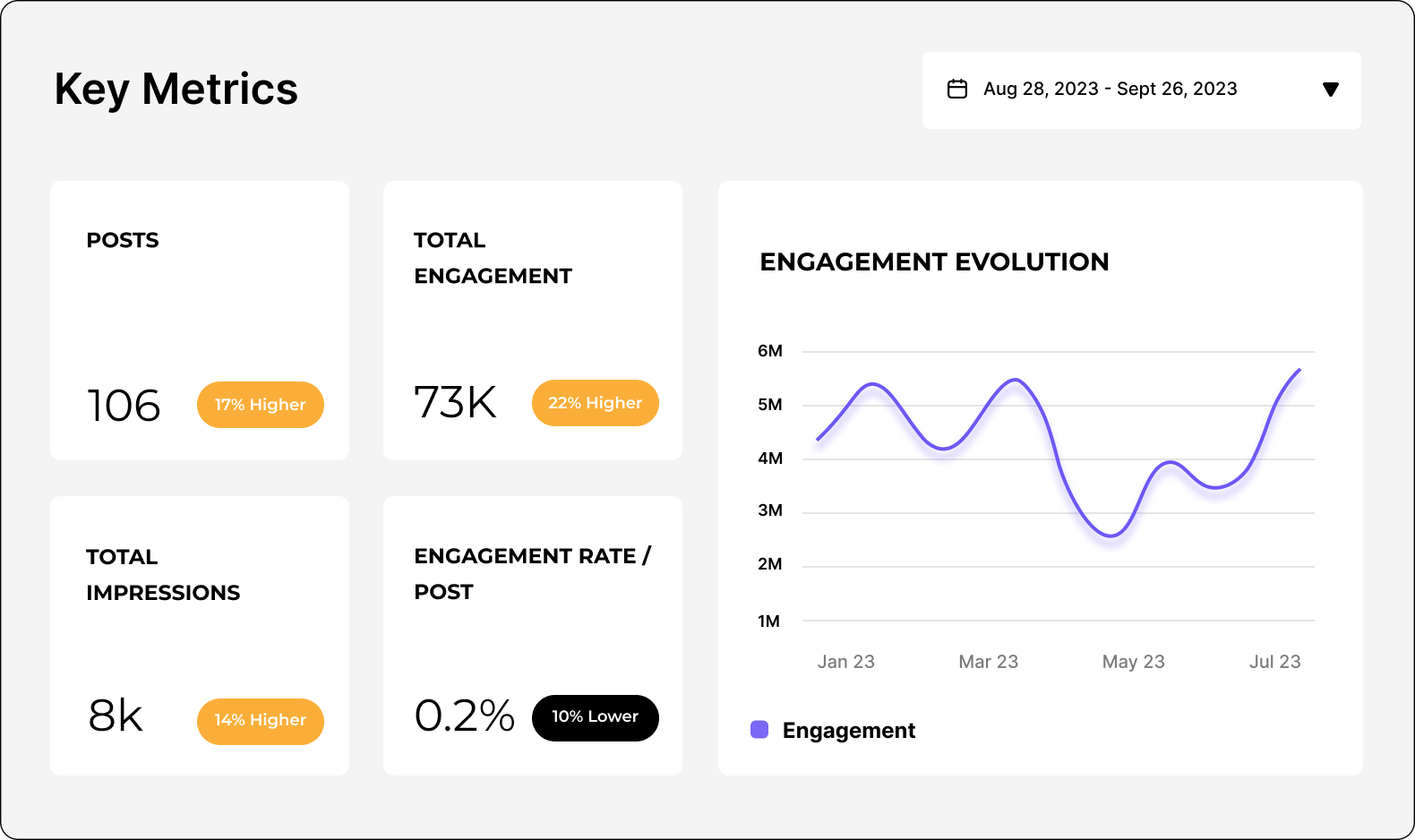
For example, Socialinsider provides you with data like:

- Number of posts within the pillar during your selected time frame
- Growth in follower count
- Average engagement (i.e., the number of comments, likes, and shares your content saw)
- Average engagement rate by followers (i.e., the percent of your followers who engaged with your content)
- Your top 10 posts
- Number of engagements per post

With insights like this, you can pinpoint your most engaging content pillars so that you can prioritize creating more of that content and increasing performance with your audience.

Step 7: Benchmarks against competitors

Socialinsider also gives you the ability to identify the social media content pillars for any profile, not just yours. Add social media profiles from your competitors so that you can see what their most popular topics (and the posts within those topics) are, so you get other ideas for how to engage your audience.

What are the top tips for doing a social media content analysis?

To get the most out of your social media content analysis, keep these tips in mind.

Focus on the right metrics

Don’t overwhelm yourself by trying to monitor every single metric. Prioritize your goals, then focus only on the metrics or KPIs that pertain to those goals.

Again, here are the metrics you should track for some of the most common social media content goals:

- Brand awareness: Impressions, reach, video views, followers
- Growth: Reach, followers
- Engagement: Engagement rate, likes, comments, shares
- Website traffic: Clicks
- Sales: Conversions
Pick one or two goals that you hope to achieve so you’re not overloading yourself with too many metrics. Trying to focus on too many KPIs won’t give you the full picture, especially if you look at data that doesn’t impact your bottom line.

Organize your data

Keep your data organized by using the right tools and spreadsheets to house it. For example, instead of looking at each individual social network’s analytics, use a third-party tool that puts all your content analytics in one place.

From there, decide what format works best for your data—PDF, CSV, Excel spreadsheet, etc. Make sure to consistently export your reports in the same format so everything stays streamlined.

Pull your reports around the same time every month or quarter so you can line everything up easily. Save reports within the same folder so you can easily find and refer back to them. Staying organized is going to be a key part of maintaining consistent and quality analysis.

Use social media analytics tools

Enlisting the help of social media analytics tools like Socialinsider helps make the entire analysis process go much more smoothly. First of all, you have all of your analytics within a single dashboard. This means you get to look at one website rather than five different dashboards during your analysis.

In addition, many social media analytics tools give you even deeper insights than your built-in analytics tool can. This is because they’ve tapped into APIs of each network as well as other marketing tools you might be using.

For example, your Instagram analytics won’t be able to tell you how many clicks to your website generated sales, but if you have your Instagram and your website analytics connected via a third-party social media analytics tool, you can certainly find that information.

Look for patterns and trends

A big part of your social media content analysis will be pinpointing similarities, patterns, or trends amongst your content and its results.

This is why Socialinsider’s content pillars feature is so valuable. It creates the perfect dashboard for analyzing patterns amongst your content, helping you find topics that are more engaging and relevant to your audience than others.

By also enabling you to benchmark your competitors’ content, you can further analyze trends within your industry. Look to see if your competitors’ content patterns line up with yours. Are similar topics just as popular for them? And why does that seem to be the case, one way or the other?

Keep track of content lifespans
Content lifespans refer to the length of time that a piece of content continues to get reach and engagement. By tracking your top posts each month and their growth, you can see how long your content tends to continue reaching new audience members.

Knowing your content lifespans helps you to prioritize top-performing platforms and topics. For example, if your content tends to last longer on LinkedIn than on X/Twitter, you’ll know it’s more valuable for your company to create more LinkedIn content.

Conduct regular content audits

A content audit is a more in-depth social media content analysis. It looks at content performance over time, with the goal being to pinpoint areas of improvement rather than finding patterns amongst your content topics.

Conducting a content audit helps you to eliminate low-performing post types, improve content creation and publication processes, and work towards a better marketing strategy.

Present your findings in a visual report

If you need to relay your social media content analysis findings, it’s always a good idea to put them into a visual report that makes it easy for others to look at and understand what they’re seeing.

Using charts and graphs, rather than a spreadsheet or list of numbers, helps convey your results in a much more digestible way.

Spreadsheets like Excel allow you to turn tables of data into graphs, but third-party analytics tools like Socialinsider also give you the ability to present your data in visual ways, with some of our reports appearing in line graphs, bar charts, and more.

Socialinsider로 소셜 미디어에서 콘텐츠 분석을 어떻게 할 수 있나요?

Socialinsider를 소셜 미디어 콘텐츠 분석 도구로 사용하고 싶으신가요? 간단하게 설정할 수 있습니다. 아래의 세 단계를 따라 진행하세요.

1단계: Socialinsider 계정을 만드세요. 최소 요금제는 월 $99부터 시작하며, 다양한 맞춤형 보고서를 이용할 수 있습니다.

2단계: 소셜 미디어 계정을 연결하세요. Socialinsider는 다음 플랫폼을 지원합니다.

- TikTok
- LinkedIn
- Instagram
- X/Twitter
- Facebook
- YouTube

3단계: 직관적인 보고서를 확인하세요. 여러 가지 보고서는 Socialinsider 대시보드의 왼쪽 사이드바에서 바로 확인하실 수 있습니다.

이 보고서에는 다음이 포함됩니다.

- 콘텐츠 성과
- 인게이지먼트
- 임프레션
- 팔로워 성장
- 콘텐츠 필러
- 게시물 개요
- 경쟁사 비교

가장 중요한 소셜 미디어 콘텐츠 분석용 보고서는 콘텐츠 개요, 콘텐츠 필러, 게시물 개요입니다. 이 보고서를 통해 어떤 게시물이 가장 뛰어난 성과를 냈는지, 어떤 주제에 속하는지, 기대에 못 미친 게시물은 무엇인지 알 수 있습니다.

내 소셜 미디어 계정의 AI 콘텐츠 필러를 변경할 수 있나요?

계정에 설정된 AI 콘텐츠 필러는 변경할 수 없습니다. 이는 당사 AI 분석이 귀사에 적합한 카테고리로 자동 선정한 결과입니다.

하지만 직접 콘텐츠 필러를 생성하고 관리할 수 있는 방법이 있습니다. Socialinsider 대시보드에서 소셜 미디어 계정을 클릭한 후 게시물 보고서로 이동하세요.

여기서 검색창에 원하는 해시태그, 키워드, 카테고리를 입력해 해당 게시물을 찾을 수 있습니다. 그 후, 해당 해시태그나 키워드, 카테고리를 자동 태그로 추가하면, 이전과 향후 게시물 모두 태그로 쉽게 접근할 수 있습니다.

Can I change the industry assigned to a social media account?

You may have noticed that our analytics tool sets an industry for each profile you add. This is automatically added via our AI analysis tool based on the content you’ve created and our tool’s closest idea of what you post about.

For the most part, these industries are extremely accurate. But in case we haven’t quite hit the nail on the head, you want to change it to something more niche, or you’re switching industries, our engineers are still developing the ability to change this.

So, for now, the industry assigned to a social media account cannot be changed. But keep checking back as this is a work in progress.

소셜 미디어 콘텐츠 전략을 개선할 준비가 되셨나요?

심층 소셜 미디어 콘텐츠 데이터를 확인하세요. 전략적인 인사이트를 통해 소셜 미디어 콘텐츠 전략을 최적화하고 경쟁력을 확보할 수 있습니다.